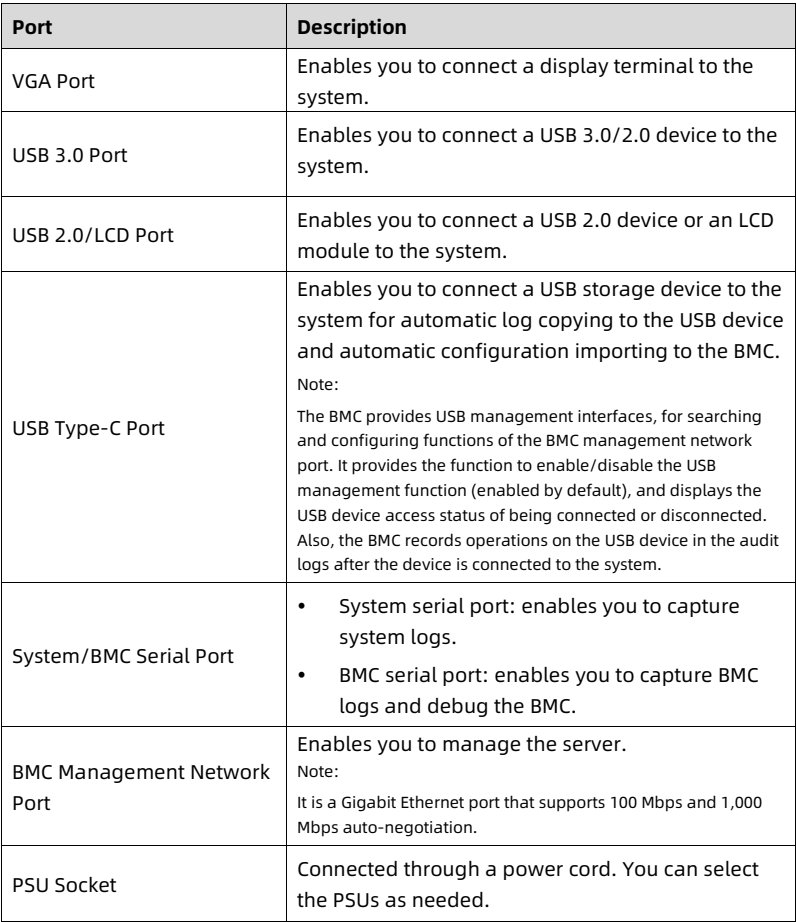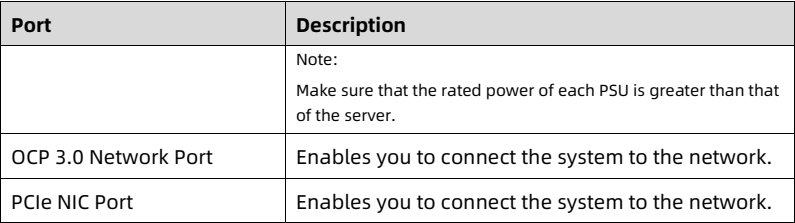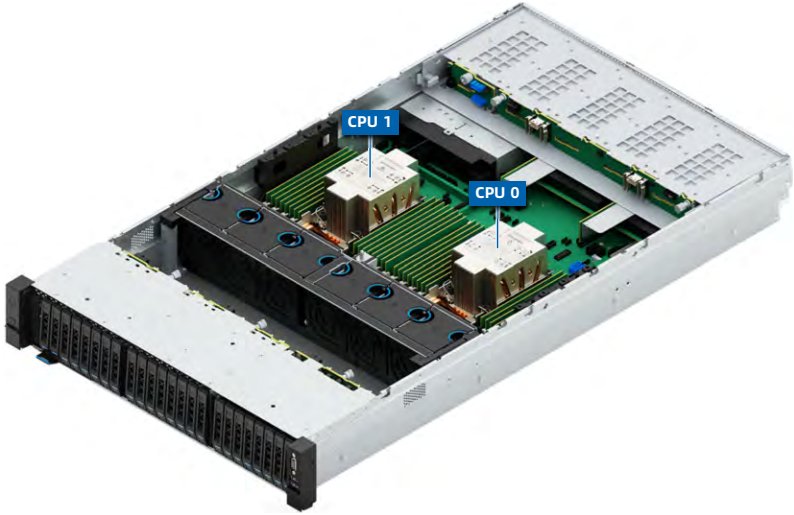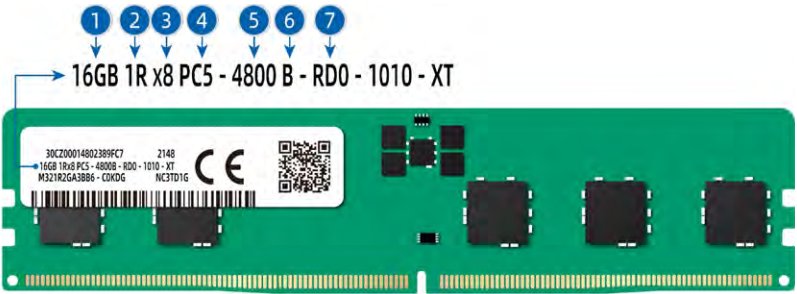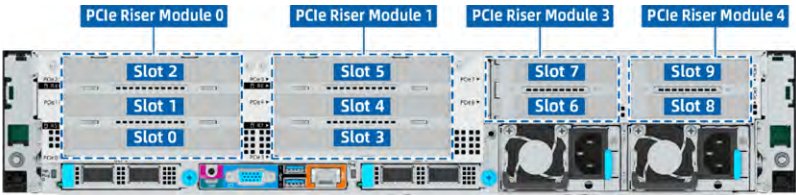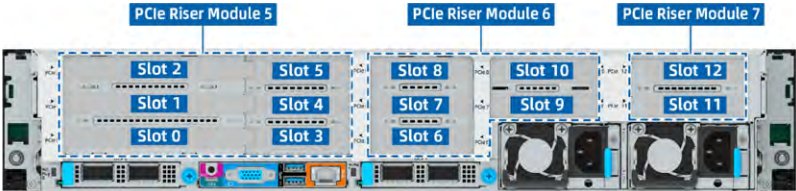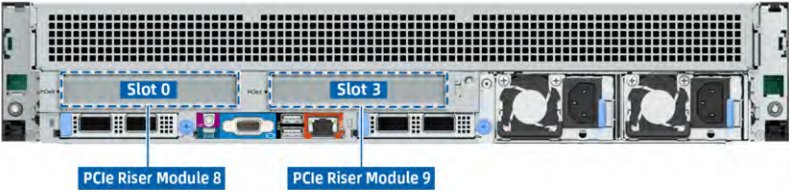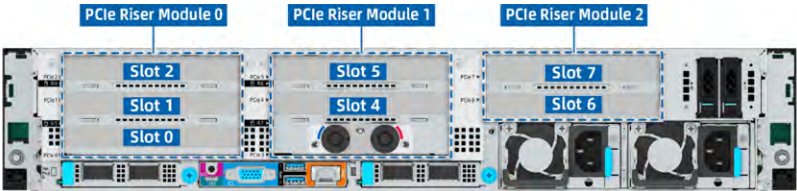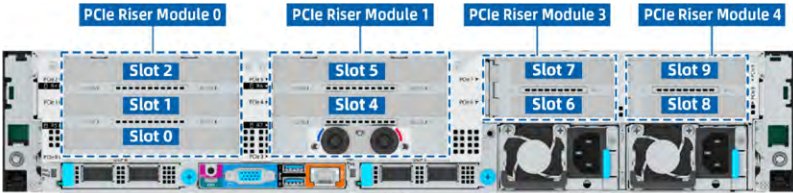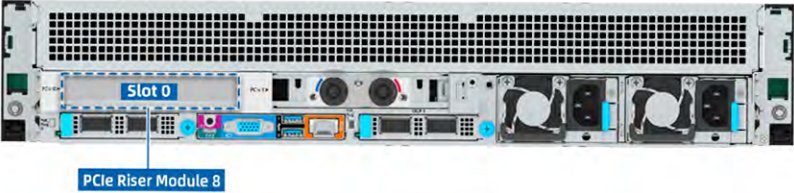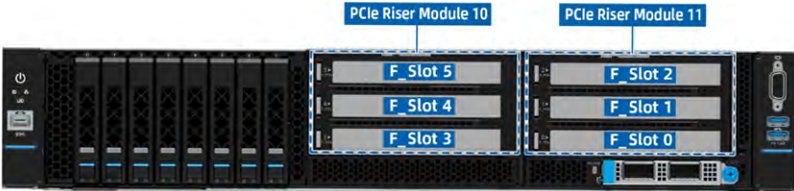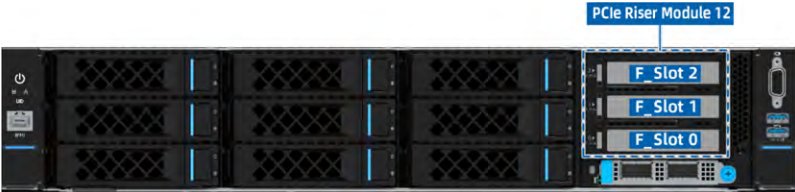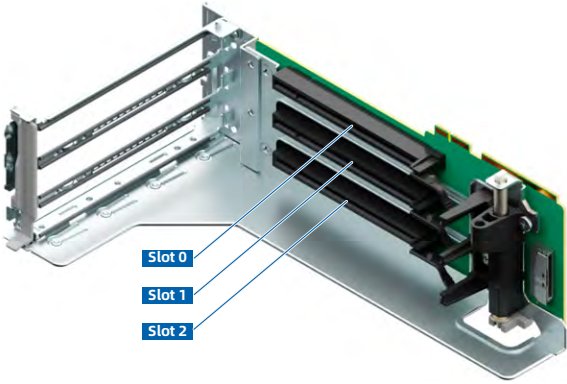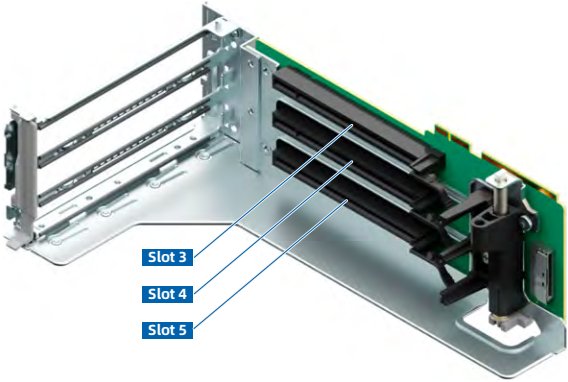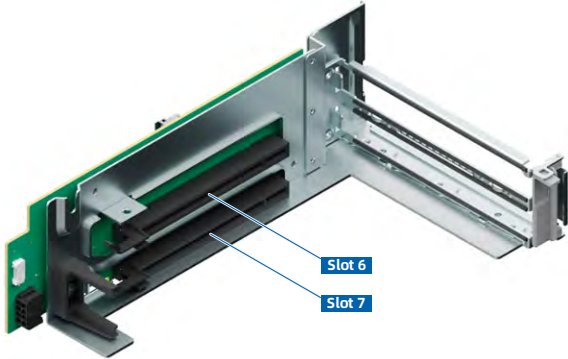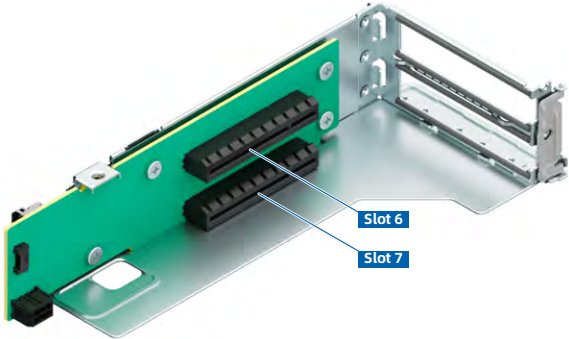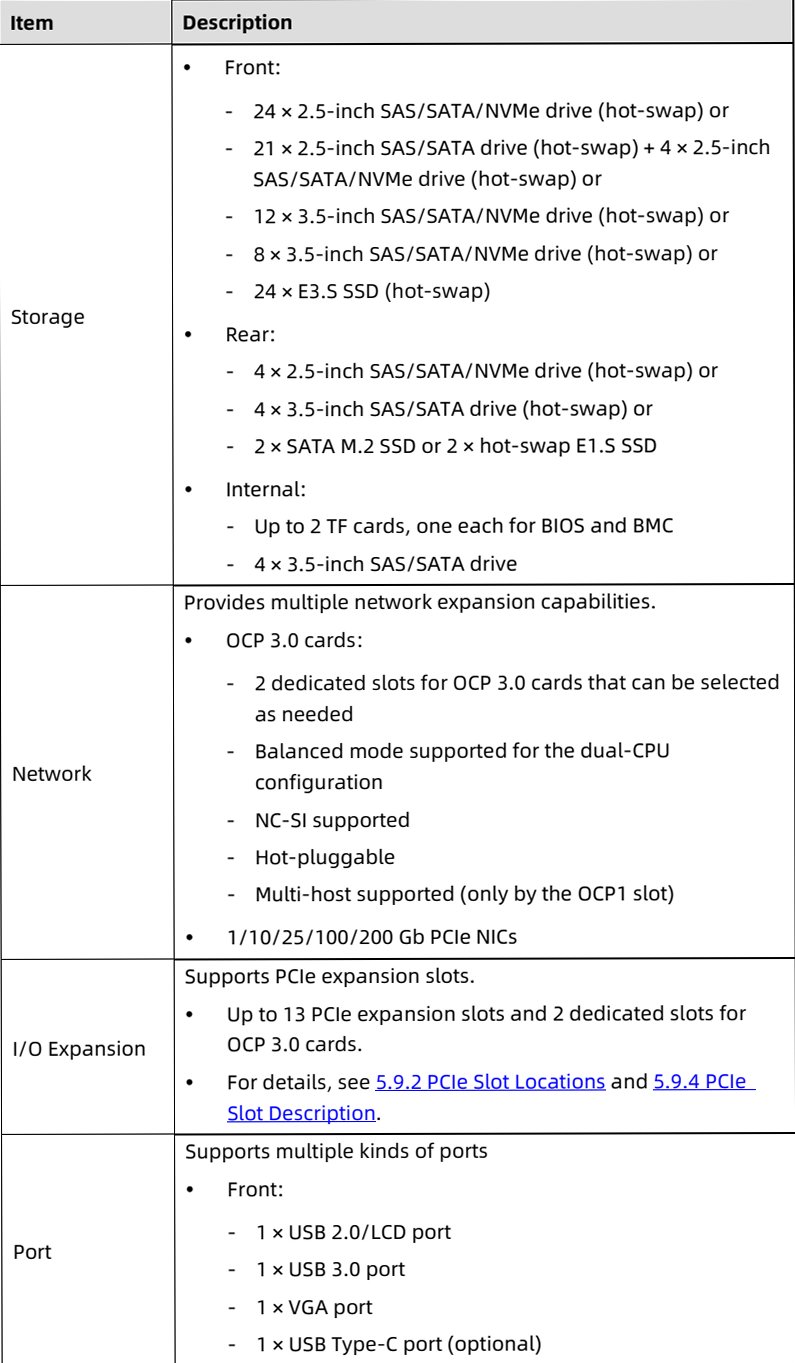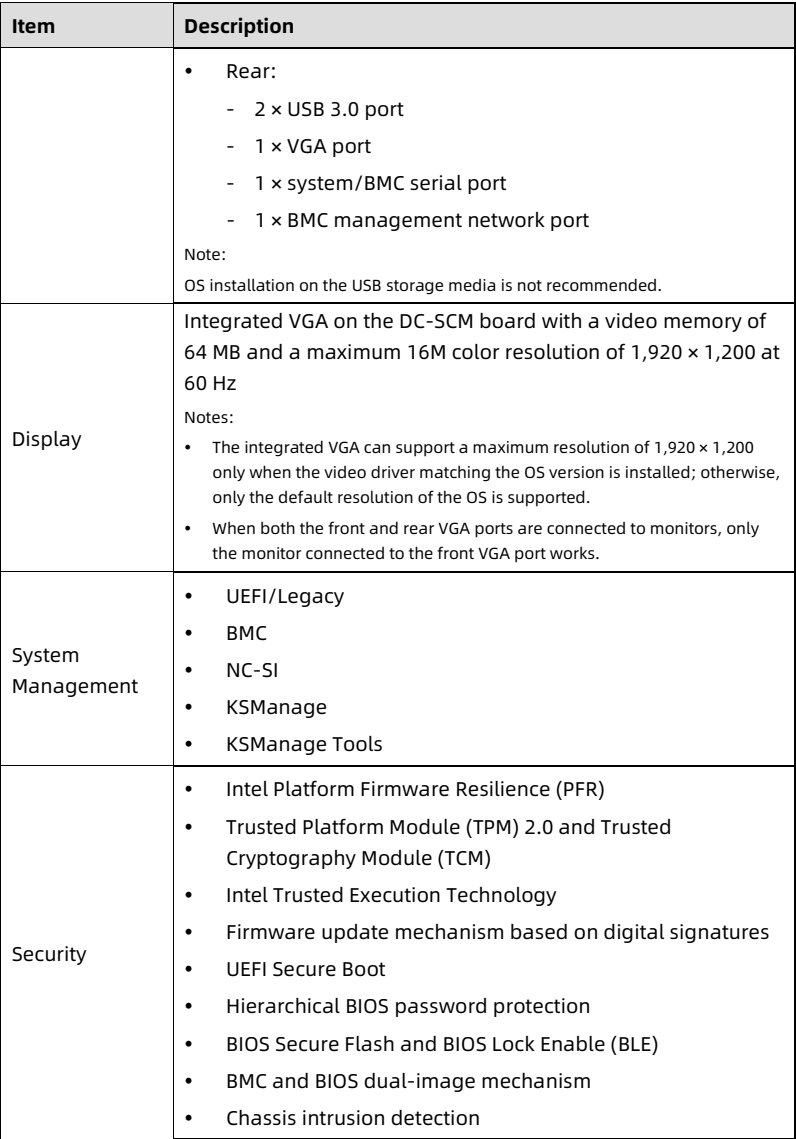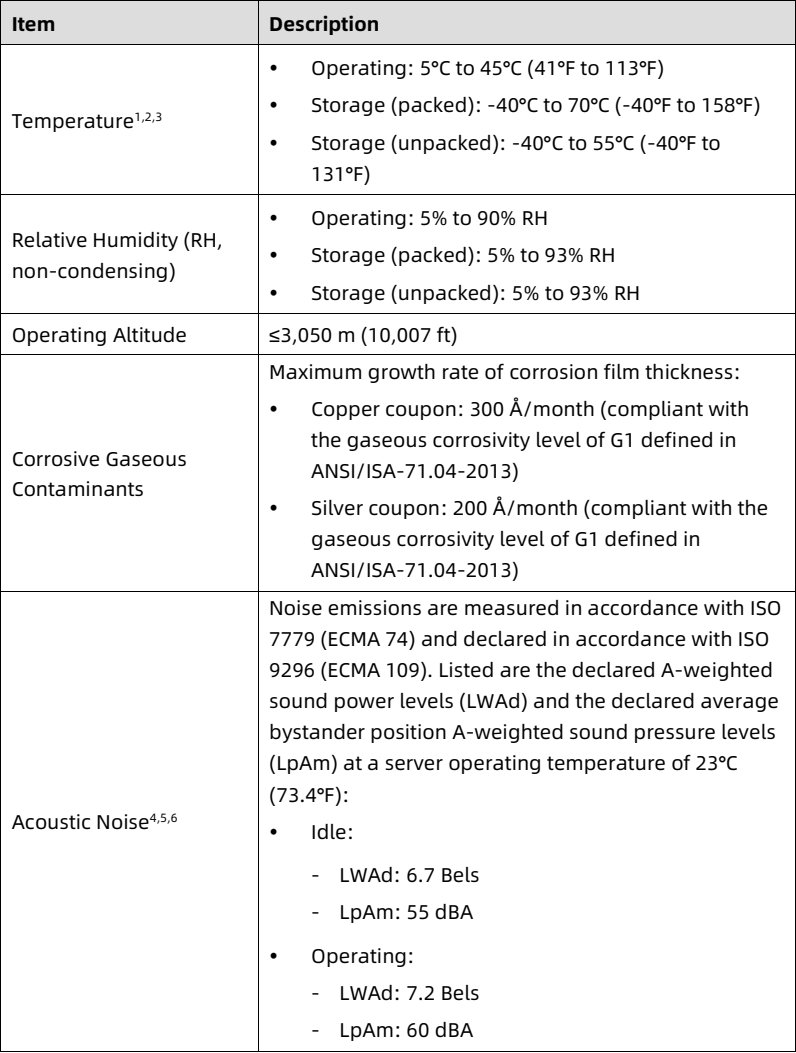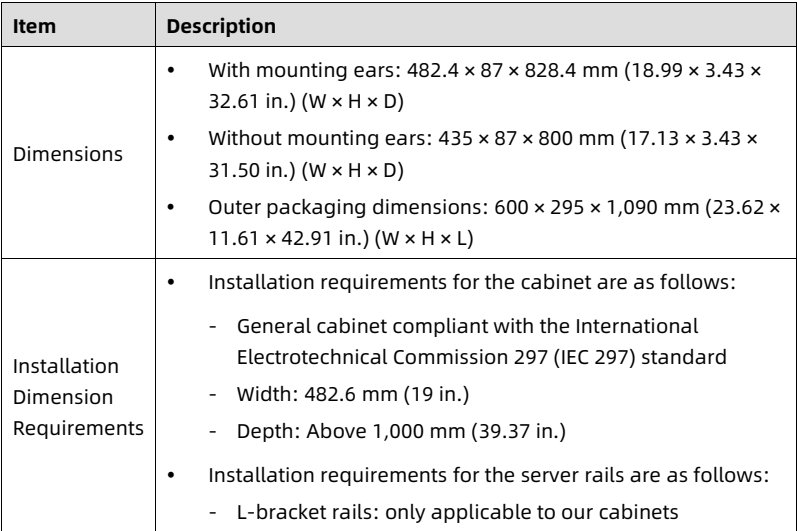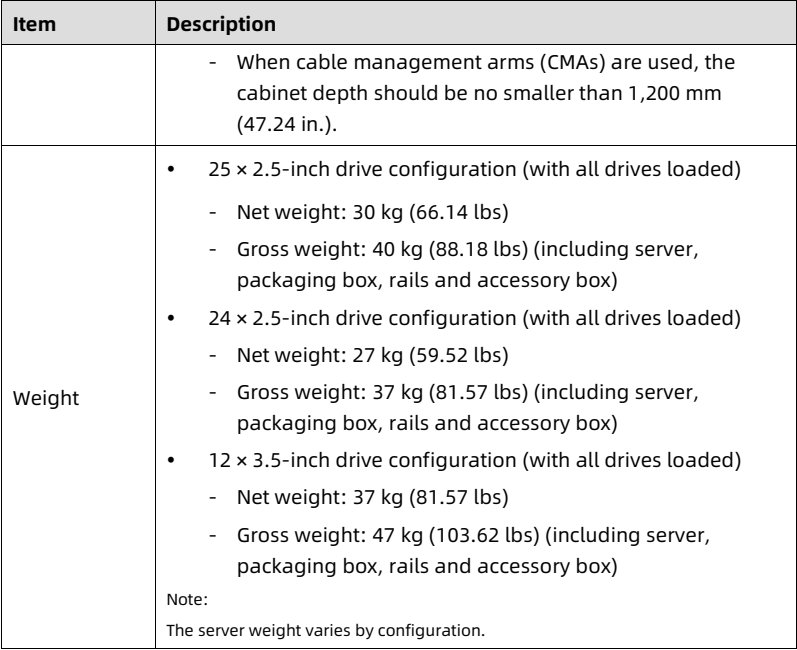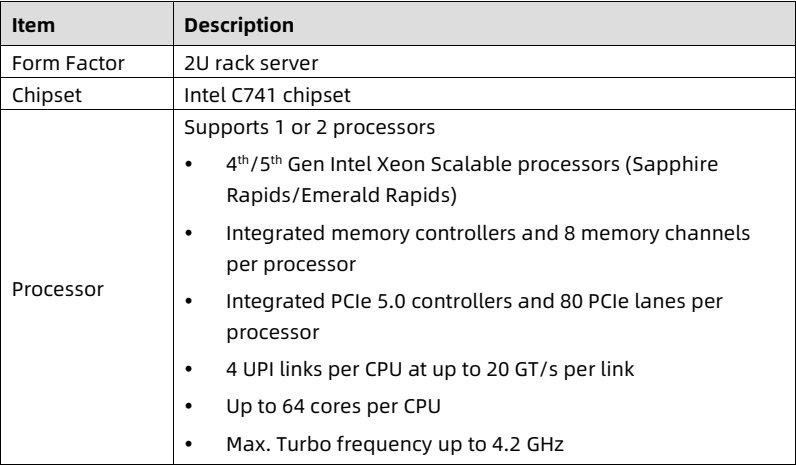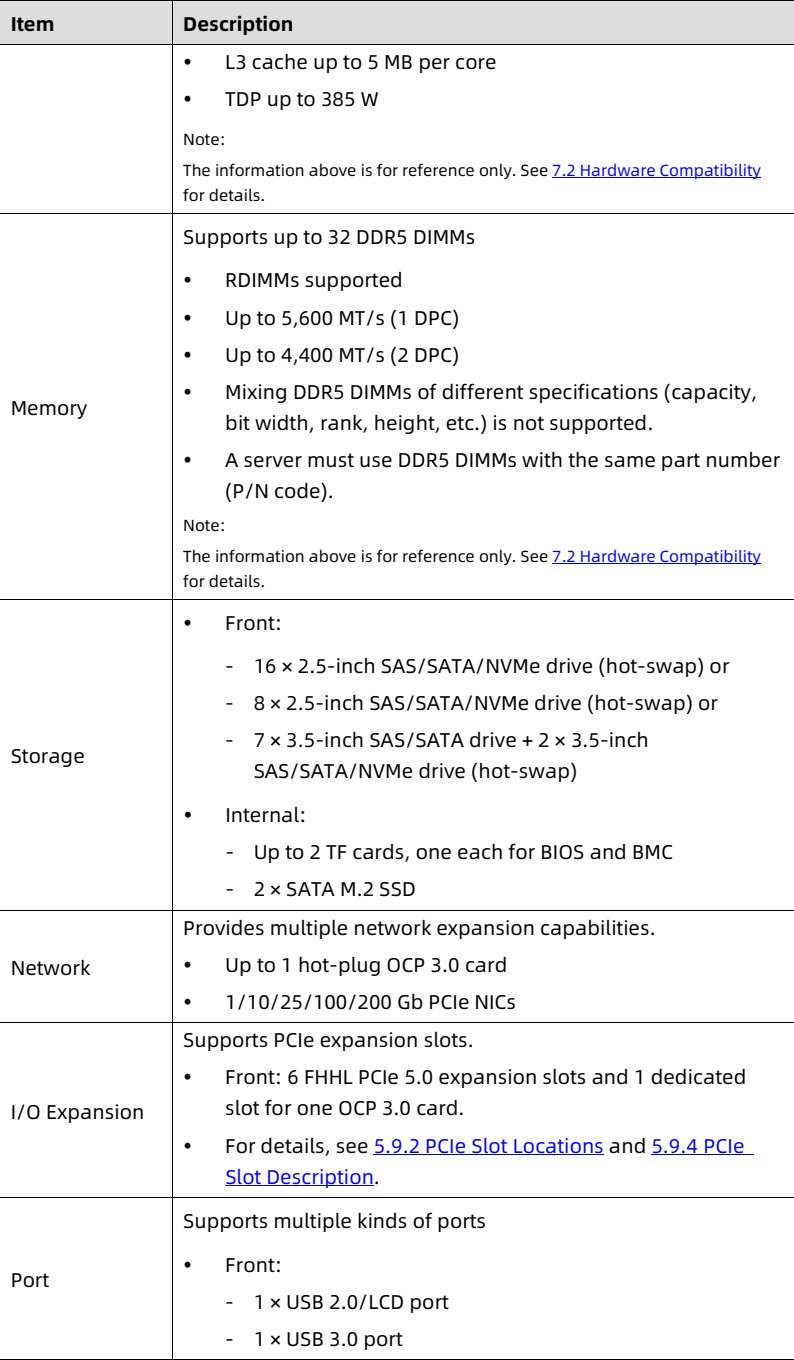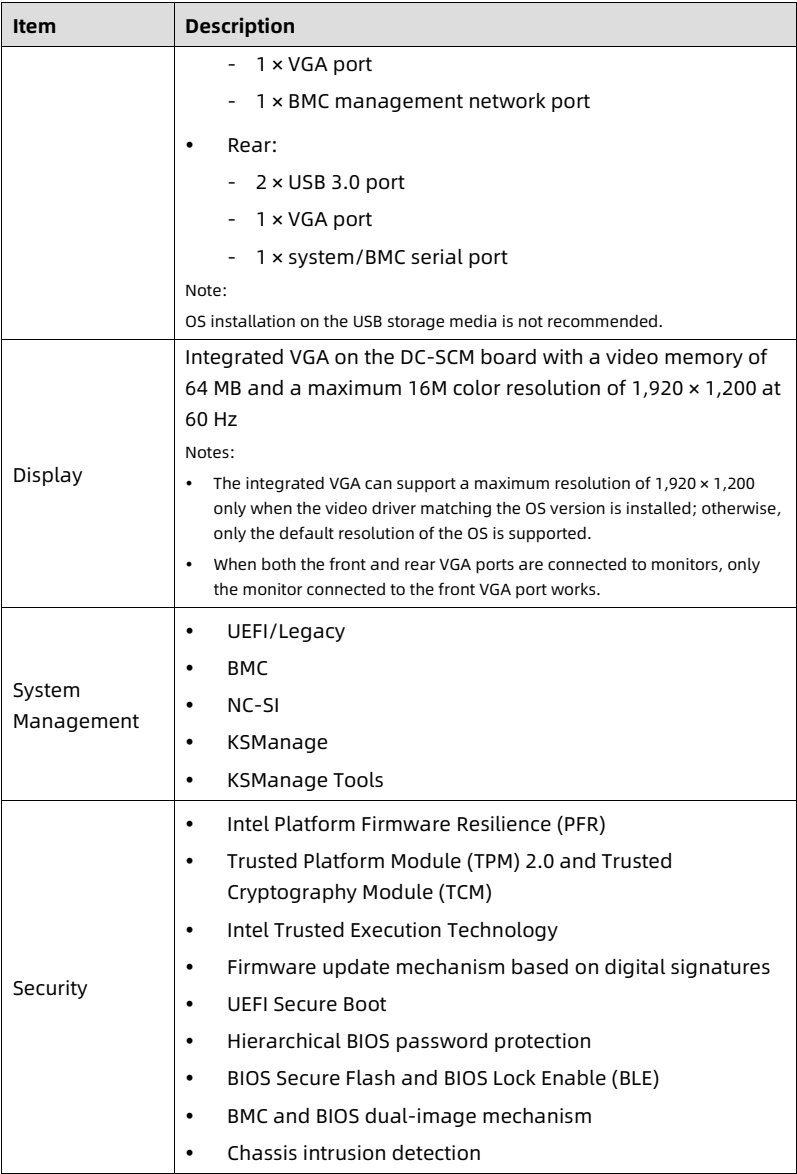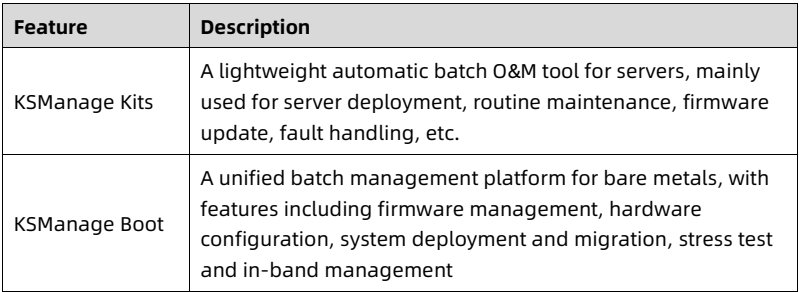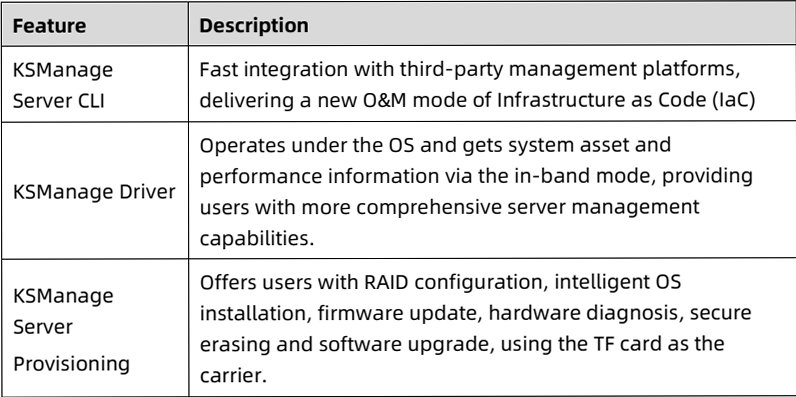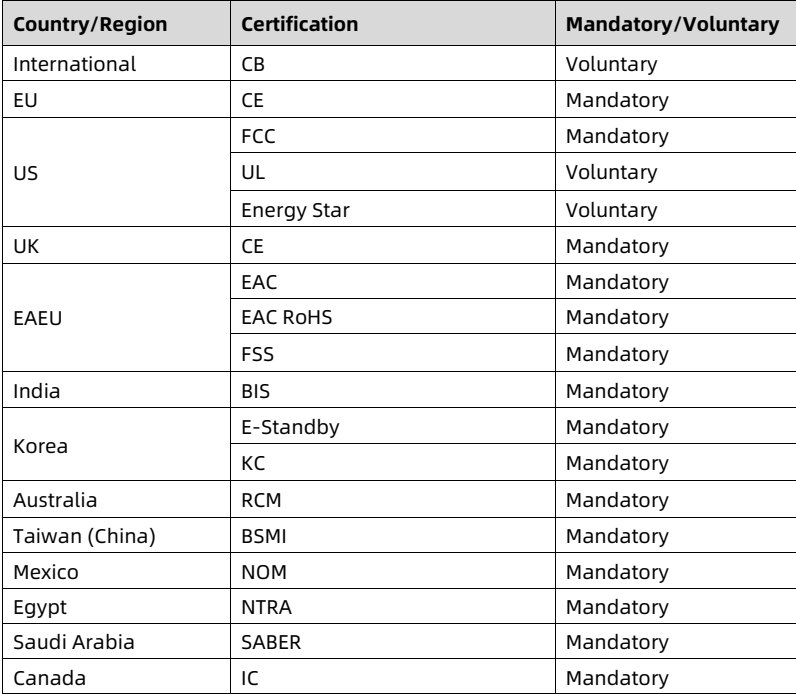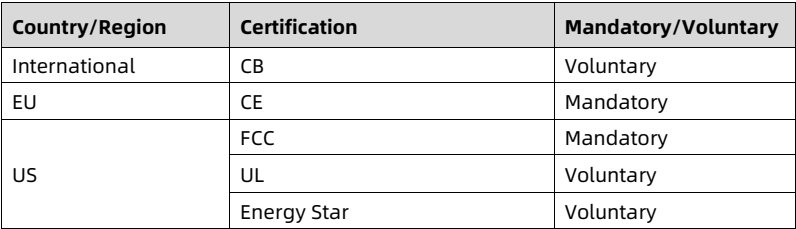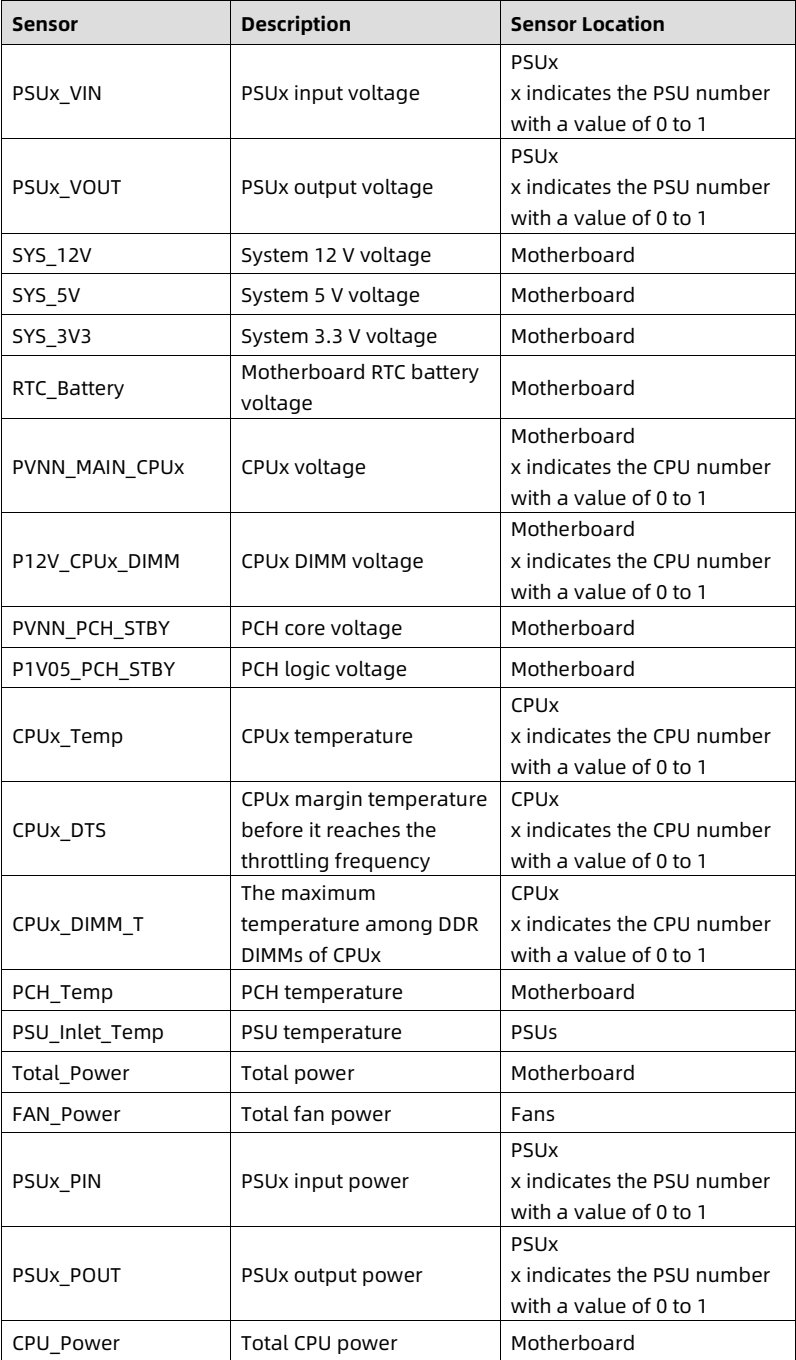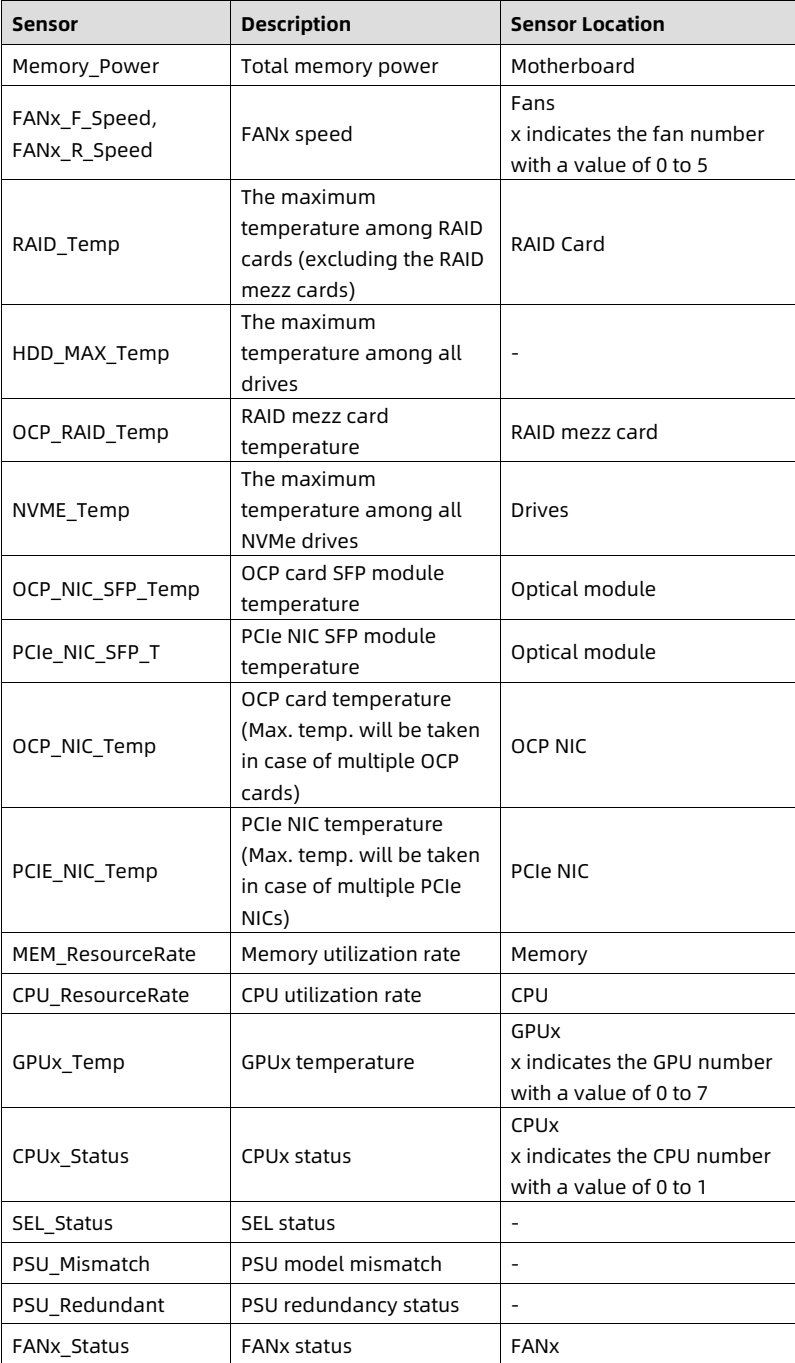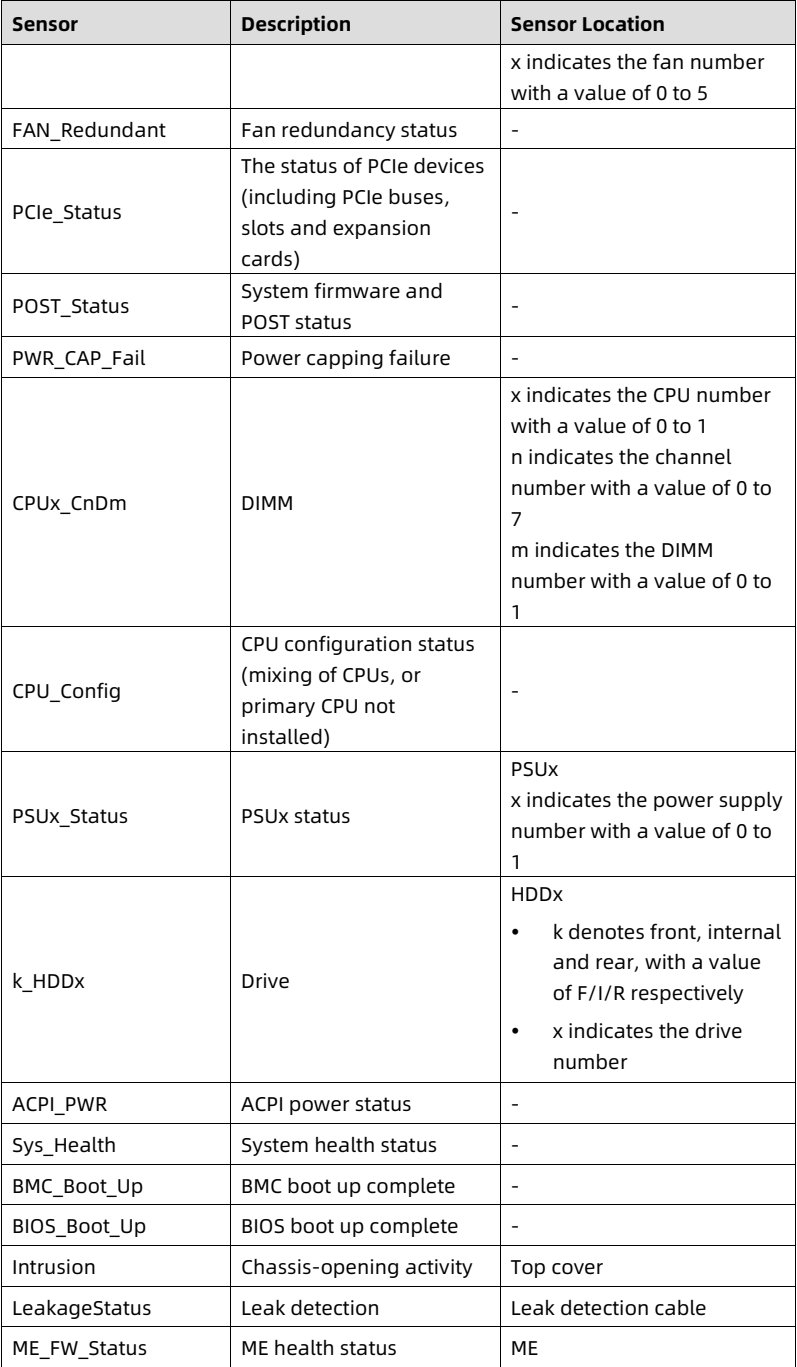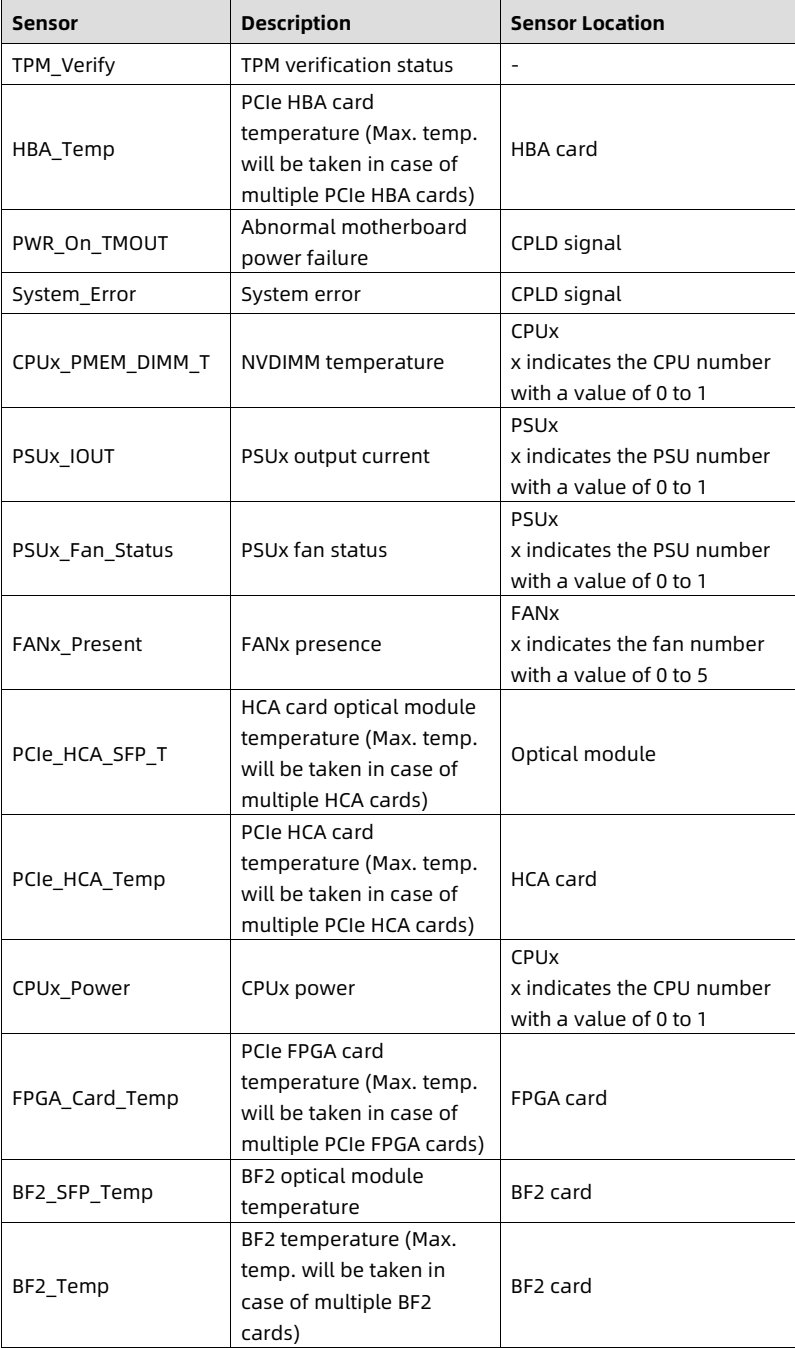
# Aivres KR2280 white paper (parsed)

Parsed from Aivres's PDF https://aivres.com/wp-content/uploads/Aivres-White-Paper-KR2280-X2-v1.pdf on 2026-10-15 (152 pages; OCR and table reconstruction by Reducto; tables are HTML inside this Markdown, images are figure crops from the PDF). Specifications belong to Aivres and are subject to change without notice; the PDF is the authority.

Products: [kr2280-x2](https://aivres.upstation.io/p/kr2280-x2)

---


<!-- page: 1 -->
<figure style="margin: 1rem 0; padding: 0.6rem; background: rgba(255,255,255,0.04); border-radius: 4px;">
  <img src="images/reducto/p001_figure_0001.jpg" alt="figure p1" style="max-width: 100%; max-height: 480px; display: block; margin: 0 auto;" />
  <figcaption style="font-size: 0.78rem; color: rgba(255,255,255,0.55); text-align: center; margin-top: 0.5rem;">AIVRES</figcaption>
</figure>

<b>White Paper for</b>
<b>KR2280V2 Series Servers</b>

<b>Powered by Intel Processors</b>

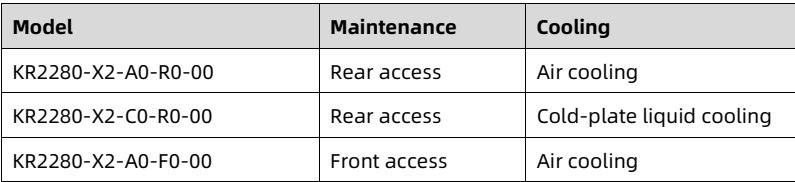
For KR2280-X2-A0-R0-00, KR2280-X2-C0-R0-00, and KR2280-X2-A0-F0-00

Document Version: V1.0
Release Date: April 24, 2025

<!-- page: 2 -->
Copyright © 2025 AIVRES SYSTEMS INC. All rights reserved.

No part of this document may be reproduced or transmitted in any form or by any means without our prior written consent.

<b>Applicable Model</b>

<table>
<thead>
<tr>
<th> <b>Model</b> </th>
<th> <b>Maintenance</b> </th>
<th> <b>Cooling</b> </th>
</tr>
</thead>
<tbody>
<tr>
<td> KR2280-X2-A0-R0-00 </td>
<td> Rear access </td>
<td> Air cooling </td>
</tr>
<tr>
<td> KR2280-X2-C0-R0-00 </td>
<td> Rear access </td>
<td> Cold-plate liquid cooling </td>
</tr>
<tr>
<td> KR2280-X2-A0-F0-00 </td>
<td> Front access </td>
<td> Air cooling </td>
</tr>
</tbody>
</table>

<details style="margin: 0.3rem 0 1rem; padding: 0.4rem 0.6rem; background: rgba(255,255,255,0.03); border-radius: 4px; border: 1px solid rgba(255,255,255,0.08);">
  <summary style="cursor: pointer; font-size: 0.75rem; color: rgba(255,255,255,0.55);">📷 view source screenshot for verification (page 2)</summary>
  <img src="images/reducto/p002_table_0011.jpg" alt="table source p2" style="max-width: 100%; margin-top: 0.6rem; display: block;" />
</details>

<b>Technical Support</b>

Global Service Hotline: (+1) 844-912-0007
Address: 1501 McCarthy Blvd, Milpitas, CA 95035
AIVRES SYSTEMS INC.
Website: <u>https://aivres.com</u>
Email: <u>serversupport@aivres.com</u>

<!-- page: 3 -->
<b>Environmental Protection</b>

Please dispose of product packaging by recycling at a local recycling center for a greener planet.

<b>Trademarks</b>

All the trademarks or registered trademarks mentioned herein may be the property of their respective holders. This document does not mark any product or brand with the symbol ® or ™.

<b>Security Statement</b>

We are intensely focused on server product safety and have placed a high priority on this. For a better understanding of our server products, carefully read through the following security risk statements.

• When servers are to be repurposed or retired, we recommend that you restore their firmware factory settings, delete information and clear logs from BIOS and BMC to protect data privacy. Meanwhile, we recommend that you wipe the drive data thoroughly and securely with trusted erasing tools. You can use KSManage Server Provisioning. Contact us for specific server models to which KSManage Server Provisioning is applicable.

• For server open source software statements, please contact us.

• Some interfaces and commands for production, assembly and return-to-depot, and advanced commands for locating faults, if used improperly, may cause equipment abnormality or business interruption. This is not described herein. Please contact us for such information.

• External ports of our servers do not use private protocols for communication.

• Our products will not initiatively obtain or use your personal data. Only when you consent to use certain functions or services, some personal data such as IP address and email address for alerts may be obtained or used during business operation or fault location. We have implemented necessary measures on product functions to ensure personal data security throughout the data lifecycle, including but not limited to data collection, storage, use, transmission, and destruction. Meanwhile, you are obligated to establish necessary user privacy policies in accordance with applicable national/regional laws and regulations to fully protect user personal data.

• Committed to product data security, we have implemented necessary measures on product functions to protect system operation and security data throughout its lifecycle in strict accordance with relevant laws, regulations and supervision

<!-- page: 4 -->
requirements. As the owner of system operation and security data, you are obligated to establish necessary data security policies and take adequate measures in accordance with applicable national/regional laws and regulations to fully protect system operation and security data.

• We will remain committed to the safety of our products and solutions to achieve better customer satisfaction. We have established emergency response procedures and action plans for security vulnerabilities, so that product safety issues can be dealt with in a timely manner. Please contact us for any safety problems found or necessary support on security vulnerabilities when using our products.

<b>Disclaimer</b>

The purchased products, services, and features shall be bound by the contract made between the customer and us. All or part of the products, services and features described herein may not be within your purchase or usage scope. Unless otherwise agreed in the contract, we make no express or implied statement or warranty on the contents herein. Images provided herein are for reference only and may contain information or features that do not apply to your purchased model. This document is only used as a guide. We shall not be liable for any damage, including but not limited to loss of profits, loss of information, interruption of business, personal injury, or any consequential damage incurred before, during, or after your use of our products. We assume you have sufficient knowledge of servers and are well trained in protecting yourself from personal injury or preventing product damage during operation and maintenance. The information in this document is subject to change without notice.

<!-- page: 5 -->
*Preface*

<b>Abstract</b>

This document describes the KR2280V2 Intel-based server's appearance, features, performance parameters, and software and hardware compatibility, providing in-depth information of the server.

<b>Intended Audience</b>

This document is intended for pre-sales engineers.

<b>Symbol Conventions</b>

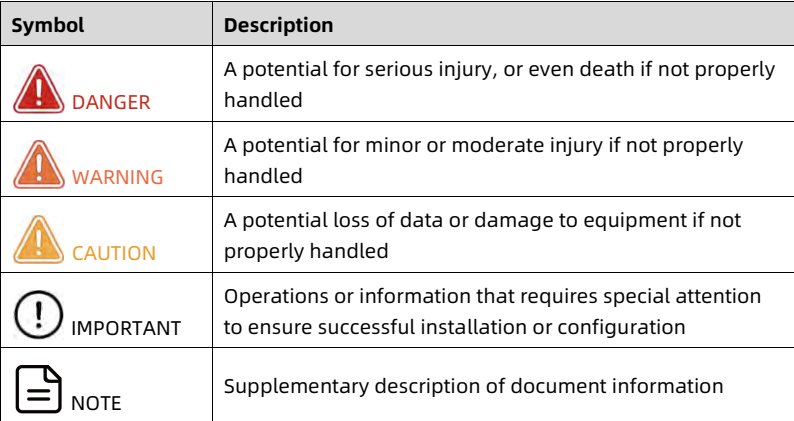
The symbols that may be found in this document are defined as follows.

<table>
<thead>
<tr>
<th> Symbol </th>
<th> Description </th>
</tr>
</thead>
<tbody>
<tr>
<td> DANGER </td>
<td> A potential for serious injury, or even death if not properly handled </td>
</tr>
<tr>
<td> WARNING </td>
<td> A potential for minor or moderate injury if not properly handled </td>
</tr>
<tr>
<td> CAUTION </td>
<td> A potential loss of data or damage to equipment if not properly handled </td>
</tr>
<tr>
<td> IMPORTANT </td>
<td> Operations or information that requires special attention to ensure successful installation or configuration </td>
</tr>
<tr>
<td> NOTE </td>
<td> Supplementary description of document information </td>
</tr>
</tbody>
</table>

<details style="margin: 0.3rem 0 1rem; padding: 0.4rem 0.6rem; background: rgba(255,255,255,0.03); border-radius: 4px; border: 1px solid rgba(255,255,255,0.08);">
  <summary style="cursor: pointer; font-size: 0.75rem; color: rgba(255,255,255,0.55);">📷 view source screenshot for verification (page 5)</summary>
  <img src="images/reducto/p005_table_0043.jpg" alt="table source p5" style="max-width: 100%; margin-top: 0.6rem; display: block;" />
</details>

<b>Revision History</b>

<table>
<thead>
<tr>
<th> <b>Version</b> </th>
<th> <b>Date</b> </th>
<th> <b>Description of Changes</b> </th>
</tr>
</thead>
<tbody>
<tr>
<td> V1.0 </td>
<td> 2025/04/24 </td>
<td> Initial release </td>
</tr>
</tbody>
</table>

<details style="margin: 0.3rem 0 1rem; padding: 0.4rem 0.6rem; background: rgba(255,255,255,0.03); border-radius: 4px; border: 1px solid rgba(255,255,255,0.08);">
  <summary style="cursor: pointer; font-size: 0.75rem; color: rgba(255,255,255,0.55);">📷 view source screenshot for verification (page 5)</summary>
  <img src="images/reducto/p005_table_0045.jpg" alt="table source p5" style="max-width: 100%; margin-top: 0.6rem; display: block;" />
</details>

<!-- page: 6 -->
<b>Table of Contents</b>

1 Product Overview ... 1
2 Features ... 4
2.1 Scalability and Performance ... 4
2.2 Availability and Serviceability ... 5
2.3 Manageability and Security... 6
2.4 Energy Efficiency ... 8
3 System Parts Breakdown ... 10
4 System Logical Diagram ... 13
4.1 System Logical Diagram of Motherboard 1 ... 13
4.2 System Logical Diagram of Motherboard 2 ... 15
5 Hardware Description... 17
5.1 Front Panel... 17
5.1.1 12 × 3.5-Inch Drive Configuration ... 17
5.1.2 24 × 2.5-Inch Drive Configuration ... 18
5.1.3 25 × 2.5-Inch Drive Configuration ... 18
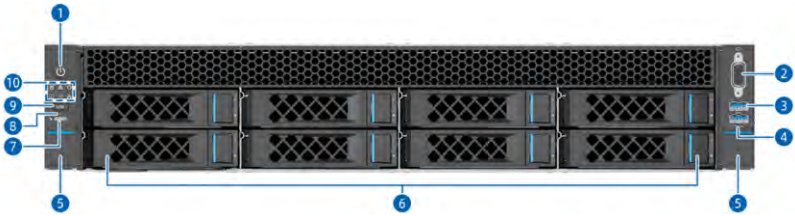
5.1.4 8 × 3.5-Inch Drive Configuration ... 19
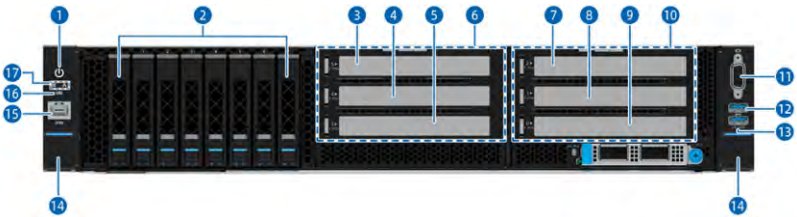
5.1.5 8 × 2.5-Inch Drive Configuration ... 20
5.1.6 16 × 2.5-Inch Drive Configuration ... 20
5.1.7 9 × 3.5-Inch Drive Configuration ... 21
5.1.8 24 × E3.S/NVMe Drive Configuration... 22
5.2 Rear Panel... 23
5.2.1 KR2280-X2-A0-R0-00... 23
5.2.2 KR2280-X2-C0-R0-00 ... 25
5.2.3 KR2280-X2-A0-F0-00 ... 26
5.3 LEDs and Buttons ... 26

<!-- page: 7 -->
5.4 Port Description... 30
5.5 Processors... 31
5.6 Memory ... 32
5.6.1 DDR5 DIMMs ... 32
5.7 Storage ... 38
5.7.1 Drive Configurations ... 38
5.7.2 Drive Numbering ... 41
5.7.3 Drive LEDs... 46
5.7.4 RAID Cards ... 48
5.8 Network ... 48
5.9 I/O Expansion ... 49
5.9.1 PCIe Expansion Cards ... 49
5.9.2 PCIe Slot Locations... 49
5.9.3 PCIe Riser Modules... 53
5.9.4 PCIe Slot Description ... 59
5.10 PSUs... 63
5.11 Fan Modules... 63
5.12 LCD Module ... 64
5.12.1 Function... 64
5.12.2 Mobile Management Software ISMM ... 64
5.13 Boards... 66
5.13.1 Motherboard ... 66
5.13.2 DC-SCM Board ... 70
5.13.3 Drive Backplanes ... 72
Product Specifications ... 78
6.1 KR2280-X2-A0-R0-00 ... 78
6.1.1 Technical Specifications ... 78

6

<!-- page: 8 -->
6.1.2 Environmental Specifications ... 81
6.1.3 Physical Specifications... 82
6.2 KR2280-X2-C0-R0-00 ... 83
6.2.1 Technical Specifications ... 83
6.2.2 Environmental Specifications ... 86
6.2.3 Physical Specifications... 88
6.3 KR2280-X2-A0-F0-00 ... 89
6.3.1 Technical Specifications ... 89
6.3.2 Environmental Specifications ... 92
6.3.3 Physical Specifications... 93
7 Operating System and Hardware Compatibility ... 95
7.1 Supported Operating Systems ... 95
7.2 Hardware Compatibility ... 96
7.2.1 CPU Specifications ... 96
7.2.2 DIMM Specifications... 98
7.2.3 Drive Specifications ... 98
7.2.4 SAS/RAID Card Specifications ... 99
7.2.5 NIC Specifications ... 101
7.2.6 GPU Specifications... 102
7.2.7 PSU Specifications ... 102
8 Regulatory Information ... 104
8.1 Safety... 104
8.1.1 General... 104
8.1.2 Personal Safety... 104
8.1.3 Equipment Safety ... 106
8.1.4 Transportation Precautions ... 107
8.1.5 Manual Handling Weight Limits... 107

<!-- page: 9 -->
9 Limited Warranty... 109
9.1 Warranty Service ... 109
9.1.1 Remote Technical Support... 109
9.1.2 RMA Service ... 110
9.1.3 ARMA Service ... 110
9.1.4 9 × 5 × NBD Onsite Service ... 110
9.1.5 24 × 7 × 4 Onsite Service ... 111
9.2 Our Service SLA ... 111
9.3 Warranty Exclusions ... 111
10 System Management... 114
10.1 Intelligent Management System BMC... 114
10.2 KSManage... 117
10.3 KSManage Tools... 119
11 Certifications ... 121
11.1 KR2280-X2-A0-R0-00 ... 121
11.2 KR2280-X2-C0-R0-00 ... 121
11.3 KR2280-X2-A0-F0-00 ... 122
12 Appendix A... 124
12.1 Operating Temperature Specification Limits ... 124
12.1.1 KR2280-X2-A0-R0-00... 124
12.1.2 KR2280-X2-C0-R0-00 ... 127
12.1.3 KR2280-X2-A0-F0-00 ... 129
12.2 Models ... 130
12.3 RAS Features ... 130
12.4 Sensor List... 130
13 Appendix B Acronyms and Abbreviations ... 1
13.1 A - E... 1

<!-- page: 10 -->
13.2 F - J ... 3
13.3 K - O ... 4
13.4 P - T ... 5
13.5 U - Z ... 7

<!-- page: 11 -->
White Paper for KAYTUS KR2280V2 Series Servers_Powered by Intel Processors

<b>1 Product Overview</b>

The KR2280V2 Intel-based system is a high-end 2-socket rack server that features the 4<sup>th</sup>/5<sup>th</sup> Gen Intel Xeon Scalable processors. It is designed for high-end IT applications such as cloud computing, big data, and deep learning. The server maintains the high quality and reliability of our servers, delivering exceptional computing performance, storage performance, and scalability. It provides a variety of options, such as front or rear I/O (front or rear accessed) configurations, overcoming O&M challenges in traditional data centers. In addition, it incorporates advanced cooling technologies such as cold-plate liquid cooling and extended volume air cooling (EVAC) to meet the diverse requirements of different industries and scenarios effectively.

Figure 1-1 12 × 3.5-Inch Drive Configuration

![figure](images/reducto/p011_figure_0069.jpg)

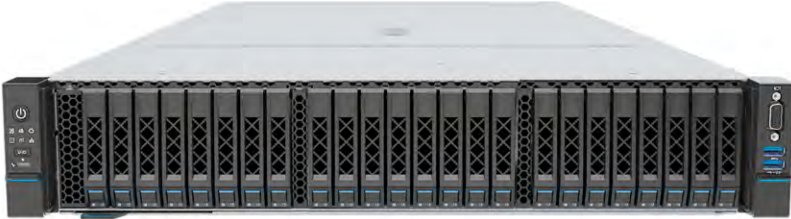
Figure 1-2 24 × 2.5-Inch Drive Configuration

<figure style="margin: 1rem 0; padding: 0.6rem; background: rgba(255,255,255,0.04); border-radius: 4px;">
  <img src="images/reducto/p011_figure_0071.jpg" alt="figure p11" style="max-width: 100%; max-height: 480px; display: block; margin: 0 auto;" />
  <figcaption style="font-size: 0.78rem; color: rgba(255,255,255,0.55); text-align: center; margin-top: 0.5rem;">XXXX XXXX XXXXL XXXX XXXX XXXXI XXXX XXXX XXXXI KXXX KXXX XXXXI KXXX XXXXI XXXXI KXXX I KXXX I KXXX XXXX T KXXX KXXX I XXXX</figcaption>
</figure>

1

<!-- page: 12 -->
White Paper for KAYTUS KR2280V2 Series Servers_Powered by Intel Processors

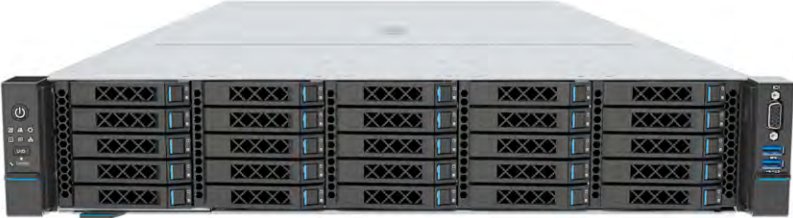
Figure 1-3 25 × 2.5-Inch Drive Configuration

<figure style="margin: 1rem 0; padding: 0.6rem; background: rgba(255,255,255,0.04); border-radius: 4px;">
  <img src="images/reducto/p012_figure_0077.jpg" alt="figure p12" style="max-width: 100%; max-height: 480px; display: block; margin: 0 auto;" />
  <figcaption style="font-size: 0.78rem; color: rgba(255,255,255,0.55); text-align: center; margin-top: 0.5rem;">XXXX XXXXL: XXXX: XXXX XXXX I
XXXX XXXX XXXX XXXX XXXX
၁ .
XXXX XXXX XXXX XXXX XXXXX
XXXX B XXXX XXXX XXXX XXXX
XXXX XXXX XXXX XXXX XXXX</figcaption>
</figure>

Figure 1-4 8 × 3.5-Inch Drive Configuration

![figure](images/reducto/p012_figure_0079.jpg)

Figure 1-5 8 × 2.5-Inch Drive Configuration

![figure](images/reducto/p012_figure_0081.jpg)

Figure 1-6 16 × 2.5-Inch Drive Configuration

![figure](images/reducto/p012_figure_0083.jpg)

2

<!-- page: 13 -->
White Paper for KAYTUS KR2280V2 Series Servers_Powered by Intel Processors

Figure 1-7 9 × 3.5-Inch Drive Configuration

![figure](images/reducto/p013_figure_0089.jpg)

Figure 1-8 24 × E3.S/NVMe Drive Configuration

![figure](images/reducto/p013_figure_0091.jpg)

3

<!-- page: 14 -->
White Paper for KAYTUS KR2280V2 Series Servers_Powered by Intel Processors

<figure style="margin: 1rem 0; padding: 0.6rem; background: rgba(255,255,255,0.04); border-radius: 4px;">
  <img src="images/reducto/p014_figure_0096.jpg" alt="figure p14" style="max-width: 100%; max-height: 480px; display: block; margin: 0 auto;" />
  <figcaption style="font-size: 0.78rem; color: rgba(255,255,255,0.55); text-align: center; margin-top: 0.5rem;">2 Features</figcaption>
</figure>

<b>2.1 Scalability and Performance</b>

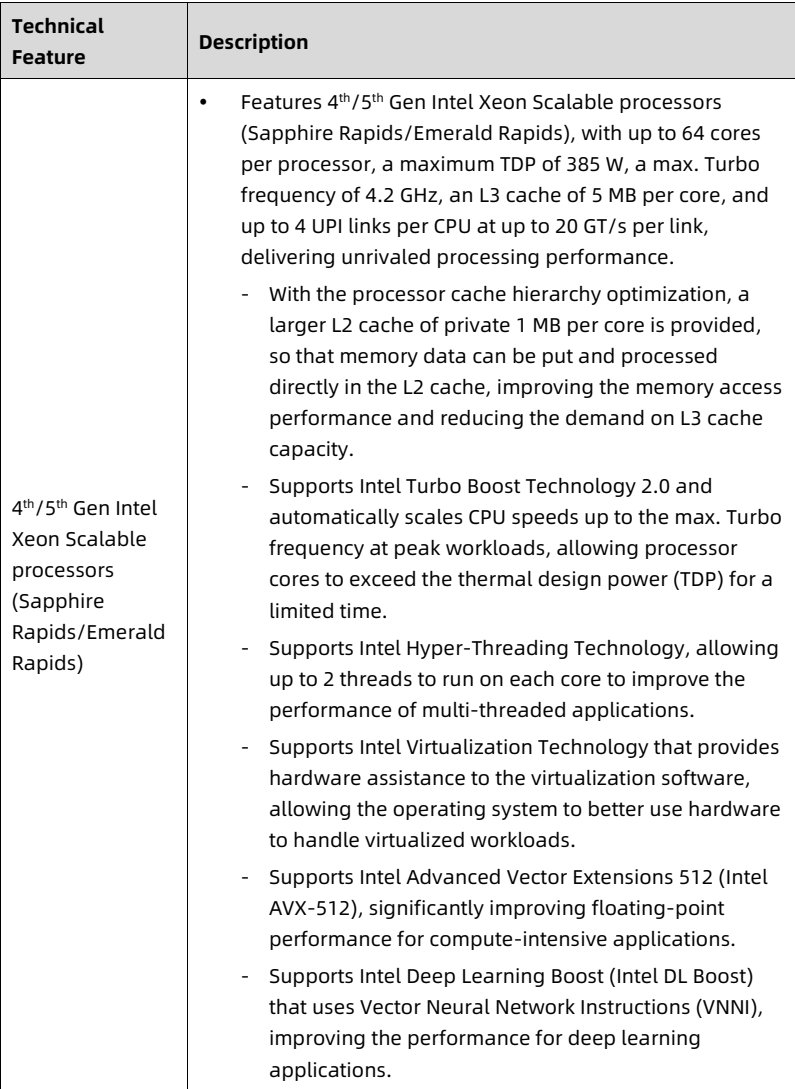
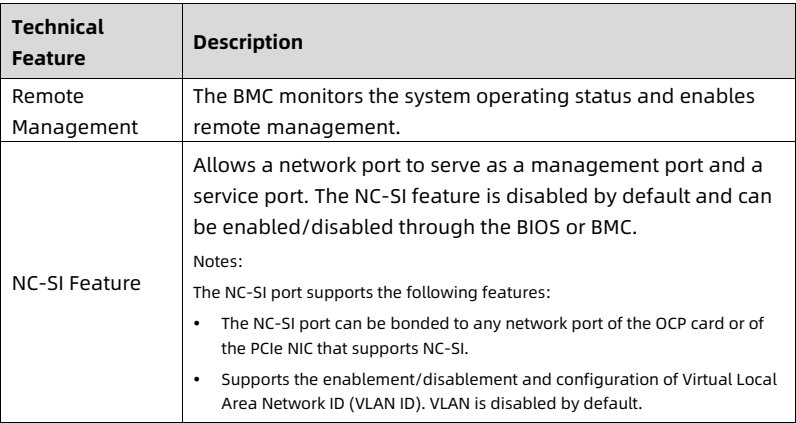
Table 2-1 Scalability and Performance

<table>
<thead>
<tr>
<th> Technical Feature </th>
<th> Description </th>
</tr>
</thead>
<tbody>
<tr>
<td> 4<sup>th</sup>/5<sup>th</sup> Gen Intel Xeon Scalable processors (Sapphire Rapids/Emerald Rapids) </td>
<td> • Features 4<sup>th</sup>/5<sup>th</sup> Gen Intel Xeon Scalable processors (Sapphire Rapids/Emerald Rapids), with up to 64 cores per processor, a maximum TDP of 385 W, a max. Turbo frequency of 4.2 GHz, an L3 cache of 5 MB per core, and up to 4 UPI links per CPU at up to 20 GT/s per link, delivering unrivaled processing performance.
- With the processor cache hierarchy optimization, a larger L2 cache of private 1 MB per core is provided, so that memory data can be put and processed directly in the L2 cache, improving the memory access performance and reducing the demand on L3 cache capacity.
- Supports Intel Turbo Boost Technology 2.0 and automatically scales CPU speeds up to the max. Turbo frequency at peak workloads, allowing processor cores to exceed the thermal design power (TDP) for a limited time.
- Supports Intel Hyper-Threading Technology, allowing up to 2 threads to run on each core to improve the performance of multi-threaded applications.
- Supports Intel Virtualization Technology that provides hardware assistance to the virtualization software, allowing the operating system to better use hardware to handle virtualized workloads.
- Supports Intel Advanced Vector Extensions 512 (Intel AVX-512), significantly improving floating-point performance for compute-intensive applications.
- Supports Intel Deep Learning Boost (Intel DL Boost) that uses Vector Neural Network Instructions (VNNI), improving the performance for deep learning applications. </td>
</tr>
</tbody>
</table>

<details style="margin: 0.3rem 0 1rem; padding: 0.4rem 0.6rem; background: rgba(255,255,255,0.03); border-radius: 4px; border: 1px solid rgba(255,255,255,0.08);">
  <summary style="cursor: pointer; font-size: 0.75rem; color: rgba(255,255,255,0.55);">📷 view source screenshot for verification (page 14)</summary>
  <img src="images/reducto/p014_table_0099.jpg" alt="table source p14" style="max-width: 100%; margin-top: 0.6rem; display: block;" />
</details>

4

<!-- page: 15 -->
White Paper for KAYTUS KR2280V2 Series Servers_Powered by Intel Processors

<table>
<thead>
<tr>
<th> Technical Feature </th>
<th> Description </th>
</tr>
</thead>
<tbody>
<tr>
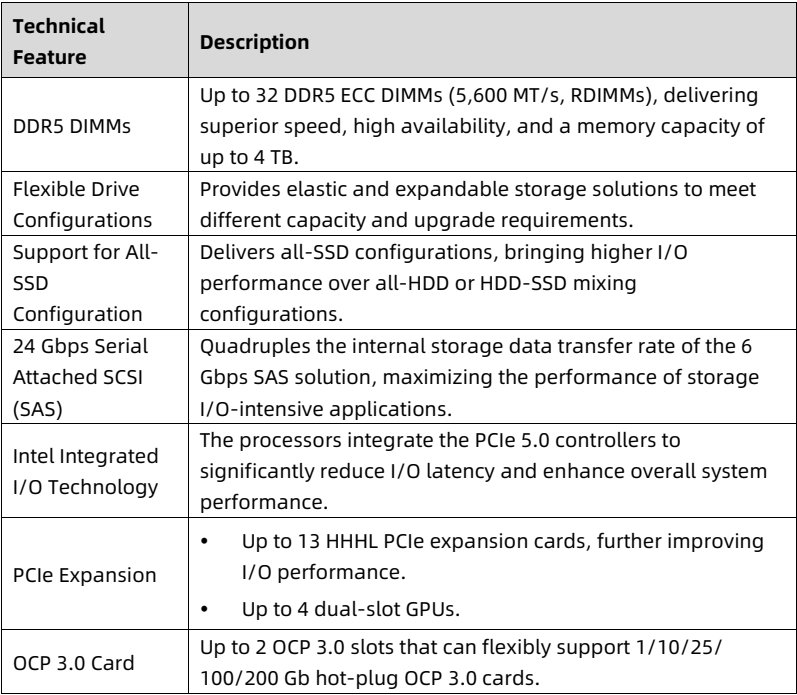
<td> DDR5 DIMMs </td>
<td> Up to 32 DDR5 ECC DIMMs (5,600 MT/s, RDIMMs), delivering superior speed, high availability, and a memory capacity of up to 4 TB. </td>
</tr>
<tr>
<td> Flexible Drive Configurations </td>
<td> Provides elastic and expandable storage solutions to meet different capacity and upgrade requirements. </td>
</tr>
<tr>
<td> Support for All-SSD Configuration </td>
<td> Delivers all-SSD configurations, bringing higher I/O performance over all-HDD or HDD-SSD mixing configurations. </td>
</tr>
<tr>
<td> 24 Gbps Serial Attached SCSI (SAS) </td>
<td> Quadruples the internal storage data transfer rate of the 6 Gbps SAS solution, maximizing the performance of storage I/O-intensive applications. </td>
</tr>
<tr>
<td> Intel Integrated I/O Technology </td>
<td> The processors integrate the PCIe 5.0 controllers to significantly reduce I/O latency and enhance overall system performance. </td>
</tr>
<tr>
<td> PCIe Expansion </td>
<td> • Up to 13 HHHL PCIe expansion cards, further improving I/O performance.
• Up to 4 dual-slot GPUs. </td>
</tr>
<tr>
<td> OCP 3.0 Card </td>
<td> Up to 2 OCP 3.0 slots that can flexibly support 1/10/25/100/200 Gb hot-plug OCP 3.0 cards. </td>
</tr>
</tbody>
</table>

<details style="margin: 0.3rem 0 1rem; padding: 0.4rem 0.6rem; background: rgba(255,255,255,0.03); border-radius: 4px; border: 1px solid rgba(255,255,255,0.08);">
  <summary style="cursor: pointer; font-size: 0.75rem; color: rgba(255,255,255,0.55);">📷 view source screenshot for verification (page 15)</summary>
  <img src="images/reducto/p015_table_0104.jpg" alt="table source p15" style="max-width: 100%; margin-top: 0.6rem; display: block;" />
</details>

<b>2.2 Availability and Serviceability</b>

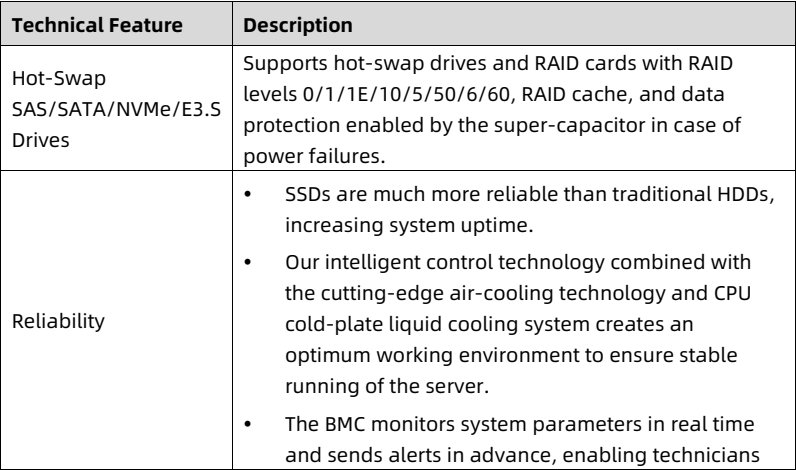
Table 2-2 Availability and Serviceability

<table>
<thead>
<tr>
<th> <b>Technical Feature</b> </th>
<th> <b>Description</b> </th>
</tr>
</thead>
<tbody>
<tr>
<td> Hot-Swap SAS/SATA/NVMe/E3.S Drives </td>
<td> Supports hot-swap drives and RAID cards with RAID levels 0/1/1E/10/5/50/6/60, RAID cache, and data protection enabled by the super-capacitor in case of power failures. </td>
</tr>
<tr>
<td> Reliability </td>
<td> • SSDs are much more reliable than traditional HDDs, increasing system uptime.
• Our intelligent control technology combined with the cutting-edge air-cooling technology and CPU cold-plate liquid cooling system creates an optimum working environment to ensure stable running of the server.
• The BMC monitors system parameters in real time and sends alerts in advance, enabling technicians </td>
</tr>
</tbody>
</table>

<details style="margin: 0.3rem 0 1rem; padding: 0.4rem 0.6rem; background: rgba(255,255,255,0.03); border-radius: 4px; border: 1px solid rgba(255,255,255,0.08);">
  <summary style="cursor: pointer; font-size: 0.75rem; color: rgba(255,255,255,0.55);">📷 view source screenshot for verification (page 15)</summary>
  <img src="images/reducto/p015_table_0107.jpg" alt="table source p15" style="max-width: 100%; margin-top: 0.6rem; display: block;" />
</details>

5

<!-- page: 16 -->
White Paper for KAYTUS KR2280V2 Series Servers_Powered by Intel Processors

<table>
<thead>
<tr>
<th> Technical Feature </th>
<th> Description </th>
</tr>
</thead>
<tbody>
<tr>
<td></td>
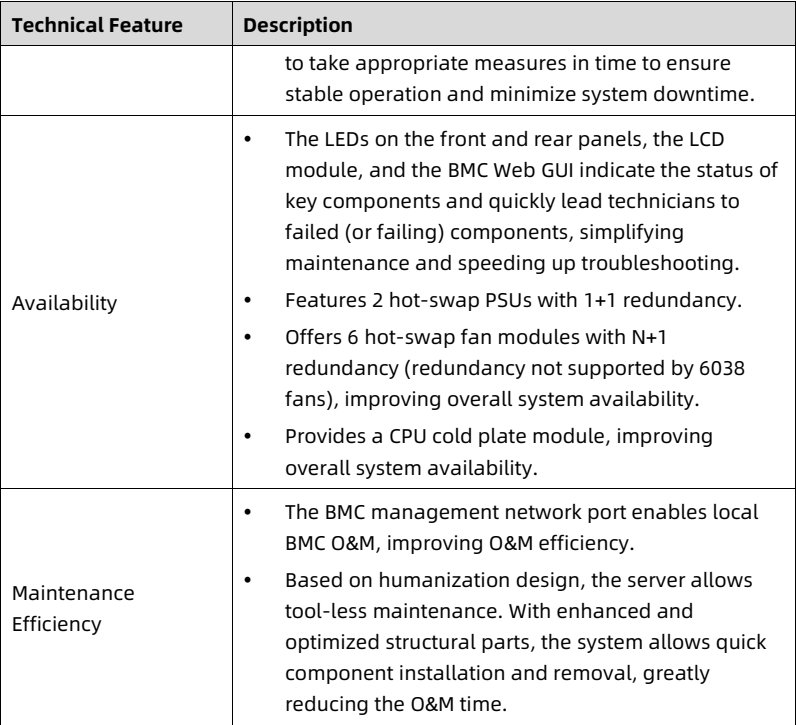
<td> to take appropriate measures in time to ensure stable operation and minimize system downtime. </td>
</tr>
<tr>
<td> Availability </td>
<td> • The LEDs on the front and rear panels, the LCD module, and the BMC Web GUI indicate the status of key components and quickly lead technicians to failed (or failing) components, simplifying maintenance and speeding up troubleshooting.
• Features 2 hot-swap PSUs with 1+1 redundancy.
• Offers 6 hot-swap fan modules with N+1 redundancy (redundancy not supported by 6038 fans), improving overall system availability.
• Provides a CPU cold plate module, improving overall system availability. </td>
</tr>
<tr>
<td> Maintenance Efficiency </td>
<td> • The BMC management network port enables local BMC O&amp;M, improving O&amp;M efficiency.
• Based on humanization design, the server allows tool-less maintenance. With enhanced and optimized structural parts, the system allows quick component installation and removal, greatly reducing the O&amp;M time. </td>
</tr>
</tbody>
</table>

<details style="margin: 0.3rem 0 1rem; padding: 0.4rem 0.6rem; background: rgba(255,255,255,0.03); border-radius: 4px; border: 1px solid rgba(255,255,255,0.08);">
  <summary style="cursor: pointer; font-size: 0.75rem; color: rgba(255,255,255,0.55);">📷 view source screenshot for verification (page 16)</summary>
  <img src="images/reducto/p016_table_0112.jpg" alt="table source p16" style="max-width: 100%; margin-top: 0.6rem; display: block;" />
</details>

<b>2.3 Manageability and Security</b>

Table 2-3 Manageability and Security

<table>
<thead>
<tr>
<th> <b>Technical Feature</b> </th>
<th> <b>Description</b> </th>
</tr>
</thead>
<tbody>
<tr>
<td> Remote Management </td>
<td> The BMC monitors the system operating status and enables remote management. </td>
</tr>
<tr>
<td> NC-SI Feature </td>
<td> Allows a network port to serve as a management port and a service port. The NC-SI feature is disabled by default and can be enabled/disabled through the BIOS or BMC.
Notes:
The NC-SI port supports the following features:
• The NC-SI port can be bonded to any network port of the OCP card or of the PCIe NIC that supports NC-SI.
• Supports the enablement/disablement and configuration of Virtual Local Area Network ID (VLAN ID). VLAN is disabled by default. </td>
</tr>
</tbody>
</table>

<details style="margin: 0.3rem 0 1rem; padding: 0.4rem 0.6rem; background: rgba(255,255,255,0.03); border-radius: 4px; border: 1px solid rgba(255,255,255,0.08);">
  <summary style="cursor: pointer; font-size: 0.75rem; color: rgba(255,255,255,0.55);">📷 view source screenshot for verification (page 16)</summary>
  <img src="images/reducto/p016_table_0115.jpg" alt="table source p16" style="max-width: 100%; margin-top: 0.6rem; display: block;" />
</details>

6

<!-- page: 17 -->
White Paper for KAYTUS KR2280V2 Series Servers_Powered by Intel Processors

<table>
<thead>
<tr>
<th> Technical Feature </th>
<th> Description </th>
</tr>
</thead>
<tbody>
<tr>
<td></td>
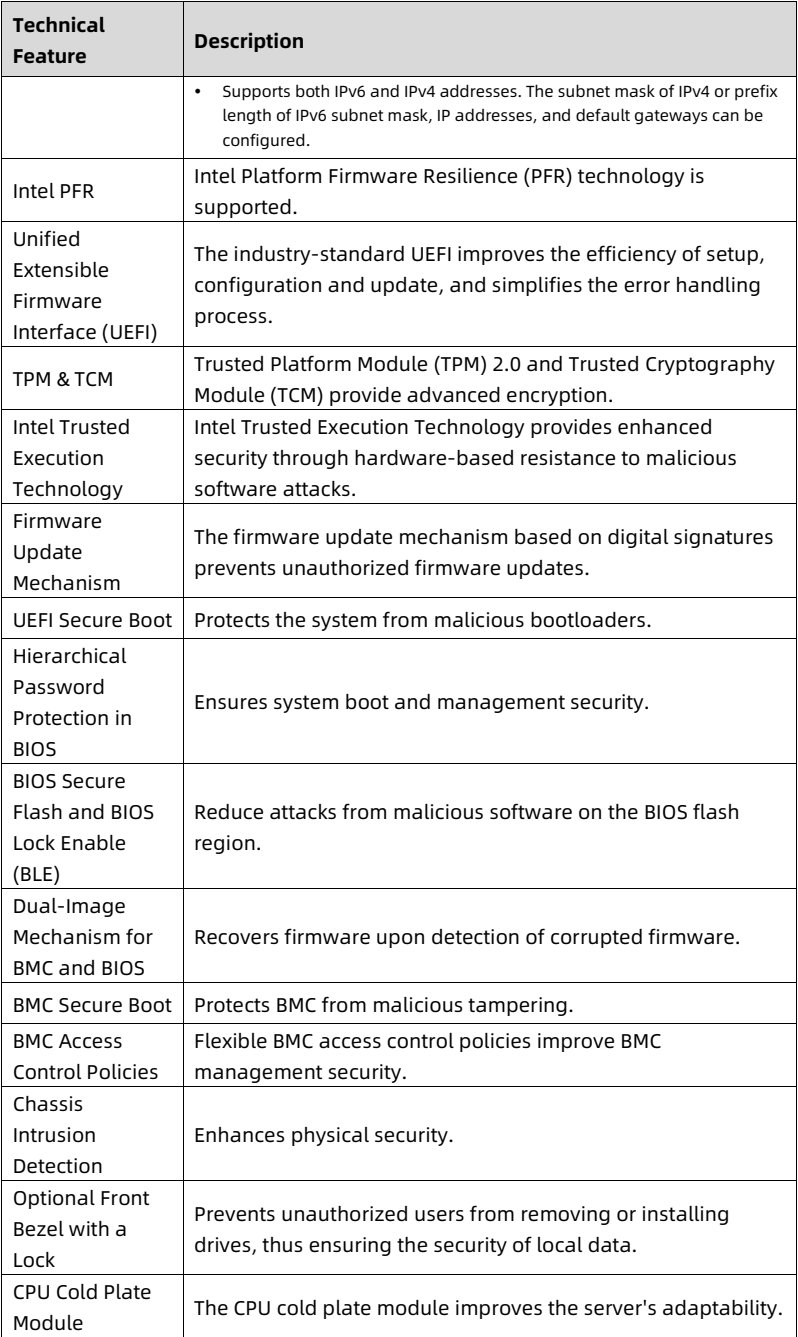
<td> • Supports both IPv6 and IPv4 addresses. The subnet mask of IPv4 or prefix length of IPv6 subnet mask, IP addresses, and default gateways can be configured. </td>
</tr>
<tr>
<td> Intel PFR </td>
<td> Intel Platform Firmware Resilience (PFR) technology is supported. </td>
</tr>
<tr>
<td> Unified Extensible Firmware Interface (UEFI) </td>
<td> The industry-standard UEFI improves the efficiency of setup, configuration and update, and simplifies the error handling process. </td>
</tr>
<tr>
<td> TPM &amp; TCM </td>
<td> Trusted Platform Module (TPM) 2.0 and Trusted Cryptography Module (TCM) provide advanced encryption. </td>
</tr>
<tr>
<td> Intel Trusted Execution Technology </td>
<td> Intel Trusted Execution Technology provides enhanced security through hardware-based resistance to malicious software attacks. </td>
</tr>
<tr>
<td> Firmware Update Mechanism </td>
<td> The firmware update mechanism based on digital signatures prevents unauthorized firmware updates. </td>
</tr>
<tr>
<td> UEFI Secure Boot </td>
<td> Protects the system from malicious bootloaders. </td>
</tr>
<tr>
<td> Hierarchical Password Protection in BIOS </td>
<td> Ensures system boot and management security. </td>
</tr>
<tr>
<td> BIOS Secure Flash and BIOS Lock Enable (BLE) </td>
<td> Reduce attacks from malicious software on the BIOS flash region. </td>
</tr>
<tr>
<td> Dual-Image Mechanism for BMC and BIOS </td>
<td> Recovers firmware upon detection of corrupted firmware. </td>
</tr>
<tr>
<td> BMC Secure Boot </td>
<td> Protects BMC from malicious tampering. </td>
</tr>
<tr>
<td> BMC Access Control Policies </td>
<td> Flexible BMC access control policies improve BMC management security. </td>
</tr>
<tr>
<td> Chassis Intrusion Detection </td>
<td> Enhances physical security. </td>
</tr>
<tr>
<td> Optional Front Bezel with a Lock </td>
<td> Prevents unauthorized users from removing or installing drives, thus ensuring the security of local data. </td>
</tr>
<tr>
<td> CPU Cold Plate Module </td>
<td> The CPU cold plate module improves the server's adaptability. </td>
</tr>
</tbody>
</table>

<details style="margin: 0.3rem 0 1rem; padding: 0.4rem 0.6rem; background: rgba(255,255,255,0.03); border-radius: 4px; border: 1px solid rgba(255,255,255,0.08);">
  <summary style="cursor: pointer; font-size: 0.75rem; color: rgba(255,255,255,0.55);">📷 view source screenshot for verification (page 17)</summary>
  <img src="images/reducto/p017_table_0120.jpg" alt="table source p17" style="max-width: 100%; margin-top: 0.6rem; display: block;" />
</details>

7

<!-- page: 18 -->
White Paper for KAYTUS KR2280V2 Series Servers_Powered by Intel Processors

<table>
<thead>
<tr>
<th> Technical Feature </th>
<th> Description </th>
</tr>
</thead>
<tbody>
<tr>
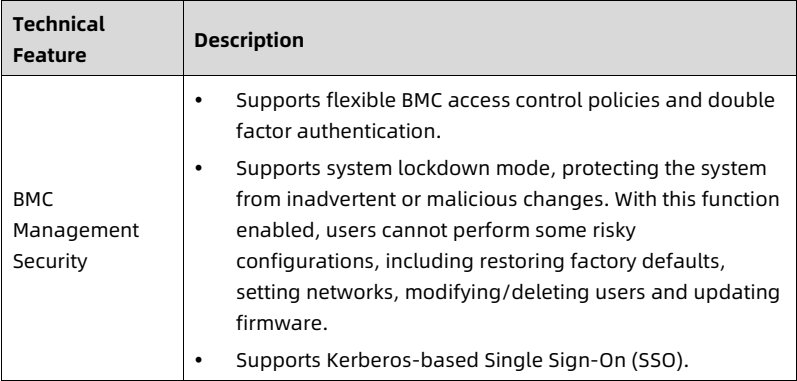
<td> BMC Management Security </td>
<td> • Supports flexible BMC access control policies and double factor authentication.
• Supports system lockdown mode, protecting the system from inadvertent or malicious changes. With this function enabled, users cannot perform some risky configurations, including restoring factory defaults, setting networks, modifying/deleting users and updating firmware.
• Supports Kerberos-based Single Sign-On (SSO). </td>
</tr>
</tbody>
</table>

<details style="margin: 0.3rem 0 1rem; padding: 0.4rem 0.6rem; background: rgba(255,255,255,0.03); border-radius: 4px; border: 1px solid rgba(255,255,255,0.08);">
  <summary style="cursor: pointer; font-size: 0.75rem; color: rgba(255,255,255,0.55);">📷 view source screenshot for verification (page 18)</summary>
  <img src="images/reducto/p018_table_0125.jpg" alt="table source p18" style="max-width: 100%; margin-top: 0.6rem; display: block;" />
</details>

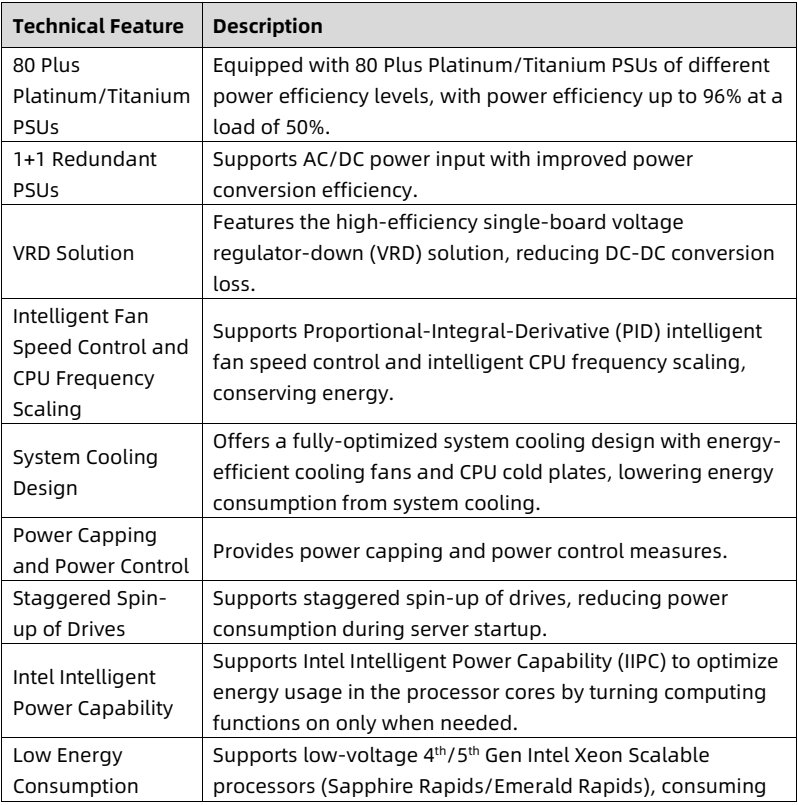
<b>2.4 Energy Efficiency</b>

Table 2-4 Energy Efficiency

<table>
<thead>
<tr>
<th> <b>Technical Feature</b> </th>
<th> <b>Description</b> </th>
</tr>
</thead>
<tbody>
<tr>
<td> 80 Plus Platinum/Titanium PSUs </td>
<td> Equipped with 80 Plus Platinum/Titanium PSUs of different power efficiency levels, with power efficiency up to 96% at a load of 50%. </td>
</tr>
<tr>
<td> 1+1 Redundant PSUs </td>
<td> Supports AC/DC power input with improved power conversion efficiency. </td>
</tr>
<tr>
<td> VRD Solution </td>
<td> Features the high-efficiency single-board voltage regulator-down (VRD) solution, reducing DC-DC conversion loss. </td>
</tr>
<tr>
<td> Intelligent Fan Speed Control and CPU Frequency Scaling </td>
<td> Supports Proportional-Integral-Derivative (PID) intelligent fan speed control and intelligent CPU frequency scaling, conserving energy. </td>
</tr>
<tr>
<td> System Cooling Design </td>
<td> Offers a fully-optimized system cooling design with energy-efficient cooling fans and CPU cold plates, lowering energy consumption from system cooling. </td>
</tr>
<tr>
<td> Power Capping and Power Control </td>
<td> Provides power capping and power control measures. </td>
</tr>
<tr>
<td> Staggered Spin-up of Drives </td>
<td> Supports staggered spin-up of drives, reducing power consumption during server startup. </td>
</tr>
<tr>
<td> Intel Intelligent Power Capability </td>
<td> Supports Intel Intelligent Power Capability (IIPC) to optimize energy usage in the processor cores by turning computing functions on only when needed. </td>
</tr>
<tr>
<td> Low Energy Consumption </td>
<td> Supports low-voltage 4<sup>th</sup>/5<sup>th</sup> Gen Intel Xeon Scalable processors (Sapphire Rapids/Emerald Rapids), consuming </td>
</tr>
</tbody>
</table>

<details style="margin: 0.3rem 0 1rem; padding: 0.4rem 0.6rem; background: rgba(255,255,255,0.03); border-radius: 4px; border: 1px solid rgba(255,255,255,0.08);">
  <summary style="cursor: pointer; font-size: 0.75rem; color: rgba(255,255,255,0.55);">📷 view source screenshot for verification (page 18)</summary>
  <img src="images/reducto/p018_table_0128.jpg" alt="table source p18" style="max-width: 100%; margin-top: 0.6rem; display: block;" />
</details>

8

<!-- page: 19 -->
White Paper for KAYTUS KR2280V2 Series Servers_Powered by Intel Processors

<table>
<thead>
<tr>
<th> <b>Technical Feature</b> </th>
<th> <b>Description</b> </th>
</tr>
</thead>
<tbody>
<tr>
<td></td>
<td> less energy and meeting the demands of data centers and telecommunications environments constrained by power and thermal limits. </td>
</tr>
</tbody>
</table>

<details style="margin: 0.3rem 0 1rem; padding: 0.4rem 0.6rem; background: rgba(255,255,255,0.03); border-radius: 4px; border: 1px solid rgba(255,255,255,0.08);">
  <summary style="cursor: pointer; font-size: 0.75rem; color: rgba(255,255,255,0.55);">📷 view source screenshot for verification (page 19)</summary>
  <img src="images/reducto/p019_table_0133.jpg" alt="table source p19" style="max-width: 100%; margin-top: 0.6rem; display: block;" />
</details>

9

<!-- page: 20 -->
White Paper for KAYTUS KR2280V2 Series Servers_Powered by Intel Processors

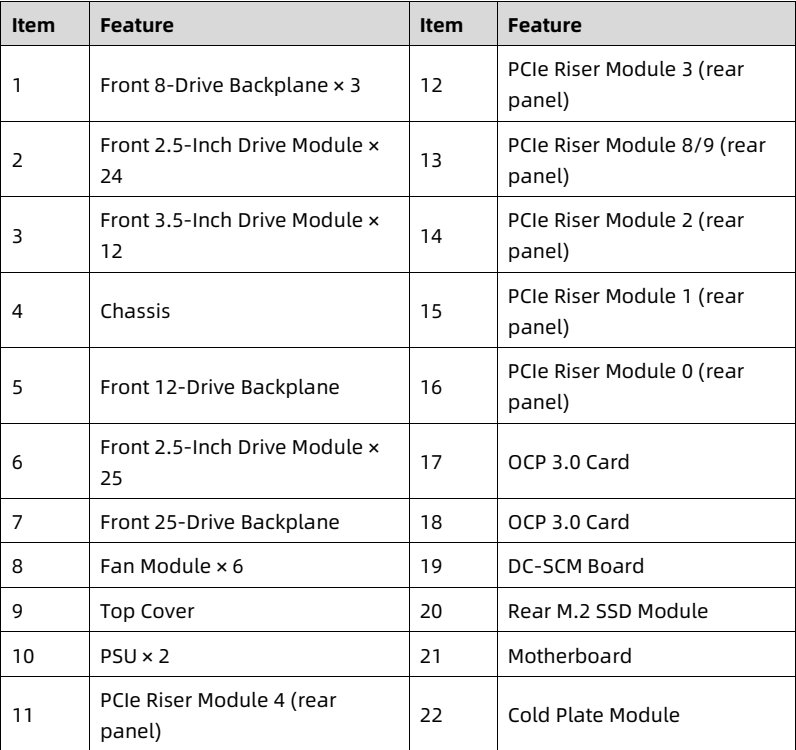
3 System Parts Breakdown

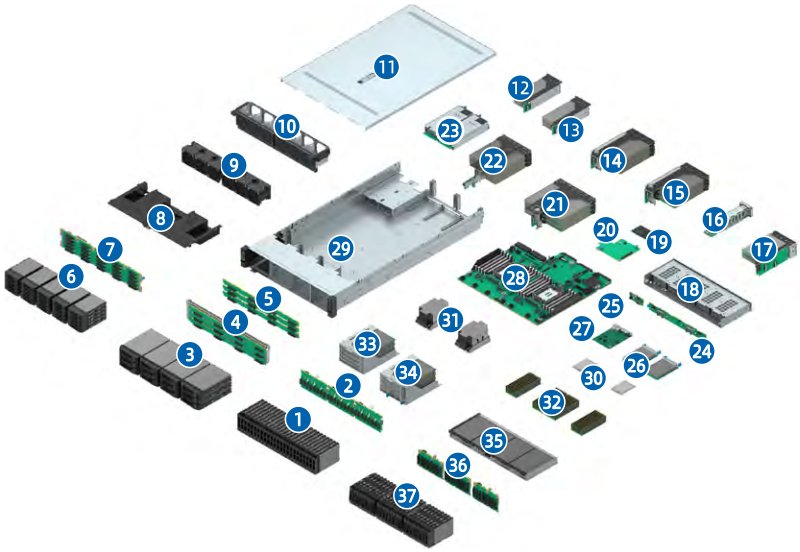
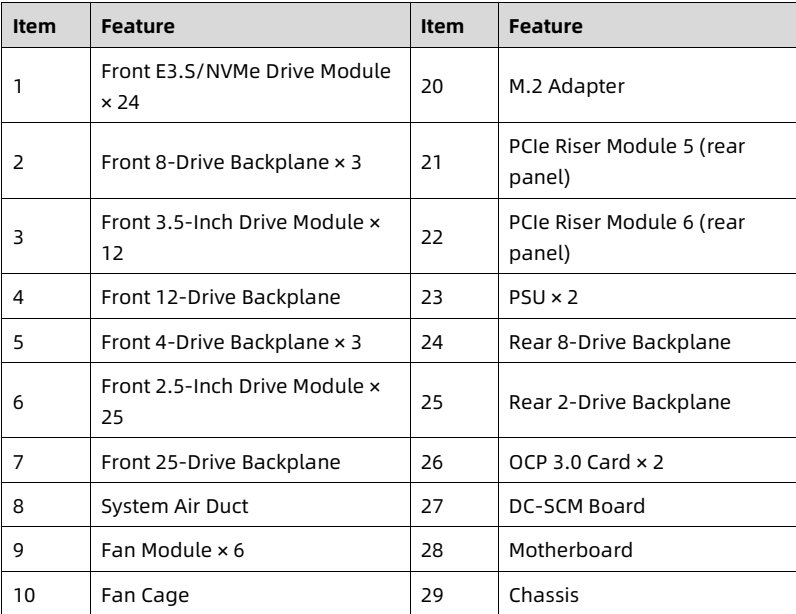
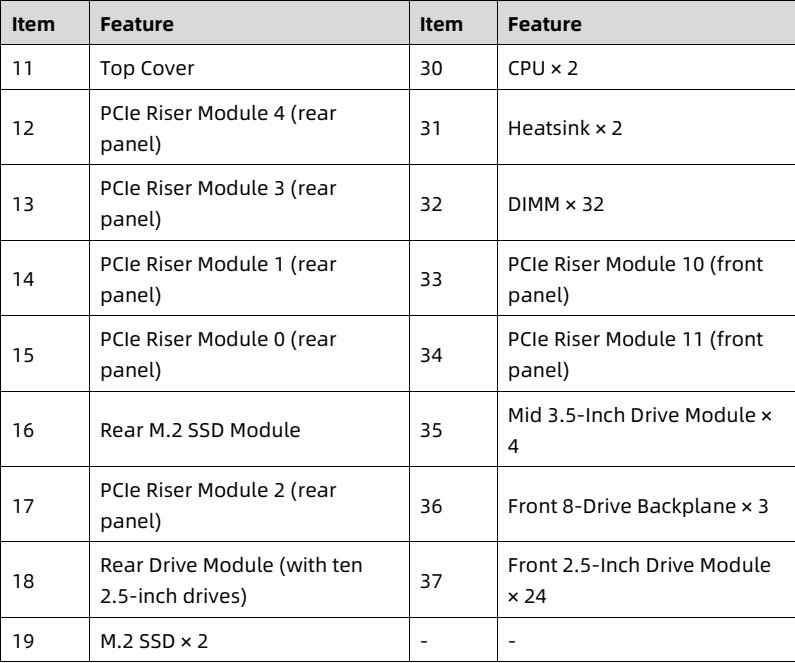
Figure 3-1 Exploded View - Air Cooling Configuration

<figure style="margin: 1rem 0; padding: 0.6rem; background: rgba(255,255,255,0.04); border-radius: 4px;">
  <img src="images/reducto/p020_figure_0140.jpg" alt="figure p20" style="max-width: 100%; max-height: 480px; display: block; margin: 0 auto;" />
  <figcaption style="font-size: 0.78rem; color: rgba(255,255,255,0.55); text-align: center; margin-top: 0.5rem;">23
22 14
(15)
(21
20 16
17
(28)
25

33 24
34 30 26
(3)

(35)</figcaption>
</figure>

<table>
<thead>
<tr>
<th> Item </th>
<th> Feature </th>
<th> Item </th>
<th> Feature </th>
</tr>
</thead>
<tbody>
<tr>
<td> 1 </td>
<td> Front E3.S/NVMe Drive Module × 24 </td>
<td> 20 </td>
<td> M.2 Adapter </td>
</tr>
<tr>
<td> 2 </td>
<td> Front 8-Drive Backplane × 3 </td>
<td> 21 </td>
<td> PCIe Riser Module 5 (rear panel) </td>
</tr>
<tr>
<td> 3 </td>
<td> Front 3.5-Inch Drive Module × 12 </td>
<td> 22 </td>
<td> PCIe Riser Module 6 (rear panel) </td>
</tr>
<tr>
<td> 4 </td>
<td> Front 12-Drive Backplane </td>
<td> 23 </td>
<td> PSU × 2 </td>
</tr>
<tr>
<td> 5 </td>
<td> Front 4-Drive Backplane × 3 </td>
<td> 24 </td>
<td> Rear 8-Drive Backplane </td>
</tr>
<tr>
<td> 6 </td>
<td> Front 2.5-Inch Drive Module × 25 </td>
<td> 25 </td>
<td> Rear 2-Drive Backplane </td>
</tr>
<tr>
<td> 7 </td>
<td> Front 25-Drive Backplane </td>
<td> 26 </td>
<td> OCP 3.0 Card × 2 </td>
</tr>
<tr>
<td> 8 </td>
<td> System Air Duct </td>
<td> 27 </td>
<td> DC-SCM Board </td>
</tr>
<tr>
<td> 9 </td>
<td> Fan Module × 6 </td>
<td> 28 </td>
<td> Motherboard </td>
</tr>
<tr>
<td> 10 </td>
<td> Fan Cage </td>
<td> 29 </td>
<td> Chassis </td>
</tr>
</tbody>
</table>

<details style="margin: 0.3rem 0 1rem; padding: 0.4rem 0.6rem; background: rgba(255,255,255,0.03); border-radius: 4px; border: 1px solid rgba(255,255,255,0.08);">
  <summary style="cursor: pointer; font-size: 0.75rem; color: rgba(255,255,255,0.55);">📷 view source screenshot for verification (page 20)</summary>
  <img src="images/reducto/p020_table_0141.jpg" alt="table source p20" style="max-width: 100%; margin-top: 0.6rem; display: block;" />
</details>

10

<!-- page: 21 -->
White Paper for KAYTUS KR2280V2 Series Servers_Powered by Intel Processors

<table>
<thead>
<tr>
<th> Item </th>
<th> Feature </th>
<th> Item </th>
<th> Feature </th>
</tr>
</thead>
<tbody>
<tr>
<td> 11 </td>
<td> Top Cover </td>
<td> 30 </td>
<td> CPU × 2 </td>
</tr>
<tr>
<td> 12 </td>
<td> PCIe Riser Module 4 (rear panel) </td>
<td> 31 </td>
<td> Heatsink × 2 </td>
</tr>
<tr>
<td> 13 </td>
<td> PCIe Riser Module 3 (rear panel) </td>
<td> 32 </td>
<td> DIMM × 32 </td>
</tr>
<tr>
<td> 14 </td>
<td> PCIe Riser Module 1 (rear panel) </td>
<td> 33 </td>
<td> PCIe Riser Module 10 (front panel) </td>
</tr>
<tr>
<td> 15 </td>
<td> PCIe Riser Module 0 (rear panel) </td>
<td> 34 </td>
<td> PCIe Riser Module 11 (front panel) </td>
</tr>
<tr>
<td> 16 </td>
<td> Rear M.2 SSD Module </td>
<td> 35 </td>
<td> Mid 3.5-Inch Drive Module × 4 </td>
</tr>
<tr>
<td> 17 </td>
<td> PCIe Riser Module 2 (rear panel) </td>
<td> 36 </td>
<td> Front 8-Drive Backplane × 3 </td>
</tr>
<tr>
<td> 18 </td>
<td> Rear Drive Module (with ten 2.5-inch drives) </td>
<td> 37 </td>
<td> Front 2.5-Inch Drive Module × 24 </td>
</tr>
<tr>
<td> 19 </td>
<td> M.2 SSD × 2 </td>
<td> - </td>
<td> - </td>
</tr>
</tbody>
</table>

<details style="margin: 0.3rem 0 1rem; padding: 0.4rem 0.6rem; background: rgba(255,255,255,0.03); border-radius: 4px; border: 1px solid rgba(255,255,255,0.08);">
  <summary style="cursor: pointer; font-size: 0.75rem; color: rgba(255,255,255,0.55);">📷 view source screenshot for verification (page 21)</summary>
  <img src="images/reducto/p021_table_0146.jpg" alt="table source p21" style="max-width: 100%; margin-top: 0.6rem; display: block;" />
</details>

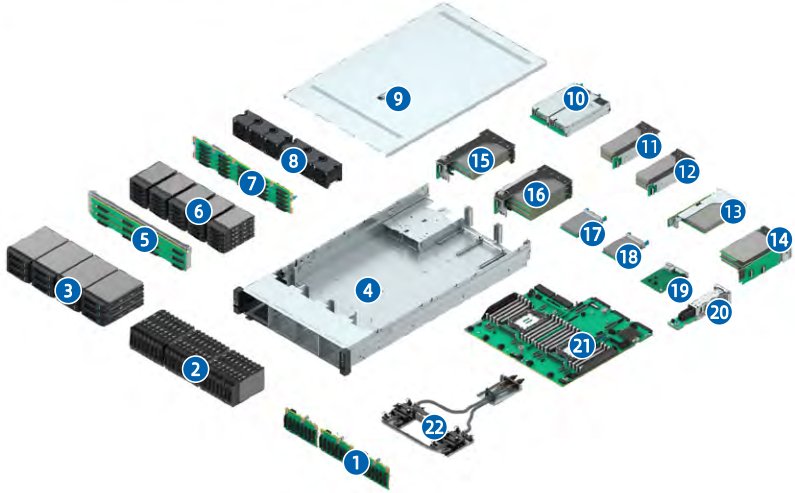
Figure 3-2 Exploded View - Liquid Cooling Configuration

<figure style="margin: 1rem 0; padding: 0.6rem; background: rgba(255,255,255,0.04); border-radius: 4px;">
  <img src="images/reducto/p021_figure_0148.jpg" alt="figure p21" style="max-width: 100%; max-height: 480px; display: block; margin: 0 auto;" />
  <figcaption style="font-size: 0.78rem; color: rgba(255,255,255,0.55); text-align: center; margin-top: 0.5rem;">10

15
16

18

20
21</figcaption>
</figure>

11

<!-- page: 22 -->
White Paper for KAYTUS KR2280V2 Series Servers_Powered by Intel Processors

<table>
<thead>
<tr>
<th> Item </th>
<th> Feature </th>
<th> Item </th>
<th> Feature </th>
</tr>
</thead>
<tbody>
<tr>
<td> 1 </td>
<td> Front 8-Drive Backplane × 3 </td>
<td> 12 </td>
<td> PCIe Riser Module 3 (rear panel) </td>
</tr>
<tr>
<td> 2 </td>
<td> Front 2.5-Inch Drive Module × 24 </td>
<td> 13 </td>
<td> PCIe Riser Module 8/9 (rear panel) </td>
</tr>
<tr>
<td> 3 </td>
<td> Front 3.5-Inch Drive Module × 12 </td>
<td> 14 </td>
<td> PCIe Riser Module 2 (rear panel) </td>
</tr>
<tr>
<td> 4 </td>
<td> Chassis </td>
<td> 15 </td>
<td> PCIe Riser Module 1 (rear panel) </td>
</tr>
<tr>
<td> 5 </td>
<td> Front 12-Drive Backplane </td>
<td> 16 </td>
<td> PCIe Riser Module 0 (rear panel) </td>
</tr>
<tr>
<td> 6 </td>
<td> Front 2.5-Inch Drive Module × 25 </td>
<td> 17 </td>
<td> OCP 3.0 Card </td>
</tr>
<tr>
<td> 7 </td>
<td> Front 25-Drive Backplane </td>
<td> 18 </td>
<td> OCP 3.0 Card </td>
</tr>
<tr>
<td> 8 </td>
<td> Fan Module × 6 </td>
<td> 19 </td>
<td> DC-SCM Board </td>
</tr>
<tr>
<td> 9 </td>
<td> Top Cover </td>
<td> 20 </td>
<td> Rear M.2 SSD Module </td>
</tr>
<tr>
<td> 10 </td>
<td> PSU × 2 </td>
<td> 21 </td>
<td> Motherboard </td>
</tr>
<tr>
<td> 11 </td>
<td> PCIe Riser Module 4 (rear panel) </td>
<td> 22 </td>
<td> Cold Plate Module </td>
</tr>
</tbody>
</table>

<details style="margin: 0.3rem 0 1rem; padding: 0.4rem 0.6rem; background: rgba(255,255,255,0.03); border-radius: 4px; border: 1px solid rgba(255,255,255,0.08);">
  <summary style="cursor: pointer; font-size: 0.75rem; color: rgba(255,255,255,0.55);">📷 view source screenshot for verification (page 22)</summary>
  <img src="images/reducto/p022_table_0153.jpg" alt="table source p22" style="max-width: 100%; margin-top: 0.6rem; display: block;" />
</details>

12

<!-- page: 23 -->
White Paper for KAYTUS KR2280V2 Series Servers_Powered by Intel Processors

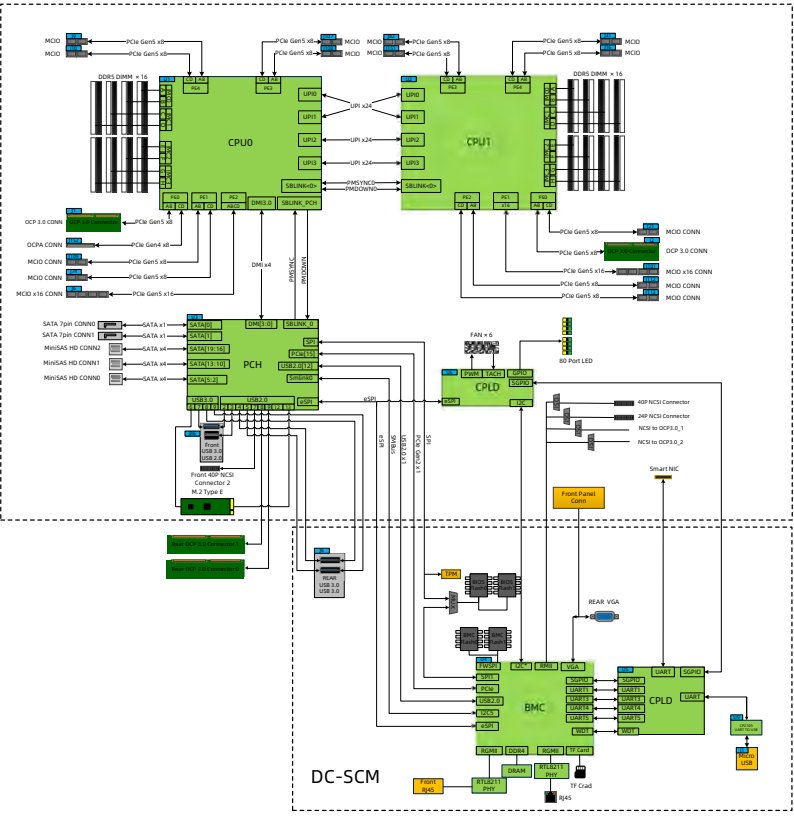
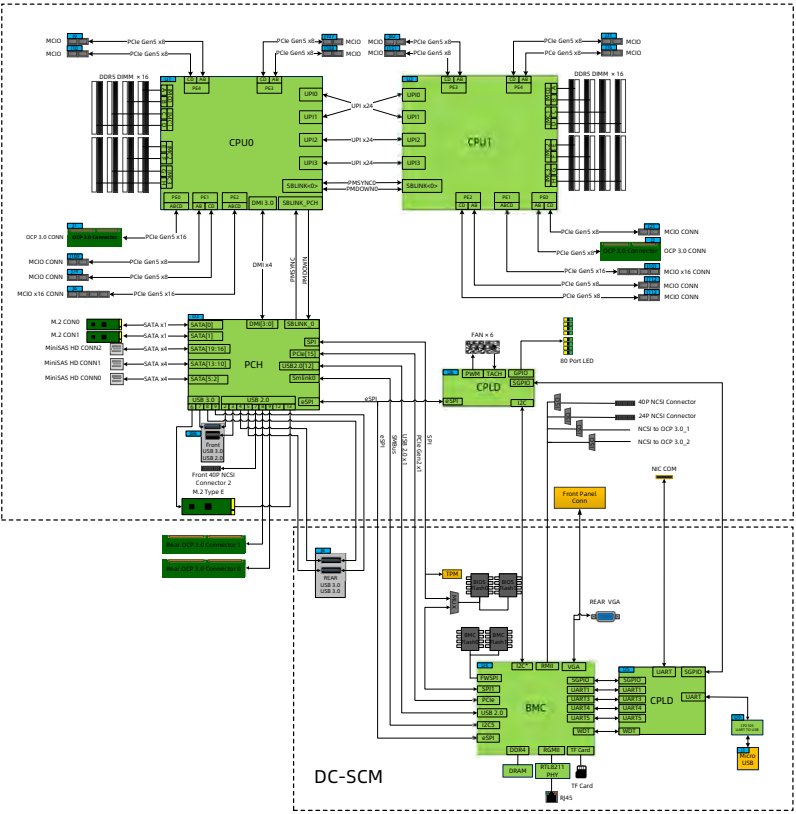
<b>4 System Logical Diagram</b>

NOTE

• Motherboard 1 (with 1 RAID mezz connector) applicable model: KR2280-X2-A0-R0-00 and KR2280-X2-A0-F0-00.

• Motherboard 2 (with 2 M.2 connectors) applicable model: KR2280-X2-A0-R0-00, KR2280-X2-C0-R0-00, and KR2280-X2-A0-F0-00.

<b>4.1 System Logical Diagram of Motherboard 1</b>

Figure 4-1 System Logical Diagram of Motherboard 1

<figure style="margin: 1rem 0; padding: 0.6rem; background: rgba(255,255,255,0.04); border-radius: 4px;">
  <img src="images/reducto/p023_figure_0164.jpg" alt="figure p23" style="max-width: 100%; max-height: 480px; display: block; margin: 0 auto;" />
  <figcaption style="font-size: 0.78rem; color: rgba(255,255,255,0.55); text-align: center; margin-top: 0.5rem;">MOO MOO
MOO MOO

DORS DIMM 16

UPI1

CPUO CPUT

UP13

SBLINK<>

OCP 3.0 CONN
MOO CONN

OCPA CONN
OCP 3.0 CONN

MCIO CONN
-PCIe Gen5 x16- MOOX16 CONN
MCO CONN
PCIe Gen5x8 MOO CONN

MOO CONN

SATA 7pin CONNO DMO SBLINK O
SATA 7pin CONNI SATA x FAN×6
SP
MiniSAS HD CONN2

MiniSAS HD CONN1 PCH US82.012 80 Port LED
MiniSAS HD CONNO PWM TACH❤
CPLD

40P NCSI Connector

24P NCSI Connecto

NCSI to OCP1.0.2

usa 2.0
Smart NIC
Front 400 NCS
Connector 2
M.2 Type E Front Panel

REAR VGA

UART SGPIO

►USB2.0 BACPLD BART
BMC UARI4
TES

RGMI DORA Card

DC-SCM
Front RTL8211 TF Crad
145</figcaption>
</figure>

13

<!-- page: 24 -->
White Paper for KAYTUS KR2280V2 Series Servers_Powered by Intel Processors

• Up to two 4<sup>th</sup>/5<sup>th</sup> Gen Intel Xeon Scalable processors (Sapphire Rapids/Emerald Rapids).

• Up to 32 DIMMs.

• Four UPI links per CPU at up to 20 GT/s per link.

• Up to 13 PCIe expansion slots and 2 OCP 3.0 slots. CPU0 and CPU1 each supports 1 OCP 3.0 card.

• The RAID mezz card is connected to CPU0 via the PCIe bus, and is connected to the drive backplanes via the SAS signal cables. Multiple local storage configurations are supported through different drive backplanes.

• The motherboard integrates the Emmitsburg (EBG) Platform Controller Hub (PCH) to support 3 USB 3.0 ports, 14 SATA 3.0 drive connectors, and 1 TF card adapter.

• The DC-SCM board integrates a BMC management chip and supports 1 VGA port, 1 BMC management network port, 1 system/BMC serial port, 1 TF card slot, and other connectors.

14

<!-- page: 25 -->
White Paper for KAYTUS KR2280V2 Series Servers_Powered by Intel Processors

<b>4.2 System Logical Diagram of Motherboard 2</b>

Figure 4-2 System Logical Diagram of Motherboard 2

<figure style="margin: 1rem 0; padding: 0.6rem; background: rgba(255,255,255,0.04); border-radius: 4px;">
  <img src="images/reducto/p025_figure_0182.jpg" alt="figure p25" style="max-width: 100%; max-height: 480px; display: block; margin: 0 auto;" />
  <figcaption style="font-size: 0.78rem; color: rgba(255,255,255,0.55); text-align: center; margin-top: 0.5rem;">-PCIe Gen
MOO Cle Gen5xB

UPIO

CPUO UP12 CPUT

UP13

SBLINK<0>

AT DMI 3.0 SBLINK PCH

MCO CONN
OCP 3.0 CONN

OCP 3.0 CONN

MOOX16 CONN
MCIO CONN
PCIe Gen5 x MCIO CONN
MCO x16 CONN◄—PC Gen5x16 MOO CONN

M.2 CONO

M.2 CON1 LATA x1 SATA[1] FAN x 6

MiniSAS HD CONN2 SATA

PCH 80 Port LED

SATA 4
CPLD

40P NCSI Connector

24P NCSI Connector

NCSI to OCP 3.01

NCSI to OCP 3.0.2
USB 3.0

NIC COM
Front 400 NCSI
Connector 2
M.2 Type E Front Panel

UART SGPIO

|| UART1 |
CPLD ART
BMC UAR14

WOT

DC-SCM</figcaption>
</figure>

• Up to two 4<sup>th</sup>/5<sup>th</sup> Gen Intel Xeon Scalable processors (Sapphire Rapids/Emerald Rapids).

• Up to 32 DIMMs.

• Four UPI links per CPU at up to 20 GT/s per link.

• Up to 13 PCIe expansion slots and 2 OCP 3.0 slots. CPU0 and CPU1 each supports 1 OCP 3.0 card.

• The motherboard integrates the Emmitsburg (EBG) Platform Controller Hub (PCH) to support 3 USB 3.0 ports, 14 SATA 3.0 drive connectors, and 1 TF card adapter.

15

<!-- page: 26 -->
<u>White Paper for KAYTUS KR2280V2 Series Servers_Powered by Intel Processors</u>

• The DC-SCM board integrates a BMC management chip and supports 1 VGA port, 1 BMC management network port, 1 system/BMC serial port, 1 TF card slot, and other connectors.

16

<!-- page: 27 -->
White Paper for KAYTUS KR2280V2 Series Servers_Powered by Intel Processors

<b>5 Hardware Description</b>

<b>5.1 Front Panel</b>

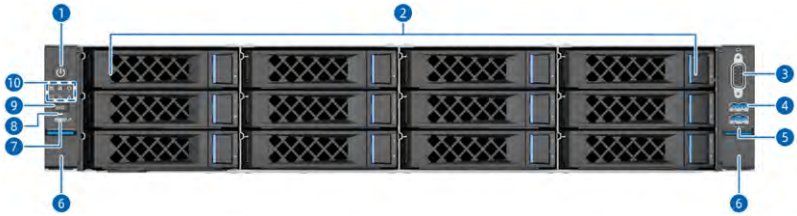
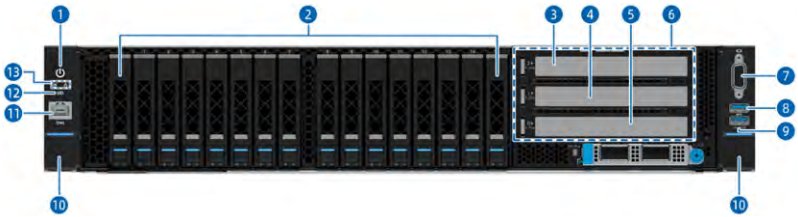
<b>5.1.1 12 × 3.5-Inch Drive Configuration</b>

IMPORTANT
A 3.5-inch drive tray can accommodate a 2.5-inch drive.

NOTE
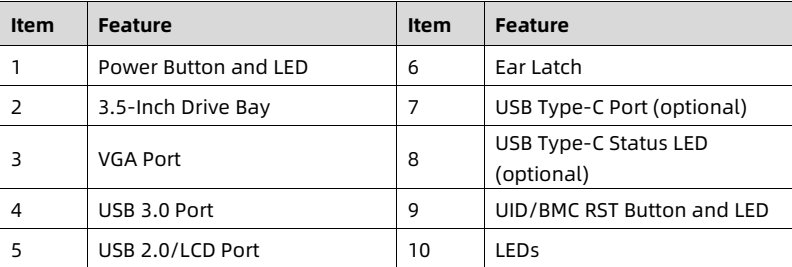
Applicable model: KR2280-X2-A0-R0-00 and KR2280-X2-C0-R0-00.

Figure 5-1 Front View

<figure style="margin: 1rem 0; padding: 0.6rem; background: rgba(255,255,255,0.04); border-radius: 4px;">
  <img src="images/reducto/p027_figure_0203.jpg" alt="figure p27" style="max-width: 100%; max-height: 480px; display: block; margin: 0 auto;" />
  <figcaption style="font-size: 0.78rem; color: rgba(255,255,255,0.55); text-align: center; margin-top: 0.5rem;">2006</figcaption>
</figure>

<table>
<thead>
<tr>
<th> Item </th>
<th> Feature </th>
<th> Item </th>
<th> Feature </th>
</tr>
</thead>
<tbody>
<tr>
<td> 1 </td>
<td> Power Button and LED </td>
<td> 6 </td>
<td> Ear Latch </td>
</tr>
<tr>
<td> 2 </td>
<td> 3.5-Inch Drive Bay </td>
<td> 7 </td>
<td> USB Type-C Port (optional) </td>
</tr>
<tr>
<td> 3 </td>
<td> VGA Port </td>
<td> 8 </td>
<td> USB Type-C Status LED (optional) </td>
</tr>
<tr>
<td> 4 </td>
<td> USB 3.0 Port </td>
<td> 9 </td>
<td> UID/BMC RST Button and LED </td>
</tr>
<tr>
<td> 5 </td>
<td> USB 2.0/LCD Port </td>
<td> 10 </td>
<td> LEDs </td>
</tr>
</tbody>
</table>

<details style="margin: 0.3rem 0 1rem; padding: 0.4rem 0.6rem; background: rgba(255,255,255,0.03); border-radius: 4px; border: 1px solid rgba(255,255,255,0.08);">
  <summary style="cursor: pointer; font-size: 0.75rem; color: rgba(255,255,255,0.55);">📷 view source screenshot for verification (page 27)</summary>
  <img src="images/reducto/p027_table_0204.jpg" alt="table source p27" style="max-width: 100%; margin-top: 0.6rem; display: block;" />
</details>

17

<!-- page: 28 -->
White Paper for KAYTUS KR2280V2 Series Servers_Powered by Intel Processors

<b>5.1.2 24 × 2.5-Inch Drive Configuration</b>

NOTE
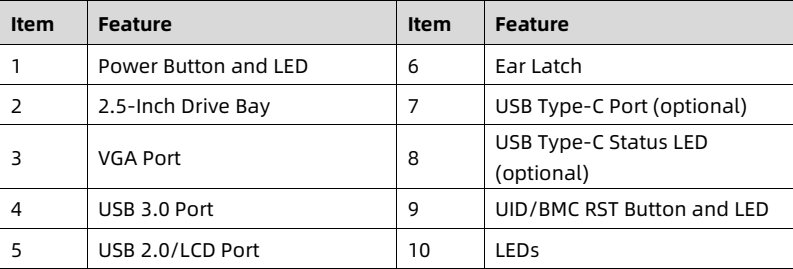
Applicable model: KR2280-X2-A0-R0-00 and KR2280-X2-C0-R0-00.

Figure 5-2 Front View

![figure](images/reducto/p028_figure_0212.jpg)

<table>
<thead>
<tr>
<th> Item </th>
<th> Feature </th>
<th> Item </th>
<th> Feature </th>
</tr>
</thead>
<tbody>
<tr>
<td> 1 </td>
<td> Power Button and LED </td>
<td> 6 </td>
<td> Ear Latch </td>
</tr>
<tr>
<td> 2 </td>
<td> 2.5-Inch Drive Bay </td>
<td> 7 </td>
<td> USB Type-C Port (optional) </td>
</tr>
<tr>
<td> 3 </td>
<td> VGA Port </td>
<td> 8 </td>
<td> USB Type-C Status LED (optional) </td>
</tr>
<tr>
<td> 4 </td>
<td> USB 3.0 Port </td>
<td> 9 </td>
<td> UID/BMC RST Button and LED </td>
</tr>
<tr>
<td> 5 </td>
<td> USB 2.0/LCD Port </td>
<td> 10 </td>
<td> LEDs </td>
</tr>
</tbody>
</table>

<details style="margin: 0.3rem 0 1rem; padding: 0.4rem 0.6rem; background: rgba(255,255,255,0.03); border-radius: 4px; border: 1px solid rgba(255,255,255,0.08);">
  <summary style="cursor: pointer; font-size: 0.75rem; color: rgba(255,255,255,0.55);">📷 view source screenshot for verification (page 28)</summary>
  <img src="images/reducto/p028_table_0213.jpg" alt="table source p28" style="max-width: 100%; margin-top: 0.6rem; display: block;" />
</details>

<b>5.1.3 25 × 2.5-Inch Drive Configuration</b>

<figure style="margin: 1rem 0; padding: 0.6rem; background: rgba(255,255,255,0.04); border-radius: 4px;">
  <img src="images/reducto/p028_figure_0215.jpg" alt="figure p28" style="max-width: 100%; max-height: 480px; display: block; margin: 0 auto;" />
  <figcaption style="font-size: 0.78rem; color: rgba(255,255,255,0.55); text-align: center; margin-top: 0.5rem;">NOTE</figcaption>
</figure>

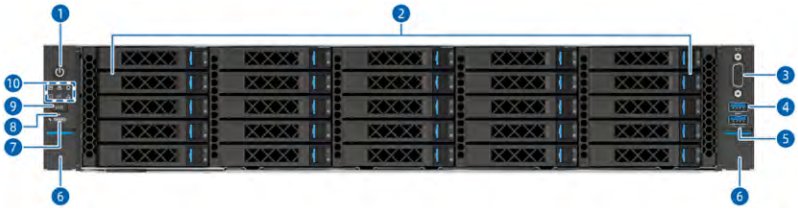
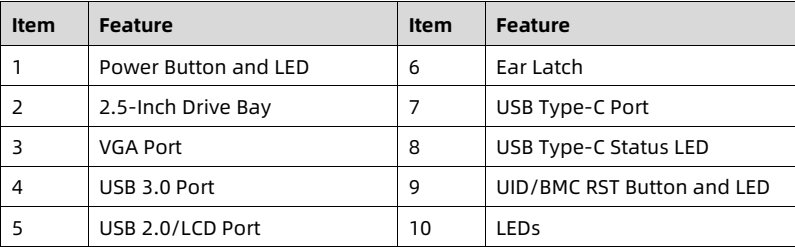
Applicable model: KR2280-X2-A0-R0-00 and KR2280-X2-C0-R0-00.

Figure 5-3 Front View

<figure style="margin: 1rem 0; padding: 0.6rem; background: rgba(255,255,255,0.04); border-radius: 4px;">
  <img src="images/reducto/p028_figure_0218.jpg" alt="figure p28" style="max-width: 100%; max-height: 480px; display: block; margin: 0 auto;" />
  <figcaption style="font-size: 0.78rem; color: rgba(255,255,255,0.55); text-align: center; margin-top: 0.5rem;">XXXX XXXXL: XXXX XXXX XXXX
XXXX E XXXX XXXX XXXX XXXX
9000 XXXX XXXX XXXX XXXX XXXX
XXXXB XXXX XXXX XXXX XXXX
XXXX XXXX XXXX XXXX XXXX</figcaption>
</figure>

18

<!-- page: 29 -->
White Paper for KAYTUS KR2280V2 Series Servers_Powered by Intel Processors

<table>
<thead>
<tr>
<th> Item </th>
<th> Feature </th>
<th> Item </th>
<th> Feature </th>
</tr>
</thead>
<tbody>
<tr>
<td> 1 </td>
<td> Power Button and LED </td>
<td> 6 </td>
<td> Ear Latch </td>
</tr>
<tr>
<td> 2 </td>
<td> 2.5-Inch Drive Bay </td>
<td> 7 </td>
<td> USB Type-C Port </td>
</tr>
<tr>
<td> 3 </td>
<td> VGA Port </td>
<td> 8 </td>
<td> USB Type-C Status LED </td>
</tr>
<tr>
<td> 4 </td>
<td> USB 3.0 Port </td>
<td> 9 </td>
<td> UID/BMC RST Button and LED </td>
</tr>
<tr>
<td> 5 </td>
<td> USB 2.0/LCD Port </td>
<td> 10 </td>
<td> LEDs </td>
</tr>
</tbody>
</table>

<details style="margin: 0.3rem 0 1rem; padding: 0.4rem 0.6rem; background: rgba(255,255,255,0.03); border-radius: 4px; border: 1px solid rgba(255,255,255,0.08);">
  <summary style="cursor: pointer; font-size: 0.75rem; color: rgba(255,255,255,0.55);">📷 view source screenshot for verification (page 29)</summary>
  <img src="images/reducto/p029_table_0223.jpg" alt="table source p29" style="max-width: 100%; margin-top: 0.6rem; display: block;" />
</details>

<b>5.1.4 8 × 3.5-Inch Drive Configuration</b>

IMPORTANT

A 3.5-inch drive tray can accommodate a 2.5-inch drive.

NOTE

Applicable model: KR2280-X2-A0-R0-00 and KR2280-X2-C0-R0-00.

Figure 5-4 Front View

<figure style="margin: 1rem 0; padding: 0.6rem; background: rgba(255,255,255,0.04); border-radius: 4px;">
  <img src="images/reducto/p029_figure_0230.jpg" alt="figure p29" style="max-width: 100%; max-height: 480px; display: block; margin: 0 auto;" />
  <figcaption style="font-size: 0.78rem; color: rgba(255,255,255,0.55); text-align: center; margin-top: 0.5rem;">2007</figcaption>
</figure>

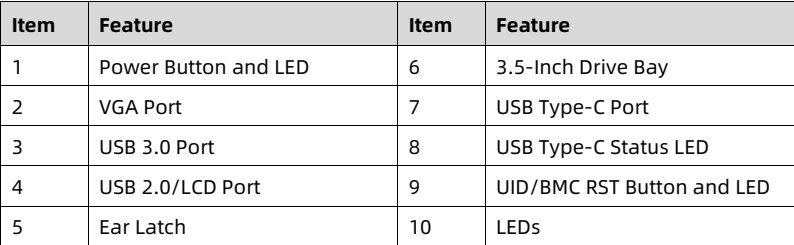
<table>
<thead>
<tr>
<th> Item </th>
<th> Feature </th>
<th> Item </th>
<th> Feature </th>
</tr>
</thead>
<tbody>
<tr>
<td> 1 </td>
<td> Power Button and LED </td>
<td> 6 </td>
<td> 3.5-Inch Drive Bay </td>
</tr>
<tr>
<td> 2 </td>
<td> VGA Port </td>
<td> 7 </td>
<td> USB Type-C Port </td>
</tr>
<tr>
<td> 3 </td>
<td> USB 3.0 Port </td>
<td> 8 </td>
<td> USB Type-C Status LED </td>
</tr>
<tr>
<td> 4 </td>
<td> USB 2.0/LCD Port </td>
<td> 9 </td>
<td> UID/BMC RST Button and LED </td>
</tr>
<tr>
<td> 5 </td>
<td> Ear Latch </td>
<td> 10 </td>
<td> LEDs </td>
</tr>
</tbody>
</table>

<details style="margin: 0.3rem 0 1rem; padding: 0.4rem 0.6rem; background: rgba(255,255,255,0.03); border-radius: 4px; border: 1px solid rgba(255,255,255,0.08);">
  <summary style="cursor: pointer; font-size: 0.75rem; color: rgba(255,255,255,0.55);">📷 view source screenshot for verification (page 29)</summary>
  <img src="images/reducto/p029_table_0231.jpg" alt="table source p29" style="max-width: 100%; margin-top: 0.6rem; display: block;" />
</details>

19

<!-- page: 30 -->
White Paper for KAYTUS KR2280V2 Series Servers_Powered by Intel Processors

<b>5.1.5 8 × 2.5-Inch Drive Configuration</b>

NOTE
Applicable model: KR2280-X2-A0-F0-00.

Figure 5-5 Front View

<figure style="margin: 1rem 0; padding: 0.6rem; background: rgba(255,255,255,0.04); border-radius: 4px;">
  <img src="images/reducto/p030_figure_0239.jpg" alt="figure p30" style="max-width: 100%; max-height: 480px; display: block; margin: 0 auto;" />
  <figcaption style="font-size: 0.78rem; color: rgba(255,255,255,0.55); text-align: center; margin-top: 0.5rem;">16</figcaption>
</figure>

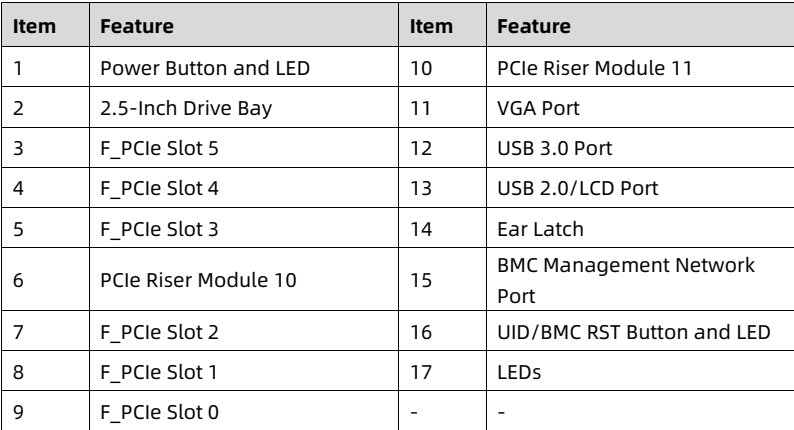
<table>
<thead>
<tr>
<th> Item </th>
<th> Feature </th>
<th> Item </th>
<th> Feature </th>
</tr>
</thead>
<tbody>
<tr>
<td> 1 </td>
<td> Power Button and LED </td>
<td> 10 </td>
<td> PCIe Riser Module 11 </td>
</tr>
<tr>
<td> 2 </td>
<td> 2.5-Inch Drive Bay </td>
<td> 11 </td>
<td> VGA Port </td>
</tr>
<tr>
<td> 3 </td>
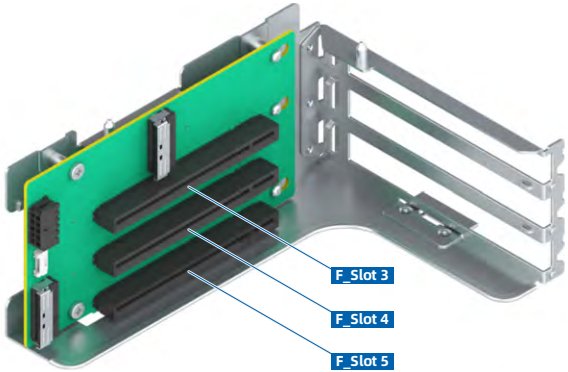
<td> F_PCIe Slot 5 </td>
<td> 12 </td>
<td> USB 3.0 Port </td>
</tr>
<tr>
<td> 4 </td>
<td> F_PCIe Slot 4 </td>
<td> 13 </td>
<td> USB 2.0/LCD Port </td>
</tr>
<tr>
<td> 5 </td>
<td> F_PCIe Slot 3 </td>
<td> 14 </td>
<td> Ear Latch </td>
</tr>
<tr>
<td> 6 </td>
<td> PCIe Riser Module 10 </td>
<td> 15 </td>
<td> BMC Management Network Port </td>
</tr>
<tr>
<td> 7 </td>
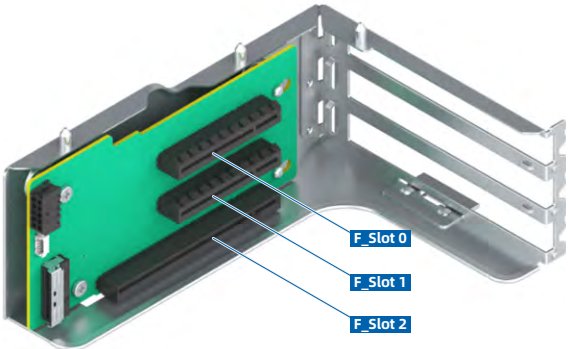
<td> F_PCIe Slot 2 </td>
<td> 16 </td>
<td> UID/BMC RST Button and LED </td>
</tr>
<tr>
<td> 8 </td>
<td> F_PCIe Slot 1 </td>
<td> 17 </td>
<td> LEDs </td>
</tr>
<tr>
<td> 9 </td>
<td> F_PCIe Slot 0 </td>
<td> - </td>
<td> - </td>
</tr>
</tbody>
</table>

<details style="margin: 0.3rem 0 1rem; padding: 0.4rem 0.6rem; background: rgba(255,255,255,0.03); border-radius: 4px; border: 1px solid rgba(255,255,255,0.08);">
  <summary style="cursor: pointer; font-size: 0.75rem; color: rgba(255,255,255,0.55);">📷 view source screenshot for verification (page 30)</summary>
  <img src="images/reducto/p030_table_0240.jpg" alt="table source p30" style="max-width: 100%; margin-top: 0.6rem; display: block;" />
</details>

<b>5.1.6 16 × 2.5-Inch Drive Configuration</b>

<figure style="margin: 1rem 0; padding: 0.6rem; background: rgba(255,255,255,0.04); border-radius: 4px;">
  <img src="images/reducto/p030_figure_0242.jpg" alt="figure p30" style="max-width: 100%; max-height: 480px; display: block; margin: 0 auto;" />
  <figcaption style="font-size: 0.78rem; color: rgba(255,255,255,0.55); text-align: center; margin-top: 0.5rem;">NOTE</figcaption>
</figure>

Applicable model: KR2280-X2-A0-F0-00.

20

<!-- page: 31 -->
White Paper for KAYTUS KR2280V2 Series Servers_Powered by Intel Processors

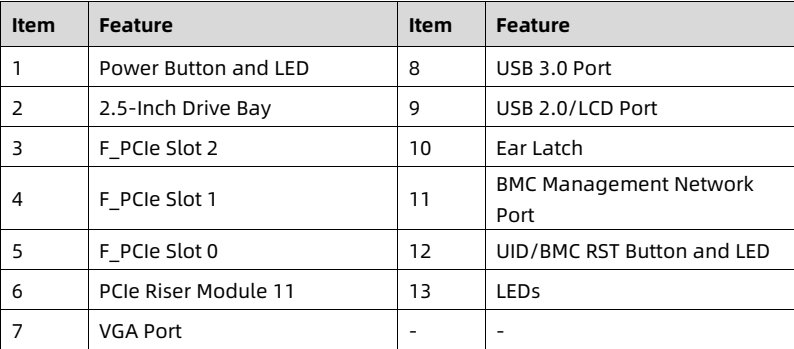
Figure 5-6 Front View

<figure style="margin: 1rem 0; padding: 0.6rem; background: rgba(255,255,255,0.04); border-radius: 4px;">
  <img src="images/reducto/p031_figure_0249.jpg" alt="figure p31" style="max-width: 100%; max-height: 480px; display: block; margin: 0 auto;" />
  <figcaption style="font-size: 0.78rem; color: rgba(255,255,255,0.55); text-align: center; margin-top: 0.5rem;">26

01 01 11 U 11</figcaption>
</figure>

<table>
<thead>
<tr>
<th> <b>Item</b> </th>
<th> <b>Feature</b> </th>
<th> <b>Item</b> </th>
<th> <b>Feature</b> </th>
</tr>
</thead>
<tbody>
<tr>
<td> 1 </td>
<td> Power Button and LED </td>
<td> 8 </td>
<td> USB 3.0 Port </td>
</tr>
<tr>
<td> 2 </td>
<td> 2.5-Inch Drive Bay </td>
<td> 9 </td>
<td> USB 2.0/LCD Port </td>
</tr>
<tr>
<td> 3 </td>
<td> F_PCIe Slot 2 </td>
<td> 10 </td>
<td> Ear Latch </td>
</tr>
<tr>
<td> 4 </td>
<td> F_PCIe Slot 1 </td>
<td> 11 </td>
<td> BMC Management Network Port </td>
</tr>
<tr>
<td> 5 </td>
<td> F_PCIe Slot 0 </td>
<td> 12 </td>
<td> UID/BMC RST Button and LED </td>
</tr>
<tr>
<td> 6 </td>
<td> PCIe Riser Module 11 </td>
<td> 13 </td>
<td> LEDs </td>
</tr>
<tr>
<td> 7 </td>
<td> VGA Port </td>
<td> - </td>
<td> - </td>
</tr>
</tbody>
</table>

<details style="margin: 0.3rem 0 1rem; padding: 0.4rem 0.6rem; background: rgba(255,255,255,0.03); border-radius: 4px; border: 1px solid rgba(255,255,255,0.08);">
  <summary style="cursor: pointer; font-size: 0.75rem; color: rgba(255,255,255,0.55);">📷 view source screenshot for verification (page 31)</summary>
  <img src="images/reducto/p031_table_0250.jpg" alt="table source p31" style="max-width: 100%; margin-top: 0.6rem; display: block;" />
</details>

<b>5.1.7 9 × 3.5-Inch Drive Configuration</b>

<b>IMPORTANT</b>

A 3.5-inch drive tray can accommodate a 2.5-inch drive.

NOTE

Applicable model: KR2280-X2-A0-F0-00.

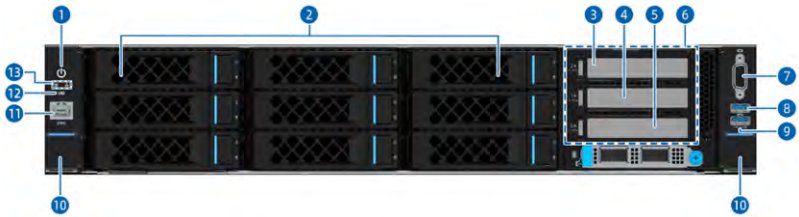
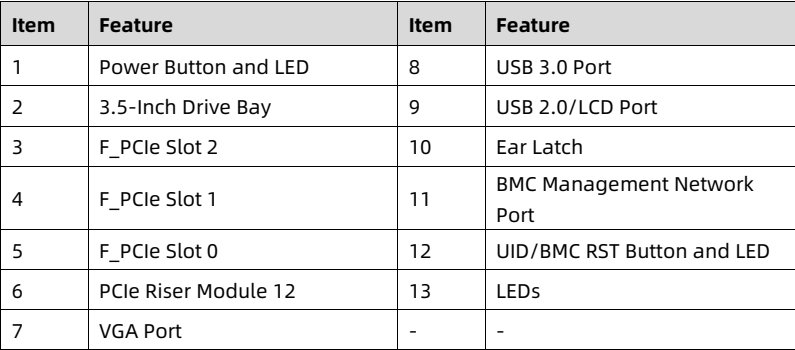
Figure 5-7 Front View

<figure style="margin: 1rem 0; padding: 0.6rem; background: rgba(255,255,255,0.04); border-radius: 4px;">
  <img src="images/reducto/p031_figure_0257.jpg" alt="figure p31" style="max-width: 100%; max-height: 480px; display: block; margin: 0 auto;" />
  <figcaption style="font-size: 0.78rem; color: rgba(255,255,255,0.55); text-align: center; margin-top: 0.5rem;">ר

10</figcaption>
</figure>

21

<!-- page: 32 -->
White Paper for KAYTUS KR2280V2 Series Servers_Powered by Intel Processors

<table>
<thead>
<tr>
<th> Item </th>
<th> Feature </th>
<th> Item </th>
<th> Feature </th>
</tr>
</thead>
<tbody>
<tr>
<td> 1 </td>
<td> Power Button and LED </td>
<td> 8 </td>
<td> USB 3.0 Port </td>
</tr>
<tr>
<td> 2 </td>
<td> 3.5-Inch Drive Bay </td>
<td> 9 </td>
<td> USB 2.0/LCD Port </td>
</tr>
<tr>
<td> 3 </td>
<td> F_PCIE Slot 2 </td>
<td> 10 </td>
<td> Ear Latch </td>
</tr>
<tr>
<td> 4 </td>
<td> F_PCIE Slot 1 </td>
<td> 11 </td>
<td> BMC Management Network Port </td>
</tr>
<tr>
<td> 5 </td>
<td> F_PCIE Slot 0 </td>
<td> 12 </td>
<td> UID/BMC RST Button and LED </td>
</tr>
<tr>
<td> 6 </td>
<td> PCIe Riser Module 12 </td>
<td> 13 </td>
<td> LEDs </td>
</tr>
<tr>
<td> 7 </td>
<td> VGA Port </td>
<td> - </td>
<td> - </td>
</tr>
</tbody>
</table>

<details style="margin: 0.3rem 0 1rem; padding: 0.4rem 0.6rem; background: rgba(255,255,255,0.03); border-radius: 4px; border: 1px solid rgba(255,255,255,0.08);">
  <summary style="cursor: pointer; font-size: 0.75rem; color: rgba(255,255,255,0.55);">📷 view source screenshot for verification (page 32)</summary>
  <img src="images/reducto/p032_table_0262.jpg" alt="table source p32" style="max-width: 100%; margin-top: 0.6rem; display: block;" />
</details>

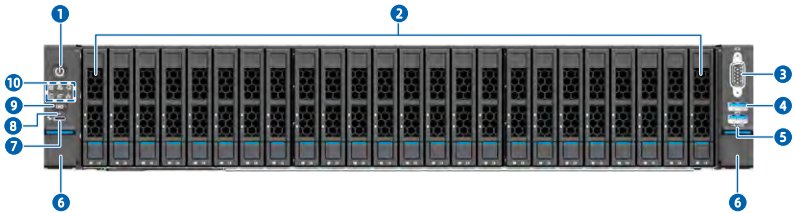
<b>5.1.8 24 × E3.S/NVMe Drive Configuration</b>

NOTE
Applicable model: KR2280-X2-A0-R0-00.

Figure 5-8 Front View

<figure style="margin: 1rem 0; padding: 0.6rem; background: rgba(255,255,255,0.04); border-radius: 4px;">
  <img src="images/reducto/p032_figure_0266.jpg" alt="figure p32" style="max-width: 100%; max-height: 480px; display: block; margin: 0 auto;" />
  <figcaption style="font-size: 0.78rem; color: rgba(255,255,255,0.55); text-align: center; margin-top: 0.5rem;">9000</figcaption>
</figure>

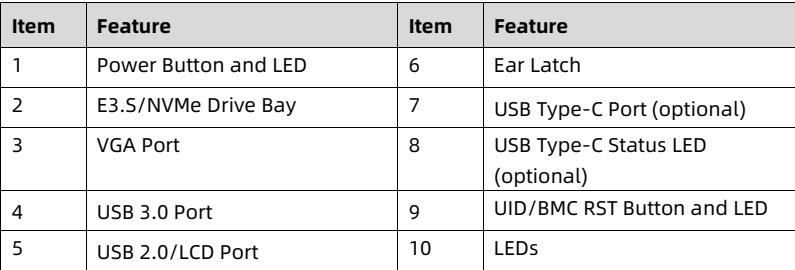
<table>
<thead>
<tr>
<th> Item </th>
<th> Feature </th>
<th> Item </th>
<th> Feature </th>
</tr>
</thead>
<tbody>
<tr>
<td> 1 </td>
<td> Power Button and LED </td>
<td> 6 </td>
<td> Ear Latch </td>
</tr>
<tr>
<td> 2 </td>
<td> E3.S/NVMe Drive Bay </td>
<td> 7 </td>
<td> USB Type-C Port (optional) </td>
</tr>
<tr>
<td> 3 </td>
<td> VGA Port </td>
<td> 8 </td>
<td> USB Type-C Status LED (optional) </td>
</tr>
<tr>
<td> 4 </td>
<td> USB 3.0 Port </td>
<td> 9 </td>
<td> UID/BMC RST Button and LED </td>
</tr>
<tr>
<td> 5 </td>
<td> USB 2.0/LCD Port </td>
<td> 10 </td>
<td> LEDs </td>
</tr>
</tbody>
</table>

<details style="margin: 0.3rem 0 1rem; padding: 0.4rem 0.6rem; background: rgba(255,255,255,0.03); border-radius: 4px; border: 1px solid rgba(255,255,255,0.08);">
  <summary style="cursor: pointer; font-size: 0.75rem; color: rgba(255,255,255,0.55);">📷 view source screenshot for verification (page 32)</summary>
  <img src="images/reducto/p032_table_0267.jpg" alt="table source p32" style="max-width: 100%; margin-top: 0.6rem; display: block;" />
</details>

22

<!-- page: 33 -->
White Paper for KAYTUS KR2280V2 Series Servers_Powered by Intel Processors

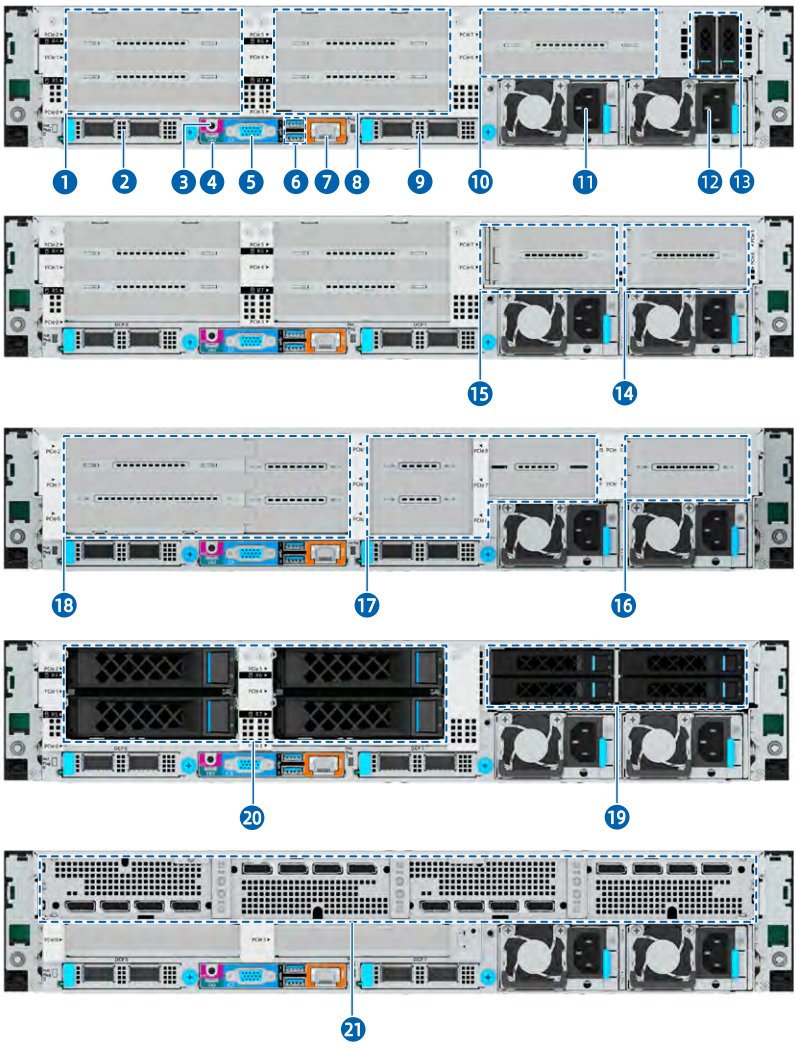
5.2 Rear Panel

5.2.1 KR2280-X2-A0-R0-00

IMPORTANT
A 3.5-inch drive tray can accommodate a 2.5-inch drive.

23

<!-- page: 34 -->
<u>White Paper for KAYTUS KR2280V2 Series Servers_Powered by Intel Processors</u>

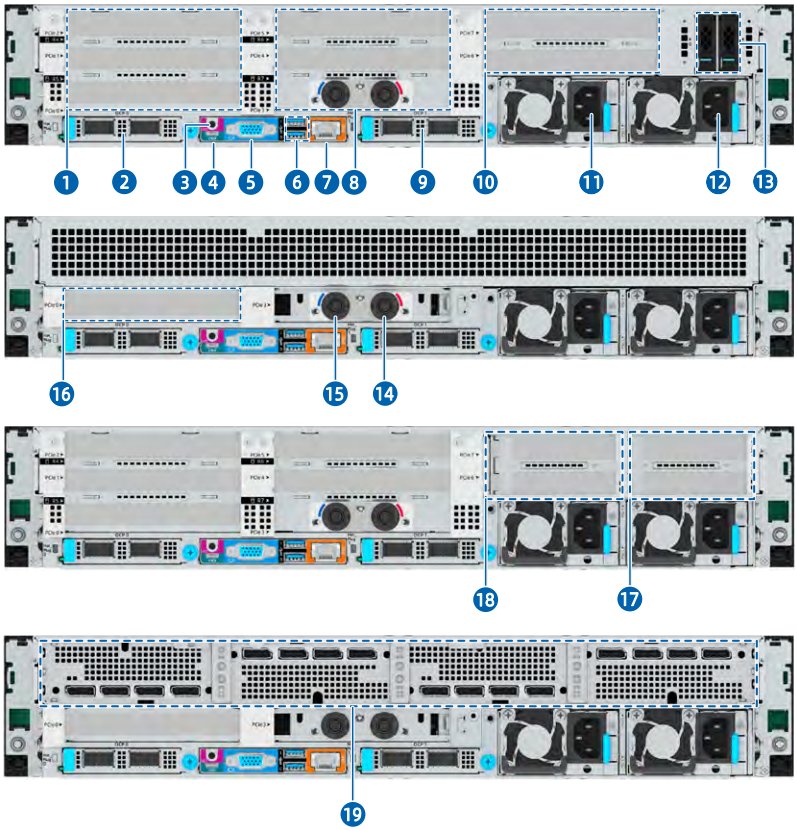
Figure 5-9 Rear View

<figure style="margin: 1rem 0; padding: 0.6rem; background: rgba(255,255,255,0.04); border-radius: 4px;">
  <img src="images/reducto/p034_figure_0280.jpg" alt="figure p34" style="max-width: 100%; max-height: 480px; display: block; margin: 0 auto;" />
  <figcaption style="font-size: 0.78rem; color: rgba(255,255,255,0.55); text-align: center; margin-top: 0.5rem;">POREK 

5 11

15 14

18 17 16

XXX XXXX D

XXXXI

20 19</figcaption>
</figure>

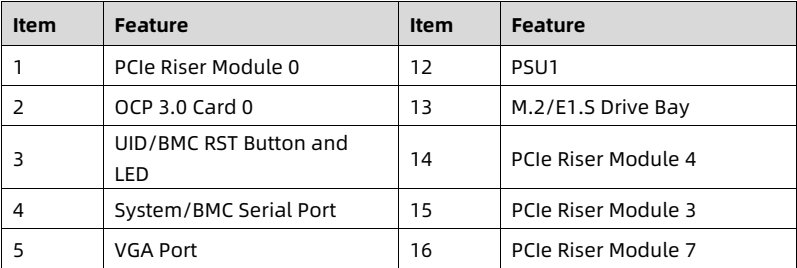
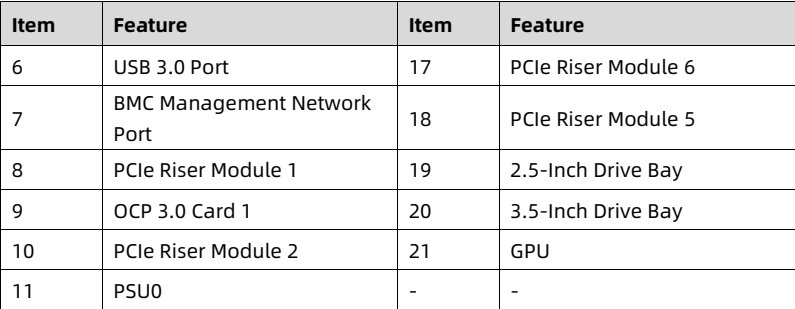
<table>
<thead>
<tr>
<th> Item </th>
<th> Feature </th>
<th> Item </th>
<th> Feature </th>
</tr>
</thead>
<tbody>
<tr>
<td> 1 </td>
<td> PCIe Riser Module 0 </td>
<td> 12 </td>
<td> PSU1 </td>
</tr>
<tr>
<td> 2 </td>
<td> OCP 3.0 Card 0 </td>
<td> 13 </td>
<td> M.2/E1.S Drive Bay </td>
</tr>
<tr>
<td> 3 </td>
<td> UID/BMC RST Button and LED </td>
<td> 14 </td>
<td> PCIe Riser Module 4 </td>
</tr>
<tr>
<td> 4 </td>
<td> System/BMC Serial Port </td>
<td> 15 </td>
<td> PCIe Riser Module 3 </td>
</tr>
<tr>
<td> 5 </td>
<td> VGA Port </td>
<td> 16 </td>
<td> PCIe Riser Module 7 </td>
</tr>
</tbody>
</table>

<details style="margin: 0.3rem 0 1rem; padding: 0.4rem 0.6rem; background: rgba(255,255,255,0.03); border-radius: 4px; border: 1px solid rgba(255,255,255,0.08);">
  <summary style="cursor: pointer; font-size: 0.75rem; color: rgba(255,255,255,0.55);">📷 view source screenshot for verification (page 34)</summary>
  <img src="images/reducto/p034_table_0281.jpg" alt="table source p34" style="max-width: 100%; margin-top: 0.6rem; display: block;" />
</details>

24

<!-- page: 35 -->
White Paper for KAYTUS KR2280V2 Series Servers_Powered by Intel Processors

<table>
<thead>
<tr>
<th> Item </th>
<th> Feature </th>
<th> Item </th>
<th> Feature </th>
</tr>
</thead>
<tbody>
<tr>
<td> 6 </td>
<td> USB 3.0 Port </td>
<td> 17 </td>
<td> PCIe Riser Module 6 </td>
</tr>
<tr>
<td> 7 </td>
<td> BMC Management Network Port </td>
<td> 18 </td>
<td> PCIe Riser Module 5 </td>
</tr>
<tr>
<td> 8 </td>
<td> PCIe Riser Module 1 </td>
<td> 19 </td>
<td> 2.5-Inch Drive Bay </td>
</tr>
<tr>
<td> 9 </td>
<td> OCP 3.0 Card 1 </td>
<td> 20 </td>
<td> 3.5-Inch Drive Bay </td>
</tr>
<tr>
<td> 10 </td>
<td> PCIe Riser Module 2 </td>
<td> 21 </td>
<td> GPU </td>
</tr>
<tr>
<td> 11 </td>
<td> PSU0 </td>
<td> - </td>
<td> - </td>
</tr>
</tbody>
</table>

<details style="margin: 0.3rem 0 1rem; padding: 0.4rem 0.6rem; background: rgba(255,255,255,0.03); border-radius: 4px; border: 1px solid rgba(255,255,255,0.08);">
  <summary style="cursor: pointer; font-size: 0.75rem; color: rgba(255,255,255,0.55);">📷 view source screenshot for verification (page 35)</summary>
  <img src="images/reducto/p035_table_0286.jpg" alt="table source p35" style="max-width: 100%; margin-top: 0.6rem; display: block;" />
</details>

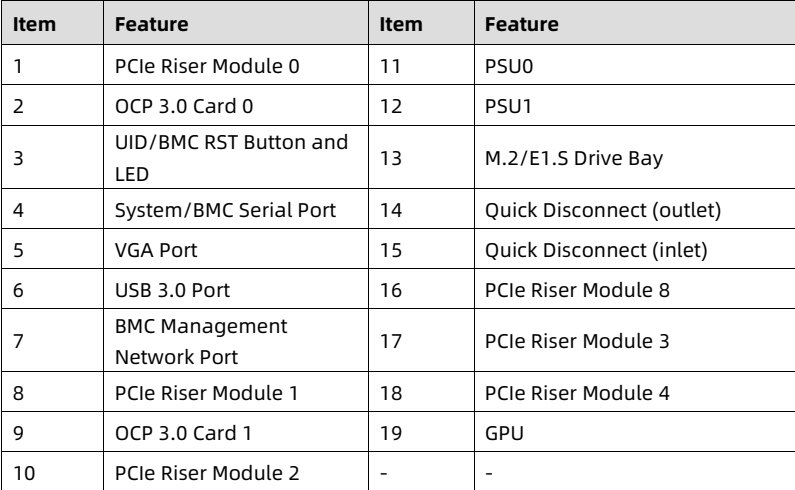
<b>5.2.2 KR2280-X2-C0-R0-00</b>

Figure 5-10 Rear View

<figure style="margin: 1rem 0; padding: 0.6rem; background: rgba(255,255,255,0.04); border-radius: 4px;">
  <img src="images/reducto/p035_figure_0289.jpg" alt="figure p35" style="max-width: 100%; max-height: 480px; display: block; margin: 0 auto;" />
  <figcaption style="font-size: 0.78rem; color: rgba(255,255,255,0.55); text-align: center; margin-top: 0.5rem;">2 5 6 7 8 9 10 12

POW3x

16 15 14

18 17

19</figcaption>
</figure>

25

<!-- page: 36 -->
<u>White Paper for KAYTUS KR2280V2 Series Servers_Powered by Intel Processors</u>

<table>
<thead>
<tr>
<th> Item </th>
<th> Feature </th>
<th> Item </th>
<th> Feature </th>
</tr>
</thead>
<tbody>
<tr>
<td> 1 </td>
<td> PCIe Riser Module 0 </td>
<td> 11 </td>
<td> PSU0 </td>
</tr>
<tr>
<td> 2 </td>
<td> OCP 3.0 Card 0 </td>
<td> 12 </td>
<td> PSU1 </td>
</tr>
<tr>
<td> 3 </td>
<td> UID/BMC RST Button and LED </td>
<td> 13 </td>
<td> M.2/E1.S Drive Bay </td>
</tr>
<tr>
<td> 4 </td>
<td> System/BMC Serial Port </td>
<td> 14 </td>
<td> Quick Disconnect (outlet) </td>
</tr>
<tr>
<td> 5 </td>
<td> VGA Port </td>
<td> 15 </td>
<td> Quick Disconnect (inlet) </td>
</tr>
<tr>
<td> 6 </td>
<td> USB 3.0 Port </td>
<td> 16 </td>
<td> PCIe Riser Module 8 </td>
</tr>
<tr>
<td> 7 </td>
<td> BMC Management Network Port </td>
<td> 17 </td>
<td> PCIe Riser Module 3 </td>
</tr>
<tr>
<td> 8 </td>
<td> PCIe Riser Module 1 </td>
<td> 18 </td>
<td> PCIe Riser Module 4 </td>
</tr>
<tr>
<td> 9 </td>
<td> OCP 3.0 Card 1 </td>
<td> 19 </td>
<td> GPU </td>
</tr>
<tr>
<td> 10 </td>
<td> PCIe Riser Module 2 </td>
<td> - </td>
<td> - </td>
</tr>
</tbody>
</table>

<details style="margin: 0.3rem 0 1rem; padding: 0.4rem 0.6rem; background: rgba(255,255,255,0.03); border-radius: 4px; border: 1px solid rgba(255,255,255,0.08);">
  <summary style="cursor: pointer; font-size: 0.75rem; color: rgba(255,255,255,0.55);">📷 view source screenshot for verification (page 36)</summary>
  <img src="images/reducto/p036_table_0294.jpg" alt="table source p36" style="max-width: 100%; margin-top: 0.6rem; display: block;" />
</details>

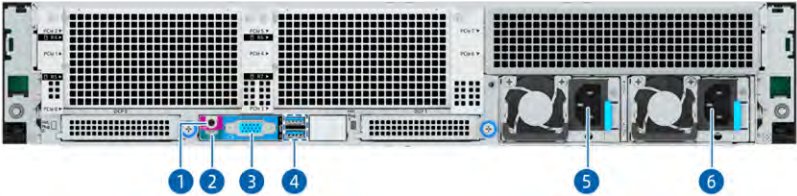
5.2.3 KR2280-X2-A0-F0-00

Figure 5-11 Rear View

<figure style="margin: 1rem 0; padding: 0.6rem; background: rgba(255,255,255,0.04); border-radius: 4px;">
  <img src="images/reducto/p036_figure_0297.jpg" alt="figure p36" style="max-width: 100%; max-height: 480px; display: block; margin: 0 auto;" />
  <figcaption style="font-size: 0.78rem; color: rgba(255,255,255,0.55); text-align: center; margin-top: 0.5rem;">5</figcaption>
</figure>

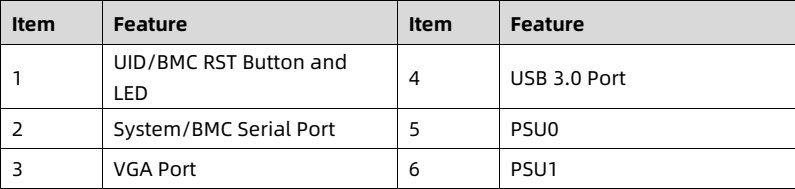
<table>
<thead>
<tr>
<th> Item </th>
<th> Feature </th>
<th> Item </th>
<th> Feature </th>
</tr>
</thead>
<tbody>
<tr>
<td> 1 </td>
<td> UID/BMC RST Button and LED </td>
<td> 4 </td>
<td> USB 3.0 Port </td>
</tr>
<tr>
<td> 2 </td>
<td> System/BMC Serial Port </td>
<td> 5 </td>
<td> PSU0 </td>
</tr>
<tr>
<td> 3 </td>
<td> VGA Port </td>
<td> 6 </td>
<td> PSU1 </td>
</tr>
</tbody>
</table>

<details style="margin: 0.3rem 0 1rem; padding: 0.4rem 0.6rem; background: rgba(255,255,255,0.03); border-radius: 4px; border: 1px solid rgba(255,255,255,0.08);">
  <summary style="cursor: pointer; font-size: 0.75rem; color: rgba(255,255,255,0.55);">📷 view source screenshot for verification (page 36)</summary>
  <img src="images/reducto/p036_table_0298.jpg" alt="table source p36" style="max-width: 100%; margin-top: 0.6rem; display: block;" />
</details>

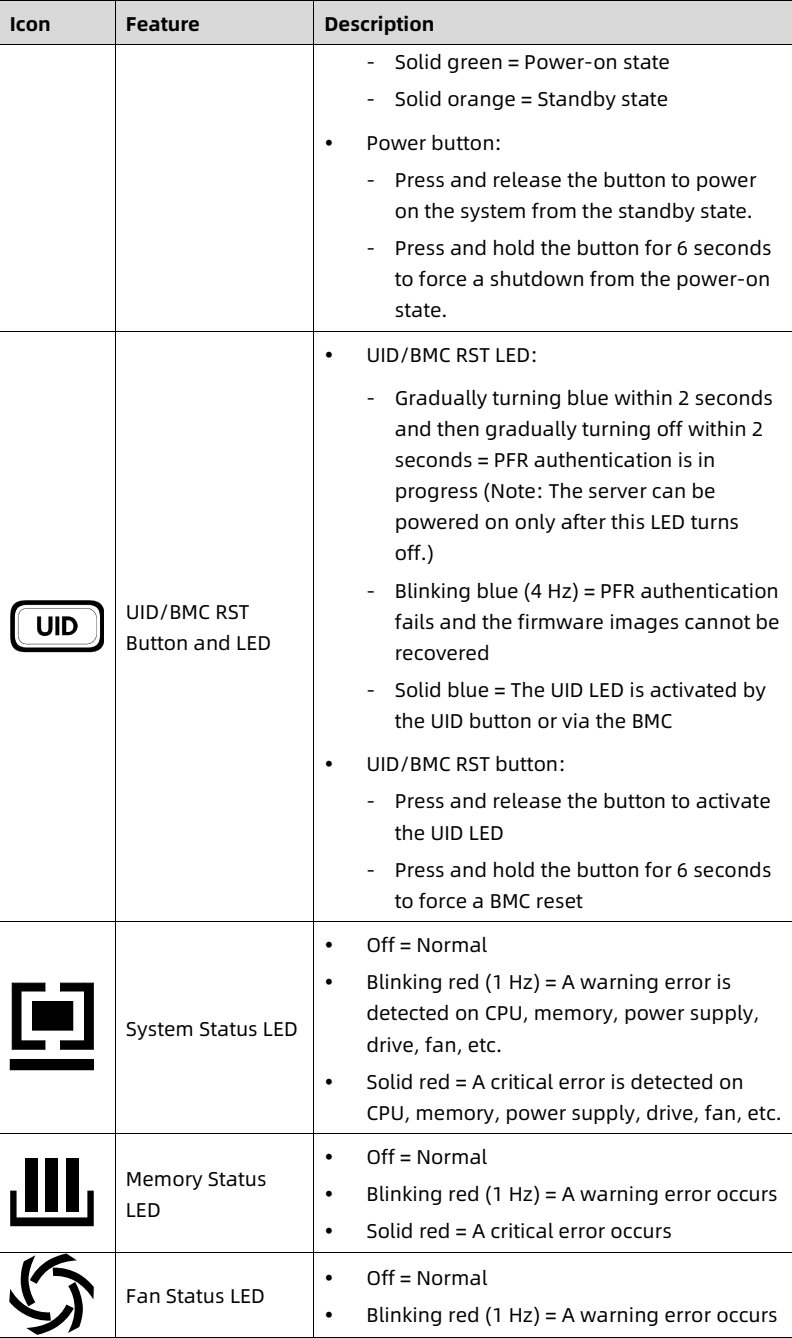
<b>5.3 LEDs and Buttons</b>

Table 5-1 LED and Button Description

<table>
<thead>
<tr>
<th> <b>Icon</b> </th>
<th> <b>Feature</b> </th>
<th> <b>Description</b> </th>
</tr>
</thead>
<tbody>
<tr>
<td> [power symbol] </td>
<td> Power Button and LED </td>
<td> • Power LED:
- Off = No power </td>
</tr>
</tbody>
</table>

<details style="margin: 0.3rem 0 1rem; padding: 0.4rem 0.6rem; background: rgba(255,255,255,0.03); border-radius: 4px; border: 1px solid rgba(255,255,255,0.08);">
  <summary style="cursor: pointer; font-size: 0.75rem; color: rgba(255,255,255,0.55);">📷 view source screenshot for verification (page 36)</summary>
  <img src="images/reducto/p036_table_0301.jpg" alt="table source p36" style="max-width: 100%; margin-top: 0.6rem; display: block;" />
</details>

26

<!-- page: 37 -->
White Paper for KAYTUS KR2280V2 Series Servers_Powered by Intel Processors

<table>
<thead>
<tr>
<th> Icon </th>
<th> Feature </th>
<th> Description </th>
</tr>
</thead>
<tbody>
<tr>
<td></td>
<td></td>
<td> - Solid green = Power-on state
- Solid orange = Standby state
• Power button:
- Press and release the button to power on the system from the standby state.
- Press and hold the button for 6 seconds to force a shutdown from the power-on state. </td>
</tr>
<tr>
<td> UID </td>
<td> UID/BMC RST Button and LED </td>
<td> • UID/BMC RST LED:
- Gradually turning blue within 2 seconds and then gradually turning off within 2 seconds = PFR authentication is in progress (Note: The server can be powered on only after this LED turns off.)
- Blinking blue (4 Hz) = PFR authentication fails and the firmware images cannot be recovered
- Solid blue = The UID LED is activated by the UID button or via the BMC
• UID/BMC RST button:
- Press and release the button to activate the UID LED
- Press and hold the button for 6 seconds to force a BMC reset </td>
</tr>
<tr>
<td></td>
<td> System Status LED </td>
<td> • Off = Normal
• Blinking red (1 Hz) = A warning error is detected on CPU, memory, power supply, drive, fan, etc.
• Solid red = A critical error is detected on CPU, memory, power supply, drive, fan, etc. </td>
</tr>
<tr>
<td></td>
<td> Memory Status LED </td>
<td> • Off = Normal
• Blinking red (1 Hz) = A warning error occurs
• Solid red = A critical error occurs </td>
</tr>
<tr>
<td></td>
<td> Fan Status LED </td>
<td> • Off = Normal
• Blinking red (1 Hz) = A warning error occurs </td>
</tr>
</tbody>
</table>

<details style="margin: 0.3rem 0 1rem; padding: 0.4rem 0.6rem; background: rgba(255,255,255,0.03); border-radius: 4px; border: 1px solid rgba(255,255,255,0.08);">
  <summary style="cursor: pointer; font-size: 0.75rem; color: rgba(255,255,255,0.55);">📷 view source screenshot for verification (page 37)</summary>
  <img src="images/reducto/p037_table_0306.jpg" alt="table source p37" style="max-width: 100%; margin-top: 0.6rem; display: block;" />
</details>

27

<!-- page: 38 -->
White Paper for KAYTUS KR2280V2 Series Servers_Powered by Intel Processors

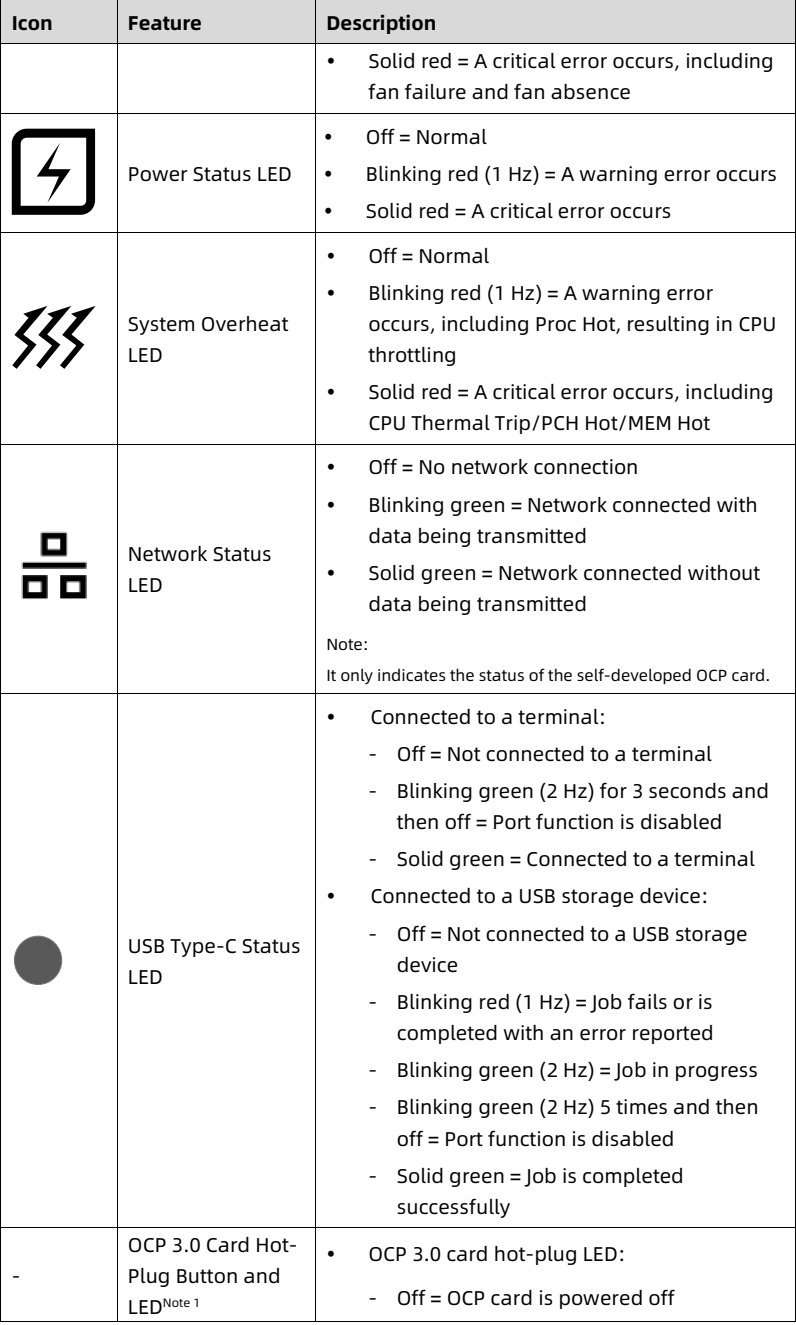
<table>
<thead>
<tr>
<th> Icon </th>
<th> Feature </th>
<th> Description </th>
</tr>
</thead>
<tbody>
<tr>
<td></td>
<td></td>
<td> • Solid red = A critical error occurs, including fan failure and fan absence </td>
</tr>
<tr>
<td> [symbol-lightning] </td>
<td> Power Status LED </td>
<td> • Off = Normal
• Blinking red (1 Hz) = A warning error occurs
• Solid red = A critical error occurs </td>
</tr>
<tr>
<td> [symbol-heat] </td>
<td> System Overheat LED </td>
<td> • Off = Normal
• Blinking red (1 Hz) = A warning error occurs, including Proc Hot, resulting in CPU throttling
• Solid red = A critical error occurs, including CPU Thermal Trip/PCH Hot/MEM Hot </td>
</tr>
<tr>
<td> [symbol-network] </td>
<td> Network Status LED </td>
<td> • Off = No network connection
• Blinking green = Network connected with data being transmitted
• Solid green = Network connected without data being transmitted
Note:
It only indicates the status of the self-developed OCP card. </td>
</tr>
<tr>
<td> [symbol-circle] </td>
<td> USB Type-C Status LED </td>
<td> • Connected to a terminal:
- Off = Not connected to a terminal
- Blinking green (2 Hz) for 3 seconds and then off = Port function is disabled
- Solid green = Connected to a terminal
• Connected to a USB storage device:
- Off = Not connected to a USB storage device
- Blinking red (1 Hz) = Job fails or is completed with an error reported
- Blinking green (2 Hz) = Job in progress
- Blinking green (2 Hz) 5 times and then off = Port function is disabled
- Solid green = Job is completed successfully </td>
</tr>
<tr>
<td> - </td>
<td> OCP 3.0 Card Hot-Plug Button and LED<sup>Note 1</sup> </td>
<td> • OCP 3.0 card hot-plug LED:
- Off = OCP card is powered off </td>
</tr>
</tbody>
</table>

<details style="margin: 0.3rem 0 1rem; padding: 0.4rem 0.6rem; background: rgba(255,255,255,0.03); border-radius: 4px; border: 1px solid rgba(255,255,255,0.08);">
  <summary style="cursor: pointer; font-size: 0.75rem; color: rgba(255,255,255,0.55);">📷 view source screenshot for verification (page 38)</summary>
  <img src="images/reducto/p038_table_0311.jpg" alt="table source p38" style="max-width: 100%; margin-top: 0.6rem; display: block;" />
</details>

28

<!-- page: 39 -->
White Paper for KAYTUS KR2280V2 Series Servers_Powered by Intel Processors

<table>
<thead>
<tr>
<th> Icon </th>
<th> Feature </th>
<th> Description </th>
</tr>
</thead>
<tbody>
<tr>
<td></td>
<td></td>
<td> - Blinking green = OCP card is getting ready for hot-plugging or OCP card is being identified after installation
- Solid green = OCP card is powered on
• OCP 3.0 card hot-plug button:
- With the LED solid on, press and release the button to power off the OCP 3.0 card.
- With the LED off and the OCP 3.0 card installed, press and release the button to power on the OCP 3.0 card. </td>
</tr>
<tr>
<td> - </td>
<td> PSU LED </td>
<td> • Solid green = Normal
• Off = No AC/DC input to the PSU
• Solid amber = PSU critical event causing a shutdown (possible causes: PSU overtemperature protection, PSU overcurrent protection, PSU overvoltage protection, short circuit protection)
• Blinking amber (1 Hz) = PSU warning event where the PSU continues to operate (possible causes: PSU overtemperature warning, PSU overcurrent warning, excessively low fan speed warning)
• Blinking green (1 Hz) = PSU operating in standby state with normal input
• Blinking green (on for 2 seconds and off for 1 second) = PSU in sleep state for cold redundancy
• Blinking green (2 Hz) = PSU firmware updating </td>
</tr>
</tbody>
</table>

<details style="margin: 0.3rem 0 1rem; padding: 0.4rem 0.6rem; background: rgba(255,255,255,0.03); border-radius: 4px; border: 1px solid rgba(255,255,255,0.08);">
  <summary style="cursor: pointer; font-size: 0.75rem; color: rgba(255,255,255,0.55);">📷 view source screenshot for verification (page 39)</summary>
  <img src="images/reducto/p039_table_0316.jpg" alt="table source p39" style="max-width: 100%; margin-top: 0.6rem; display: block;" />
</details>

Note 1: The OCP 3.0 card is hot-pluggable. Under Red Hat Enterprise Linux 8.x, the OCP 3.0 card hot-plug LED is lit orange for several seconds after the card is hot plugged into its slot. This does not affect the normal use of the card. It is caused by the conflict between the OCP NIC 3.0 design specification and the PCIe hot-plug specification.

29

<!-- page: 40 -->
White Paper for KAYTUS KR2280V2 Series Servers_Powered by Intel Processors

<figure style="margin: 1rem 0; padding: 0.6rem; background: rgba(255,255,255,0.04); border-radius: 4px;">
  <img src="images/reducto/p040_figure_0322.jpg" alt="figure p40" style="max-width: 100%; max-height: 480px; display: block; margin: 0 auto;" />
  <figcaption style="font-size: 0.78rem; color: rgba(255,255,255,0.55); text-align: center; margin-top: 0.5rem;">NOTE</figcaption>
</figure>

• Warning error: Errors that result in redundancy degradation or loss, and other errors that have a minor impact on the system running and that require attention.

• Critical error: Errors that result in system crash/restart or part failure, and other errors that have a major impact on the system running and that require immediate attention.

<b>5.4 Port Description</b>

Table 5-2 Port Description

<table>
<thead>
<tr>
<th> Port </th>
<th> Description </th>
</tr>
</thead>
<tbody>
<tr>
<td> VGA Port </td>
<td> Enables you to connect a display terminal to the system. </td>
</tr>
<tr>
<td> USB 3.0 Port </td>
<td> Enables you to connect a USB 3.0/2.0 device to the system. </td>
</tr>
<tr>
<td> USB 2.0/LCD Port </td>
<td> Enables you to connect a USB 2.0 device or an LCD module to the system. </td>
</tr>
<tr>
<td> USB Type-C Port </td>
<td> Enables you to connect a USB storage device to the system for automatic log copying to the USB device and automatic configuration importing to the BMC.
Note:
The BMC provides USB management interfaces, for searching and configuring functions of the BMC management network port. It provides the function to enable/disable the USB management function (enabled by default), and displays the USB device access status of being connected or disconnected. Also, the BMC records operations on the USB device in the audit logs after the device is connected to the system. </td>
</tr>
<tr>
<td> System/BMC Serial Port </td>
<td> • System serial port: enables you to capture system logs.
• BMC serial port: enables you to capture BMC logs and debug the BMC. </td>
</tr>
<tr>
<td> BMC Management Network Port </td>
<td> Enables you to manage the server.
Note:
It is a Gigabit Ethernet port that supports 100 Mbps and 1,000 Mbps auto-negotiation. </td>
</tr>
<tr>
<td> PSU Socket </td>
<td> Connected through a power cord. You can select the PSUs as needed. </td>
</tr>
</tbody>
</table>

<details style="margin: 0.3rem 0 1rem; padding: 0.4rem 0.6rem; background: rgba(255,255,255,0.03); border-radius: 4px; border: 1px solid rgba(255,255,255,0.08);">
  <summary style="cursor: pointer; font-size: 0.75rem; color: rgba(255,255,255,0.55);">📷 view source screenshot for verification (page 40)</summary>
  <img src="images/reducto/p040_table_0327.jpg" alt="table source p40" style="max-width: 100%; margin-top: 0.6rem; display: block;" />
</details>

30

<!-- page: 41 -->
White Paper for KAYTUS KR2280V2 Series Servers_Powered by Intel Processors

<table>
<thead>
<tr>
<th> Port </th>
<th> Description </th>
</tr>
</thead>
<tbody>
<tr>
<td></td>
<td> Note:
Make sure that the rated power of each PSU is greater than that of the server. </td>
</tr>
<tr>
<td> OCP 3.0 Network Port </td>
<td> Enables you to connect the system to the network. </td>
</tr>
<tr>
<td> PCIe NIC Port </td>
<td> Enables you to connect the system to the network. </td>
</tr>
</tbody>
</table>

<details style="margin: 0.3rem 0 1rem; padding: 0.4rem 0.6rem; background: rgba(255,255,255,0.03); border-radius: 4px; border: 1px solid rgba(255,255,255,0.08);">
  <summary style="cursor: pointer; font-size: 0.75rem; color: rgba(255,255,255,0.55);">📷 view source screenshot for verification (page 41)</summary>
  <img src="images/reducto/p041_table_0332.jpg" alt="table source p41" style="max-width: 100%; margin-top: 0.6rem; display: block;" />
</details>

<b>5.5 Processors</b>

• Supports 1 or 2 processors.

• If only 1 processor is configured, install it in the CPU0 socket.

• The processors used in a server must bear the same part number (P/N code).

For specific processor options, consult your local sales representative or refer to <u>7.2 Hardware Compatibility</u>.

Figure 5-12 Processor Locations

<figure style="margin: 1rem 0; padding: 0.6rem; background: rgba(255,255,255,0.04); border-radius: 4px;">
  <img src="images/reducto/p041_figure_0339.jpg" alt="figure p41" style="max-width: 100%; max-height: 480px; display: block; margin: 0 auto;" />
  <figcaption style="font-size: 0.78rem; color: rgba(255,255,255,0.55); text-align: center; margin-top: 0.5rem;">CPU 1

CPU O</figcaption>
</figure>

31

<!-- page: 42 -->
White Paper for KAYTUS KR2280V2 Series Servers_Powered by Intel Processors

<b>5.6 Memory</b>

<b>5.6.1 DDR5 DIMMs</b>

<b>1. Identification</b>

To determine DIMM characteristics, refer to the label attached to the DIMM and the following figure and table.

Figure 5-13 DIMM Identification

<figure style="margin: 1rem 0; padding: 0.6rem; background: rgba(255,255,255,0.04); border-radius: 4px;">
  <img src="images/reducto/p042_figure_0349.jpg" alt="figure p42" style="max-width: 100%; max-height: 480px; display: block; margin: 0 auto;" />
  <figcaption style="font-size: 0.78rem; color: rgba(255,255,255,0.55); text-align: center; margin-top: 0.5rem;">1 2 3 4 5 6 7

16GB 1R x8 PC5-4800 B- RD0-1010-XT

30CZ00014802389FC7 2148
16GB 1Rx8 PCS-48008-RDO-1010-XT CE
M321R2GA3886-COKDG NC3TD1G</figcaption>
</figure>

<table>
<thead>
<tr>
<th> Item </th>
<th> Description </th>
<th> Example </th>
</tr>
</thead>
<tbody>
<tr>
<td> 1 </td>
<td> Capacity </td>
<td> • 16 GB
• 32 GB
• 64 GB
• 128 GB
• 256 GB </td>
</tr>
<tr>
<td> 2 </td>
<td> Rank(s) </td>
<td> • 1R = Single rank
• 2R = Dual rank
• 2S2R = Two ranks of two high stacked 3DS DRAM
• 2S4R = Four ranks of two high stacked 3DS DRAM
• 4R = Quad rank </td>
</tr>
<tr>
<td> 3 </td>
<td> Data width of DRAM </td>
<td> • x4 = 4 bits
• x8 = 8 bits </td>
</tr>
<tr>
<td> 4 </td>
<td> DIMM slot type </td>
<td> PC5 = DDR5 </td>
</tr>
<tr>
<td> 5 </td>
<td> Maximum memory speed </td>
<td> • 4,800 MT/s
• 5,600 MT/s </td>
</tr>
<tr>
<td> 6 </td>
<td> CAS latency </td>
<td> B = 4800 40-39-39 </td>
</tr>
</tbody>
</table>

<details style="margin: 0.3rem 0 1rem; padding: 0.4rem 0.6rem; background: rgba(255,255,255,0.03); border-radius: 4px; border: 1px solid rgba(255,255,255,0.08);">
  <summary style="cursor: pointer; font-size: 0.75rem; color: rgba(255,255,255,0.55);">📷 view source screenshot for verification (page 42)</summary>
  <img src="images/reducto/p042_table_0350.jpg" alt="table source p42" style="max-width: 100%; margin-top: 0.6rem; display: block;" />
</details>

32

<!-- page: 43 -->
White Paper for KAYTUS KR2280V2 Series Servers_Powered by Intel Processors

<table>
<tr>
<th> Item </th>
<th> Description </th>
<th> Example </th>
</tr>
<tr>
<td> 7 </td>
<td> DIMM type </td>
<td> R = RDIMM </td>
</tr>
</table>

<details style="margin: 0.3rem 0 1rem; padding: 0.4rem 0.6rem; background: rgba(255,255,255,0.03); border-radius: 4px; border: 1px solid rgba(255,255,255,0.08);">
  <summary style="cursor: pointer; font-size: 0.75rem; color: rgba(255,255,255,0.55);">📷 view source screenshot for verification (page 43)</summary>
  <img src="images/reducto/p043_table_0355.jpg" alt="table source p43" style="max-width: 100%; margin-top: 0.6rem; display: block;" />
</details>

<b>2. Memory Subsystem Architecture</b>

The server supports 32 DIMM slots and 8 memory channels per CPU.

Table 5-3 DIMM Slot List

<table>
<thead>
<tr>
<th> CPU </th>
<th> Channel ID </th>
<th> Silk Screen </th>
</tr>
</thead>
<tbody>
<tr>
<td rowspan="16"> CPU0 </td>
<td rowspan="2"> Channel 0 </td>
<td> CPU0_C0D0 </td>
</tr>
<tr>
<td> CPU0_C0D1 </td>
</tr>
<tr>
<td rowspan="2"> Channel 1 </td>
<td> CPU0_C1D0 </td>
</tr>
<tr>
<td> CPU0_C1D1 </td>
</tr>
<tr>
<td rowspan="2"> Channel 2 </td>
<td> CPU0_C2D0 </td>
</tr>
<tr>
<td> CPU0_C2D1 </td>
</tr>
<tr>
<td rowspan="2"> Channel 3 </td>
<td> CPU0_C3D0 </td>
</tr>
<tr>
<td> CPU0_C3D1 </td>
</tr>
<tr>
<td rowspan="2"> Channel 4 </td>
<td> CPU0_C4D0 </td>
</tr>
<tr>
<td> CPU0_C4D1 </td>
</tr>
<tr>
<td rowspan="2"> Channel 5 </td>
<td> CPU0_C5D0 </td>
</tr>
<tr>
<td> CPU0_C5D1 </td>
</tr>
<tr>
<td rowspan="2"> Channel 6 </td>
<td> CPU0_C6D0 </td>
</tr>
<tr>
<td> CPU0_C6D1 </td>
</tr>
<tr>
<td rowspan="2"> Channel 7 </td>
<td> CPU0_C7D0 </td>
</tr>
<tr>
<td> CPU0_C7D1 </td>
</tr>
<tr>
<td rowspan="16"> CPU1 </td>
<td rowspan="2"> Channel 0 </td>
<td> CPU1_C0D0 </td>
</tr>
<tr>
<td> CPU1_C0D1 </td>
</tr>
<tr>
<td rowspan="2"> Channel 1 </td>
<td> CPU1_C1D0 </td>
</tr>
<tr>
<td> CPU1_C1D1 </td>
</tr>
<tr>
<td rowspan="2"> Channel 2 </td>
<td> CPU1_C2D0 </td>
</tr>
<tr>
<td> CPU1_C2D1 </td>
</tr>
<tr>
<td rowspan="2"> Channel 3 </td>
<td> CPU1_C3D0 </td>
</tr>
<tr>
<td> CPU1_C3D1 </td>
</tr>
<tr>
<td rowspan="2"> Channel 4 </td>
<td> CPU1_C4D0 </td>
</tr>
<tr>
<td> CPU1_C4D1 </td>
</tr>
<tr>
<td rowspan="2"> Channel 5 </td>
<td> CPU1_C5D0 </td>
</tr>
<tr>
<td> CPU1_C5D1 </td>
</tr>
<tr>
<td rowspan="2"> Channel 6 </td>
<td> CPU1_C6D0 </td>
</tr>
<tr>
<td> CPU1_C6D1 </td>
</tr>
<tr>
<td rowspan="2"> Channel 7 </td>
<td> CPU1_C7D0 </td>
</tr>
<tr>
<td> CPU1_C7D1 </td>
</tr>
</tbody>
</table>

<details style="margin: 0.3rem 0 1rem; padding: 0.4rem 0.6rem; background: rgba(255,255,255,0.03); border-radius: 4px; border: 1px solid rgba(255,255,255,0.08);">
  <summary style="cursor: pointer; font-size: 0.75rem; color: rgba(255,255,255,0.55);">📷 view source screenshot for verification (page 43)</summary>
  <img src="images/reducto/p043_table_0359.jpg" alt="table source p43" style="max-width: 100%; margin-top: 0.6rem; display: block;" />
</details>

33

<!-- page: 44 -->
White Paper for KAYTUS KR2280V2 Series Servers_Powered by Intel Processors

<b>3. Compatibility</b>

Refer to the following rules to select the DDR5 DIMMs.

IMPORTANT

• A server must use DDR5 DIMMs with the same part number (P/N code). All DDR5 DIMMs operate at the same speed, which is the lowest of:

- Memory speed supported by a specific CPU.

- Maximum operating speed of a specific memory configuration.

• Mixing DDR5 DIMMs of different specifications (capacity, bit width, rank, height, etc.) is not supported.

• For specific memory options, consult your local sales representative or refer to <u>7.2 Hardware Compatibility</u>.

• DDR5 DIMMs can be used with the 4<sup>th</sup>/5<sup>th</sup> Gen Intel Xeon Scalable processors (Sapphire Rapids/Emerald Rapids). The maximum memory capacity supported is identical for different CPU models.

• The maximum number of DIMMs supported varies by the CPU type, DIMM type and rank quantity.

NOTE

Maximum number of DIMMs supported per channel ≤ Maximum number of ranks supported per channel ÷ Number of ranks per DIMM.

Table 5-4 DDR5 DIMM (4,800 MT/s) Specifications

<table>
<thead>
<tr>
<th colspan="2"> <b>Item</b> </th>
<th colspan="4"> <b>Value</b> </th>
</tr>
</thead>
<tbody>
<tr>
<td colspan="2"> Capacity per DDR5 DIMM (GB) </td>
<td> 16 </td>
<td> 32 </td>
<td> 64 </td>
<td> 128 </td>
</tr>
<tr>
<td colspan="2"> Type </td>
<td> RDIMM </td>
<td> RDIMM </td>
<td> RDIMM </td>
<td> RDIMM </td>
</tr>
<tr>
<td colspan="2"> Rated speed (MT/s) </td>
<td> 4,800 </td>
<td> 4,800 </td>
<td> 4,800 </td>
<td> 4,800 </td>
</tr>
<tr>
<td colspan="2"> Operating voltage (V) </td>
<td> 1.1 </td>
<td> 1.1 </td>
<td> 1.1 </td>
<td> 1.1 </td>
</tr>
<tr>
<td colspan="2"> Maximum number of DDR5 DIMMs supported in a server<sup>a</sup> </td>
<td> 32 </td>
<td> 32 </td>
<td> 32 </td>
<td> 32 </td>
</tr>
<tr>
<td colspan="2"> Maximum capacity of DDR5 DIMMs supported in a server (GB)<sup>b</sup> </td>
<td> 512 </td>
<td> 1,024 </td>
<td> 2,048 </td>
<td> 4,096 </td>
</tr>
<tr>
<td rowspan="2"> Actual speed (MT/s) </td>
<td> 1 DPC<sup>c</sup> </td>
<td> 4,800 </td>
<td> 4,800 </td>
<td> 4,800 </td>
<td> 4,800 </td>
</tr>
<tr>
<td> 2 DPC </td>
<td> 4,400 </td>
<td> 4,400 </td>
<td> 4,400 </td>
<td> 4,400 </td>
</tr>
</tbody>
</table>

<details style="margin: 0.3rem 0 1rem; padding: 0.4rem 0.6rem; background: rgba(255,255,255,0.03); border-radius: 4px; border: 1px solid rgba(255,255,255,0.08);">
  <summary style="cursor: pointer; font-size: 0.75rem; color: rgba(255,255,255,0.55);">📷 view source screenshot for verification (page 44)</summary>
  <img src="images/reducto/p044_table_0377.jpg" alt="table source p44" style="max-width: 100%; margin-top: 0.6rem; display: block;" />
</details>

34

<!-- page: 45 -->
White Paper for KAYTUS KR2280V2 Series Servers_Powered by Intel Processors

<b>Item</b>
<b>Value</b>
a: The maximum number of DDR5 DIMMs supported is based on the dual-CPU configuration. The number is halved for the single-CPU configuration.
b: It indicates the maximum memory capacity supported when all the DIMM slots are populated with DDR5 DIMMs. The maximum DDR5 capacity varies by the CPU type.
c: DIMM Per Channel (DPC) is the number of DIMMs per memory channel.
The information above is for reference only. Consult your local sales representative for details.

Table 5-5 DDR5 DIMM (5,600 MT/s) Specifications

<table>
<thead>
<tr>
<th colspan="2"> Item </th>
<th colspan="4"> Value </th>
</tr>
</thead>
<tbody>
<tr>
<td colspan="2"> Capacity per DDR5 DIMM (GB) </td>
<td> 16 </td>
<td> 32 </td>
<td> 64 </td>
<td> 128 </td>
</tr>
<tr>
<td colspan="2"> Type </td>
<td> RDIMM </td>
<td> RDIMM </td>
<td> RDIMM </td>
<td> RDIMM </td>
</tr>
<tr>
<td colspan="2"> Rated speed (MT/s) </td>
<td> 5,600 </td>
<td> 5,600 </td>
<td> 5,600 </td>
<td> 5,600 </td>
</tr>
<tr>
<td colspan="2"> Operating voltage (V) </td>
<td> 1.1 </td>
<td> 1.1 </td>
<td> 1.1 </td>
<td> 1.1 </td>
</tr>
<tr>
<td colspan="2"> Maximum number of DDR5 DIMMs supported in a server<sup>a</sup> </td>
<td> 32 </td>
<td> 32 </td>
<td> 32 </td>
<td> 32 </td>
</tr>
<tr>
<td colspan="2"> Maximum capacity of DDR5 DIMMs supported in a server (GB)<sup>b</sup> </td>
<td> 512 </td>
<td> 1,024 </td>
<td> 2,048 </td>
<td> 4,096 </td>
</tr>
<tr>
<td rowspan="2"> Actual speed (MT/s) </td>
<td> 1 DPC<sup>c</sup> </td>
<td> 5,600 </td>
<td> 5,600 </td>
<td> 5,600 </td>
<td> 5,600 </td>
</tr>
<tr>
<td> 2 DPC </td>
<td> 4,400 </td>
<td> 4,400 </td>
<td> 4,400 </td>
<td> 4,400 </td>
</tr>
<tr>
<td colspan="6"> a: The maximum number of DDR5 DIMMs supported is based on the dual-CPU configuration. The number is halved for the single-CPU configuration.
b: It indicates the maximum memory capacity supported when all the DIMM slots are populated with DDR5 DIMMs. The maximum DDR5 capacity varies by the CPU type.
c: DIMM Per Channel (DPC) is the number of DIMMs per memory channel. When DDR5 DIMMs are used with the Sapphire Rapids CPU, the actual speed is 4,800 MT/s at 1 DPC.
The information above is for reference only. Consult your local sales representative for details. </td>
</tr>
</tbody>
</table>

<details style="margin: 0.3rem 0 1rem; padding: 0.4rem 0.6rem; background: rgba(255,255,255,0.03); border-radius: 4px; border: 1px solid rgba(255,255,255,0.08);">
  <summary style="cursor: pointer; font-size: 0.75rem; color: rgba(255,255,255,0.55);">📷 view source screenshot for verification (page 45)</summary>
  <img src="images/reducto/p045_table_0384.jpg" alt="table source p45" style="max-width: 100%; margin-top: 0.6rem; display: block;" />
</details>

<b>4. Population Rules</b>

General population rules for DDR5 DIMMs:

• Install DIMMs only when the corresponding processor is installed.

• Install dummies in the empty DIMM slots.

35

<!-- page: 46 -->
White Paper for KAYTUS KR2280V2 Series Servers_Powered by Intel Processors

Population rules for DDR5 DIMMs in specific modes:

• Memory sparing mode

- Follow the general population rules.

- Each channel must have a valid online spare configuration.

- Each channel can have a different online spare configuration.

- Each channel with a DIMM installed must have a spare rank.

• Memory mirroring mode

- Follow the general population rules.

- Each processor supports 4 integrated memory controllers (iMCs). Each iMC has 2 channels to be populated with DIMMs. Installed DIMMs must be of the same capacity and organization.

- In a multi-processor configuration, each processor must have a valid memory mirroring configuration.

<b>5. DIMM Slot Layout</b>

Up to 32 DDR5 DIMMs can be installed in a server, and a balanced DIMM configuration is recommended for optimal memory performance. DIMM configuration must be compliant with the DIMM population rules.

Figure 5-14 DIMM Slot Layout

<figure style="margin: 1rem 0; padding: 0.6rem; background: rgba(255,255,255,0.04); border-radius: 4px;">
  <img src="images/reducto/p046_figure_0406.jpg" alt="figure p46" style="max-width: 100%; max-height: 480px; display: block; margin: 0 auto;" />
  <figcaption style="font-size: 0.78rem; color: rgba(255,255,255,0.55); text-align: center; margin-top: 0.5rem;">PUO C3D CPU G CPUO_C2D1 CPUO_CIDO CPUO_CIDI CPUO CODO CPUO __CPUD CAD. _CPOO C5D1 CPUO_C5D0- CPU1 C3D0 CPU1 C3D1 CPU1_C1D1 CPU1 CODO: CPU1 COD1 CPU1 CPUT_CAD CPU1 C5D1 CPU1 C5DO - C6D1 CPU1_C6D0 CPU1 C7D1</figcaption>
</figure>

Detailed DIMM population rules are as follows:

• Single-CPU (Sapphire Rapids/Emerald Rapids) Configuration

<figure style="margin: 1rem 0; padding: 0.6rem; background: rgba(255,255,255,0.04); border-radius: 4px;">
  <img src="images/reducto/p046_figure_0409.jpg" alt="figure p46" style="max-width: 100%; max-height: 480px; display: block; margin: 0 auto;" />
  <figcaption style="font-size: 0.78rem; color: rgba(255,255,255,0.55); text-align: center; margin-top: 0.5rem;">NOTE</figcaption>
</figure>

For 24 Gb DRAM chip-based DIMMs used with Sapphire Rapids CPUs, follow <u>Table 5-10 DDR5 DIMM Population Rules</u> and <u>Table 5-11 DDR5 DIMM Population Rules</u>

36

<!-- page: 47 -->
White Paper for KAYTUS KR2280V2 Series Servers_Powered by Intel Processors

for installation.

Table 5-6 DDR5 DIMM Population Rules

<table>
<thead>
<tr>
<th rowspan="3"> <b>DDR5
QTY</b> </th>
<th colspan="16"> <b>CPU0</b> </th>
</tr>
<tr>
<th colspan="2"> <b>C3</b> </th>
<th colspan="2"> <b>C2</b> </th>
<th colspan="2"> <b>C1</b> </th>
<th colspan="2"> <b>C0</b> </th>
<th colspan="2"> <b>C4</b> </th>
<th colspan="2"> <b>C5</b> </th>
<th colspan="2"> <b>C6</b> </th>
<th colspan="2"> <b>C7</b> </th>
</tr>
<tr>
<th> <b>D0</b> </th>
<th> <b>D1</b> </th>
<th> <b>D0</b> </th>
<th> <b>D1</b> </th>
<th> <b>D0</b> </th>
<th> <b>D1</b> </th>
<th> <b>D0</b> </th>
<th> <b>D1</b> </th>
<th> <b>D0</b> </th>
<th> <b>D1</b> </th>
<th> <b>D0</b> </th>
<th> <b>D1</b> </th>
<th> <b>D0</b> </th>
<th> <b>D1</b> </th>
<th> <b>D0</b> </th>
</tr>
</thead>
<tbody>
<tr>
<td> 1 </td>
<td></td>
<td></td>
<td></td>
<td></td>
<td></td>
<td></td>
<td> V </td>
<td></td>
<td></td>
<td></td>
<td></td>
<td></td>
<td></td>
<td></td>
<td></td>
<td></td>
</tr>
<tr>
<td> 2 </td>
<td></td>
<td></td>
<td></td>
<td></td>
<td></td>
<td></td>
<td> V </td>
<td></td>
<td></td>
<td></td>
<td></td>
<td></td>
<td></td>
<td> V </td>
<td></td>
<td></td>
</tr>
<tr>
<td> 4 </td>
<td></td>
<td></td>
<td> V </td>
<td></td>
<td></td>
<td></td>
<td> V </td>
<td></td>
<td></td>
<td> V </td>
<td></td>
<td></td>
<td></td>
<td> V </td>
<td></td>
<td></td>
</tr>
<tr>
<td> 6 </td>
<td> V </td>
<td></td>
<td> V </td>
<td></td>
<td></td>
<td></td>
<td> V </td>
<td></td>
<td></td>
<td> V </td>
<td></td>
<td> V </td>
<td></td>
<td> V </td>
<td></td>
<td></td>
</tr>
<tr>
<td> 8 </td>
<td> V </td>
<td></td>
<td> V </td>
<td></td>
<td> V </td>
<td></td>
<td> V </td>
<td></td>
<td></td>
<td> V </td>
<td></td>
<td> V </td>
<td></td>
<td> V </td>
<td></td>
<td> V </td>
</tr>
<tr>
<td> 12 </td>
<td> V </td>
<td></td>
<td> V </td>
<td> V </td>
<td> V </td>
<td></td>
<td> V </td>
<td> V </td>
<td> V </td>
<td> V </td>
<td></td>
<td> V </td>
<td> V </td>
<td> V </td>
<td></td>
<td> V </td>
</tr>
<tr>
<td> 16 </td>
<td> V </td>
<td> V </td>
<td> V </td>
<td> V </td>
<td> V </td>
<td> V </td>
<td> V </td>
<td> V </td>
<td> V </td>
<td> V </td>
<td> V </td>
<td> V </td>
<td> V </td>
<td> V </td>
<td> V </td>
<td> V </td>
</tr>
</tbody>
</table>

<details style="margin: 0.3rem 0 1rem; padding: 0.4rem 0.6rem; background: rgba(255,255,255,0.03); border-radius: 4px; border: 1px solid rgba(255,255,255,0.08);">
  <summary style="cursor: pointer; font-size: 0.75rem; color: rgba(255,255,255,0.55);">📷 view source screenshot for verification (page 47)</summary>
  <img src="images/reducto/p047_table_0417.jpg" alt="table source p47" style="max-width: 100%; margin-top: 0.6rem; display: block;" />
</details>

• Dual-CPU (Sapphire Rapids/Emerald Rapids) Configuration

NOTE

For 24 Gb DRAM chip-based DIMMs used with Sapphire Rapids CPUs, follow <u>Table 5-10 DDR5 DIMM Population Rules</u> and <u>Table 5-11 DDR5 DIMM Population Rules</u> for installation.

Table 5-7 DDR5 DIMM Population Rules

<table>
<thead>
<tr>
<th rowspan="2"> <b>DDR5 QTY</b> </th>
<th colspan="16"> <b>CPU0</b> </th>
<th colspan="16"> <b>CPU1</b> </th>
</tr>
<tr>
<th colspan="2"> <b>C3</b> </th>
<th colspan="2"> <b>C2</b> </th>
<th colspan="2"> <b>C1</b> </th>
<th colspan="2"> <b>C0</b> </th>
<th colspan="2"> <b>C4</b> </th>
<th colspan="2"> <b>C5</b> </th>
<th colspan="2"> <b>C6</b> </th>
<th colspan="2"> <b>C7</b> </th>
<th colspan="2"> <b>C3</b> </th>
<th colspan="2"> <b>C2</b> </th>
<th colspan="2"> <b>C1</b> </th>
<th colspan="2"> <b>C0</b> </th>
<th colspan="2"> <b>C4</b> </th>
<th colspan="2"> <b>C5</b> </th>
<th colspan="2"> <b>C6</b> </th>
<th colspan="2"> <b>C7</b> </th>
</tr>
<tr>
<th></th>
<th> <b>D0</b> </th>
<th> <b>D1</b> </th>
<th> <b>D0</b> </th>
<th> <b>D1</b> </th>
<th> <b>D0</b> </th>
<th> <b>D1</b> </th>
<th> <b>D0</b> </th>
<th> <b>D1</b> </th>
<th> <b>D0</b> </th>
<th> <b>D1</b> </th>
<th> <b>D0</b> </th>
<th> <b>D1</b> </th>
<th> <b>D0</b> </th>
<th> <b>D1</b> </th>
<th> <b>D0</b> </th>
<th> <b>D1</b> </th>
<th> <b>D0</b> </th>
<th> <b>D1</b> </th>
<th> <b>D0</b> </th>
<th> <b>D1</b> </th>
<th> <b>D0</b> </th>
<th> <b>D1</b> </th>
<th> <b>D0</b> </th>
<th> <b>D1</b> </th>
<th> <b>D0</b> </th>
<th> <b>D1</b> </th>
<th> <b>D0</b> </th>
<th> <b>D1</b> </th>
<th> <b>D0</b> </th>
<th> <b>D1</b> </th>
</tr>
</thead>
<tbody>
<tr>
<td> <b>2</b> </td>
<td></td>
<td></td>
<td></td>
<td></td>
<td> V </td>
<td></td>
<td></td>
<td></td>
<td></td>
<td></td>
<td></td>
<td></td>
<td></td>
<td></td>
<td></td>
<td></td>
<td></td>
<td></td>
<td></td>
<td></td>
<td></td>
<td></td>
<td></td>
<td></td>
<td></td>
<td></td>
<td></td>
<td></td>
<td></td>
<td></td>
</tr>
<tr>
<td> <b>4</b> </td>
<td></td>
<td></td>
<td></td>
<td></td>
<td> V </td>
<td></td>
<td></td>
<td></td>
<td></td>
<td></td>
<td> V </td>
<td></td>
<td></td>
<td></td>
<td></td>
<td></td>
<td></td>
<td></td>
<td></td>
<td></td>
<td></td>
<td></td>
<td></td>
<td></td>
<td></td>
<td></td>
<td></td>
<td></td>
<td></td>
<td></td>
</tr>
<tr>
<td> <b>8</b> </td>
<td></td>
<td> V </td>
<td></td>
<td></td>
<td> V </td>
<td></td>
<td> V </td>
<td></td>
<td> V </td>
<td></td>
<td> V </td>
<td></td>
<td></td>
<td> V </td>
<td></td>
<td> V </td>
<td></td>
<td> V </td>
<td></td>
<td> V </td>
<td></td>
<td> V </td>
<td></td>
<td> V </td>
<td></td>
<td> V </td>
<td></td>
<td> V </td>
<td></td>
<td> V </td>
</tr>
<tr>
<td> <b>12</b> </td>
<td> V </td>
<td> V </td>
<td></td>
<td></td>
<td> V </td>
<td></td>
<td> V </td>
<td></td>
<td> V </td>
<td></td>
<td> V </td>
<td></td>
<td> V </td>
<td></td>
<td> V </td>
<td></td>
<td> V </td>
<td></td>
<td> V </td>
<td></td>
<td> V </td>
<td></td>
<td> V </td>
<td></td>
<td> V </td>
<td></td>
<td> V </td>
<td></td>
<td> V </td>
</tr>
<tr>
<td> <b>16</b> </td>
<td> V </td>
<td> V </td>
<td> V </td>
<td></td>
<td> V </td>
<td></td>
<td> V </td>
<td></td>
<td> V </td>
<td></td>
<td> V </td>
<td></td>
<td> V </td>
<td></td>
<td> V </td>
<td></td>
<td> V </td>
<td></td>
<td> V </td>
<td></td>
<td> V </td>
<td></td>
<td> V </td>
<td></td>
<td> V </td>
<td></td>
<td> V </td>
<td></td>
<td> V </td>
</tr>
<tr>
<td> <b>24</b> </td>
<td> V </td>
<td> V </td>
<td> V </td>
<td> V </td>
<td> V </td>
<td> V </td>
<td> V </td>
<td></td>
<td> V </td>
<td></td>
<td> V </td>
<td></td>
<td> V </td>
<td></td>
<td> V </td>
<td></td>
<td> V </td>
<td></td>
<td> V </td>
<td></td>
<td> V </td>
<td></td>
<td> V </td>
<td></td>
<td> V </td>
<td></td>
<td> V </td>
<td></td>
<td> V </td>
</tr>
<tr>
<td> <b>32</b> </td>
<td> V </td>
<td> V </td>
<td> V </td>
<td> V </td>
<td> V </td>
<td> V </td>
<td> V </td>
<td> V </td>
<td> V </td>
<td> V </td>
<td> V </td>
<td> V </td>
<td> V </td>
<td> V </td>
<td> V </td>
<td> V </td>
<td> V </td>
<td> V </td>
<td> V </td>
<td> V </td>
<td> V </td>
<td> V </td>
<td> V </td>
<td> V </td>
<td> V </td>
<td> V </td>
<td> V </td>
<td> V </td>
<td> V </td>
</tr>
</tbody>
</table>

<details style="margin: 0.3rem 0 1rem; padding: 0.4rem 0.6rem; background: rgba(255,255,255,0.03); border-radius: 4px; border: 1px solid rgba(255,255,255,0.08);">
  <summary style="cursor: pointer; font-size: 0.75rem; color: rgba(255,255,255,0.55);">📷 view source screenshot for verification (page 47)</summary>
  <img src="images/reducto/p047_table_0422.jpg" alt="table source p47" style="max-width: 100%; margin-top: 0.6rem; display: block;" />
</details>

• Single-CPU (HBM CPU) Configuration

Table 5-8 DDR5 DIMM Population Rules

<table>
<thead>
<tr>
<th rowspan="3"> DDR5 QTY </th>
<th colspan="16"> CPU0 </th>
</tr>
<tr>
<th colspan="2"> C3 </th>
<th colspan="2"> C2 </th>
<th colspan="2"> C1 </th>
<th colspan="2"> C0 </th>
<th colspan="2"> C4 </th>
<th colspan="2"> C5 </th>
<th colspan="2"> C6 </th>
<th colspan="2"> C7 </th>
</tr>
<tr>
<th> D0 </th>
<th> D1 </th>
<th> D0 </th>
<th> D1 </th>
<th> D0 </th>
<th> D1 </th>
<th> D0 </th>
<th> D1 </th>
<th> D1 </th>
<th> D0 </th>
<th> D1 </th>
<th> D0 </th>
<th> D1 </th>
<th> D0 </th>
<th> D1 </th>
<th> D0 </th>
</tr>
</thead>
<tbody>
<tr>
<td> 0 </td>
<td></td>
<td></td>
<td></td>
<td></td>
<td></td>
<td></td>
<td></td>
<td></td>
<td></td>
<td></td>
<td></td>
<td></td>
<td></td>
<td></td>
<td></td>
<td></td>
</tr>
<tr>
<td> 1 </td>
<td></td>
<td></td>
<td></td>
<td></td>
<td></td>
<td></td>
<td> V </td>
<td></td>
<td></td>
<td></td>
<td></td>
<td></td>
<td></td>
<td></td>
<td></td>
<td></td>
</tr>
<tr>
<td> 2 </td>
<td></td>
<td></td>
<td></td>
<td></td>
<td></td>
<td></td>
<td> V </td>
<td></td>
<td></td>
<td></td>
<td></td>
<td></td>
<td></td>
<td> V </td>
<td></td>
<td></td>
</tr>
<tr>
<td> 4 </td>
<td></td>
<td></td>
<td> V </td>
<td></td>
<td></td>
<td></td>
<td> V </td>
<td></td>
<td> V </td>
<td></td>
<td></td>
<td></td>
<td></td>
<td> V </td>
<td></td>
<td></td>
</tr>
<tr>
<td> 8 </td>
<td> V </td>
<td></td>
<td> V </td>
<td></td>
<td> V </td>
<td></td>
<td> V </td>
<td></td>
<td> V </td>
<td></td>
<td> V </td>
<td></td>
<td> V </td>
<td></td>
<td> V </td>
<td> V </td>
</tr>
<tr>
<td> 16 </td>
<td> V </td>
<td> V </td>
<td> V </td>
<td> V </td>
<td> V </td>
<td> V </td>
<td> V </td>
<td> V </td>
<td> V </td>
<td> V </td>
<td> V </td>
<td> V </td>
<td> V </td>
<td> V </td>
<td> V </td>
<td> V </td>
</tr>
</tbody>
</table>

<details style="margin: 0.3rem 0 1rem; padding: 0.4rem 0.6rem; background: rgba(255,255,255,0.03); border-radius: 4px; border: 1px solid rgba(255,255,255,0.08);">
  <summary style="cursor: pointer; font-size: 0.75rem; color: rgba(255,255,255,0.55);">📷 view source screenshot for verification (page 47)</summary>
  <img src="images/reducto/p047_table_0425.jpg" alt="table source p47" style="max-width: 100%; margin-top: 0.6rem; display: block;" />
</details>

37

<!-- page: 48 -->
White Paper for KAYTUS KR2280V2 Series Servers_Powered by Intel Processors

• Dual-CPU (HBM CPU) Configuration

Table 5-9 DDR5 DIMM Population Rules

<table>
<thead>
<tr>
<th rowspan="2"> DDR3 QTY </th>
<th colspan="8"> CPU0 </th>
<th colspan="8"> CPU1 </th>
</tr>
<tr>
<th> C3 </th>
<th> C2 </th>
<th> C1 </th>
<th> C0 </th>
<th> C4 </th>
<th> C5 </th>
<th> C6 </th>
<th> C7 </th>
<th> C3 </th>
<th> C2 </th>
<th> C1 </th>
<th> C0 </th>
<th> C4 </th>
<th> C5 </th>
<th> C6 </th>
<th> C7 </th>
</tr>
<tr>
<th></th>
<th> D0 </th>
<th> D1 </th>
<th> D0 </th>
<th> D1 </th>
<th> D0 </th>
<th> D1 </th>
<th> D0 </th>
<th> D1 </th>
<th> D0 </th>
<th> D1 </th>
<th> D0 </th>
<th> D1 </th>
<th> D0 </th>
<th> D1 </th>
<th> D0 </th>
<th> D1 </th>
<th> D0 </th>
<th> D1 </th>
</tr>
</thead>
<tbody>
<tr>
<td> 0 </td>
<td></td>
<td></td>
<td></td>
<td></td>
<td></td>
<td></td>
<td></td>
<td></td>
<td></td>
<td></td>
<td></td>
<td></td>
<td></td>
<td></td>
<td></td>
<td></td>
<td></td>
<td></td>
</tr>
<tr>
<td> 2 </td>
<td></td>
<td></td>
<td></td>
<td> V </td>
<td></td>
<td></td>
<td></td>
<td></td>
<td></td>
<td></td>
<td></td>
<td> V </td>
<td></td>
<td></td>
<td></td>
<td></td>
<td></td>
<td></td>
</tr>
<tr>
<td> 4 </td>
<td></td>
<td></td>
<td></td>
<td> V </td>
<td></td>
<td></td>
<td> V </td>
<td></td>
<td></td>
<td></td>
<td></td>
<td> V </td>
<td></td>
<td></td>
<td></td>
<td> V </td>
<td></td>
<td></td>
</tr>
<tr>
<td> 8 </td>
<td></td>
<td> V </td>
<td></td>
<td> V </td>
<td></td>
<td> V </td>
<td> V </td>
<td></td>
<td></td>
<td> V </td>
<td></td>
<td> V </td>
<td></td>
<td> V </td>
<td></td>
<td> V </td>
<td></td>
<td></td>
</tr>
<tr>
<td> 16 </td>
<td> V </td>
<td> V </td>
<td> V </td>
<td> V </td>
<td></td>
<td> V </td>
<td> V </td>
<td> V </td>
<td> V </td>
<td> V </td>
<td> V </td>
<td> V </td>
<td></td>
<td> V </td>
<td> V </td>
<td> V </td>
<td> V </td>
<td> V </td>
</tr>
<tr>
<td> 32 </td>
<td> V </td>
<td> V </td>
<td> V </td>
<td> V </td>
<td> V </td>
<td> V </td>
<td> V </td>
<td> V </td>
<td> V </td>
<td> V </td>
<td> V </td>
<td> V </td>
<td> V </td>
<td> V </td>
<td> V </td>
<td> V </td>
<td> V </td>
<td> V </td>
</tr>
</tbody>
</table>

<details style="margin: 0.3rem 0 1rem; padding: 0.4rem 0.6rem; background: rgba(255,255,255,0.03); border-radius: 4px; border: 1px solid rgba(255,255,255,0.08);">
  <summary style="cursor: pointer; font-size: 0.75rem; color: rgba(255,255,255,0.55);">📷 view source screenshot for verification (page 48)</summary>
  <img src="images/reducto/p048_table_0432.jpg" alt="table source p48" style="max-width: 100%; margin-top: 0.6rem; display: block;" />
</details>

• Single-CPU (Sapphire Rapids) and 24 Gb DRAM Chip-Based DIMM Configuration

Table 5-10 DDR5 DIMM Population Rules

<table>
<thead>
<tr>
<th rowspan="3"> <b>DDR5
QTY</b> </th>
<th colspan="16"> <b>CPU0</b> </th>
</tr>
<tr>
<th colspan="2"> <b>C3</b> </th>
<th colspan="2"> <b>C2</b> </th>
<th colspan="2"> <b>C1</b> </th>
<th colspan="2"> <b>C0</b> </th>
<th colspan="2"> <b>C4</b> </th>
<th colspan="2"> <b>C5</b> </th>
<th colspan="2"> <b>C6</b> </th>
<th colspan="2"> <b>C7</b> </th>
</tr>
<tr>
<th> <b>D0</b> </th>
<th> <b>D1</b> </th>
<th> <b>D0</b> </th>
<th> <b>D1</b> </th>
<th> <b>D0</b> </th>
<th> <b>D1</b> </th>
<th> <b>D0</b> </th>
<th> <b>D1</b> </th>
<th> <b>D0</b> </th>
<th> <b>D1</b> </th>
<th> <b>D0</b> </th>
<th> <b>D1</b> </th>
<th> <b>D0</b> </th>
<th> <b>D1</b> </th>
<th> <b>D0</b> </th>
</tr>
</thead>
<tbody>
<tr>
<td> <b>8</b> </td>
<td> <b>V</b> </td>
<td></td>
<td> <b>V</b> </td>
<td></td>
<td> <b>V</b> </td>
<td></td>
<td> <b>V</b> </td>
<td></td>
<td></td>
<td> <b>V</b> </td>
<td></td>
<td> <b>V</b> </td>
<td></td>
<td> <b>V</b> </td>
<td></td>
<td> <b>V</b> </td>
</tr>
<tr>
<td> <b>16</b> </td>
<td> <b>V</b> </td>
<td> <b>V</b> </td>
<td> <b>V</b> </td>
<td> <b>V</b> </td>
<td> <b>V</b> </td>
<td> <b>V</b> </td>
<td> <b>V</b> </td>
<td> <b>V</b> </td>
<td> <b>V</b> </td>
<td> <b>V</b> </td>
<td> <b>V</b> </td>
<td> <b>V</b> </td>
<td> <b>V</b> </td>
<td> <b>V</b> </td>
<td> <b>V</b> </td>
<td> <b>V</b> </td>
</tr>
</tbody>
</table>

<details style="margin: 0.3rem 0 1rem; padding: 0.4rem 0.6rem; background: rgba(255,255,255,0.03); border-radius: 4px; border: 1px solid rgba(255,255,255,0.08);">
  <summary style="cursor: pointer; font-size: 0.75rem; color: rgba(255,255,255,0.55);">📷 view source screenshot for verification (page 48)</summary>
  <img src="images/reducto/p048_table_0435.jpg" alt="table source p48" style="max-width: 100%; margin-top: 0.6rem; display: block;" />
</details>

• Dual-CPU (Sapphire Rapids) and 24 Gb DRAM Chip-Based DIMM Configuration

Table 5-11 DDR5 DIMM Population Rules

<table>
<thead>
<tr>
<th rowspan="2"> <b>DDR3 QTY</b> </th>
<th colspan="8"> <b>CPU0</b> </th>
<th colspan="8"> <b>CPU1</b> </th>
</tr>
<tr>
<th colspan="2"> C3 </th>
<th colspan="2"> C2 </th>
<th colspan="2"> C1 </th>
<th colspan="2"> C0 </th>
<th colspan="2"> C4 </th>
<th colspan="2"> C5 </th>
<th colspan="2"> C6 </th>
<th colspan="2"> C7 </th>
<th colspan="2"> C3 </th>
<th colspan="2"> C2 </th>
<th colspan="2"> C1 </th>
<th colspan="2"> C0 </th>
<th colspan="2"> C4 </th>
<th colspan="2"> C5 </th>
<th colspan="2"> C6 </th>
<th colspan="2"> C7 </th>
</tr>
<tr>
<th></th>
<th> D0 </th>
<th> D1 </th>
<th> D0 </th>
<th> D1 </th>
<th> D0 </th>
<th> D1 </th>
<th> D0 </th>
<th> D1 </th>
<th> D0 </th>
<th> D1 </th>
<th> D0 </th>
<th> D1 </th>
<th> D0 </th>
<th> D1 </th>
<th> D0 </th>
<th> D1 </th>
<th> D0 </th>
<th> D1 </th>
<th> D0 </th>
<th> D1 </th>
<th> D0 </th>
<th> D1 </th>
<th> D0 </th>
<th> D1 </th>
<th> D0 </th>
<th> D1 </th>
<th> D0 </th>
<th> D1 </th>
<th> D0 </th>
<th> D1 </th>
<th> D0 </th>
<th> D1 </th>
</tr>
</thead>
<tbody>
<tr>
<td> 16 </td>
<td> V </td>
<td></td>
<td> V </td>
<td></td>
<td> V </td>
<td></td>
<td> V </td>
<td></td>
<td> V </td>
<td></td>
<td> V </td>
<td></td>
<td> V </td>
<td></td>
<td> V </td>
<td></td>
<td> V </td>
<td></td>
<td> V </td>
<td></td>
<td> V </td>
<td></td>
<td> V </td>
<td></td>
<td> V </td>
<td></td>
<td> V </td>
<td></td>
<td> V </td>
<td></td>
<td> V </td>
<td></td>
</tr>
<tr>
<td> 32 </td>
<td> V </td>
<td> V </td>
<td> V </td>
<td> V </td>
<td> V </td>
<td> V </td>
<td> V </td>
<td> V </td>
<td> V </td>
<td> V </td>
<td> V </td>
<td> V </td>
<td> V </td>
<td> V </td>
<td> V </td>
<td> V </td>
<td> V </td>
<td> V </td>
<td> V </td>
<td> V </td>
<td> V </td>
<td> V </td>
<td> V </td>
<td> V </td>
<td> V </td>
<td> V </td>
<td> V </td>
<td> V </td>
<td> V </td>
<td> V </td>
<td> V </td>
<td> V </td>
</tr>
</tbody>
</table>

<details style="margin: 0.3rem 0 1rem; padding: 0.4rem 0.6rem; background: rgba(255,255,255,0.03); border-radius: 4px; border: 1px solid rgba(255,255,255,0.08);">
  <summary style="cursor: pointer; font-size: 0.75rem; color: rgba(255,255,255,0.55);">📷 view source screenshot for verification (page 48)</summary>
  <img src="images/reducto/p048_table_0438.jpg" alt="table source p48" style="max-width: 100%; margin-top: 0.6rem; display: block;" />
</details>

NOTE

In Table 5-10 and Table 5-11, 24 Gb DRAM chip-based DIMMs indicate 24/48/96 GB DIMMs only. These 24/48/96 GB DIMMs feature 24 Gb DRAM chips only.

<b>5.7 Storage</b>

<b>5.7.1 Drive Configurations</b>

NOTE

For the physical drive No. of each configuration, refer to <u>5.7.2 Drive Numbering</u>.

38

<!-- page: 49 -->
White Paper for KAYTUS KR2280V2 Series Servers_Powered by Intel Processors

1. KR2280-X2-A0-R0-00

Table 5-12 Drive Configurations

<table>
<thead>
<tr>
<th> Config. </th>
<th> Front Drives </th>
<th> Rear Drives </th>
<th> Internal Drives </th>
<th> Drive Management Mode </th>
</tr>
</thead>
<tbody>
<tr>
<td> 12 × 3.5-Inch Drive Config. </td>
<td> 12 × 3.5-inch drive (Drive bays with physical drive No. 0 to 11 support SAS/SATA/NVMe drives only) </td>
<td> • 4 × 3.5-inch SAS/SATA drive
• 4 × 2.5-inch SAS/SATA/NVMe drive
• 2 × M.2/E1.S SSD </td>
<td> 2 × internal M.2 SATA SSD </td>
<td> • SAS/SATA drive: PCIe RAID card
• NVMe drive: CPU
• M.2/E1.S SSD: CPU </td>
</tr>
<tr>
<td> 24 × 2.5-Inch Drive Config. </td>
<td> 24 × 2.5-inch drive (Drive bays with physical drive No. 0 to 23 support SAS/SATA/NVMe drives) </td>
<td> • 4 × 3.5-inch SAS/SATA drive
• 4 × 2.5-inch SAS/SATA/NVMe drive
• 2 × M.2 SSD </td>
<td> - </td>
<td> • SAS/SATA drive: PCIe RAID card
• NVMe drive: CPU
• 2 × M.2 SSD: CPU </td>
</tr>
<tr>
<td rowspan="2"> 25 × 2.5-Inch Drive Config. </td>
<td> 25 × 2.5-inch drive (Drive bays with physical drive No. 0 to 24 support SAS/SATA drives only) </td>
<td> • 3 × 2.5-inch SAS/SATA drive
• 2 × E1.S SSD </td>
<td> - </td>
<td> • SAS/SATA drive: PCIe RAID card
• 2 × E1.S SSD: CPU </td>
</tr>
<tr>
<td> 25 × 2.5-inch drive (Drive bays with physical drive No. 0 to 20 support SAS/SATA drives only, and drive bays with physical drive No. 21 to 24 support SAS/SATA/NVMe drives) </td>
<td> - </td>
<td> - </td>
<td> • SAS/SATA drive: PCIe RAID card
• NVMe drive: CPU </td>
</tr>
</tbody>
</table>

<details style="margin: 0.3rem 0 1rem; padding: 0.4rem 0.6rem; background: rgba(255,255,255,0.03); border-radius: 4px; border: 1px solid rgba(255,255,255,0.08);">
  <summary style="cursor: pointer; font-size: 0.75rem; color: rgba(255,255,255,0.55);">📷 view source screenshot for verification (page 49)</summary>
  <img src="images/reducto/p049_table_0452.jpg" alt="table source p49" style="max-width: 100%; margin-top: 0.6rem; display: block;" />
</details>

39

<!-- page: 50 -->
White Paper for KAYTUS KR2280V2 Series Servers_Powered by Intel Processors

<table>
<thead>
<tr>
<th> Config. </th>
<th> Front Drives </th>
<th> Rear Drives </th>
<th> Internal Drives </th>
<th> Drive Management Mode </th>
</tr>
</thead>
<tbody>
<tr>
<td> 8 × 3.5-Inch Drive Config. </td>
<td> 8 × 3.5-inch drive (Drive bays with physical drive No. 0 to 7 support SAS/SATA/NVMe drives only) </td>
<td> - </td>
<td> - </td>
<td> • SAS/SATA drive: PCIe RAID card
• NVMe drive: CPU </td>
</tr>
<tr>
<td> 24 × E3.S Drive Config. </td>
<td> 24 × 2.5-inch drive (Drive bays with physical drive No. 0 to 23 support E3.S drives only) </td>
<td> 2 × M.2 SSD </td>
<td> - </td>
<td> • E3.S drive: CPU
• 2 × M.2 SSD: CPU </td>
</tr>
</tbody>
</table>

<details style="margin: 0.3rem 0 1rem; padding: 0.4rem 0.6rem; background: rgba(255,255,255,0.03); border-radius: 4px; border: 1px solid rgba(255,255,255,0.08);">
  <summary style="cursor: pointer; font-size: 0.75rem; color: rgba(255,255,255,0.55);">📷 view source screenshot for verification (page 50)</summary>
  <img src="images/reducto/p050_table_0457.jpg" alt="table source p50" style="max-width: 100%; margin-top: 0.6rem; display: block;" />
</details>

2. KR2280-X2-C0-R0-00

Table 5-13 Drive Configurations

<table>
<thead>
<tr>
<th> Config. </th>
<th> Front Drives </th>
<th> Internal Drives </th>
<th> Drive Management Mode </th>
</tr>
</thead>
<tbody>
<tr>
<td> 12 × 3.5-Inch Drive Config. </td>
<td> 12 × 3.5-inch drive (Drive bays with physical drive No. 0 to 11 support SAS/SATA/NVMe drives only) </td>
<td> 2 × internal M.2 SATA SSD </td>
<td> • SAS/SATA drive: PCIe RAID card
• NVMe drive: CPU </td>
</tr>
<tr>
<td> 24 × 2.5-Inch Drive Config. </td>
<td> 24 × 2.5-inch drive (Drive bays with physical drive No. 0 to 23 support SAS/SATA/NVMe drives) </td>
<td> - </td>
<td> • SAS/SATA drive: PCIe RAID card
• NVMe drive: CPU </td>
</tr>
<tr>
<td rowspan="2"> 25 × 2.5-Inch Drive Config. </td>
<td> 25 × 2.5-inch drive (Drive bays with physical drive No. 0 to 24 support SAS/SATA drives only) </td>
<td> - </td>
<td> SAS/SATA drive: PCIe RAID card </td>
</tr>
<tr>
<td> 25 × 2.5-inch drive (Drive bays with physical drive No. 0 to 20 support SAS/SATA drives only, and drive bays with physical drive </td>
<td> - </td>
<td> • SAS/SATA drive: PCIe RAID card
• NVMe drive: CPU </td>
</tr>
</tbody>
</table>

<details style="margin: 0.3rem 0 1rem; padding: 0.4rem 0.6rem; background: rgba(255,255,255,0.03); border-radius: 4px; border: 1px solid rgba(255,255,255,0.08);">
  <summary style="cursor: pointer; font-size: 0.75rem; color: rgba(255,255,255,0.55);">📷 view source screenshot for verification (page 50)</summary>
  <img src="images/reducto/p050_table_0460.jpg" alt="table source p50" style="max-width: 100%; margin-top: 0.6rem; display: block;" />
</details>

40

<!-- page: 51 -->
White Paper for KAYTUS KR2280V2 Series Servers_Powered by Intel Processors

<table>
<thead>
<tr>
<th> Config. </th>
<th> Front Drives </th>
<th> Internal Drives </th>
<th> Drive Management Mode </th>
</tr>
</thead>
<tbody>
<tr>
<td></td>
<td> No. 21 to 24 support SAS/SATA/NVMe drives) </td>
<td></td>
<td></td>
</tr>
<tr>
<td> 8 × 3.5-Inch Drive Config. </td>
<td> 8 × 3.5-inch drive (Drive bays with physical drive No. 0 to 7 support SAS/SATA/NVMe drives) </td>
<td> - </td>
<td> • SAS/SATA drive: PCIe RAID card
• NVMe drive: CPU </td>
</tr>
</tbody>
</table>

<details style="margin: 0.3rem 0 1rem; padding: 0.4rem 0.6rem; background: rgba(255,255,255,0.03); border-radius: 4px; border: 1px solid rgba(255,255,255,0.08);">
  <summary style="cursor: pointer; font-size: 0.75rem; color: rgba(255,255,255,0.55);">📷 view source screenshot for verification (page 51)</summary>
  <img src="images/reducto/p051_table_0465.jpg" alt="table source p51" style="max-width: 100%; margin-top: 0.6rem; display: block;" />
</details>

<b>3. KR2280-X2-A0-F0-00</b>

Table 5-14 Drive Configurations

<table>
<thead>
<tr>
<th> Config. </th>
<th> Front Drives </th>
<th> Drive Management Mode </th>
</tr>
</thead>
<tbody>
<tr>
<td> 9 × 3.5-Inch Drive Config. </td>
<td> 9 × 3.5-inch drive (Drive bays with physical drive No. 0 to 6 support SAS/SATA drives only, and drive bays with physical drive No. 7 to 8 support SAS/SATA/NVMe drives) </td>
<td> SAS/SATA drive: PCIe RAID card </td>
</tr>
<tr>
<td> 8 × 2.5-Inch Drive Config. </td>
<td> 8 × 2.5-inch drive (Drive bays with physical drive No. 0 to 7 support SAS/SATA/NVMe drives) </td>
<td> • SAS/SATA drive: PCIe RAID card
• NVMe drive: CPU </td>
</tr>
<tr>
<td> 16 × 2.5-Inch Drive Config. </td>
<td> 16 × 2.5-inch drive (Drive bays with physical drive No. 0 to 15 support SAS/SATA/NVMe drives) </td>
<td> • SAS/SATA drive: PCIe RAID card
• NVMe drive: CPU </td>
</tr>
</tbody>
</table>

<details style="margin: 0.3rem 0 1rem; padding: 0.4rem 0.6rem; background: rgba(255,255,255,0.03); border-radius: 4px; border: 1px solid rgba(255,255,255,0.08);">
  <summary style="cursor: pointer; font-size: 0.75rem; color: rgba(255,255,255,0.55);">📷 view source screenshot for verification (page 51)</summary>
  <img src="images/reducto/p051_table_0468.jpg" alt="table source p51" style="max-width: 100%; margin-top: 0.6rem; display: block;" />
</details>

<b>5.7.2 Drive Numbering</b>

NOTE

The drive numbers identified by RAID cards in this section are those designated by 8i RAID cards.

41

<!-- page: 52 -->
White Paper for KAYTUS KR2280V2 Series Servers_Powered by Intel Processors

<b>1. 12 × 3.5-Inch Drive Configuration</b>

NOTE
Applicable model: KR2280-X2-A0-R0-00 and KR2280-X2-C0-R0-00.

Figure 5-15 Physical Drive Numbering

0
1
2
3
4
5
6
7
8
9
10
11

<table>
<thead>
<tr>
<th> Config. </th>
<th> Physical Drive No. </th>
<th> Drive No. Identified by the BMC </th>
<th> Front/Rear </th>
<th> Drive Number Identified by an 8i RAID Card </th>
</tr>
</thead>
<tbody>
<tr>
<td> 12 × SAS/SATA </td>
<td> 0 to 11 </td>
<td> 0 to 11 </td>
<td> Front </td>
<td> 0 to 11 </td>
</tr>
<tr>
<td> 12 × NVMe </td>
<td> 0 to 11 </td>
<td> 0 to 11 </td>
<td> Front </td>
<td> - </td>
</tr>
</tbody>
</table>

<details style="margin: 0.3rem 0 1rem; padding: 0.4rem 0.6rem; background: rgba(255,255,255,0.03); border-radius: 4px; border: 1px solid rgba(255,255,255,0.08);">
  <summary style="cursor: pointer; font-size: 0.75rem; color: rgba(255,255,255,0.55);">📷 view source screenshot for verification (page 52)</summary>
  <img src="images/reducto/p052_table_0480.jpg" alt="table source p52" style="max-width: 100%; margin-top: 0.6rem; display: block;" />
</details>

<b>2. 24 × 2.5-Inch Drive Configuration</b>

NOTE
Applicable model: KR2280-X2-A0-R0-00 and KR2280-X2-C0-R0-00.

Figure 5-16 Physical Drive Numbering

<figure style="margin: 1rem 0; padding: 0.6rem; background: rgba(255,255,255,0.04); border-radius: 4px;">
  <img src="images/reducto/p052_figure_0484.jpg" alt="figure p52" style="max-width: 100%; max-height: 480px; display: block; margin: 0 auto;" />
  <figcaption style="font-size: 0.78rem; color: rgba(255,255,255,0.55); text-align: center; margin-top: 0.5rem;">KOX 01 14 (15) KX 16 17 (22) (23)
K</figcaption>
</figure>

<table>
<thead>
<tr>
<th> Config. </th>
<th> Physical Drive No. </th>
<th> Drive No. Identified by the BMC </th>
<th> Front/Rear </th>
<th> Drive Number Identified by an 8i RAID Card </th>
</tr>
</thead>
<tbody>
<tr>
<td rowspan="3"> 24 × SAS/SATA </td>
<td> 0 to 7 </td>
<td> 0 to 7 </td>
<td> Front </td>
<td> 0 to 7 </td>
</tr>
<tr>
<td> 8 to 15 </td>
<td> 8 to 15 </td>
<td> Front </td>
<td> 0 to 7 </td>
</tr>
<tr>
<td> 16 to 23 </td>
<td> 16 to 23 </td>
<td> Front </td>
<td> 0 to 7 </td>
</tr>
<tr>
<td> 24 × NVMe </td>
<td> 0 to 23 </td>
<td> 0 to 23 </td>
<td> Front </td>
<td> - </td>
</tr>
</tbody>
</table>

<details style="margin: 0.3rem 0 1rem; padding: 0.4rem 0.6rem; background: rgba(255,255,255,0.03); border-radius: 4px; border: 1px solid rgba(255,255,255,0.08);">
  <summary style="cursor: pointer; font-size: 0.75rem; color: rgba(255,255,255,0.55);">📷 view source screenshot for verification (page 52)</summary>
  <img src="images/reducto/p052_table_0485.jpg" alt="table source p52" style="max-width: 100%; margin-top: 0.6rem; display: block;" />
</details>

42

<!-- page: 53 -->
White Paper for KAYTUS KR2280V2 Series Servers_Powered by Intel Processors

<table>
<thead>
<tr>
<th> Config. </th>
<th> Physical Drive No. </th>
<th> Drive No. Identified by the BMC </th>
<th> Front/Rear </th>
<th> Drive Number Identified by an 8i RAID Card </th>
</tr>
</thead>
<tbody>
<tr>
<td rowspan="2"> 8 × SAS/SATA + 16 × NVMe </td>
<td> 0 to 7 </td>
<td> 0 to 7 </td>
<td> Front </td>
<td> 0 to 7 </td>
</tr>
<tr>
<td> 8 to 23 </td>
<td> 8 to 23 </td>
<td> Front </td>
<td> - </td>
</tr>
<tr>
<td rowspan="3"> 16 × SAS/SATA + 8 × NVMe </td>
<td> 0 to 7 </td>
<td> 0 to 7 </td>
<td> Front </td>
<td> 0 to 7 </td>
</tr>
<tr>
<td> 8 to 15 </td>
<td> 8 to 15 </td>
<td> Front </td>
<td> 0 to 7 </td>
</tr>
<tr>
<td> 16 to 23 </td>
<td> 16 to 23 </td>
<td> Front </td>
<td> - </td>
</tr>
</tbody>
</table>

<details style="margin: 0.3rem 0 1rem; padding: 0.4rem 0.6rem; background: rgba(255,255,255,0.03); border-radius: 4px; border: 1px solid rgba(255,255,255,0.08);">
  <summary style="cursor: pointer; font-size: 0.75rem; color: rgba(255,255,255,0.55);">📷 view source screenshot for verification (page 53)</summary>
  <img src="images/reducto/p053_table_0490.jpg" alt="table source p53" style="max-width: 100%; margin-top: 0.6rem; display: block;" />
</details>

<b>3. 25 × 2.5-Inch Drive Configuration</b>

NOTE
Applicable model: KR2280-X2-A0-R0-00 and KR2280-X2-C0-R0-00.

Figure 5-17 Physical Drive Numbering

<figure style="margin: 1rem 0; padding: 0.6rem; background: rgba(255,255,255,0.04); border-radius: 4px;">
  <img src="images/reducto/p053_figure_0494.jpg" alt="figure p53" style="max-width: 100%; max-height: 480px; display: block; margin: 0 auto;" />
  <figcaption style="font-size: 0.78rem; color: rgba(255,255,255,0.55); text-align: center; margin-top: 0.5rem;">X2
X7 X9
X10XX XXX X12 X13X X14
X15XX X16 X17 X18XB X 19
X(20) 22 X23 X241</figcaption>
</figure>

<table>
<thead>
<tr>
<th> Config. </th>
<th> Physical Drive No. </th>
<th> Drive No. Identified by the BMC </th>
<th> Front/Rear </th>
<th> Drive Number Identified by an 8i RAID Card </th>
</tr>
</thead>
<tbody>
<tr>
<td> 25 × SAS/SATA </td>
<td> 0 to 24 </td>
<td> 0 to 24 </td>
<td> Front </td>
<td> 0 to 24 </td>
</tr>
<tr>
<td rowspan="2"> 21 × SAS/SATA + 4 × NVMe </td>
<td> 0 to 20 </td>
<td> 0 to 20 </td>
<td> Front </td>
<td> 0 to 20 </td>
</tr>
<tr>
<td> 21 to 24 </td>
<td> 21 to 24 </td>
<td> Front </td>
<td> - </td>
</tr>
</tbody>
</table>

<details style="margin: 0.3rem 0 1rem; padding: 0.4rem 0.6rem; background: rgba(255,255,255,0.03); border-radius: 4px; border: 1px solid rgba(255,255,255,0.08);">
  <summary style="cursor: pointer; font-size: 0.75rem; color: rgba(255,255,255,0.55);">📷 view source screenshot for verification (page 53)</summary>
  <img src="images/reducto/p053_table_0495.jpg" alt="table source p53" style="max-width: 100%; margin-top: 0.6rem; display: block;" />
</details>

<b>4. 8 × 3.5-Inch Drive Configuration</b>

NOTE
Applicable model: KR2280-X2-A0-R0-00 and KR2280-X2-C0-R0-00.

43

<!-- page: 54 -->
White Paper for KAYTUS KR2280V2 Series Servers_Powered by Intel Processors

Figure 5-18 Physical Drive Numbering

![figure](images/reducto/p054_figure_0503.jpg)

<table>
<thead>
<tr>
<th> Config. </th>
<th> Physical Drive No. </th>
<th> Drive No. Identified by the BMC </th>
<th> Front/Rear </th>
<th> Drive Number Identified by an 8i RAID Card </th>
</tr>
</thead>
<tbody>
<tr>
<td> 8 × SAS/SATA </td>
<td> 0 to 7 </td>
<td> 0 to 7 </td>
<td> Front </td>
<td> 0 to 7 </td>
</tr>
<tr>
<td> 8 × NVMe </td>
<td> 0 to 7 </td>
<td> 0 to 7 </td>
<td> Front </td>
<td> - </td>
</tr>
</tbody>
</table>

<details style="margin: 0.3rem 0 1rem; padding: 0.4rem 0.6rem; background: rgba(255,255,255,0.03); border-radius: 4px; border: 1px solid rgba(255,255,255,0.08);">
  <summary style="cursor: pointer; font-size: 0.75rem; color: rgba(255,255,255,0.55);">📷 view source screenshot for verification (page 54)</summary>
  <img src="images/reducto/p054_table_0504.jpg" alt="table source p54" style="max-width: 100%; margin-top: 0.6rem; display: block;" />
</details>

<b>5. 8 × 2.5-Inch Drive Configuration</b>

NOTE
Applicable model: KR2280-X2-A0-F0-00.

Figure 5-19 Physical Drive Numbering

![figure](images/reducto/p054_figure_0508.jpg)

<table>
<thead>
<tr>
<th> Config. </th>
<th> Physical Drive No. </th>
<th> Drive No. Identified by the BMC </th>
<th> Front/Rear </th>
<th> Drive Number Identified by an 8i RAID Card </th>
</tr>
</thead>
<tbody>
<tr>
<td> 8 × SAS/SATA </td>
<td> 0 to 7 </td>
<td> 0 to 7 </td>
<td> Front </td>
<td> 0 to 7 </td>
</tr>
<tr>
<td> 8 × NVMe </td>
<td> 0 to 7 </td>
<td> 0 to 7 </td>
<td> Front </td>
<td> - </td>
</tr>
</tbody>
</table>

<details style="margin: 0.3rem 0 1rem; padding: 0.4rem 0.6rem; background: rgba(255,255,255,0.03); border-radius: 4px; border: 1px solid rgba(255,255,255,0.08);">
  <summary style="cursor: pointer; font-size: 0.75rem; color: rgba(255,255,255,0.55);">📷 view source screenshot for verification (page 54)</summary>
  <img src="images/reducto/p054_table_0509.jpg" alt="table source p54" style="max-width: 100%; margin-top: 0.6rem; display: block;" />
</details>

<b>6. 16 × 2.5-Inch Drive Configuration</b>

NOTE
Applicable model: KR2280-X2-A0-F0-00.

44

<!-- page: 55 -->
White Paper for KAYTUS KR2280V2 Series Servers_Powered by Intel Processors

Figure 5-20 Physical Drive Numbering

![figure](images/reducto/p055_figure_0517.jpg)

<table>
<thead>
<tr>
<th> Config. </th>
<th> Physical Drive No. </th>
<th> Drive No. Identified by the BMC </th>
<th> Front/Rear </th>
<th> Drive Number Identified by an 8i RAID Card </th>
</tr>
</thead>
<tbody>
<tr>
<td rowspan="2"> 16 × SAS/SATA </td>
<td> 0 to 7 </td>
<td> 0 to 7 </td>
<td> Front </td>
<td> 0 to 7 </td>
</tr>
<tr>
<td> 8 to 15 </td>
<td> 8 to 15 </td>
<td> Front </td>
<td> 0 to 7 </td>
</tr>
<tr>
<td> 16 × NVMe </td>
<td> 0 to 15 </td>
<td> 0 to 15 </td>
<td> Front </td>
<td> - </td>
</tr>
</tbody>
</table>

<details style="margin: 0.3rem 0 1rem; padding: 0.4rem 0.6rem; background: rgba(255,255,255,0.03); border-radius: 4px; border: 1px solid rgba(255,255,255,0.08);">
  <summary style="cursor: pointer; font-size: 0.75rem; color: rgba(255,255,255,0.55);">📷 view source screenshot for verification (page 55)</summary>
  <img src="images/reducto/p055_table_0518.jpg" alt="table source p55" style="max-width: 100%; margin-top: 0.6rem; display: block;" />
</details>

<b>7. 9 × 3.5-Inch Drive Configuration</b>

NOTE
Applicable model: KR2280-X2-A0-F0-00.

Figure 5-21 Physical Drive Numbering

<figure style="margin: 1rem 0; padding: 0.6rem; background: rgba(255,255,255,0.04); border-radius: 4px;">
  <img src="images/reducto/p055_figure_0522.jpg" alt="figure p55" style="max-width: 100%; max-height: 480px; display: block; margin: 0 auto;" />
  <figcaption style="font-size: 0.78rem; color: rgba(255,255,255,0.55); text-align: center; margin-top: 0.5rem;">3 5

6</figcaption>
</figure>

<table>
<thead>
<tr>
<th> Config. </th>
<th> Physical Drive No. </th>
<th> Drive No. Identified by the BMC </th>
<th> Front/Rear </th>
<th> Drive Number Identified by an 8i RAID Card </th>
</tr>
</thead>
<tbody>
<tr>
<td> 9 × SAS/SATA </td>
<td> 0 to 8 </td>
<td> 0 to 8 </td>
<td> Front </td>
<td> 0 to 8 </td>
</tr>
<tr>
<td rowspan="2"> 7 × SAS/SATA + 2 × NVMe </td>
<td> 0 to 6 </td>
<td> 0 to 6 </td>
<td> Front </td>
<td> 0 to 6 </td>
</tr>
<tr>
<td> 7 to 8 </td>
<td> 7 to 8 </td>
<td> Front </td>
<td> - </td>
</tr>
</tbody>
</table>

<details style="margin: 0.3rem 0 1rem; padding: 0.4rem 0.6rem; background: rgba(255,255,255,0.03); border-radius: 4px; border: 1px solid rgba(255,255,255,0.08);">
  <summary style="cursor: pointer; font-size: 0.75rem; color: rgba(255,255,255,0.55);">📷 view source screenshot for verification (page 55)</summary>
  <img src="images/reducto/p055_table_0523.jpg" alt="table source p55" style="max-width: 100%; margin-top: 0.6rem; display: block;" />
</details>

<b>8. 24 × E3.S Drive Configuration</b>

NOTE
Applicable model: KR2280-X2-A0-R0-00.

45

<!-- page: 56 -->
White Paper for KAYTUS KR2280V2 Series Servers_Powered by Intel Processors

Figure 5-22 Physical Drive Numbering

<figure style="margin: 1rem 0; padding: 0.6rem; background: rgba(255,255,255,0.04); border-radius: 4px;">
  <img src="images/reducto/p056_figure_0531.jpg" alt="figure p56" style="max-width: 100%; max-height: 480px; display: block; margin: 0 auto;" />
  <figcaption style="font-size: 0.78rem; color: rgba(255,255,255,0.55); text-align: center; margin-top: 0.5rem;">0 1 346 16 17 18 19 20 21 22 23</figcaption>
</figure>

<table>
<thead>
<tr>
<th> Config. </th>
<th> Physical Drive No. </th>
<th> Drive No. Identified by the BMC </th>
<th> Front/Rear </th>
<th> Drive Number Identified by an 8i RAID Card </th>
</tr>
</thead>
<tbody>
<tr>
<td> 24 × E3.S </td>
<td> 0 to 23 </td>
<td> 0 to 23 </td>
<td> Front </td>
<td> - </td>
</tr>
</tbody>
</table>

<details style="margin: 0.3rem 0 1rem; padding: 0.4rem 0.6rem; background: rgba(255,255,255,0.03); border-radius: 4px; border: 1px solid rgba(255,255,255,0.08);">
  <summary style="cursor: pointer; font-size: 0.75rem; color: rgba(255,255,255,0.55);">📷 view source screenshot for verification (page 56)</summary>
  <img src="images/reducto/p056_table_0532.jpg" alt="table source p56" style="max-width: 100%; margin-top: 0.6rem; display: block;" />
</details>

<b>5.7.3 Drive LEDs</b>

<b>1. SAS/SATA Drive LEDs</b>

Figure 5-23 SAS/SATA Drive LEDs

![figure](images/reducto/p056_figure_0536.jpg)

<table>
<thead>
<tr>
<th> <b>Activity LED (①)</b> </th>
<th colspan="3"> <b>Locator/Error LED (②)</b> </th>
<th> <b>Description</b> </th>
</tr>
<tr>
<th> <b>Green</b> </th>
<th> <b>Blue</b> </th>
<th colspan="2"> <b>Red</b> </th>
<th></th>
</tr>
</thead>
<tbody>
<tr>
<td rowspan="2"> Off </td>
<td> RAID created </td>
<td> RAID not created </td>
<td rowspan="2"> Drive absent </td>
</tr>
<tr>
<td> Solid on </td>
<td> Off </td>
</tr>
<tr>
<td> Solid on </td>
<td> Off </td>
<td colspan="2"> Off </td>
<td> Drive present but not in use </td>
</tr>
<tr>
<td> Blinking (4 Hz) </td>
<td> Off </td>
<td colspan="2"> Off </td>
<td> Drive present and in use </td>
</tr>
<tr>
<td> Blinking (4 Hz) </td>
<td colspan="3"> Solid pink </td>
<td> Copyback/Rebuild in progress </td>
</tr>
<tr>
<td> Solid on </td>
<td> Solid on </td>
<td colspan="2"> Off </td>
<td> Drive selected but not in use </td>
</tr>
<tr>
<td> Blinking (4 Hz) </td>
<td> Solid on </td>
<td colspan="2"> Off </td>
<td> Drive selected and in use </td>
</tr>
<tr>
<td> Off </td>
<td> Solid on </td>
<td colspan="2"> Off </td>
<td> Drive is selected but fails </td>
</tr>
<tr>
<td> Any status </td>
<td> Off </td>
<td colspan="2"> Solid on </td>
<td> Drive fails </td>
</tr>
</tbody>
</table>

<details style="margin: 0.3rem 0 1rem; padding: 0.4rem 0.6rem; background: rgba(255,255,255,0.03); border-radius: 4px; border: 1px solid rgba(255,255,255,0.08);">
  <summary style="cursor: pointer; font-size: 0.75rem; color: rgba(255,255,255,0.55);">📷 view source screenshot for verification (page 56)</summary>
  <img src="images/reducto/p056_table_0537.jpg" alt="table source p56" style="max-width: 100%; margin-top: 0.6rem; display: block;" />
</details>

46

<!-- page: 57 -->
White Paper for KAYTUS KR2280V2 Series Servers_Powered by Intel Processors

<b>2. NVMe Drive LEDs</b>

Figure 5-24 NVMe Drive LEDs

![figure](images/reducto/p057_figure_0544.jpg)

Figure 5-25 NVMe Drive LEDs

<figure style="margin: 1rem 0; padding: 0.6rem; background: rgba(255,255,255,0.04); border-radius: 4px;">
  <img src="images/reducto/p057_figure_0546.jpg" alt="figure p57" style="max-width: 100%; max-height: 480px; display: block; margin: 0 auto;" />
  <figcaption style="font-size: 0.78rem; color: rgba(255,255,255,0.55); text-align: center; margin-top: 0.5rem;">2</figcaption>
</figure>

When the VMD function is enabled and the latest VMD driver is installed, the NVMe drives support surprise hot swap, and the LEDs can be lit up.

Table 5-15 NVMe Drive LED Description

<table>
<thead>
<tr>
<th> <b>Activity LED (①)</b> </th>
<th colspan="2"> <b>Locator/Error LED (②)</b> </th>
<th rowspan="2"> <b>Description</b> </th>
</tr>
<tr>
<th> <b>Green</b> </th>
<th> <b>Blue</b> </th>
<th> <b>Red</b> </th>
</tr>
</thead>
<tbody>
<tr>
<td> Off </td>
<td> Off </td>
<td> Off </td>
<td> Drive absent </td>
</tr>
<tr>
<td> Solid on </td>
<td> Off </td>
<td> Off </td>
<td> Drive present but not in use </td>
</tr>
<tr>
<td> Blinking (4 Hz) </td>
<td> Off </td>
<td> Off </td>
<td> Drive present and in use </td>
</tr>
<tr>
<td> Blinking (4 Hz) </td>
<td colspan="2"> Solid pink </td>
<td> Copyback/Rebuild/Initializing/Verifying in progress </td>
</tr>
<tr>
<td> Solid on </td>
<td> Solid on </td>
<td> Off </td>
<td> Drive selected but not in use </td>
</tr>
<tr>
<td> Blinking (4 Hz) </td>
<td> Solid on </td>
<td> Off </td>
<td> Drive selected and in use </td>
</tr>
<tr>
<td> Off </td>
<td> Solid on </td>
<td> Off </td>
<td> Drive is selected but fails </td>
</tr>
<tr>
<td> Any status </td>
<td> Off </td>
<td> Solid on </td>
<td> Drive fails </td>
</tr>
</tbody>
</table>

<details style="margin: 0.3rem 0 1rem; padding: 0.4rem 0.6rem; background: rgba(255,255,255,0.03); border-radius: 4px; border: 1px solid rgba(255,255,255,0.08);">
  <summary style="cursor: pointer; font-size: 0.75rem; color: rgba(255,255,255,0.55);">📷 view source screenshot for verification (page 57)</summary>
  <img src="images/reducto/p057_table_0549.jpg" alt="table source p57" style="max-width: 100%; margin-top: 0.6rem; display: block;" />
</details>

47

<!-- page: 58 -->
White Paper for KAYTUS KR2280V2 Series Servers_Powered by Intel Processors

<b>3. E3.S Drive LEDs</b>

Figure 5-26 E3.S Drive LEDs

![figure](images/reducto/p058_figure_0556.jpg)

<table>
<thead>
<tr>
<th> <b>Activity LED (①)</b> </th>
<th colspan="2"> <b>Locator/Error LED (②)</b> </th>
<th rowspan="2"> <b>Description</b> </th>
</tr>
<tr>
<th> <b>Green</b> </th>
<th> <b>Blue</b> </th>
<th> <b>Amber</b> </th>
</tr>
</thead>
<tbody>
<tr>
<td> Off </td>
<td> Off </td>
<td> Off </td>
<td> Drive absent </td>
</tr>
<tr>
<td> Solid on </td>
<td> Off </td>
<td> Off </td>
<td> Drive present but not in use </td>
</tr>
<tr>
<td> Blinking (4 Hz) </td>
<td> Off </td>
<td> Off </td>
<td> Drive present and in use </td>
</tr>
<tr>
<td> Blinking (4 Hz) </td>
<td> Solid on </td>
<td> Off </td>
<td> Drive selected </td>
</tr>
<tr>
<td> Off </td>
<td colspan="2"> Solid purple </td>
<td> Copyback/Rebuild/Initializing/
Verifying in progress </td>
</tr>
<tr>
<td> Off </td>
<td> Off </td>
<td> Solid on </td>
<td> Drive fails </td>
</tr>
</tbody>
</table>

<details style="margin: 0.3rem 0 1rem; padding: 0.4rem 0.6rem; background: rgba(255,255,255,0.03); border-radius: 4px; border: 1px solid rgba(255,255,255,0.08);">
  <summary style="cursor: pointer; font-size: 0.75rem; color: rgba(255,255,255,0.55);">📷 view source screenshot for verification (page 58)</summary>
  <img src="images/reducto/p058_table_0557.jpg" alt="table source p58" style="max-width: 100%; margin-top: 0.6rem; display: block;" />
</details>

<b>5.7.4 RAID Cards</b>

The RAID cards provide functions such as RAID configuration, RAID level migration, and drive roaming.

For specific RAID card options, consult your local sales representative or refer to <u>7.2 Hardware Compatibility</u>.

5.8 Network

NICs provide network expansion capabilities.

• The OCP slots support OCP 3.0 cards. Users can select the OCP 3.0 cards as needed.

• The PCIe expansion slots support PCIe NICs. Users can select the PCIe cards as needed.

• For specific NIC options, consult your local sales representative or refer to <u>7.2 Hardware Compatibility</u>.

48

<!-- page: 59 -->
White Paper for KAYTUS KR2280V2 Series Servers_Powered by Intel Processors

<b>5.9 I/O Expansion</b>

<b>5.9.1 PCIe Expansion Cards</b>

PCIe expansion cards provide network expansion capabilities.

• Up to 13 PCIe expansion slots.

• The OpROM resources are limited in the Legacy mode and may not satisfy the OpROM resource demand of the PCIe cards. Consult your local sales representative for details.

• For specific PCIe expansion card options, consult your local sales representative or refer to <u>7.2 Hardware Compatibility</u>.

<b>5.9.2 PCIe Slot Locations</b>

Figure 5-27 PCIe Slots - 8 × Rear PCIe Slot

<figure style="margin: 1rem 0; padding: 0.6rem; background: rgba(255,255,255,0.04); border-radius: 4px;">
  <img src="images/reducto/p059_figure_0578.jpg" alt="figure p59" style="max-width: 100%; max-height: 480px; display: block; margin: 0 auto;" />
  <figcaption style="font-size: 0.78rem; color: rgba(255,255,255,0.55); text-align: center; margin-top: 0.5rem;">PCle Riser Module 0 PCle Riser Module 1 PCle Riser Module 2

Slot 2 Slot 5 Slot 7

Slot 1 Slot 4 Slot 6

Slot 0 Slot 3</figcaption>
</figure>

<figure style="margin: 1rem 0; padding: 0.6rem; background: rgba(255,255,255,0.04); border-radius: 4px;">
  <img src="images/reducto/p059_figure_0579.jpg" alt="figure p59" style="max-width: 100%; max-height: 480px; display: block; margin: 0 auto;" />
  <figcaption style="font-size: 0.78rem; color: rgba(255,255,255,0.55); text-align: center; margin-top: 0.5rem;">NOTE</figcaption>
</figure>

Applicable model: KR2280-X2-A0-R0-00.

• Slot 2, slot 1, and slot 0 reside in PCIe riser module 0.

• Slot 5, slot 4, and slot 3 reside in PCIe riser module 1.

• Slot 7 and slot 6 reside in PCIe riser module 2.

Figure 5-28 PCIe Slots - 10 x Rear PCIe Slot

<figure style="margin: 1rem 0; padding: 0.6rem; background: rgba(255,255,255,0.04); border-radius: 4px;">
  <img src="images/reducto/p059_figure_0585.jpg" alt="figure p59" style="max-width: 100%; max-height: 480px; display: block; margin: 0 auto;" />
  <figcaption style="font-size: 0.78rem; color: rgba(255,255,255,0.55); text-align: center; margin-top: 0.5rem;">PCle Riser Module 0 PCle Riser Module 1 PCle Riser Module 3 PCle Riser Module 4

Slot 2 Slot 5 Slot 7 Slot 9

Slot 1 Slot 4 Slot 6 Slot 8

Slot 0 Slot 3</figcaption>
</figure>

49

<!-- page: 60 -->
White Paper for KAYTUS KR2280V2 Series Servers_Powered by Intel Processors

NOTE

Applicable model: KR2280-X2-A0-R0-00.

• Slot 2, slot 1, and slot 0 reside in PCIe riser module 0.

• Slot 5, slot 4, and slot 3 reside in PCIe riser module 1.

• Slot 7 and slot 6 reside in PCIe riser module 3.

• Slot 9 and slot 8 reside in PCIe riser module 4.

Figure 5-29 PCIe Slots - 13 × Rear PCIe Slot

<figure style="margin: 1rem 0; padding: 0.6rem; background: rgba(255,255,255,0.04); border-radius: 4px;">
  <img src="images/reducto/p060_figure_0598.jpg" alt="figure p60" style="max-width: 100%; max-height: 480px; display: block; margin: 0 auto;" />
  <figcaption style="font-size: 0.78rem; color: rgba(255,255,255,0.55); text-align: center; margin-top: 0.5rem;">PCle Riser Module 5 PCle Riser Module 6 PCle Riser Module 7

Slot 2 Slot 5 Slot 8 Slot 10 Slot 12

Slot 1 Slot 4 Slot 7 Slot 9 Slot 11

Slot 0 Slot 3 Slot 6</figcaption>
</figure>

NOTE

Applicable model: KR2280-X2-A0-R0-00.

• Slot 2, slot 1, slot 0, slot 5, slot 4, and slot 3 reside in PCIe riser module 5.

• Slot 8, slot 7, slot 6, slot 10, and slot 9 reside in PCIe riser module 6.

• Slot 12 and slot 11 reside in PCIe riser module 7.

Figure 5-30 PCIe Slots - 4 × Rear GPU + 2 × Rear PCIe Slot

<figure style="margin: 1rem 0; padding: 0.6rem; background: rgba(255,255,255,0.04); border-radius: 4px;">
  <img src="images/reducto/p060_figure_0605.jpg" alt="figure p60" style="max-width: 100%; max-height: 480px; display: block; margin: 0 auto;" />
  <figcaption style="font-size: 0.78rem; color: rgba(255,255,255,0.55); text-align: center; margin-top: 0.5rem;">Slot 0 Slot 3

O

PCle Riser Module 8 PCle Riser Module 9</figcaption>
</figure>

NOTE

Applicable model: KR2280-X2-A0-R0-00.

50

<!-- page: 61 -->
White Paper for KAYTUS KR2280V2 Series Servers_Powered by Intel Processors

• The upper 1U space can accommodate 4 dual-slot GPUs.

• Slot 0 resides in PCIe riser module 8.

● Slot 3 resides in PCIe riser module 9.

Figure 5-31 PCIe Slots - 7 x Rear PCIe Slot

<figure style="margin: 1rem 0; padding: 0.6rem; background: rgba(255,255,255,0.04); border-radius: 4px;">
  <img src="images/reducto/p061_figure_0616.jpg" alt="figure p61" style="max-width: 100%; max-height: 480px; display: block; margin: 0 auto;" />
  <figcaption style="font-size: 0.78rem; color: rgba(255,255,255,0.55); text-align: center; margin-top: 0.5rem;">PCle Riser Module 0 PCle Riser Module 1 PCIe Riser Module 2

Slot 2 Slot 5 Slot 7

Slot 1 Slot 4 Slot 6

Slot 0</figcaption>
</figure>

NOTE

Applicable model: KR2280-X2-C0-R0-00.

• Slot 2, slot 1, and slot 0 reside in PCIe riser module 0.

• Slot 5 and slot 4 reside in PCIe riser module 1.

• Slot 7 and slot 6 reside in PCIe riser module 2.

Figure 5-32 PCIe Slots - 9 x Rear PCIe Slot

<figure style="margin: 1rem 0; padding: 0.6rem; background: rgba(255,255,255,0.04); border-radius: 4px;">
  <img src="images/reducto/p061_figure_0623.jpg" alt="figure p61" style="max-width: 100%; max-height: 480px; display: block; margin: 0 auto;" />
  <figcaption style="font-size: 0.78rem; color: rgba(255,255,255,0.55); text-align: center; margin-top: 0.5rem;">PCle Riser Module 0 PCle Riser Module 1 PCle Riser Module 3 PCle Riser Module 4

Slot 2 Slot 5 Slot 7 Slot 9

Slot 1 Slot 4 Slot 6 Slot 8

Slot 0</figcaption>
</figure>

NOTE

Applicable model: KR2280-X2-C0-R0-00.

• Slot 2, slot 1, and slot 0 reside in PCIe riser module 0.

• Slot 5 and slot 4 reside in PCIe riser module 1.

• Slot 7 and slot 6 reside in PCIe riser module 3.

51

<!-- page: 62 -->
White Paper for KAYTUS KR2280V2 Series Servers_Powered by Intel Processors

• Slot 9 and slot 8 reside in PCIe riser module 4.

Figure 5-33 PCIe Slots - 4 x Rear GPU + 1 x Rear PCIe Slot

<figure style="margin: 1rem 0; padding: 0.6rem; background: rgba(255,255,255,0.04); border-radius: 4px;">
  <img src="images/reducto/p062_figure_0635.jpg" alt="figure p62" style="max-width: 100%; max-height: 480px; display: block; margin: 0 auto;" />
  <figcaption style="font-size: 0.78rem; color: rgba(255,255,255,0.55); text-align: center; margin-top: 0.5rem;">Slot 0

PCle Riser Module 8</figcaption>
</figure>

NOTE

Applicable model: KR2280-X2-C0-R0-00.

• The upper 1U space can accommodate 4 dual-slot GPUs.

• Slot 0 resides in PCIe riser module 8.

Figure 5-34 PCIe Slots - 6 × Front PCIe Slot

<figure style="margin: 1rem 0; padding: 0.6rem; background: rgba(255,255,255,0.04); border-radius: 4px;">
  <img src="images/reducto/p062_figure_0641.jpg" alt="figure p62" style="max-width: 100%; max-height: 480px; display: block; margin: 0 auto;" />
  <figcaption style="font-size: 0.78rem; color: rgba(255,255,255,0.55); text-align: center; margin-top: 0.5rem;">PCle Riser Module 10 PCle Riser Module 11

F_Slot 5 F_Slot 2

F_Slot 4 F_Slot 1

F Slot 3 F Slot 0
01</figcaption>
</figure>

NOTE

Applicable model: KR2280-X2-A0-F0-00.

• F_Slot 5, F_Slot 4, and F_Slot 3 reside in PCIe riser module 10.

• F_Slot 2, F_Slot 1, and F_Slot 0 reside in PCIe riser module 11.

52

<!-- page: 63 -->
White Paper for KAYTUS KR2280V2 Series Servers_Powered by Intel Processors

Figure 5-35 PCIe Slots - 3 × Front PCIe Slot

<figure style="margin: 1rem 0; padding: 0.6rem; background: rgba(255,255,255,0.04); border-radius: 4px;">
  <img src="images/reducto/p063_figure_0651.jpg" alt="figure p63" style="max-width: 100%; max-height: 480px; display: block; margin: 0 auto;" />
  <figcaption style="font-size: 0.78rem; color: rgba(255,255,255,0.55); text-align: center; margin-top: 0.5rem;">PCle Riser Module 12

F_Slot 2

F_Slot 1

F Slot 0</figcaption>
</figure>

NOTE
Applicable model: KR2280-X2-A0-F0-00.

F_Slot 2, F_Slot 1, and F_Slot 0 reside in PCIe riser module 12.

<b>5.9.3 PCIe Riser Modules</b>

• PCIe Riser Module 0 (with 3 PCIe x16 slots)

Figure 5-36 PCIe Riser Module 0

<figure style="margin: 1rem 0; padding: 0.6rem; background: rgba(255,255,255,0.04); border-radius: 4px;">
  <img src="images/reducto/p063_figure_0657.jpg" alt="figure p63" style="max-width: 100%; max-height: 480px; display: block; margin: 0 auto;" />
  <figcaption style="font-size: 0.78rem; color: rgba(255,255,255,0.55); text-align: center; margin-top: 0.5rem;">Slot 0

Slot 1

Slot 2</figcaption>
</figure>

• PCIe Riser Module 1 (with 3 PCIe x16 slots)

53

<!-- page: 64 -->
White Paper for KAYTUS KR2280V2 Series Servers_Powered by Intel Processors

Figure 5-37 PCIe Riser Module 1

<figure style="margin: 1rem 0; padding: 0.6rem; background: rgba(255,255,255,0.04); border-radius: 4px;">
  <img src="images/reducto/p064_figure_0664.jpg" alt="figure p64" style="max-width: 100%; max-height: 480px; display: block; margin: 0 auto;" />
  <figcaption style="font-size: 0.78rem; color: rgba(255,255,255,0.55); text-align: center; margin-top: 0.5rem;">Slot 3

Slot 4

Slot 5</figcaption>
</figure>

NOTE

Slot 3 is unavailable for KR2280-X2-C0-A0-00.

• PCIe Riser Module 2 (with 2 PCIe x16 slots)

Figure 5-38 PCIe Riser Module 2

<figure style="margin: 1rem 0; padding: 0.6rem; background: rgba(255,255,255,0.04); border-radius: 4px;">
  <img src="images/reducto/p064_figure_0669.jpg" alt="figure p64" style="max-width: 100%; max-height: 480px; display: block; margin: 0 auto;" />
  <figcaption style="font-size: 0.78rem; color: rgba(255,255,255,0.55); text-align: center; margin-top: 0.5rem;">Slot 6

Slot 7</figcaption>
</figure>

• PCIe Riser Module 3 (with 2 PCIe x8 slots)

54

<!-- page: 65 -->
White Paper for KAYTUS KR2280V2 Series Servers_Powered by Intel Processors

Figure 5-39 PCIe Riser Module 3

<figure style="margin: 1rem 0; padding: 0.6rem; background: rgba(255,255,255,0.04); border-radius: 4px;">
  <img src="images/reducto/p065_figure_0676.jpg" alt="figure p65" style="max-width: 100%; max-height: 480px; display: block; margin: 0 auto;" />
  <figcaption style="font-size: 0.78rem; color: rgba(255,255,255,0.55); text-align: center; margin-top: 0.5rem;">Slot 6

Slot 7</figcaption>
</figure>

• PCIe Riser Module 4 (with 2 PCIe x8 slots)

Figure 5-40 PCIe Riser Module 4

<figure style="margin: 1rem 0; padding: 0.6rem; background: rgba(255,255,255,0.04); border-radius: 4px;">
  <img src="images/reducto/p065_figure_0679.jpg" alt="figure p65" style="max-width: 100%; max-height: 480px; display: block; margin: 0 auto;" />
  <figcaption style="font-size: 0.78rem; color: rgba(255,255,255,0.55); text-align: center; margin-top: 0.5rem;">Slot 8

Slot 9</figcaption>
</figure>

• PCIe Riser Module 5 (with 6 PCIe x8 slots)

55

<!-- page: 66 -->
White Paper for KAYTUS KR2280V2 Series Servers_Powered by Intel Processors

Figure 5-41 PCIe Riser Module 5

<figure style="margin: 1rem 0; padding: 0.6rem; background: rgba(255,255,255,0.04); border-radius: 4px;">
  <img src="images/reducto/p066_figure_0686.jpg" alt="figure p66" style="max-width: 100%; max-height: 480px; display: block; margin: 0 auto;" />
  <figcaption style="font-size: 0.78rem; color: rgba(255,255,255,0.55); text-align: center; margin-top: 0.5rem;">Slot 0

Slot 1

Slot 2

Slot 3

Slot 4

Slot 5</figcaption>
</figure>

• PCIe Riser Module 6 (with 5 PCIe x8 slots)

Figure 5-42 PCIe Riser Module 6

<figure style="margin: 1rem 0; padding: 0.6rem; background: rgba(255,255,255,0.04); border-radius: 4px;">
  <img src="images/reducto/p066_figure_0689.jpg" alt="figure p66" style="max-width: 100%; max-height: 480px; display: block; margin: 0 auto;" />
  <figcaption style="font-size: 0.78rem; color: rgba(255,255,255,0.55); text-align: center; margin-top: 0.5rem;">Slot 6

Slot 7

Slot 8

Slot 9

Slot 10</figcaption>
</figure>

• PCIe Riser Module 7 (with 2 PCIe x8 slots)

56

<!-- page: 67 -->
<u>White Paper for KAYTUS KR2280V2 Series Servers_Powered by Intel Processors</u>

Figure 5-43 PCIe Riser Module 7

<figure style="margin: 1rem 0; padding: 0.6rem; background: rgba(255,255,255,0.04); border-radius: 4px;">
  <img src="images/reducto/p067_figure_0696.jpg" alt="figure p67" style="max-width: 100%; max-height: 480px; display: block; margin: 0 auto;" />
  <figcaption style="font-size: 0.78rem; color: rgba(255,255,255,0.55); text-align: center; margin-top: 0.5rem;">Slot 11

Slot 12</figcaption>
</figure>

• PCIe Riser Module 8 (with 1 PCIe x16 slot)

Figure 5-44 PCIe Riser Module 8

<figure style="margin: 1rem 0; padding: 0.6rem; background: rgba(255,255,255,0.04); border-radius: 4px;">
  <img src="images/reducto/p067_figure_0699.jpg" alt="figure p67" style="max-width: 100%; max-height: 480px; display: block; margin: 0 auto;" />
  <figcaption style="font-size: 0.78rem; color: rgba(255,255,255,0.55); text-align: center; margin-top: 0.5rem;">Slot 0</figcaption>
</figure>

• PCIe Riser Module 9 (with 1 PCIe x16 slot)

Figure 5-45 PCIe Riser Module 9

<figure style="margin: 1rem 0; padding: 0.6rem; background: rgba(255,255,255,0.04); border-radius: 4px;">
  <img src="images/reducto/p067_figure_0702.jpg" alt="figure p67" style="max-width: 100%; max-height: 480px; display: block; margin: 0 auto;" />
  <figcaption style="font-size: 0.78rem; color: rgba(255,255,255,0.55); text-align: center; margin-top: 0.5rem;">Slot 3</figcaption>
</figure>

• PCIe Riser Module 10 (with 3 PCIe x16 slots)

57

<!-- page: 68 -->
White Paper for KAYTUS KR2280V2 Series Servers_Powered by Intel Processors

Figure 5-46 PCIe Riser Module 10

<figure style="margin: 1rem 0; padding: 0.6rem; background: rgba(255,255,255,0.04); border-radius: 4px;">
  <img src="images/reducto/p068_figure_0709.jpg" alt="figure p68" style="max-width: 100%; max-height: 480px; display: block; margin: 0 auto;" />
  <figcaption style="font-size: 0.78rem; color: rgba(255,255,255,0.55); text-align: center; margin-top: 0.5rem;">F_Slot 3

F_Slot 4

F_Slot 5</figcaption>
</figure>

• PCIe Riser Module 11 (with 2 PCIe x8 slots and 1 PCIe x16 slot)
Figure 5-47 PCIe Riser Module 11

<figure style="margin: 1rem 0; padding: 0.6rem; background: rgba(255,255,255,0.04); border-radius: 4px;">
  <img src="images/reducto/p068_figure_0711.jpg" alt="figure p68" style="max-width: 100%; max-height: 480px; display: block; margin: 0 auto;" />
  <figcaption style="font-size: 0.78rem; color: rgba(255,255,255,0.55); text-align: center; margin-top: 0.5rem;">F_Slot 0

F_Slot 1

F_Slot 2</figcaption>
</figure>

• PCIe Riser Module 12 (with 2 PCIe x8 slots and 1PCIe x16 slot)

58

<!-- page: 69 -->
White Paper for KAYTUS KR2280V2 Series Servers_Powered by Intel Processors

Figure 5-48 PCIe Riser Module 12

<figure style="margin: 1rem 0; padding: 0.6rem; background: rgba(255,255,255,0.04); border-radius: 4px;">
  <img src="images/reducto/p069_figure_0718.jpg" alt="figure p69" style="max-width: 100%; max-height: 480px; display: block; margin: 0 auto;" />
  <figcaption style="font-size: 0.78rem; color: rgba(255,255,255,0.55); text-align: center; margin-top: 0.5rem;">F_Slot 0

F_Slot

F_Slot 2</figcaption>
</figure>

<b>5.9.4 PCIe Slot Description</b>

NOTE
When a CPU is absent, its corresponding PCIe slots are not available.

• Models with rear PCIe riser modules

Table 5-16 PCIe Slot Description - 8 x Rear PCIe Slot (1)

<table>
<thead>
<tr>
<th> PCIe Slot </th>
<th> Owner </th>
<th> PCIe Standard </th>
<th> Connector Width </th>
<th> Bus Width </th>
<th> Port No. </th>
<th> Form Factor </th>
</tr>
</thead>
<tbody>
<tr>
<td> Slot 0 </td>
<td> CPU0 </td>
<td> PCIe 5.0 </td>
<td> x16 </td>
<td> x16 </td>
<td> PE2 </td>
<td> FHHL </td>
</tr>
<tr>
<td> Slot 1 </td>
<td> CPU0 </td>
<td> PCIe 5.0 </td>
<td> x16 </td>
<td> x16 </td>
<td> PE1 </td>
<td> Full-height 3/4-length </td>
</tr>
<tr>
<td> Slot 2 </td>
<td> CPU0 </td>
<td> PCIe 5.0 </td>
<td> x16 </td>
<td> x16 </td>
<td> PE3 </td>
<td> Full-height 3/4-length </td>
</tr>
<tr>
<td> Slot 3<sup>Note 1</sup> </td>
<td> CPU1 </td>
<td> PCIe 5.0 </td>
<td> x16 </td>
<td> x16 </td>
<td> PE1 </td>
<td> FHHL </td>
</tr>
<tr>
<td> Slot 4 </td>
<td> CPU1 </td>
<td> PCIe 5.0 </td>
<td> x16 </td>
<td> x16 </td>
<td> PE2 </td>
<td> Full-height 3/4-length </td>
</tr>
<tr>
<td> Slot 5 </td>
<td> CPU0 </td>
<td> PCIe 5.0 </td>
<td> x16 </td>
<td> x16 </td>
<td> PE4 </td>
<td> Full-height 3/4-length </td>
</tr>
<tr>
<td> Slot 6 </td>
<td> CPU1 </td>
<td> PCIe 5.0 </td>
<td> x16 </td>
<td> x16 </td>
<td> PE3 </td>
<td> Full-height 3/4-length </td>
</tr>
<tr>
<td> Slot 7 </td>
<td> CPU1 </td>
<td> PCIe 5.0 </td>
<td> x16 </td>
<td> x16 </td>
<td> PE4 </td>
<td> Full-height 3/4-length </td>
</tr>
</tbody>
</table>

<details style="margin: 0.3rem 0 1rem; padding: 0.4rem 0.6rem; background: rgba(255,255,255,0.03); border-radius: 4px; border: 1px solid rgba(255,255,255,0.08);">
  <summary style="cursor: pointer; font-size: 0.75rem; color: rgba(255,255,255,0.55);">📷 view source screenshot for verification (page 69)</summary>
  <img src="images/reducto/p069_table_0723.jpg" alt="table source p69" style="max-width: 100%; margin-top: 0.6rem; display: block;" />
</details>

59

<!-- page: 70 -->
White Paper for KAYTUS KR2280V2 Series Servers_Powered by Intel Processors

<table>
<thead>
<tr>
<th> PCIe Slot </th>
<th> Owner </th>
<th> PCIe Standard </th>
<th> Connector Width </th>
<th> Bus Width </th>
<th> Port No. </th>
<th> Form Factor </th>
</tr>
</thead>
<tbody>
<tr>
<td> OCP 3.0 Slot </td>
<td> CPU0 </td>
<td> PCIe 5.0 </td>
<td> x16 </td>
<td> x16 </td>
<td> PE0 </td>
<td> Standard OCP 3.0 </td>
</tr>
<tr>
<td> OCP 3.0 Slot </td>
<td> CPU1 </td>
<td> PCIe 5.0 </td>
<td> x8/x16 </td>
<td> x8/x16 </td>
<td> PE0 </td>
<td> Standard OCP 3.0 </td>
</tr>
</tbody>
</table>

<details style="margin: 0.3rem 0 1rem; padding: 0.4rem 0.6rem; background: rgba(255,255,255,0.03); border-radius: 4px; border: 1px solid rgba(255,255,255,0.08);">
  <summary style="cursor: pointer; font-size: 0.75rem; color: rgba(255,255,255,0.55);">📷 view source screenshot for verification (page 70)</summary>
  <img src="images/reducto/p070_table_0728.jpg" alt="table source p70" style="max-width: 100%; margin-top: 0.6rem; display: block;" />
</details>

Table 5-17 PCIe Slot Description - 8 × Rear PCIe Slot (2)

<table>
<thead>
<tr>
<th> PCIe Slot </th>
<th> Owner </th>
<th> PCIe Standard </th>
<th> Connector Width </th>
<th> Bus Width </th>
<th> Port No. </th>
<th> Form Factor </th>
</tr>
</thead>
<tbody>
<tr>
<td> Slot 0 </td>
<td> CPU0 </td>
<td> PCIe 5.0 </td>
<td> x8 </td>
<td> x8 </td>
<td> PE2 </td>
<td> FHHL </td>
</tr>
<tr>
<td> Slot 1 </td>
<td> CPU0 </td>
<td> PCIe 5.0 </td>
<td> x8 </td>
<td> x8 </td>
<td> PE2 </td>
<td> Full-height 3/4-length </td>
</tr>
<tr>
<td> Slot 2 </td>
<td> CPU0 </td>
<td> PCIe 5.0 </td>
<td> x16 </td>
<td> x16 </td>
<td> PE1 </td>
<td> Full-height 3/4-length </td>
</tr>
<tr>
<td> Slot 3<sup>Note 1</sup> </td>
<td> CPU1 </td>
<td> PCIe 5.0 </td>
<td> x8 </td>
<td> x8 </td>
<td> PE1 </td>
<td> FHHL </td>
</tr>
<tr>
<td> Slot 4 </td>
<td> CPU1 </td>
<td> PCIe 5.0 </td>
<td> x8 </td>
<td> x8 </td>
<td> PE1 </td>
<td> Full-height 3/4-length </td>
</tr>
<tr>
<td> Slot 5 </td>
<td> CPU1 </td>
<td> PCIe 5.0 </td>
<td> x16 </td>
<td> x16 </td>
<td> PE2 </td>
<td> Full-height 3/4-length </td>
</tr>
<tr>
<td> Slot 6 </td>
<td> CPU1 </td>
<td> PCIe 5.0 </td>
<td> x8 </td>
<td> x8 </td>
<td> PE3 </td>
<td> Full-height 3/4-length </td>
</tr>
<tr>
<td> Slot 7 </td>
<td> CPU0 </td>
<td> PCIe 5.0 </td>
<td> x8 </td>
<td> x8 </td>
<td> PE3 </td>
<td> Full-height 3/4-length </td>
</tr>
<tr>
<td> OCP 3.0 Slot </td>
<td> CPU0 </td>
<td> PCIe 5.0 </td>
<td> x16 </td>
<td> x16 </td>
<td> PE0 </td>
<td> Standard OCP 3.0 </td>
</tr>
<tr>
<td> OCP 3.0 Slot </td>
<td> CPU1 </td>
<td> PCIe 5.0 </td>
<td> x8/x16 </td>
<td> x8/x16 </td>
<td> PE0 </td>
<td> Standard OCP 3.0 </td>
</tr>
</tbody>
</table>

<details style="margin: 0.3rem 0 1rem; padding: 0.4rem 0.6rem; background: rgba(255,255,255,0.03); border-radius: 4px; border: 1px solid rgba(255,255,255,0.08);">
  <summary style="cursor: pointer; font-size: 0.75rem; color: rgba(255,255,255,0.55);">📷 view source screenshot for verification (page 70)</summary>
  <img src="images/reducto/p070_table_0730.jpg" alt="table source p70" style="max-width: 100%; margin-top: 0.6rem; display: block;" />
</details>

Table 5-18 PCIe Slot Description - 13 × Rear PCIe Slot

<table>
<thead>
<tr>
<th> PCIe Slot </th>
<th> Owner </th>
<th> PCIe Standard </th>
<th> Connector Width </th>
<th> Bus Width </th>
<th> Port No. </th>
<th> Form Factor </th>
</tr>
</thead>
<tbody>
<tr>
<td> Slot 0 </td>
<td> CPU0 </td>
<td> PCIe 5.0 </td>
<td> x8 </td>
<td> x8 </td>
<td> PE2 </td>
<td> FHHL </td>
</tr>
<tr>
<td> Slot 1 </td>
<td> CPU0 </td>
<td> PCIe 5.0 </td>
<td> x8 </td>
<td> x8 </td>
<td> PE2 </td>
<td> Full-height 3/4-length </td>
</tr>
<tr>
<td> Slot 2 </td>
<td> CPU0 </td>
<td> PCIe 5.0 </td>
<td> x8 </td>
<td> x8 </td>
<td> PE1 </td>
<td> Full-height 3/4-length </td>
</tr>
<tr>
<td> Slot 3 </td>
<td> CPU0 </td>
<td> PCIe 5.0 </td>
<td> x8 </td>
<td> x8 </td>
<td> PE1 </td>
<td> HHHL </td>
</tr>
</tbody>
</table>

<details style="margin: 0.3rem 0 1rem; padding: 0.4rem 0.6rem; background: rgba(255,255,255,0.03); border-radius: 4px; border: 1px solid rgba(255,255,255,0.08);">
  <summary style="cursor: pointer; font-size: 0.75rem; color: rgba(255,255,255,0.55);">📷 view source screenshot for verification (page 70)</summary>
  <img src="images/reducto/p070_table_0732.jpg" alt="table source p70" style="max-width: 100%; margin-top: 0.6rem; display: block;" />
</details>

60

<!-- page: 71 -->
White Paper for KAYTUS KR2280V2 Series Servers_Powered by Intel Processors

<table>
<thead>
<tr>
<th> PCIe Slot </th>
<th> Owner </th>
<th> PCIe Standard </th>
<th> Connector Width </th>
<th> Bus Width </th>
<th> Port No. </th>
<th> Form Factor </th>
</tr>
</thead>
<tbody>
<tr>
<td> Slot 4 </td>
<td> CPU0 </td>
<td> PCIe 5.0 </td>
<td> x8 </td>
<td> x8 </td>
<td> PE3 </td>
<td> Half-height 3/4-length </td>
</tr>
<tr>
<td> Slot 5 </td>
<td> CPU0 </td>
<td> PCIe 5.0 </td>
<td> x8 </td>
<td> x8 </td>
<td> PE3 </td>
<td> Half-height 3/4-length </td>
</tr>
<tr>
<td> Slot 6 </td>
<td> CPU1 </td>
<td> PCIe 5.0 </td>
<td> x8 </td>
<td> x8 </td>
<td> PE0 </td>
<td> HHHL </td>
</tr>
<tr>
<td> Slot 7 </td>
<td> CPU1 </td>
<td> PCIe 5.0 </td>
<td> x8 </td>
<td> x8 </td>
<td> PE2 </td>
<td> Half-height 3/4-length </td>
</tr>
<tr>
<td> Slot 8 </td>
<td> CPU1 </td>
<td> PCIe 5.0 </td>
<td> x8 </td>
<td> x8 </td>
<td> PE2 </td>
<td> Half-height 3/4-length </td>
</tr>
<tr>
<td> Slot 9 </td>
<td> CPU1 </td>
<td> PCIe 5.0 </td>
<td> x8 </td>
<td> x8 </td>
<td> PE4 </td>
<td> Half-height 3/4-length </td>
</tr>
<tr>
<td> Slot 10 </td>
<td> CPU1 </td>
<td> PCIe 5.0 </td>
<td> x8 </td>
<td> x8 </td>
<td> PE4 </td>
<td> Half-height 3/4-length </td>
</tr>
<tr>
<td> Slot 11 </td>
<td> CPU1 </td>
<td> PCIe 5.0 </td>
<td> x8 </td>
<td> x8 </td>
<td> PE3 </td>
<td> Half-height 3/4-length </td>
</tr>
<tr>
<td> Slot 12 </td>
<td> CPU1 </td>
<td> PCIe 5.0 </td>
<td> x8 </td>
<td> x8 </td>
<td> PE3 </td>
<td> Half-height 3/4-length </td>
</tr>
<tr>
<td> OCP 3.0 Slot </td>
<td> CPU0 </td>
<td> PCIe 5.0 </td>
<td> x16 </td>
<td> x16 </td>
<td> PE0 </td>
<td> Standard OCP 3.0 </td>
</tr>
<tr>
<td> OCP 3.0 Slot </td>
<td> CPU1 </td>
<td> PCIe 5.0 </td>
<td> x8 </td>
<td> x8 </td>
<td> PE0 </td>
<td> Standard OCP 3.0 </td>
</tr>
</tbody>
</table>

<details style="margin: 0.3rem 0 1rem; padding: 0.4rem 0.6rem; background: rgba(255,255,255,0.03); border-radius: 4px; border: 1px solid rgba(255,255,255,0.08);">
  <summary style="cursor: pointer; font-size: 0.75rem; color: rgba(255,255,255,0.55);">📷 view source screenshot for verification (page 71)</summary>
  <img src="images/reducto/p071_table_0737.jpg" alt="table source p71" style="max-width: 100%; margin-top: 0.6rem; display: block;" />
</details>

Table 5-19 PCIe Slot Description - 10 × Rear PCIe Slot

<table>
<thead>
<tr>
<th> PCIe Slot </th>
<th> Owner </th>
<th> PCIe Standard </th>
<th> Connector Width </th>
<th> Bus Width </th>
<th> Port No. </th>
<th> Form Factor </th>
</tr>
</thead>
<tbody>
<tr>
<td> Slot 0 </td>
<td> CPU0 </td>
<td> PCIe 5.0 </td>
<td> x16 </td>
<td> x16 </td>
<td> PE2 </td>
<td> FHHL </td>
</tr>
<tr>
<td> Slot 1 </td>
<td> CPU0 </td>
<td> PCIe 5.0 </td>
<td> x16 </td>
<td> x16 </td>
<td> PE1 </td>
<td> Full-height 3/4-length </td>
</tr>
<tr>
<td> Slot 2 </td>
<td> CPU0 </td>
<td> PCIe 5.0 </td>
<td> x16 </td>
<td> x16 </td>
<td> PE3 </td>
<td> Full-height 3/4-length </td>
</tr>
<tr>
<td> Slot 3<sup>Note 1</sup> </td>
<td> CPU1 </td>
<td> PCIe 5.0 </td>
<td> x16 </td>
<td> x16 </td>
<td> PE1 </td>
<td> FHHL </td>
</tr>
<tr>
<td> Slot 4 </td>
<td> CPU1 </td>
<td> PCIe 5.0 </td>
<td> x16 </td>
<td> x16 </td>
<td> PE2 </td>
<td> Full-height 3/4-length </td>
</tr>
<tr>
<td> Slot 5 </td>
<td> CPU0 </td>
<td> PCIe 5.0 </td>
<td> x16 </td>
<td> x16 </td>
<td> PE4 </td>
<td> Full-height 3/4-length </td>
</tr>
<tr>
<td> Slot 6 </td>
<td> CPU1 </td>
<td> PCIe 5.0 </td>
<td> x8 </td>
<td> x8 </td>
<td> PE3 </td>
<td> Half-height 3/4-length </td>
</tr>
</tbody>
</table>

<details style="margin: 0.3rem 0 1rem; padding: 0.4rem 0.6rem; background: rgba(255,255,255,0.03); border-radius: 4px; border: 1px solid rgba(255,255,255,0.08);">
  <summary style="cursor: pointer; font-size: 0.75rem; color: rgba(255,255,255,0.55);">📷 view source screenshot for verification (page 71)</summary>
  <img src="images/reducto/p071_table_0739.jpg" alt="table source p71" style="max-width: 100%; margin-top: 0.6rem; display: block;" />
</details>

61

<!-- page: 72 -->
White Paper for KAYTUS KR2280V2 Series Servers_Powered by Intel Processors

<table>
<thead>
<tr>
<th> PCIe Slot </th>
<th> Owner </th>
<th> PCIe Standard </th>
<th> Connector Width </th>
<th> Bus Width </th>
<th> Port No. </th>
<th> Form Factor </th>
</tr>
</thead>
<tbody>
<tr>
<td> Slot 7 </td>
<td> CPU1 </td>
<td> PCIe 5.0 </td>
<td> x8 </td>
<td> x8 </td>
<td> PE3 </td>
<td> Half-height 3/4-length </td>
</tr>
<tr>
<td> Slot 8 </td>
<td> CPU1 </td>
<td> PCIe 5.0 </td>
<td> x8 </td>
<td> x8 </td>
<td> PE4 </td>
<td> Half-height 3/4-length </td>
</tr>
<tr>
<td> Slot 9 </td>
<td> CPU1 </td>
<td> PCIe 5.0 </td>
<td> x8 </td>
<td> x8 </td>
<td> PE4 </td>
<td> Half-height 3/4-length </td>
</tr>
<tr>
<td> OCP 3.0 Slot </td>
<td> CPU0 </td>
<td> PCIe 5.0 </td>
<td> x16 </td>
<td> x16 </td>
<td> PE0 </td>
<td> Standard OCP 3.0 </td>
</tr>
<tr>
<td> OCP 3.0 Slot </td>
<td> CPU1 </td>
<td> PCIe 5.0 </td>
<td> x8/x16 </td>
<td> x8/x16 </td>
<td> PE0 </td>
<td> Standard OCP 3.0 </td>
</tr>
</tbody>
</table>

<details style="margin: 0.3rem 0 1rem; padding: 0.4rem 0.6rem; background: rgba(255,255,255,0.03); border-radius: 4px; border: 1px solid rgba(255,255,255,0.08);">
  <summary style="cursor: pointer; font-size: 0.75rem; color: rgba(255,255,255,0.55);">📷 view source screenshot for verification (page 72)</summary>
  <img src="images/reducto/p072_table_0744.jpg" alt="table source p72" style="max-width: 100%; margin-top: 0.6rem; display: block;" />
</details>

Table 5-20 PCIe Slot Description - with Rear GPU Configured

<table>
<thead>
<tr>
<th> PCIe Slot </th>
<th> Owner </th>
<th> PCIe Standard </th>
<th> Connector Width </th>
<th> Bus Width </th>
<th> Port No. </th>
<th> Form Factor </th>
</tr>
</thead>
<tbody>
<tr>
<td> Slot 0 </td>
<td> CPU0 </td>
<td> PCIe 5.0 </td>
<td> x16 </td>
<td> x16 </td>
<td> PE2 </td>
<td> FHHL </td>
</tr>
<tr>
<td> Slot 3<sup>Note 1</sup> </td>
<td> CPU1 </td>
<td> PCIe 5.0 </td>
<td> x16 </td>
<td> x16 </td>
<td> PE1 </td>
<td> FHHL </td>
</tr>
<tr>
<td> OCP 3.0 Slot </td>
<td> CPU0 </td>
<td> PCIe 5.0 </td>
<td> x16 </td>
<td> x16 </td>
<td> PE0 </td>
<td> Standard OCP 3.0 </td>
</tr>
<tr>
<td> OCP 3.0 Slot </td>
<td> CPU1 </td>
<td> PCIe 5.0 </td>
<td> x8/x16 </td>
<td> x8/x16 </td>
<td> PE0 </td>
<td> Standard OCP 3.0 </td>
</tr>
</tbody>
</table>

<details style="margin: 0.3rem 0 1rem; padding: 0.4rem 0.6rem; background: rgba(255,255,255,0.03); border-radius: 4px; border: 1px solid rgba(255,255,255,0.08);">
  <summary style="cursor: pointer; font-size: 0.75rem; color: rgba(255,255,255,0.55);">📷 view source screenshot for verification (page 72)</summary>
  <img src="images/reducto/p072_table_0746.jpg" alt="table source p72" style="max-width: 100%; margin-top: 0.6rem; display: block;" />
</details>

Note 1: This slot is unavailable for KR2280-X2-C0-R0-00.

• Model with front PCIe riser modules

Table 5-21 PCIe Slot Description - Front I/O

<table>
<thead>
<tr>
<th> PCIe Slot </th>
<th> Owner </th>
<th> PCIe Standard </th>
<th> Connector Width </th>
<th> Bus Width </th>
<th> Port No. </th>
<th> Form Factor </th>
</tr>
</thead>
<tbody>
<tr>
<td> F_Slot 0 </td>
<td> CPU0 </td>
<td> PCIe 5.0 </td>
<td> x8 </td>
<td> x8 </td>
<td> PE3 </td>
<td> FHHL </td>
</tr>
<tr>
<td> F_Slot 1 </td>
<td> CPU0 </td>
<td> PCIe 5.0 </td>
<td> x8 </td>
<td> x8 </td>
<td> PE3 </td>
<td> FHHL </td>
</tr>
<tr>
<td> F_Slot 2 </td>
<td> CPU0 </td>
<td> PCIe 5.0 </td>
<td> x16 </td>
<td> x16 </td>
<td> PE1 </td>
<td> FHHL </td>
</tr>
<tr>
<td> F_Slot 3 </td>
<td> CPU1 </td>
<td> PCIe 5.0 </td>
<td> x16 </td>
<td> x16 </td>
<td> PE4 </td>
<td> FHHL </td>
</tr>
<tr>
<td> F_Slot 4 </td>
<td> CPU1 </td>
<td> PCIe 5.0 </td>
<td> x16 </td>
<td> x16 </td>
<td> PE3 </td>
<td> FHHL </td>
</tr>
<tr>
<td> F_Slot 5 </td>
<td> CPU1 </td>
<td> PCIe 5.0 </td>
<td> x16 </td>
<td> x16 </td>
<td> PE2 </td>
<td> FHHL </td>
</tr>
<tr>
<td> OCP 3.0 Slot </td>
<td> CPU0 </td>
<td> PCIe 5.0 </td>
<td> x16 </td>
<td> x16 </td>
<td> PE4 </td>
<td> Standard OCP 3.0 </td>
</tr>
</tbody>
</table>

<details style="margin: 0.3rem 0 1rem; padding: 0.4rem 0.6rem; background: rgba(255,255,255,0.03); border-radius: 4px; border: 1px solid rgba(255,255,255,0.08);">
  <summary style="cursor: pointer; font-size: 0.75rem; color: rgba(255,255,255,0.55);">📷 view source screenshot for verification (page 72)</summary>
  <img src="images/reducto/p072_table_0750.jpg" alt="table source p72" style="max-width: 100%; margin-top: 0.6rem; display: block;" />
</details>

62

<!-- page: 73 -->
White Paper for KAYTUS KR2280V2 Series Servers_Powered by Intel Processors

5.10 PSUs

• The server supports 1 or 2 PSUs.

• The server supports AC or DC power input.

• The PSUs are hot-swappable.

• The server supports 2 PSUs in 1+1 redundancy.

• The server must use PSUs with the same part number (P/N code).

• The PSUs provide short circuit protection.

Figure 5-49 PSU Locations

<figure style="margin: 1rem 0; padding: 0.6rem; background: rgba(255,255,255,0.04); border-radius: 4px;">
  <img src="images/reducto/p073_figure_0763.jpg" alt="figure p73" style="max-width: 100%; max-height: 480px; display: block; margin: 0 auto;" />
  <figcaption style="font-size: 0.78rem; color: rgba(255,255,255,0.55); text-align: center; margin-top: 0.5rem;">PSU 0 PSU 1</figcaption>
</figure>

<b>5.11 Fan Modules</b>

• The server supports 6 fan modules. Users can select 6038 or 6056 fans based on the configuration.

- The 6056 fans support N+1 redundancy, which means that the server can continue working properly when a single fan fails.

- The 6038 fans does not support redundancy.

• The fan modules are hot-swappable.

• The server supports intelligent fan speed control.

• The server must use fan modules with the same part number (P/N code).

63

<!-- page: 74 -->
White Paper for KAYTUS KR2280V2 Series Servers_Powered by Intel Processors

Figure 5-50 Fan Module Locations

<figure style="margin: 1rem 0; padding: 0.6rem; background: rgba(255,255,255,0.04); border-radius: 4px;">
  <img src="images/reducto/p074_figure_0776.jpg" alt="figure p74" style="max-width: 100%; max-height: 480px; display: block; margin: 0 auto;" />
  <figcaption style="font-size: 0.78rem; color: rgba(255,255,255,0.55); text-align: center; margin-top: 0.5rem;">Fan modules</figcaption>
</figure>

<b>5.12 LCD Module</b>

<b>5.12.1 Function</b>

The LCD module reads server-related information from the BMC, such as the operating status of processors and memories, network status, logs, and alerts, and transmits the information to client mobile terminals via Bluetooth.

The LCD module synchronizes information with the BMC through I<sup>2</sup>C and can display information on an LCD screen or in the app. The server's basic information, system status and alert diagnosis can be displayed in the app via Bluetooth, facilitating the operation and maintenance.

<b>5.12.2 Mobile Management Software ISMM</b>

As mobile management software, ISMM reads server-related information from the BMC via the LCD module, including the operating status of processors and memories, network status, logs, and alerts, and transmits the information to client mobile terminals via Bluetooth. ISMM facilitates the O&M personnel to inspect and maintain the server and delivers more comprehensive server management capabilities.

64

<!-- page: 75 -->
White Paper for KAYTUS KR2280V2 Series Servers_Powered by Intel Processors

Table 5-22 Basic Features of ISMM

<table>
<thead>
<tr>
<th> <b>Feature</b> </th>
<th> <b>Item</b> </th>
</tr>
</thead>
<tbody>
<tr>
<td rowspan="9"> Basic Information </td>
<td> Host name </td>
</tr>
<tr>
<td> IP address </td>
</tr>
<tr>
<td> Asset label </td>
</tr>
<tr>
<td> Product serial number </td>
</tr>
<tr>
<td> Product model </td>
</tr>
<tr>
<td> All CPU models </td>
</tr>
<tr>
<td> Total memory capacity (GB) </td>
</tr>
<tr>
<td> Firmware version
Note:
BMC/BIOS/ME/CPLD version </td>
</tr>
<tr>
<td> Status
(Power-on/power-off/processor/memory/hard disk/fan/power, etc.) </td>
</tr>
<tr>
<td rowspan="4"> Hardware Device </td>
<td> Processor </td>
</tr>
<tr>
<td> Memory </td>
</tr>
<tr>
<td> Device list </td>
</tr>
<tr>
<td> Power </td>
</tr>
<tr>
<td rowspan="10"> Health </td>
<td> Processor </td>
</tr>
<tr>
<td> Memory </td>
</tr>
<tr>
<td> Hard disk </td>
</tr>
<tr>
<td> Network </td>
</tr>
<tr>
<td> Power consumption </td>
</tr>
<tr>
<td> Power </td>
</tr>
<tr>
<td> Fan </td>
</tr>
<tr>
<td> Temperature </td>
</tr>
<tr>
<td> Voltage </td>
</tr>
<tr>
<td> GPU </td>
</tr>
<tr>
<td rowspan="4"> Warning </td>
<td> No. </td>
</tr>
<tr>
<td> Item </td>
</tr>
<tr>
<td> Status </td>
</tr>
<tr>
<td> Time </td>
</tr>
<tr>
<td rowspan="2"> Network Conditions </td>
<td> LAN interface type </td>
</tr>
<tr>
<td> MAC address </td>
</tr>
</tbody>
</table>

<details style="margin: 0.3rem 0 1rem; padding: 0.4rem 0.6rem; background: rgba(255,255,255,0.03); border-radius: 4px; border: 1px solid rgba(255,255,255,0.08);">
  <summary style="cursor: pointer; font-size: 0.75rem; color: rgba(255,255,255,0.55);">📷 view source screenshot for verification (page 75)</summary>
  <img src="images/reducto/p075_table_0788.jpg" alt="table source p75" style="max-width: 100%; margin-top: 0.6rem; display: block;" />
</details>

65

<!-- page: 76 -->
White Paper for KAYTUS KR2280V2 Series Servers_Powered by Intel Processors

<table>
<thead>
<tr>
<th> Feature </th>
<th colspan="2"> Item </th>
</tr>
</thead>
<tbody>
<tr>
<td rowspan="6"></td>
<td rowspan="3"> IPv4 configuration </td>
<td> IPv4 address </td>
</tr>
<tr>
<td> Subnet mask </td>
</tr>
<tr>
<td> IPv4 default gateway </td>
</tr>
<tr>
<td rowspan="3"> IPv6 configuration </td>
<td> IPv6 address </td>
</tr>
<tr>
<td> Subnet mask </td>
</tr>
<tr>
<td> IPv6 default gateway </td>
</tr>
<tr>
<td> Log </td>
<td colspan="2"> Logs </td>
</tr>
<tr>
<td> Service Support </td>
<td colspan="2"> Service support (hotline and official website) </td>
</tr>
</tbody>
</table>

<details style="margin: 0.3rem 0 1rem; padding: 0.4rem 0.6rem; background: rgba(255,255,255,0.03); border-radius: 4px; border: 1px solid rgba(255,255,255,0.08);">
  <summary style="cursor: pointer; font-size: 0.75rem; color: rgba(255,255,255,0.55);">📷 view source screenshot for verification (page 76)</summary>
  <img src="images/reducto/p076_table_0793.jpg" alt="table source p76" style="max-width: 100%; margin-top: 0.6rem; display: block;" />
</details>

<b>5.13 Boards</b>

<b>5.13.1 Motherboard</b>

NOTE

• Motherboard 1 (with 1 RAID mezz connector) applicable model: KR2280-X2-A0-R0-00 and KR2280-X2-A0-F0-00.

• Motherboard 2 (with 2 M.2 connectors) applicable model: KR2280-X2-A0-R0-00, KR2280-X2-C0-R0-00, and KR2280-X2-A0-F0-00.

66

<!-- page: 77 -->
White Paper for KAYTUS KR2280V2 Series Servers_Powered by Intel Processors

Figure 5-51 Motherboard 1

<figure style="margin: 1rem 0; padding: 0.6rem; background: rgba(255,255,255,0.04); border-radius: 4px;">
  <img src="images/reducto/p077_figure_0804.jpg" alt="figure p77" style="max-width: 100%; max-height: 480px; display: block; margin: 0 auto;" />
  <figcaption style="font-size: 0.78rem; color: rgba(255,255,255,0.55); text-align: center; margin-top: 0.5rem;">CPUO C3D0
CPUO C3D1
57 CPUO C2D0 CPUO_C2D1
CPUO CIDO
CPUO_CIDI
55 CPUO CODO
CPUO_CODI FANS
53
52 14
51
50 CPUO
49
-FAN4

DR
G CPUO_C4D1
46 CPUO CADO
CPUO_C5D1
CPUO_C5D0
CPUO_C6D1
45 CPUO C600
44 CPUO C7D1 FAN3
43 CPUO C7D0 15

CPU1 C3D0 16
CPU1 C3D1
CPU1_C2D0 17
CPU1 C2D1
CPU1_C1D0
CPU1 C1D1
CPU1 CODO
CPU1 COD1 -FAN2

35
18

34 CPU1

33
-FAN1

CPUT C4D1
9 31 CPU1 C4D0
CPU1 C5D1
30 CPUT CSDO
CPU1_C6D
CPU1 C6D0
CPU1 C7D1 FANO
29 CPU1 C7D0

28 27 25 24 22 20 19

26 23 21</figcaption>
</figure>

<table>
<thead>
<tr>
<th> Item </th>
<th> Feature </th>
<th> Item </th>
<th> Feature </th>
</tr>
</thead>
<tbody>
<tr>
<td> 1 </td>
<td> OCP 3.0_0 Button &amp; LED Connector </td>
<td> 2 </td>
<td> Mid-Drive Power Connector </td>
</tr>
<tr>
<td> 3 </td>
<td> Right Control Panel Connector </td>
<td> 4 </td>
<td> SYS_TF Connector </td>
</tr>
<tr>
<td> 5 </td>
<td> Mini SAS Connector × 3 </td>
<td> 6 </td>
<td> Rear Drive Backplane Power Connector × 4 </td>
</tr>
<tr>
<td> 7 </td>
<td> Front OCP Power Connector </td>
<td> 8 </td>
<td> I<sup>2</sup>C Connector </td>
</tr>
<tr>
<td> 9 </td>
<td> SATA Connector × 2 </td>
<td> 10 </td>
<td> MCIO x8 Connector (CPU0) × 2 </td>
</tr>
<tr>
<td> 11 </td>
<td> Front Drive Backplane Power Connector × 2 </td>
<td> 12 </td>
<td> Sensor Connector </td>
</tr>
<tr>
<td> 13 </td>
<td> Front Drive Backplane Power Connector </td>
<td> 14 </td>
<td> MCIO x8 Connector (CPU0) × 4 </td>
</tr>
</tbody>
</table>

<details style="margin: 0.3rem 0 1rem; padding: 0.4rem 0.6rem; background: rgba(255,255,255,0.03); border-radius: 4px; border: 1px solid rgba(255,255,255,0.08);">
  <summary style="cursor: pointer; font-size: 0.75rem; color: rgba(255,255,255,0.55);">📷 view source screenshot for verification (page 77)</summary>
  <img src="images/reducto/p077_table_0805.jpg" alt="table source p77" style="max-width: 100%; margin-top: 0.6rem; display: block;" />
</details>

67

<!-- page: 78 -->
White Paper for KAYTUS KR2280V2 Series Servers_Powered by Intel Processors

<table>
<thead>
<tr>
<th> Item </th>
<th> Feature </th>
<th> Item </th>
<th> Feature </th>
</tr>
</thead>
<tbody>
<tr>
<td> 15 </td>
<td> Intrusion Detection Connector </td>
<td> 16 </td>
<td> OCP2 Sideband Connector </td>
</tr>
<tr>
<td> 17 </td>
<td> OCP 3.0_2 Button &amp; LED Connector </td>
<td> 18 </td>
<td> MCIO x8 Connector (CPU1) × 4 </td>
</tr>
<tr>
<td> 19 </td>
<td> CMOS Jumper </td>
<td> 20 </td>
<td> Backplane I<sup>2</sup>C Connector × 2 </td>
</tr>
<tr>
<td> 21 </td>
<td> VPP Connector </td>
<td> 22 </td>
<td> Left Control Panel Connector </td>
</tr>
<tr>
<td> 23 </td>
<td> Backplane I<sup>2</sup>C Connector </td>
<td> 24 </td>
<td> Backplane I<sup>2</sup>C Connector × 4 </td>
</tr>
<tr>
<td> 25 </td>
<td> IPMB Connector </td>
<td> 26 </td>
<td> RAID Key Connector </td>
</tr>
<tr>
<td> 27 </td>
<td> Capacitor Board Power Connector </td>
<td> 28 </td>
<td> I<sup>2</sup>C Connector × 2 </td>
</tr>
<tr>
<td> 29 </td>
<td> PSU1 Connector </td>
<td> 30 </td>
<td> GPU_Riser Power Connector × 2 </td>
</tr>
<tr>
<td> 31 </td>
<td> MCIO x8 Connector (CPU1) </td>
<td> 32 </td>
<td> NC-SI Connector </td>
</tr>
<tr>
<td> 33 </td>
<td> PSU0 Connector </td>
<td> 34 </td>
<td> GPU Power Connector × 3 </td>
</tr>
<tr>
<td> 35 </td>
<td> Smart NIC UART Connector </td>
<td> 36 </td>
<td> I<sup>2</sup>C Connector </td>
</tr>
<tr>
<td> 37 </td>
<td> MCIO x8 Connector (CPU1) × 2 </td>
<td> 38 </td>
<td> Riser Power Connector </td>
</tr>
<tr>
<td> 39 </td>
<td> MCIO x16 Connector (CPU1) </td>
<td> 40 </td>
<td> Riser Power Connector </td>
</tr>
<tr>
<td> 41 </td>
<td> OCP 3.0 Connector </td>
<td> 42 </td>
<td> OCP 3.0 MCIO Connector (CPU1) </td>
</tr>
<tr>
<td> 43 </td>
<td> GPU_Riser Power Connector </td>
<td> 44 </td>
<td> OCPA Connector (CPU0) </td>
</tr>
<tr>
<td> 45 </td>
<td> OCP 3.0_1 Button &amp; LED Connector </td>
<td> 46 </td>
<td> DC-SCM Board Connector </td>
</tr>
<tr>
<td> 47 </td>
<td> VPP Connector </td>
<td> 48 </td>
<td> Leak Detection Connector × 2 </td>
</tr>
<tr>
<td> 49 </td>
<td> Riser Power Connector </td>
<td> 50 </td>
<td> MCIO x16 Connector (CPU0) </td>
</tr>
<tr>
<td> 51 </td>
<td> GPU0 Power Connector </td>
<td> 52 </td>
<td> GPU_Riser Power Connector </td>
</tr>
<tr>
<td> 53 </td>
<td> I<sup>2</sup>C Connector </td>
<td> 54 </td>
<td> Button Cell Battery Socket </td>
</tr>
<tr>
<td> 55 </td>
<td> Smart NIC Power Connector </td>
<td> 56 </td>
<td> SGPIO Connector </td>
</tr>
<tr>
<td> 57 </td>
<td> OCP 3.0 Connector </td>
<td> - </td>
<td> - </td>
</tr>
</tbody>
</table>

<details style="margin: 0.3rem 0 1rem; padding: 0.4rem 0.6rem; background: rgba(255,255,255,0.03); border-radius: 4px; border: 1px solid rgba(255,255,255,0.08);">
  <summary style="cursor: pointer; font-size: 0.75rem; color: rgba(255,255,255,0.55);">📷 view source screenshot for verification (page 78)</summary>
  <img src="images/reducto/p078_table_0810.jpg" alt="table source p78" style="max-width: 100%; margin-top: 0.6rem; display: block;" />
</details>

68

<!-- page: 79 -->
White Paper for KAYTUS KR2280V2 Series Servers_Powered by Intel Processors

Figure 5-52 Motherboard 2

<figure style="margin: 1rem 0; padding: 0.6rem; background: rgba(255,255,255,0.04); border-radius: 4px;">
  <img src="images/reducto/p079_figure_0816.jpg" alt="figure p79" style="max-width: 100%; max-height: 480px; display: block; margin: 0 auto;" />
  <figcaption style="font-size: 0.78rem; color: rgba(255,255,255,0.55); text-align: center; margin-top: 0.5rem;">10

CPUO C3D0
CPUO C3D1
CPU0 C2D0
CPUO C2D1
56 CPUO_CIDO
CPUO CIDI
55 CPUO CODO
CPUO COD1 -FANS
53

51
CPUO
49
-FAN4
48

CPUD CAD.
46 CPUO_C4DO CPUO C5D1
CPUO C5DO
CPUO C6D1
45 44 CPUO C7D CPUO C6D0 -FAN3
45 CPUO C7DC 15

42 CPU1 C3DO CPU1 C3D1 16
CPU1 C2D0 17
40 CPU1 C2D1
CPU1 C1DC
CPU1 C1D
38 CPU1 CODO
CPU1_COD FAN2

35
18

34 CPU1

33
-FAN1

31 CPUT CAM. CPU1 C401
CPU1 C5D1
CPUT CSM
CPU1_C6D1
CPU1 C6D0
CPU1_C7D1 -FANO
CPU1_C7D0

28 27 25 24 22 20 19

23 21</figcaption>
</figure>

<table>
<thead>
<tr>
<th> Item </th>
<th> Feature </th>
<th> Item </th>
<th> Feature </th>
</tr>
</thead>
<tbody>
<tr>
<td> 1 </td>
<td> OCP 3.0_0 Button &amp; LED Connector </td>
<td> 2 </td>
<td> Mid-Drive Power Connector </td>
</tr>
<tr>
<td> 3 </td>
<td> Right Control Panel Connector </td>
<td> 4 </td>
<td> SYS_TF Connector </td>
</tr>
<tr>
<td> 5 </td>
<td> Mini SAS Connector × 3 </td>
<td> 6 </td>
<td> Rear Drive BP Power Connector × 4 </td>
</tr>
<tr>
<td> 7 </td>
<td> Front OCP Power Connector </td>
<td> 8 </td>
<td> I<sup>2</sup>C Connector </td>
</tr>
<tr>
<td> 9 </td>
<td> SATA Connector × 2 </td>
<td> 10 </td>
<td> MCIO x8 Connector (CPU0) × 2 </td>
</tr>
<tr>
<td> 11 </td>
<td> Front Drive Backplane Power Connector × 2 </td>
<td> 12 </td>
<td> Sensor Connector </td>
</tr>
<tr>
<td> 13 </td>
<td> Front Drive Backplane Power Connector </td>
<td> 14 </td>
<td> MCIO x8 Connector (CPU0) × 4 </td>
</tr>
</tbody>
</table>

<details style="margin: 0.3rem 0 1rem; padding: 0.4rem 0.6rem; background: rgba(255,255,255,0.03); border-radius: 4px; border: 1px solid rgba(255,255,255,0.08);">
  <summary style="cursor: pointer; font-size: 0.75rem; color: rgba(255,255,255,0.55);">📷 view source screenshot for verification (page 79)</summary>
  <img src="images/reducto/p079_table_0817.jpg" alt="table source p79" style="max-width: 100%; margin-top: 0.6rem; display: block;" />
</details>

69

<!-- page: 80 -->
White Paper for KAYTUS KR2280V2 Series Servers_Powered by Intel Processors

<table>
<thead>
<tr>
<th> Item </th>
<th> Feature </th>
<th> Item </th>
<th> Feature </th>
</tr>
</thead>
<tbody>
<tr>
<td> 15 </td>
<td> Intrusion Detection Connector </td>
<td> 16 </td>
<td> OCP2 Sideband Connector </td>
</tr>
<tr>
<td> 17 </td>
<td> OCP 3.0_2 Button &amp; LED Connector </td>
<td> 18 </td>
<td> MCIO x8 Connector (CPU1) × 4 </td>
</tr>
<tr>
<td> 19 </td>
<td> CMOS Jumper </td>
<td> 20 </td>
<td> Backplane I<sup>2</sup>C Connector × 2 </td>
</tr>
<tr>
<td> 21 </td>
<td> VPP Connector </td>
<td> 22 </td>
<td> Left Control Panel Connector </td>
</tr>
<tr>
<td> 23 </td>
<td> Backplane I<sup>2</sup>C Connector </td>
<td> 24 </td>
<td> Backplane I<sup>2</sup>C Connector × 4 </td>
</tr>
<tr>
<td> 25 </td>
<td> IPMB Connector </td>
<td> 26 </td>
<td> RAID Key Connector </td>
</tr>
<tr>
<td> 27 </td>
<td> Capacitor Board Power Connector </td>
<td> 28 </td>
<td> I<sup>2</sup>C Connector × 2 </td>
</tr>
<tr>
<td> 29 </td>
<td> PSU1 Connector </td>
<td> 30 </td>
<td> GPU_Riser Power Connector × 2 </td>
</tr>
<tr>
<td> 31 </td>
<td> MCIO x8 Connector (CPU1) </td>
<td> 32 </td>
<td> NC-SI Connector </td>
</tr>
<tr>
<td> 33 </td>
<td> PSU0 Connector </td>
<td> 34 </td>
<td> GPU Power Connector × 3 </td>
</tr>
<tr>
<td> 35 </td>
<td> Smart NIC UART Connector </td>
<td> 36 </td>
<td> I<sup>2</sup>C Connector </td>
</tr>
<tr>
<td> 37 </td>
<td> MCIO x8 Connector (CPU1) × 2 </td>
<td> 38 </td>
<td> Riser Power Connector </td>
</tr>
<tr>
<td> 39 </td>
<td> MCIO x16 Connector (CPU1) </td>
<td> 40 </td>
<td> Riser Power Connector </td>
</tr>
<tr>
<td> 41 </td>
<td> OCP 3.0 Connector </td>
<td> 42 </td>
<td> OCP 3.0 MCIO Connector (CPU1) </td>
</tr>
<tr>
<td> 43 </td>
<td> GPU_Riser Power Connector </td>
<td> 44 </td>
<td> Leak Detection Connector × 2 </td>
</tr>
<tr>
<td> 45 </td>
<td> OCP 3.0_1 Button &amp; LED Connector </td>
<td> 46 </td>
<td> DC-SCM Board Connector </td>
</tr>
<tr>
<td> 47 </td>
<td> VPP Connector </td>
<td> 48 </td>
<td> M.2 Connector × 2 </td>
</tr>
<tr>
<td> 49 </td>
<td> Riser Power Connector </td>
<td> 50 </td>
<td> MCIO x16 Connector (CPU0) </td>
</tr>
<tr>
<td> 51 </td>
<td> GPU0 Power Connector </td>
<td> 52 </td>
<td> GPU_Riser Power Connector </td>
</tr>
<tr>
<td> 53 </td>
<td> I<sup>2</sup>C Connector </td>
<td> 54 </td>
<td> Button Cell Battery Socket </td>
</tr>
<tr>
<td> 55 </td>
<td> Smart NIC Power Connector </td>
<td> 56 </td>
<td> SGPIO Connector </td>
</tr>
<tr>
<td> 57 </td>
<td> OCP 3.0 Connector </td>
<td> - </td>
<td> - </td>
</tr>
</tbody>
</table>

<details style="margin: 0.3rem 0 1rem; padding: 0.4rem 0.6rem; background: rgba(255,255,255,0.03); border-radius: 4px; border: 1px solid rgba(255,255,255,0.08);">
  <summary style="cursor: pointer; font-size: 0.75rem; color: rgba(255,255,255,0.55);">📷 view source screenshot for verification (page 80)</summary>
  <img src="images/reducto/p080_table_0822.jpg" alt="table source p80" style="max-width: 100%; margin-top: 0.6rem; display: block;" />
</details>

<b>5.13.2 DC-SCM Board</b>

NOTE

• DC-SCM Board 1 applicable model: KR2280-X2-A0-R0-00 and KR2280-X2-C0-R0-00.

• DC-SCM Board 2 applicable model: KR2280-X2-A0-F0-00.

70

<!-- page: 81 -->
White Paper for KAYTUS KR2280V2 Series Servers_Powered by Intel Processors

Figure 5-53 DC-SCM Board 1

<figure style="margin: 1rem 0; padding: 0.6rem; background: rgba(255,255,255,0.04); border-radius: 4px;">
  <img src="images/reducto/p081_figure_0833.jpg" alt="figure p81" style="max-width: 100%; max-height: 480px; display: block; margin: 0 auto;" />
  <figcaption style="font-size: 0.78rem; color: rgba(255,255,255,0.55); text-align: center; margin-top: 0.5rem;">6

5

4
VAVO
3

2</figcaption>
</figure>

<table>
<thead>
<tr>
<th> Item </th>
<th> Port </th>
<th> Item </th>
<th> Port </th>
</tr>
</thead>
<tbody>
<tr>
<td> 1 </td>
<td> BMC TF Card Slot </td>
<td> 2 </td>
<td> TCM/TPM Connector </td>
</tr>
<tr>
<td> 3 </td>
<td> BMC Management Network Port </td>
<td> 4 </td>
<td> USB 3.0 Port </td>
</tr>
<tr>
<td> 5 </td>
<td> VGA Port </td>
<td> 6 </td>
<td> System/BMC Serial Port </td>
</tr>
</tbody>
</table>

<details style="margin: 0.3rem 0 1rem; padding: 0.4rem 0.6rem; background: rgba(255,255,255,0.03); border-radius: 4px; border: 1px solid rgba(255,255,255,0.08);">
  <summary style="cursor: pointer; font-size: 0.75rem; color: rgba(255,255,255,0.55);">📷 view source screenshot for verification (page 81)</summary>
  <img src="images/reducto/p081_table_0834.jpg" alt="table source p81" style="max-width: 100%; margin-top: 0.6rem; display: block;" />
</details>

Figure 5-54 DC-SCM Board 2

<figure style="margin: 1rem 0; padding: 0.6rem; background: rgba(255,255,255,0.04); border-radius: 4px;">
  <img src="images/reducto/p081_figure_0836.jpg" alt="figure p81" style="max-width: 100%; max-height: 480px; display: block; margin: 0 auto;" />
  <figcaption style="font-size: 0.78rem; color: rgba(255,255,255,0.55); text-align: center; margin-top: 0.5rem;">6

5</figcaption>
</figure>

<table>
<thead>
<tr>
<th> Item </th>
<th> Feature </th>
<th> Item </th>
<th> Feature </th>
</tr>
</thead>
<tbody>
<tr>
<td> 1 </td>
<td> BMC TF Card Connector </td>
<td> 4 </td>
<td> USB 3.0 Port × 2 </td>
</tr>
</tbody>
</table>

<details style="margin: 0.3rem 0 1rem; padding: 0.4rem 0.6rem; background: rgba(255,255,255,0.03); border-radius: 4px; border: 1px solid rgba(255,255,255,0.08);">
  <summary style="cursor: pointer; font-size: 0.75rem; color: rgba(255,255,255,0.55);">📷 view source screenshot for verification (page 81)</summary>
  <img src="images/reducto/p081_table_0837.jpg" alt="table source p81" style="max-width: 100%; margin-top: 0.6rem; display: block;" />
</details>

71

<!-- page: 82 -->
White Paper for KAYTUS KR2280V2 Series Servers_Powered by Intel Processors

<table>
<tr>
<th> Item </th>
<th> Feature </th>
<th> Item </th>
<th> Feature </th>
</tr>
<tr>
<td> 2 </td>
<td> BTB_PHY Connector </td>
<td> 5 </td>
<td> VGA Port </td>
</tr>
<tr>
<td> 3 </td>
<td> TPM/TCM Connector </td>
<td> 6 </td>
<td> UID/BMC RST Button and LED </td>
</tr>
</table>

<details style="margin: 0.3rem 0 1rem; padding: 0.4rem 0.6rem; background: rgba(255,255,255,0.03); border-radius: 4px; border: 1px solid rgba(255,255,255,0.08);">
  <summary style="cursor: pointer; font-size: 0.75rem; color: rgba(255,255,255,0.55);">📷 view source screenshot for verification (page 82)</summary>
  <img src="images/reducto/p082_table_0842.jpg" alt="table source p82" style="max-width: 100%; margin-top: 0.6rem; display: block;" />
</details>

<b>5.13.3 Drive Backplanes</b>

<b>1. Front Drive Backplanes</b>

Figure 5-55 4 × 3.5-Inch SAS/SATA Drive Backplane

<figure style="margin: 1rem 0; padding: 0.6rem; background: rgba(255,255,255,0.04); border-radius: 4px;">
  <img src="images/reducto/p082_figure_0846.jpg" alt="figure p82" style="max-width: 100%; max-height: 480px; display: block; margin: 0 auto;" />
  <figcaption style="font-size: 0.78rem; color: rgba(255,255,255,0.55); text-align: center; margin-top: 0.5rem;">2</figcaption>
</figure>

<table>
<tr>
<th> Item </th>
<th> Feature </th>
<th> Item </th>
<th> Feature </th>
</tr>
<tr>
<td> 1 </td>
<td> SATA Connector </td>
<td> 3 </td>
<td> SGPIO Connector </td>
</tr>
<tr>
<td> 2 </td>
<td> Power Connector </td>
<td> 4 </td>
<td> BMC_I<sup>2</sup>C Connector </td>
</tr>
</table>

<details style="margin: 0.3rem 0 1rem; padding: 0.4rem 0.6rem; background: rgba(255,255,255,0.03); border-radius: 4px; border: 1px solid rgba(255,255,255,0.08);">
  <summary style="cursor: pointer; font-size: 0.75rem; color: rgba(255,255,255,0.55);">📷 view source screenshot for verification (page 82)</summary>
  <img src="images/reducto/p082_table_0847.jpg" alt="table source p82" style="max-width: 100%; margin-top: 0.6rem; display: block;" />
</details>

Figure 5-56 4 x 3.5-Inch SAS/SATA/NVMe Drive Backplane

![figure](images/reducto/p082_figure_0849.jpg)

<table>
<thead>
<tr>
<th> Item </th>
<th> Feature </th>
<th> Item </th>
<th> Feature </th>
</tr>
</thead>
<tbody>
<tr>
<td> 1 </td>
<td> VPP Connector </td>
<td> 4 </td>
<td> Power Connector </td>
</tr>
<tr>
<td> 2 </td>
<td> Slimline x4 Connector </td>
<td> 5 </td>
<td> BMC_I<sup>2</sup>C Connector </td>
</tr>
<tr>
<td> 3 </td>
<td> MCIO x8 Connector </td>
<td> - </td>
<td> - </td>
</tr>
</tbody>
</table>

<details style="margin: 0.3rem 0 1rem; padding: 0.4rem 0.6rem; background: rgba(255,255,255,0.03); border-radius: 4px; border: 1px solid rgba(255,255,255,0.08);">
  <summary style="cursor: pointer; font-size: 0.75rem; color: rgba(255,255,255,0.55);">📷 view source screenshot for verification (page 82)</summary>
  <img src="images/reducto/p082_table_0850.jpg" alt="table source p82" style="max-width: 100%; margin-top: 0.6rem; display: block;" />
</details>

Figure 5-57 12 x 3.5-Inch SAS/SATA Drive Backplane

<figure style="margin: 1rem 0; padding: 0.6rem; background: rgba(255,255,255,0.04); border-radius: 4px;">
  <img src="images/reducto/p082_figure_0852.jpg" alt="figure p82" style="max-width: 100%; max-height: 480px; display: block; margin: 0 auto;" />
  <figcaption style="font-size: 0.78rem; color: rgba(255,255,255,0.55); text-align: center; margin-top: 0.5rem;">1 3</figcaption>
</figure>

72

<!-- page: 83 -->
White Paper for KAYTUS KR2280V2 Series Servers_Powered by Intel Processors

<table>
<thead>
<tr>
<th> Item </th>
<th> Feature </th>
<th> Item </th>
<th> Feature </th>
</tr>
</thead>
<tbody>
<tr>
<td> 1 </td>
<td> SATA Connector </td>
<td> 3 </td>
<td> SGPIO Connector </td>
</tr>
<tr>
<td> 2 </td>
<td> Power Connector </td>
<td> 4 </td>
<td> BMC_I<sup>2</sup>C Connector </td>
</tr>
</tbody>
</table>

<details style="margin: 0.3rem 0 1rem; padding: 0.4rem 0.6rem; background: rgba(255,255,255,0.03); border-radius: 4px; border: 1px solid rgba(255,255,255,0.08);">
  <summary style="cursor: pointer; font-size: 0.75rem; color: rgba(255,255,255,0.55);">📷 view source screenshot for verification (page 83)</summary>
  <img src="images/reducto/p083_table_0857.jpg" alt="table source p83" style="max-width: 100%; margin-top: 0.6rem; display: block;" />
</details>

Figure 5-58 12 x 3.5-Inch SAS/SATA Drive Backplane

<figure style="margin: 1rem 0; padding: 0.6rem; background: rgba(255,255,255,0.04); border-radius: 4px;">
  <img src="images/reducto/p083_figure_0859.jpg" alt="figure p83" style="max-width: 100%; max-height: 480px; display: block; margin: 0 auto;" />
  <figcaption style="font-size: 0.78rem; color: rgba(255,255,255,0.55); text-align: center; margin-top: 0.5rem;">1</figcaption>
</figure>

<table>
<thead>
<tr>
<th> Item </th>
<th> Feature </th>
<th> Item </th>
<th> Feature </th>
</tr>
</thead>
<tbody>
<tr>
<td> 1 </td>
<td> Slimline x4 Connector </td>
<td> 3 </td>
<td> BMC_I<sup>2</sup>C Connector </td>
</tr>
<tr>
<td> 2 </td>
<td> Power Connector </td>
<td> - </td>
<td> - </td>
</tr>
</tbody>
</table>

<details style="margin: 0.3rem 0 1rem; padding: 0.4rem 0.6rem; background: rgba(255,255,255,0.03); border-radius: 4px; border: 1px solid rgba(255,255,255,0.08);">
  <summary style="cursor: pointer; font-size: 0.75rem; color: rgba(255,255,255,0.55);">📷 view source screenshot for verification (page 83)</summary>
  <img src="images/reducto/p083_table_0860.jpg" alt="table source p83" style="max-width: 100%; margin-top: 0.6rem; display: block;" />
</details>

Figure 5-59 12 x 3.5-Inch SAS/SATA Drive Backplane

<figure style="margin: 1rem 0; padding: 0.6rem; background: rgba(255,255,255,0.04); border-radius: 4px;">
  <img src="images/reducto/p083_figure_0862.jpg" alt="figure p83" style="max-width: 100%; max-height: 480px; display: block; margin: 0 auto;" />
  <figcaption style="font-size: 0.78rem; color: rgba(255,255,255,0.55); text-align: center; margin-top: 0.5rem;">3</figcaption>
</figure>

<table>
<thead>
<tr>
<th> Item </th>
<th> Feature </th>
<th> Item </th>
<th> Feature </th>
</tr>
</thead>
<tbody>
<tr>
<td> 1 </td>
<td> Slimline x4 Connector </td>
<td> 3 </td>
<td> Power Connector </td>
</tr>
<tr>
<td> 2 </td>
<td> BMC_I<sup>2</sup>C Connector </td>
<td> - </td>
<td> - </td>
</tr>
</tbody>
</table>

<details style="margin: 0.3rem 0 1rem; padding: 0.4rem 0.6rem; background: rgba(255,255,255,0.03); border-radius: 4px; border: 1px solid rgba(255,255,255,0.08);">
  <summary style="cursor: pointer; font-size: 0.75rem; color: rgba(255,255,255,0.55);">📷 view source screenshot for verification (page 83)</summary>
  <img src="images/reducto/p083_table_0863.jpg" alt="table source p83" style="max-width: 100%; margin-top: 0.6rem; display: block;" />
</details>

Figure 5-60 21 × 2.5-Inch SAS/SATA Drive + 4 × 2.5-Inch SAS/SATA/NVMe Drive Backplane

<figure style="margin: 1rem 0; padding: 0.6rem; background: rgba(255,255,255,0.04); border-radius: 4px;">
  <img src="images/reducto/p083_figure_0865.jpg" alt="figure p83" style="max-width: 100%; max-height: 480px; display: block; margin: 0 auto;" />
  <figcaption style="font-size: 0.78rem; color: rgba(255,255,255,0.55); text-align: center; margin-top: 0.5rem;">4 3 5 5 5 3</figcaption>
</figure>

73

<!-- page: 84 -->
White Paper for KAYTUS KR2280V2 Series Servers_Powered by Intel Processors

<table>
<thead>
<tr>
<th> Item </th>
<th> Feature </th>
<th> Item </th>
<th> Feature </th>
</tr>
</thead>
<tbody>
<tr>
<td> 1 </td>
<td> Slimline x8 Connector </td>
<td> 4 </td>
<td> BMC_I<sup>2</sup>C Connector </td>
</tr>
<tr>
<td> 2 </td>
<td> VPP Connector </td>
<td> 5 </td>
<td> Slimline x4 Connector </td>
</tr>
<tr>
<td> 3 </td>
<td> Power Connector </td>
<td> - </td>
<td> - </td>
</tr>
</tbody>
</table>

<details style="margin: 0.3rem 0 1rem; padding: 0.4rem 0.6rem; background: rgba(255,255,255,0.03); border-radius: 4px; border: 1px solid rgba(255,255,255,0.08);">
  <summary style="cursor: pointer; font-size: 0.75rem; color: rgba(255,255,255,0.55);">📷 view source screenshot for verification (page 84)</summary>
  <img src="images/reducto/p084_table_0870.jpg" alt="table source p84" style="max-width: 100%; margin-top: 0.6rem; display: block;" />
</details>

Figure 5-61 8 x 2.5-Inch SAS/SATA/NVMe Drive Backplane

<figure style="margin: 1rem 0; padding: 0.6rem; background: rgba(255,255,255,0.04); border-radius: 4px;">
  <img src="images/reducto/p084_figure_0872.jpg" alt="figure p84" style="max-width: 100%; max-height: 480px; display: block; margin: 0 auto;" />
  <figcaption style="font-size: 0.78rem; color: rgba(255,255,255,0.55); text-align: center; margin-top: 0.5rem;">3

5 4 4</figcaption>
</figure>

<table>
<thead>
<tr>
<th> Item </th>
<th> Feature </th>
<th> Item </th>
<th> Feature </th>
</tr>
</thead>
<tbody>
<tr>
<td> 1 </td>
<td> MCIO x8 Connector </td>
<td> 4 </td>
<td> Slimline x4 Connector </td>
</tr>
<tr>
<td> 2 </td>
<td> VPP Connector </td>
<td> 5 </td>
<td> BMC_I<sup>2</sup>C Connector </td>
</tr>
<tr>
<td> 3 </td>
<td> Power Connector </td>
<td> - </td>
<td> - </td>
</tr>
</tbody>
</table>

<details style="margin: 0.3rem 0 1rem; padding: 0.4rem 0.6rem; background: rgba(255,255,255,0.03); border-radius: 4px; border: 1px solid rgba(255,255,255,0.08);">
  <summary style="cursor: pointer; font-size: 0.75rem; color: rgba(255,255,255,0.55);">📷 view source screenshot for verification (page 84)</summary>
  <img src="images/reducto/p084_table_0873.jpg" alt="table source p84" style="max-width: 100%; margin-top: 0.6rem; display: block;" />
</details>

Figure 5-62 6 × 2.5-Inch SAS/SATA Drive + 2 × 2.5-Inch SAS/SATA/NVMe Drive Backplane

<figure style="margin: 1rem 0; padding: 0.6rem; background: rgba(255,255,255,0.04); border-radius: 4px;">
  <img src="images/reducto/p084_figure_0875.jpg" alt="figure p84" style="max-width: 100%; max-height: 480px; display: block; margin: 0 auto;" />
  <figcaption style="font-size: 0.78rem; color: rgba(255,255,255,0.55); text-align: center; margin-top: 0.5rem;">3 '5'</figcaption>
</figure>

<table>
<tr>
<th> Item </th>
<th> Feature </th>
<th> Item </th>
<th> Feature </th>
</tr>
<tr>
<td> 1 </td>
<td> BMC_I<sup>2</sup>C Connector </td>
<td> 4 </td>
<td> VPP Connector </td>
</tr>
<tr>
<td> 2 </td>
<td> MCIO x8 Connector </td>
<td> 5 </td>
<td> Power Connector </td>
</tr>
<tr>
<td> 3 </td>
<td> Slimline x4 Connector </td>
<td> - </td>
<td> - </td>
</tr>
</table>

<details style="margin: 0.3rem 0 1rem; padding: 0.4rem 0.6rem; background: rgba(255,255,255,0.03); border-radius: 4px; border: 1px solid rgba(255,255,255,0.08);">
  <summary style="cursor: pointer; font-size: 0.75rem; color: rgba(255,255,255,0.55);">📷 view source screenshot for verification (page 84)</summary>
  <img src="images/reducto/p084_table_0876.jpg" alt="table source p84" style="max-width: 100%; margin-top: 0.6rem; display: block;" />
</details>

74

<!-- page: 85 -->
White Paper for KAYTUS KR2280V2 Series Servers_Powered by Intel Processors

Figure 5-63 8 × E3.S SSD Backplane

![figure](images/reducto/p085_figure_0882.jpg)

<table>
<thead>
<tr>
<th> Item </th>
<th> Feature </th>
<th> Item </th>
<th> Feature </th>
</tr>
</thead>
<tbody>
<tr>
<td> 1 </td>
<td> VPP Connector </td>
<td> 3 </td>
<td> Power Connector </td>
</tr>
<tr>
<td> 2 </td>
<td> BMC_I2C Connector </td>
<td> 4 </td>
<td> MCIO x8 Connector </td>
</tr>
</tbody>
</table>

<details style="margin: 0.3rem 0 1rem; padding: 0.4rem 0.6rem; background: rgba(255,255,255,0.03); border-radius: 4px; border: 1px solid rgba(255,255,255,0.08);">
  <summary style="cursor: pointer; font-size: 0.75rem; color: rgba(255,255,255,0.55);">📷 view source screenshot for verification (page 85)</summary>
  <img src="images/reducto/p085_table_0883.jpg" alt="table source p85" style="max-width: 100%; margin-top: 0.6rem; display: block;" />
</details>

Figure 5-64 8 × NVMe Backplane

<figure style="margin: 1rem 0; padding: 0.6rem; background: rgba(255,255,255,0.04); border-radius: 4px;">
  <img src="images/reducto/p085_figure_0885.jpg" alt="figure p85" style="max-width: 100%; max-height: 480px; display: block; margin: 0 auto;" />
  <figcaption style="font-size: 0.78rem; color: rgba(255,255,255,0.55); text-align: center; margin-top: 0.5rem;">2</figcaption>
</figure>

<table>
<tr>
<th> Item </th>
<th> Feature </th>
<th> Item </th>
<th> Feature </th>
</tr>
<tr>
<td> 1 </td>
<td> BMC_I<sup>2</sup>C Connector </td>
<td> 3 </td>
<td> Power Connector </td>
</tr>
<tr>
<td> 2 </td>
<td> MCIO x8 Connector </td>
<td> - </td>
<td> - </td>
</tr>
</table>

<details style="margin: 0.3rem 0 1rem; padding: 0.4rem 0.6rem; background: rgba(255,255,255,0.03); border-radius: 4px; border: 1px solid rgba(255,255,255,0.08);">
  <summary style="cursor: pointer; font-size: 0.75rem; color: rgba(255,255,255,0.55);">📷 view source screenshot for verification (page 85)</summary>
  <img src="images/reducto/p085_table_0886.jpg" alt="table source p85" style="max-width: 100%; margin-top: 0.6rem; display: block;" />
</details>

Figure 5-65 7 × 3.5-Inch SAS/SATA Drive + 2 × 3.5-Inch SAS/SATA/NVMe Drive Backplane

<figure style="margin: 1rem 0; padding: 0.6rem; background: rgba(255,255,255,0.04); border-radius: 4px;">
  <img src="images/reducto/p085_figure_0888.jpg" alt="figure p85" style="max-width: 100%; max-height: 480px; display: block; margin: 0 auto;" />
  <figcaption style="font-size: 0.78rem; color: rgba(255,255,255,0.55); text-align: center; margin-top: 0.5rem;">3</figcaption>
</figure>

75

<!-- page: 86 -->
White Paper for KAYTUS KR2280V2 Series Servers_Powered by Intel Processors

<table>
<thead>
<tr>
<th> Item </th>
<th> Feature </th>
<th> Item </th>
<th> Feature </th>
</tr>
</thead>
<tbody>
<tr>
<td> 1 </td>
<td> Slimline x4 Connector </td>
<td> 4 </td>
<td> VPP Connector </td>
</tr>
<tr>
<td> 2 </td>
<td> MCIO x8 Connector </td>
<td> 5 </td>
<td> BMC_I<sup>2</sup>C Connector </td>
</tr>
<tr>
<td> 3 </td>
<td> Power Connector </td>
<td> - </td>
<td> - </td>
</tr>
</tbody>
</table>

<details style="margin: 0.3rem 0 1rem; padding: 0.4rem 0.6rem; background: rgba(255,255,255,0.03); border-radius: 4px; border: 1px solid rgba(255,255,255,0.08);">
  <summary style="cursor: pointer; font-size: 0.75rem; color: rgba(255,255,255,0.55);">📷 view source screenshot for verification (page 86)</summary>
  <img src="images/reducto/p086_table_0893.jpg" alt="table source p86" style="max-width: 100%; margin-top: 0.6rem; display: block;" />
</details>

<b>2. Rear Drive Backplanes</b>

Figure 5-66 2 x 3.5-Inch SAS/SATA Drive Backplane

![figure](images/reducto/p086_figure_0896.jpg)

<table>
<thead>
<tr>
<th> Item </th>
<th> Feature </th>
<th> Item </th>
<th> Feature </th>
</tr>
</thead>
<tbody>
<tr>
<td> 1 </td>
<td> Slimline x4 Connector </td>
<td> 3 </td>
<td> Power Connector </td>
</tr>
<tr>
<td> 2 </td>
<td> BMC_I<sup>2</sup>C Connector </td>
<td> - </td>
<td> - </td>
</tr>
</tbody>
</table>

<details style="margin: 0.3rem 0 1rem; padding: 0.4rem 0.6rem; background: rgba(255,255,255,0.03); border-radius: 4px; border: 1px solid rgba(255,255,255,0.08);">
  <summary style="cursor: pointer; font-size: 0.75rem; color: rgba(255,255,255,0.55);">📷 view source screenshot for verification (page 86)</summary>
  <img src="images/reducto/p086_table_0897.jpg" alt="table source p86" style="max-width: 100%; margin-top: 0.6rem; display: block;" />
</details>

Figure 5-67 2 x 2.5-Inch NVMe Drive Backplane

<figure style="margin: 1rem 0; padding: 0.6rem; background: rgba(255,255,255,0.04); border-radius: 4px;">
  <img src="images/reducto/p086_figure_0899.jpg" alt="figure p86" style="max-width: 100%; max-height: 480px; display: block; margin: 0 auto;" />
  <figcaption style="font-size: 0.78rem; color: rgba(255,255,255,0.55); text-align: center; margin-top: 0.5rem;">1</figcaption>
</figure>

<table>
<tr>
<th> Item </th>
<th> Feature </th>
<th> Item </th>
<th> Feature </th>
</tr>
<tr>
<td> 1 </td>
<td> BMC_I<sup>2</sup>C Connector </td>
<td> 3 </td>
<td> VPP Connector </td>
</tr>
<tr>
<td> 2 </td>
<td> Power Connector </td>
<td> 4 </td>
<td> Slimline x8 Connector </td>
</tr>
</table>

<details style="margin: 0.3rem 0 1rem; padding: 0.4rem 0.6rem; background: rgba(255,255,255,0.03); border-radius: 4px; border: 1px solid rgba(255,255,255,0.08);">
  <summary style="cursor: pointer; font-size: 0.75rem; color: rgba(255,255,255,0.55);">📷 view source screenshot for verification (page 86)</summary>
  <img src="images/reducto/p086_table_0900.jpg" alt="table source p86" style="max-width: 100%; margin-top: 0.6rem; display: block;" />
</details>

76

<!-- page: 87 -->
White Paper for KAYTUS KR2280V2 Series Servers_Powered by Intel Processors

Figure 5-68 2 × 2.5-Inch SAS/SATA Drive Backplane

![figure](images/reducto/p087_figure_0906.jpg)

<table>
<thead>
<tr>
<th> Item </th>
<th> Feature </th>
<th> Item </th>
<th> Feature </th>
</tr>
</thead>
<tbody>
<tr>
<td> 1 </td>
<td> Power Connector </td>
<td> 3 </td>
<td> Slimline x4 Connector </td>
</tr>
<tr>
<td> 2 </td>
<td> BMC_I<sup>2</sup>C Connector </td>
<td> - </td>
<td> - </td>
</tr>
</tbody>
</table>

<details style="margin: 0.3rem 0 1rem; padding: 0.4rem 0.6rem; background: rgba(255,255,255,0.03); border-radius: 4px; border: 1px solid rgba(255,255,255,0.08);">
  <summary style="cursor: pointer; font-size: 0.75rem; color: rgba(255,255,255,0.55);">📷 view source screenshot for verification (page 87)</summary>
  <img src="images/reducto/p087_table_0907.jpg" alt="table source p87" style="max-width: 100%; margin-top: 0.6rem; display: block;" />
</details>

Figure 5-69 2 × M.2 SSD Backplane

<figure style="margin: 1rem 0; padding: 0.6rem; background: rgba(255,255,255,0.04); border-radius: 4px;">
  <img src="images/reducto/p087_figure_0909.jpg" alt="figure p87" style="max-width: 100%; max-height: 480px; display: block; margin: 0 auto;" />
  <figcaption style="font-size: 0.78rem; color: rgba(255,255,255,0.55); text-align: center; margin-top: 0.5rem;">3</figcaption>
</figure>

<table>
<thead>
<tr>
<th> Item </th>
<th> Feature </th>
<th> Item </th>
<th> Feature </th>
</tr>
</thead>
<tbody>
<tr>
<td> 1 </td>
<td> Slimline x4 Connector </td>
<td> 3 </td>
<td> M.2 Connector </td>
</tr>
<tr>
<td> 2 </td>
<td> Power Connector </td>
<td> - </td>
<td> - </td>
</tr>
</tbody>
</table>

<details style="margin: 0.3rem 0 1rem; padding: 0.4rem 0.6rem; background: rgba(255,255,255,0.03); border-radius: 4px; border: 1px solid rgba(255,255,255,0.08);">
  <summary style="cursor: pointer; font-size: 0.75rem; color: rgba(255,255,255,0.55);">📷 view source screenshot for verification (page 87)</summary>
  <img src="images/reducto/p087_table_0910.jpg" alt="table source p87" style="max-width: 100%; margin-top: 0.6rem; display: block;" />
</details>

Figure 5-70 8 × 2.5-Inch SAS/SATA/NVMe Drive Backplane

<figure style="margin: 1rem 0; padding: 0.6rem; background: rgba(255,255,255,0.04); border-radius: 4px;">
  <img src="images/reducto/p087_figure_0912.jpg" alt="figure p87" style="max-width: 100%; max-height: 480px; display: block; margin: 0 auto;" />
  <figcaption style="font-size: 0.78rem; color: rgba(255,255,255,0.55); text-align: center; margin-top: 0.5rem;">2 2 3 4 5</figcaption>
</figure>

<table>
<thead>
<tr>
<th> Item </th>
<th> Feature </th>
<th> Item </th>
<th> Feature </th>
</tr>
</thead>
<tbody>
<tr>
<td> 1 </td>
<td> Power Connector </td>
<td> 4 </td>
<td> BMC_I<sup>2</sup>C Connector </td>
</tr>
<tr>
<td> 2 </td>
<td> MCIO_NVMe x8 Connector </td>
<td> 5 </td>
<td> VPP Connector </td>
</tr>
<tr>
<td> 3 </td>
<td> Slimline x4 Connector </td>
<td> - </td>
<td> - </td>
</tr>
</tbody>
</table>

<details style="margin: 0.3rem 0 1rem; padding: 0.4rem 0.6rem; background: rgba(255,255,255,0.03); border-radius: 4px; border: 1px solid rgba(255,255,255,0.08);">
  <summary style="cursor: pointer; font-size: 0.75rem; color: rgba(255,255,255,0.55);">📷 view source screenshot for verification (page 87)</summary>
  <img src="images/reducto/p087_table_0913.jpg" alt="table source p87" style="max-width: 100%; margin-top: 0.6rem; display: block;" />
</details>

77

<!-- page: 88 -->
White Paper for KAYTUS KR2280V2 Series Servers_Powered by Intel Processors

<b>6 Product Specifications</b>

6.1 KR2280-X2-A0-R0-00

<b>6.1.1 Technical Specifications</b>

Table 6-1 Technical Specifications

<table>
<thead>
<tr>
<th> Item </th>
<th> Description </th>
</tr>
</thead>
<tbody>
<tr>
<td> Form Factor </td>
<td> 2U rack server </td>
</tr>
<tr>
<td> Chipset </td>
<td> Intel C741 chipset </td>
</tr>
<tr>
<td> Processor </td>
<td> Supports 1 or 2 processors
• 4<sup>th</sup>/5<sup>th</sup> Gen Intel Xeon Scalable processors (Sapphire Rapids/Emerald Rapids)
• Integrated memory controllers and 8 memory channels per processor
• Integrated PCIe 5.0 controllers and 80 PCIe lanes per processor
• 4 UPI links per CPU at up to 20 GT/s per link
• Up to 64 cores per CPU
• Max. Turbo frequency up to 4.2 GHz
• L3 cache up to 5 MB per core
• TDP up to 385 W
Note:
The information above is for reference only. See <u>7.2 Hardware Compatibility</u> for details. </td>
</tr>
<tr>
<td> Memory </td>
<td> Supports up to 32 DDR5 DIMMs
• RDIMMs supported
• Up to 5,600 MT/s (1 DPC)
• Up to 4,400 MT/s (2 DPC)
• Mixing DDR5 DIMMs of different specifications (capacity, bit width, rank, height, etc.) is not supported.
• A server must use DDR5 DIMMs with the same part number (P/N code).
Note:
The information above is for reference only. See <u>7.2 Hardware Compatibility</u> for details. </td>
</tr>
</tbody>
</table>

<details style="margin: 0.3rem 0 1rem; padding: 0.4rem 0.6rem; background: rgba(255,255,255,0.03); border-radius: 4px; border: 1px solid rgba(255,255,255,0.08);">
  <summary style="cursor: pointer; font-size: 0.75rem; color: rgba(255,255,255,0.55);">📷 view source screenshot for verification (page 88)</summary>
  <img src="images/reducto/p088_table_0922.jpg" alt="table source p88" style="max-width: 100%; margin-top: 0.6rem; display: block;" />
</details>

78

<!-- page: 89 -->
White Paper for KAYTUS KR2280V2 Series Servers_Powered by Intel Processors

<table>
<thead>
<tr>
<th> Item </th>
<th> Description </th>
</tr>
</thead>
<tbody>
<tr>
<td> Storage </td>
<td> • Front:
- 24 × 2.5-inch SAS/SATA/NVMe drive (hot-swap) or
- 21 × 2.5-inch SAS/SATA drive (hot-swap) + 4 × 2.5-inch SAS/SATA/NVMe drive (hot-swap) or
- 12 × 3.5-inch SAS/SATA/NVMe drive (hot-swap) or
- 8 × 3.5-inch SAS/SATA/NVMe drive (hot-swap) or
- 24 × E3.S SSD (hot-swap)
• Rear:
- 4 × 2.5-inch SAS/SATA/NVMe drive (hot-swap) or
- 4 × 3.5-inch SAS/SATA drive (hot-swap) or
- 2 × SATA M.2 SSD or 2 × hot-swap E1.S SSD
• Internal:
- Up to 2 TF cards, one each for BIOS and BMC
- 4 × 3.5-inch SAS/SATA drive </td>
</tr>
<tr>
<td> Network </td>
<td> Provides multiple network expansion capabilities.
• OCP 3.0 cards:
- 2 dedicated slots for OCP 3.0 cards that can be selected as needed
- Balanced mode supported for the dual-CPU configuration
- NC-SI supported
- Hot-pluggable
- Multi-host supported (only by the OCP1 slot)
• 1/10/25/100/200 Gb PCIe NICs </td>
</tr>
<tr>
<td> I/O Expansion </td>
<td> Supports PCIe expansion slots.
• Up to 13 PCIe expansion slots and 2 dedicated slots for OCP 3.0 cards.
• For details, see <u>5.9.2 PCIe Slot Locations</u> and <u>5.9.4 PCIe Slot Description</u>. </td>
</tr>
<tr>
<td> Port </td>
<td> Supports multiple kinds of ports
• Front:
- 1 × USB 2.0/LCD port
- 1 × USB 3.0 port
- 1 × VGA port
- 1 × USB Type-C port (optional) </td>
</tr>
</tbody>
</table>

<details style="margin: 0.3rem 0 1rem; padding: 0.4rem 0.6rem; background: rgba(255,255,255,0.03); border-radius: 4px; border: 1px solid rgba(255,255,255,0.08);">
  <summary style="cursor: pointer; font-size: 0.75rem; color: rgba(255,255,255,0.55);">📷 view source screenshot for verification (page 89)</summary>
  <img src="images/reducto/p089_table_0927.jpg" alt="table source p89" style="max-width: 100%; margin-top: 0.6rem; display: block;" />
</details>

79

<!-- page: 90 -->
White Paper for KAYTUS KR2280V2 Series Servers_Powered by Intel Processors

<table>
<thead>
<tr>
<th> Item </th>
<th> Description </th>
</tr>
</thead>
<tbody>
<tr>
<td></td>
<td> • Rear:
- 2 × USB 3.0 port
- 1 × VGA port
- 1 × system/BMC serial port
- 1 × BMC management network port
Note:
OS installation on the USB storage media is not recommended. </td>
</tr>
<tr>
<td> Display </td>
<td> Integrated VGA on the DC-SCM board with a video memory of 64 MB and a maximum 16M color resolution of 1,920 × 1,200 at 60 Hz
Notes:
• The integrated VGA can support a maximum resolution of 1,920 × 1,200 only when the video driver matching the OS version is installed; otherwise, only the default resolution of the OS is supported.
• When both the front and rear VGA ports are connected to monitors, only the monitor connected to the front VGA port works. </td>
</tr>
<tr>
<td> System Management </td>
<td> • UEFI/Legacy
• BMC
• NC-SI
• KSManage
• KSManage Tools </td>
</tr>
<tr>
<td> Security </td>
<td> • Intel Platform Firmware Resilience (PFR)
• Trusted Platform Module (TPM) 2.0 and Trusted Cryptography Module (TCM)
• Intel Trusted Execution Technology
• Firmware update mechanism based on digital signatures
• UEFI Secure Boot
• Hierarchical BIOS password protection
• BIOS Secure Flash and BIOS Lock Enable (BLE)
• BMC and BIOS dual-image mechanism
• Chassis intrusion detection </td>
</tr>
</tbody>
</table>

<details style="margin: 0.3rem 0 1rem; padding: 0.4rem 0.6rem; background: rgba(255,255,255,0.03); border-radius: 4px; border: 1px solid rgba(255,255,255,0.08);">
  <summary style="cursor: pointer; font-size: 0.75rem; color: rgba(255,255,255,0.55);">📷 view source screenshot for verification (page 90)</summary>
  <img src="images/reducto/p090_table_0932.jpg" alt="table source p90" style="max-width: 100%; margin-top: 0.6rem; display: block;" />
</details>

80

<!-- page: 91 -->
White Paper for KAYTUS KR2280V2 Series Servers_Powered by Intel Processors

<b>6.1.2 Environmental Specifications</b>

Table 6-2 Environmental Specifications

<table>
<thead>
<tr>
<th> Item </th>
<th> Description </th>
</tr>
</thead>
<tbody>
<tr>
<td> Temperature<sup>1,2,3</sup> </td>
<td> • Operating: 5°C to 45°C (41°F to 113°F)
• Storage (packed): -40°C to 70°C (-40°F to 158°F)
• Storage (unpacked): -40°C to 55°C (-40°F to 131°F) </td>
</tr>
<tr>
<td> Relative Humidity (RH, non-condensing) </td>
<td> • Operating: 5% to 90% RH
• Storage (packed): 5% to 93% RH
• Storage (unpacked): 5% to 93% RH </td>
</tr>
<tr>
<td> Operating Altitude </td>
<td> ≤3,050 m (10,007 ft) </td>
</tr>
<tr>
<td> Corrosive Gaseous Contaminants </td>
<td> Maximum growth rate of corrosion film thickness:
• Copper coupon: 300 Å/month (compliant with the gaseous corrosivity level of G1 defined in ANSI/ISA-71.04-2013)
• Silver coupon: 200 Å/month (compliant with the gaseous corrosivity level of G1 defined in ANSI/ISA-71.04-2013) </td>
</tr>
<tr>
<td> Acoustic Noise<sup>4,5,6</sup> </td>
<td> Noise emissions are measured in accordance with ISO 7779 (ECMA 74) and declared in accordance with ISO 9296 (ECMA 109). Listed are the declared A-weighted sound power levels (LWAd) and the declared average bystander position A-weighted sound pressure levels (LpAm) at a server operating temperature of 23°C (73.4°F):
• Idle:
- LWAd: 6.7 Bels
- LpAm: 55 dBA
• Operating:
- LWAd: 7.2 Bels
- LpAm: 60 dBA </td>
</tr>
</tbody>
</table>

<details style="margin: 0.3rem 0 1rem; padding: 0.4rem 0.6rem; background: rgba(255,255,255,0.03); border-radius: 4px; border: 1px solid rgba(255,255,255,0.08);">
  <summary style="cursor: pointer; font-size: 0.75rem; color: rgba(255,255,255,0.55);">📷 view source screenshot for verification (page 91)</summary>
  <img src="images/reducto/p091_table_0939.jpg" alt="table source p91" style="max-width: 100%; margin-top: 0.6rem; display: block;" />
</details>

Notes:

1. Not all configurations support an operating temperature range of 5°C to 45°C (41°F to 113°F). The GPU configuration supports an operating temperature range of 10°C to 30°C (50°F to 86°F).

2. Standard operating temperature:

- 10°C to 35°C (50°F to 95°F) is the standard operating temperature range at sea level. At an altitude of 0 to 3,050 m (0 to 10,007 ft), derate the maximum allowable temperature by 1°C per 305 m (1°F per 556 ft). No direct sustained sunlight is permitted. The maximum

81

<!-- page: 92 -->
White Paper for KAYTUS KR2280V2 Series Servers_Powered by Intel Processors

temperature gradient is 20°C/h (36°F/h). Both the altitude and the maximum temperature gradient vary by server configuration.

- Any fan failure or operations above 30°C (86°F) may lead to system performance degradation.

3. Expanded operating temperature:

- For some configurations, the supported system inlet ambient temperature can be expanded to 5°C to 10°C (41°F to 50°F) and 35°C to 45°C (95°F to 113°F) at sea level. At an altitude of 0 to 950 m (0 to 3,117 ft), derate the maximum allowable operating temperature by 1°C per 305 m (1°F per 556 ft). At an altitude of 950 to 3,050 m (3,117 to 10,007 ft), derate the maximum allowable operating temperature by 1°C per 175 m (1°F per 319 ft).

- For some configurations, the supported system inlet ambient temperature can be expanded to 35°C to 45°C (95°F to 113°F) at sea level. At an altitude of 0 to 950 m (0 to 3,117 ft), derate the maximum allowable operating temperature by 1°C per 305 m (1°F per 556 ft). At an altitude of 950 to 3,050 m (3,117 to 10,007 ft), derate the maximum allowable operating temperature by 1°C per 125 m (1°F per 228 ft).

- Any fan failure or operations under the expanded operating temperature may lead to system performance degradation.

4. This document lists the LWAd and LpAm of the product at a 23°C (73.4°F) ambient environment. All measurements are conducted in conformance with ISO 7779 (ECMA 74) and declared in conformance with ISO 9296 (ECMA 109). Contact your sales representative for more information.

5. The sound levels shown here were measured based on the specific configurations of a server. Sound levels vary by server configuration, workload, ambient temperature, and other factors. These values are for reference only and subject to change without further notice.

6. Product conformance to cited normative standards is based on sample testing, evaluation, or assessment. This product or family of products is eligible to bear the appropriate compliance logos and statements.

<b>6.1.3 Physical Specifications</b>

Table 6-3 Physical Specifications

<table>
<thead>
<tr>
<th> Item </th>
<th> Description </th>
</tr>
</thead>
<tbody>
<tr>
<td> Dimensions </td>
<td> • With mounting ears: 482.4 × 87 × 828.4 mm (18.99 × 3.43 × 32.61 in.) (W × H × D)
• Without mounting ears: 435 × 87 × 800 mm (17.13 × 3.43 × 31.50 in.) (W × H × D)
• Outer packaging dimensions: 600 × 295 × 1,090 mm (23.62 × 11.61 × 42.91 in.) (W × H × L) </td>
</tr>
<tr>
<td> Installation Dimension Requirements </td>
<td> • Installation requirements for the cabinet are as follows:
- General cabinet compliant with the International Electrotechnical Commission 297 (IEC 297) standard
- Width: 482.6 mm (19 in.)
- Depth: Above 1,000 mm (39.37 in.)
• Installation requirements for the server rails are as follows:
- L-bracket rails: only applicable to our cabinets </td>
</tr>
</tbody>
</table>

<details style="margin: 0.3rem 0 1rem; padding: 0.4rem 0.6rem; background: rgba(255,255,255,0.03); border-radius: 4px; border: 1px solid rgba(255,255,255,0.08);">
  <summary style="cursor: pointer; font-size: 0.75rem; color: rgba(255,255,255,0.55);">📷 view source screenshot for verification (page 92)</summary>
  <img src="images/reducto/p092_table_0959.jpg" alt="table source p92" style="max-width: 100%; margin-top: 0.6rem; display: block;" />
</details>

82

<!-- page: 93 -->
White Paper for KAYTUS KR2280V2 Series Servers_Powered by Intel Processors

<table>
<thead>
<tr>
<th> Item </th>
<th> Description </th>
</tr>
</thead>
<tbody>
<tr>
<td></td>
<td> - Static rail kit: The distance between the front and rear mounting flanges ranges from 609 to 914 mm (23.98 to 35.98 in.).
- Ball-bearing slide rail kit: The distance between the front and rear mounting flanges ranges from 609 to 914 mm (23.98 to 35.98 in.).
- When cable management arms (CMAs) are used, the cabinet depth should be no smaller than 1,200 mm (47.24 in.). </td>
</tr>
<tr>
<td> Weight </td>
<td> • 25 × 2.5-inch drive configuration (with all drives loaded)
- Net weight: 30 kg (66.14 lbs)
- Gross weight: 40 kg (88.18 lbs) (including server, packaging box, rails and accessory box)
• 24 × 2.5-inch drive configuration (with all drives loaded)
- Net weight: 27 kg (59.52 lbs)
- Gross weight: 37 kg (81.57 lbs) (including server, packaging box, rails and accessory box)
• 12 × 3.5-inch drive configuration (with all drives loaded)
- Net weight: 37 kg (81.57 lbs)
- Gross weight: 47 kg (103.62 lbs) (including server, packaging box, rails and accessory box)
Note:
The server weight varies by configuration. </td>
</tr>
</tbody>
</table>

<details style="margin: 0.3rem 0 1rem; padding: 0.4rem 0.6rem; background: rgba(255,255,255,0.03); border-radius: 4px; border: 1px solid rgba(255,255,255,0.08);">
  <summary style="cursor: pointer; font-size: 0.75rem; color: rgba(255,255,255,0.55);">📷 view source screenshot for verification (page 93)</summary>
  <img src="images/reducto/p093_table_0964.jpg" alt="table source p93" style="max-width: 100%; margin-top: 0.6rem; display: block;" />
</details>

6.2 KR2280-X2-C0-R0-00

<b>6.2.1 Technical Specifications</b>

Table 6-4 Technical Specifications

<table>
<thead>
<tr>
<th> Item </th>
<th> Description </th>
</tr>
</thead>
<tbody>
<tr>
<td> Form Factor </td>
<td> 2U rack server </td>
</tr>
<tr>
<td> Chipset </td>
<td> Intel C741 chipset </td>
</tr>
<tr>
<td> Processor </td>
<td> Supports 1 or 2 processors
• 4<sup>th</sup>/5<sup>th</sup> Gen Intel Xeon Scalable processors (Sapphire Rapids/Emerald Rapids) </td>
</tr>
</tbody>
</table>

<details style="margin: 0.3rem 0 1rem; padding: 0.4rem 0.6rem; background: rgba(255,255,255,0.03); border-radius: 4px; border: 1px solid rgba(255,255,255,0.08);">
  <summary style="cursor: pointer; font-size: 0.75rem; color: rgba(255,255,255,0.55);">📷 view source screenshot for verification (page 93)</summary>
  <img src="images/reducto/p093_table_0968.jpg" alt="table source p93" style="max-width: 100%; margin-top: 0.6rem; display: block;" />
</details>

83

<!-- page: 94 -->
White Paper for KAYTUS KR2280V2 Series Servers_Powered by Intel Processors

<table>
<thead>
<tr>
<th> Item </th>
<th> Description </th>
</tr>
</thead>
<tbody>
<tr>
<td></td>
<td> • Integrated memory controllers and 8 memory channels per processor
• Integrated PCIe 5.0 controllers and 80 PCIe lanes per processor
• 4 UPI links per CPU at up to 20 GT/s per link
• Up to 64 cores per CPU
• Max. Turbo frequency up to 4.2 GHz
• L3 cache up to 5 MB per core
• TDP up to 385 W
Note:
The information above is for reference only. See <u>7.2 Hardware Compatibility</u> for details. </td>
</tr>
<tr>
<td> Memory </td>
<td> Supports up to 32 DDR5 DIMMs
• RDIMMs supported
• Up to 5,600 MT/s (1 DPC)
• Up to 4,400 MT/s (2 DPC)
• Mixing DDR5 DIMMs of different specifications (capacity, bit width, rank, height, etc.) is not supported.
• A server must use DDR5 DIMMs with the same part number (P/N code).
Note:
The information above is for reference only. See <u>7.2 Hardware Compatibility</u> for details. </td>
</tr>
<tr>
<td> Storage </td>
<td> • Front:
- 24 × 2.5-inch SAS/SATA/NVMe drive (hot-swap) or
- 21 × 2.5-inch SAS/SATA drive (hot-swap) + 4 × 2.5-inch SAS/SATA/NVMe drive (hot-swap) or
- 12 × 3.5-inch SAS/SATA/NVMe drive (hot-swap) or
- 8 × 3.5-inch SAS/SATA/NVMe drive (hot-swap)
• Rear: 2 × SATA M.2 SSD or 2 × hot-swap E1.S SSD
• Internal: Up to 2 TF cards, one each for BIOS and BMC </td>
</tr>
<tr>
<td> Network </td>
<td> Provides multiple network expansion capabilities.
• OCP 3.0 cards
- 2 dedicated slots for OCP 3.0 cards that can be selected as needed
- Balanced mode supported for the dual-CPU configuration </td>
</tr>
</tbody>
</table>

<details style="margin: 0.3rem 0 1rem; padding: 0.4rem 0.6rem; background: rgba(255,255,255,0.03); border-radius: 4px; border: 1px solid rgba(255,255,255,0.08);">
  <summary style="cursor: pointer; font-size: 0.75rem; color: rgba(255,255,255,0.55);">📷 view source screenshot for verification (page 94)</summary>
  <img src="images/reducto/p094_table_0973.jpg" alt="table source p94" style="max-width: 100%; margin-top: 0.6rem; display: block;" />
</details>

84

<!-- page: 95 -->
White Paper for KAYTUS KR2280V2 Series Servers_Powered by Intel Processors

<table>
<thead>
<tr>
<th> Item </th>
<th> Description </th>
</tr>
</thead>
<tbody>
<tr>
<td></td>
<td> - NC-SI supported
- Hot-pluggable
- Multi-host supported (only by the OCP1 slot)
• 1/10/25/100/200 Gb PCIe NICs </td>
</tr>
<tr>
<td> I/O Expansion </td>
<td> Supports PCIe expansion slots.
• Up to 9 standard PCIe expansion slots and 2 dedicated slots for OCP 3.0 cards.
• For details, see <u>5.9.2 PCIe Slot Locations</u> and <u>5.9.4 PCIe Slot Description</u>. </td>
</tr>
<tr>
<td> Cold Plate </td>
<td> • Material: copper
• Coolant: deionized water, PG25, etc.
• Coolant particle size (diameter): ≤50 μm
• Flow rate: 1 to 1.4 L/min per node, depending on the actual condition
• Inlet liquid temperature: &lt;50°C (122°F)
Note:
Liquid temperature ≥ dew point temperature of the server room + 3°C (5.4°F), to ensure that no condensation occurs.
• Outlet liquid temperature: varying by the configuration
• Operating pressure: &lt;50 psi
• Maximum transient pressure: 100 psi
• Quick disconnects: TSC/D-4Z02BSSJE </td>
</tr>
<tr>
<td> Port </td>
<td> Supports multiple kinds of ports
• Front:
- 1 × USB 2.0/LCD port
- 1 × USB 3.0 port
- 1 × VGA port
- 1 × USB Type-C port
• Rear:
- 2 × USB 3.0 port
- 1 × VGA port
- 1 × system/BMC serial port
- 1 × BMC management network port
- 1 × liquid inlet </td>
</tr>
</tbody>
</table>

<details style="margin: 0.3rem 0 1rem; padding: 0.4rem 0.6rem; background: rgba(255,255,255,0.03); border-radius: 4px; border: 1px solid rgba(255,255,255,0.08);">
  <summary style="cursor: pointer; font-size: 0.75rem; color: rgba(255,255,255,0.55);">📷 view source screenshot for verification (page 95)</summary>
  <img src="images/reducto/p095_table_0978.jpg" alt="table source p95" style="max-width: 100%; margin-top: 0.6rem; display: block;" />
</details>

85

<!-- page: 96 -->
White Paper for KAYTUS KR2280V2 Series Servers_Powered by Intel Processors

<table>
<thead>
<tr>
<th> Item </th>
<th> Description </th>
</tr>
</thead>
<tbody>
<tr>
<td></td>
<td> - 1 × liquid outlet
Note:
OS installation on the USB storage media is not recommended. </td>
</tr>
<tr>
<td> Display </td>
<td> Integrated VGA on the DC-SCM board with a video memory of 64 MB and a maximum 16M color resolution of 1,920 × 1,200 at 60 Hz
Notes:
• The integrated VGA can support a maximum resolution of 1,920 × 1,200 only when the video driver matching the OS version is installed; otherwise, only the default resolution of the OS is supported.
• When both the front and rear VGA ports are connected to monitors, only the monitor connected to the front VGA port works. </td>
</tr>
<tr>
<td> System Management </td>
<td> • UEFI/Legacy
• BMC
• NC-SI
• KSManage
• KSManage Tools </td>
</tr>
<tr>
<td> Security </td>
<td> • Intel Platform Firmware Resilience (PFR)
• Trusted Platform Module (TPM) 2.0 and Trusted Cryptography Module (TCM)
• Intel Trusted Execution Technology
• Firmware update mechanism based on digital signatures
• UEFI Secure Boot
• Hierarchical BIOS password protection
• BIOS Secure Flash and BIOS Lock Enable (BLE)
• BMC and BIOS dual-image mechanism
• Chassis intrusion detection </td>
</tr>
</tbody>
</table>

<details style="margin: 0.3rem 0 1rem; padding: 0.4rem 0.6rem; background: rgba(255,255,255,0.03); border-radius: 4px; border: 1px solid rgba(255,255,255,0.08);">
  <summary style="cursor: pointer; font-size: 0.75rem; color: rgba(255,255,255,0.55);">📷 view source screenshot for verification (page 96)</summary>
  <img src="images/reducto/p096_table_0983.jpg" alt="table source p96" style="max-width: 100%; margin-top: 0.6rem; display: block;" />
</details>

<b>6.2.2 Environmental Specifications</b>

Table 6-5 Environmental Specifications

<table>
<thead>
<tr>
<th> <b>Item</b> </th>
<th> <b>Description</b> </th>
</tr>
</thead>
<tbody>
<tr>
<td> Temperature<sup>1,2,3</sup> </td>
<td> • Operating: 5°C to 45°C (41°F to 113°F)
• Storage (packed): -40°C to 70°C (-40°F to 158°F)
• Storage (unpacked): -40°C to 55°C (-40°F to 131°F) </td>
</tr>
</tbody>
</table>

<details style="margin: 0.3rem 0 1rem; padding: 0.4rem 0.6rem; background: rgba(255,255,255,0.03); border-radius: 4px; border: 1px solid rgba(255,255,255,0.08);">
  <summary style="cursor: pointer; font-size: 0.75rem; color: rgba(255,255,255,0.55);">📷 view source screenshot for verification (page 96)</summary>
  <img src="images/reducto/p096_table_0986.jpg" alt="table source p96" style="max-width: 100%; margin-top: 0.6rem; display: block;" />
</details>

86

<!-- page: 97 -->
White Paper for KAYTUS KR2280V2 Series Servers_Powered by Intel Processors

<table>
<thead>
<tr>
<th> Item </th>
<th> Description </th>
</tr>
</thead>
<tbody>
<tr>
<td> Relative Humidity (RH, non-condensing) </td>
<td> • Operating: 5% to 90% RH
Note:
No condensation is allowed on any component.
• Storage (packed): 5% to 93% RH
• Storage (unpacked): 5% to 93% RH </td>
</tr>
<tr>
<td> Operating Altitude </td>
<td> ≤3,050 m (10,007 ft) </td>
</tr>
<tr>
<td> Corrosive Gaseous Contaminants </td>
<td> Maximum growth rate of corrosion film thickness:
• Copper coupon: 300 Å/month (compliant with the gaseous corrosivity level of G1 defined in ANSI/ISA-71.04-2013)
• Silver coupon: 200 Å/month (compliant with the gaseous corrosivity level of G1 defined in ANSI/ISA-71.04-2013) </td>
</tr>
<tr>
<td> Acoustic Noise<sup>4,5,6</sup> </td>
<td> Noise emissions are measured in accordance with ISO 7779 (ECMA 74) and declared in accordance with ISO 9296 (ECMA 109). Listed are the declared A-weighted sound power levels (LWAd) and the declared average bystander position A-weighted sound pressure levels (LpAm) at a server operating temperature of 23°C (73.4°F):
• Idle:
- LWAd: 6.7 Bels
- LpAm: 49.0 dBA
• Operating:
- LWAd: 7.2 Bels
- LpAm: 53 dBA </td>
</tr>
</tbody>
</table>

<details style="margin: 0.3rem 0 1rem; padding: 0.4rem 0.6rem; background: rgba(255,255,255,0.03); border-radius: 4px; border: 1px solid rgba(255,255,255,0.08);">
  <summary style="cursor: pointer; font-size: 0.75rem; color: rgba(255,255,255,0.55);">📷 view source screenshot for verification (page 97)</summary>
  <img src="images/reducto/p097_table_0991.jpg" alt="table source p97" style="max-width: 100%; margin-top: 0.6rem; display: block;" />
</details>

Notes:

1. Not all configurations support an operating temperature range of 5°C to 45°C (41°F to 113°F). The GPU configuration supports an operating temperature range of 10°C to 30°C (50°F to 86°F).

2. Standard operating temperature:

- 10°C to 35°C (50°F to 95°F) is the standard operating temperature range at sea level. At an altitude of 0 to 3,050 m (0 to 10,007 ft), derate the maximum allowable temperature by 1°C per 305 m (1°F per 556 ft). No direct sustained sunlight is permitted. The maximum temperature gradient is 20°C/h (36°F/h). Both the altitude and the maximum temperature gradient vary by server configuration.

- Any fan failure or operations above 30°C (86°F) may lead to system performance degradation.

3. Expanded operating temperature:

- For some configurations, the supported system inlet ambient temperature can be expanded to 5°C to 10°C (41°F to 50°F) and 35°C to 45°C (95°F to 113°F) at sea level. At an altitude of 0 to 950 m (0 to 3,117 ft), derate the maximum allowable operating temperature by 1°C per 305

87

<!-- page: 98 -->
White Paper for KAYTUS KR2280V2 Series Servers_Powered by Intel Processors

m (1°F per 556 ft). At an altitude of 950 to 3,050 m (3,117 to 10,007 ft), derate the maximum allowable operating temperature by 1°C per 175 m (1°F per 319 ft).

- For some configurations, the supported system inlet ambient temperature can be expanded to 35°C to 45°C (95°F to 113°F) at sea level. At an altitude of 0 to 950 m (0 to 3,117 ft), derate the maximum allowable operating temperature by 1°C per 305 m (1°F per 556 ft). At an altitude of 950 to 3,050 m (3,117 to 10,007 ft), derate the maximum allowable operating temperature by 1°C per 125 m (1°F per 228 ft).

- Any fan failure or operations under the expanded operating temperature may lead to system performance degradation.

4. This document lists the LWAd and LpAm of the product at a 23°C (73.4°F) ambient environment. All measurements are conducted in conformance with ISO 7779 (ECMA 74) and declared in conformance with ISO 9296 (ECMA 109). Contact your sales representative for more information.

5. The sound levels shown here were measured based on the specific configurations of a server. Sound levels vary by server configuration, workload, ambient temperature, and other factors. These values are for reference only and subject to change without further notice.

6. Product conformance to cited normative standards is based on sample testing, evaluation, or assessment. This product or family of products is eligible to bear the appropriate compliance logos and statements.

<b>6.2.3 Physical Specifications</b>

Table 6-6 Physical Specifications

<table>
<thead>
<tr>
<th> Item </th>
<th> Description </th>
</tr>
</thead>
<tbody>
<tr>
<td> Dimensions </td>
<td> • With mounting ears: 482.4 × 87 × 828.4 mm (18.99 × 3.43 × 32.61 in.) (W × H × D)
• Without mounting ears: 435 × 87 × 800 mm (17.13 × 3.43 × 31.50 in.) (W × H × D)
• Outer packaging dimensions: 600 × 295 × 1,090 mm (23.62 × 11.61 × 42.91 in.) (W × H × L) </td>
</tr>
<tr>
<td> Installation Dimension Requirements </td>
<td> • Installation requirements for the cabinet are as follows:
- General cabinet compliant with the International Electrotechnical Commission 297 (IEC 297) standard
- Width: 482.6 mm (19 in.)
- Depth: Above 1,000 mm (39.37 in.)
• Installation requirements for the server rails are as follows:
- L-bracket rails: only applicable to our cabinets
- Static rail kit: The distance between the front and rear mounting flanges ranges from 609 to 914 mm (23.98 to 35.98 in.).
- Ball-bearing slide rail kit: The distance between the front and rear mounting flanges ranges from 609 to 914 mm (23.98 to 35.98 in.). </td>
</tr>
</tbody>
</table>

<details style="margin: 0.3rem 0 1rem; padding: 0.4rem 0.6rem; background: rgba(255,255,255,0.03); border-radius: 4px; border: 1px solid rgba(255,255,255,0.08);">
  <summary style="cursor: pointer; font-size: 0.75rem; color: rgba(255,255,255,0.55);">📷 view source screenshot for verification (page 98)</summary>
  <img src="images/reducto/p098_table_1011.jpg" alt="table source p98" style="max-width: 100%; margin-top: 0.6rem; display: block;" />
</details>

88

<!-- page: 99 -->
White Paper for KAYTUS KR2280V2 Series Servers_Powered by Intel Processors

<table>
<thead>
<tr>
<th> Item </th>
<th> Description </th>
</tr>
</thead>
<tbody>
<tr>
<td></td>
<td> - When cable management arms (CMAs) are used, the cabinet depth should be no smaller than 1,200 mm (47.24 in.). </td>
</tr>
<tr>
<td> Weight </td>
<td> • 25 × 2.5-inch drive configuration (with all drives loaded)
- Net weight: 30 kg (66.14 lbs)
- Gross weight: 40 kg (88.18 lbs) (including server, packaging box, rails and accessory box)
• 24 × 2.5-inch drive configuration (with all drives loaded)
- Net weight: 27 kg (59.52 lbs)
- Gross weight: 37 kg (81.57 lbs) (including server, packaging box, rails and accessory box)
• 12 × 3.5-inch drive configuration (with all drives loaded)
- Net weight: 37 kg (81.57 lbs)
- Gross weight: 47 kg (103.62 lbs) (including server, packaging box, rails and accessory box)
Note:
The server weight varies by configuration. </td>
</tr>
</tbody>
</table>

<details style="margin: 0.3rem 0 1rem; padding: 0.4rem 0.6rem; background: rgba(255,255,255,0.03); border-radius: 4px; border: 1px solid rgba(255,255,255,0.08);">
  <summary style="cursor: pointer; font-size: 0.75rem; color: rgba(255,255,255,0.55);">📷 view source screenshot for verification (page 99)</summary>
  <img src="images/reducto/p099_table_1016.jpg" alt="table source p99" style="max-width: 100%; margin-top: 0.6rem; display: block;" />
</details>

6.3 KR2280-X2-A0-F0-00

<b>6.3.1 Technical Specifications</b>

Table 6-7 Technical Specifications

<table>
<thead>
<tr>
<th> Item </th>
<th> Description </th>
</tr>
</thead>
<tbody>
<tr>
<td> Form Factor </td>
<td> 2U rack server </td>
</tr>
<tr>
<td> Chipset </td>
<td> Intel C741 chipset </td>
</tr>
<tr>
<td> Processor </td>
<td> Supports 1 or 2 processors
• 4<sup>th</sup>/5<sup>th</sup> Gen Intel Xeon Scalable processors (Sapphire Rapids/Emerald Rapids)
• Integrated memory controllers and 8 memory channels per processor
• Integrated PCIe 5.0 controllers and 80 PCIe lanes per processor
• 4 UPI links per CPU at up to 20 GT/s per link
• Up to 64 cores per CPU
• Max. Turbo frequency up to 4.2 GHz </td>
</tr>
</tbody>
</table>

<details style="margin: 0.3rem 0 1rem; padding: 0.4rem 0.6rem; background: rgba(255,255,255,0.03); border-radius: 4px; border: 1px solid rgba(255,255,255,0.08);">
  <summary style="cursor: pointer; font-size: 0.75rem; color: rgba(255,255,255,0.55);">📷 view source screenshot for verification (page 99)</summary>
  <img src="images/reducto/p099_table_1020.jpg" alt="table source p99" style="max-width: 100%; margin-top: 0.6rem; display: block;" />
</details>

89

<!-- page: 100 -->
White Paper for KAYTUS KR2280V2 Series Servers_Powered by Intel Processors

<table>
<thead>
<tr>
<th> Item </th>
<th> Description </th>
</tr>
</thead>
<tbody>
<tr>
<td></td>
<td> • L3 cache up to 5 MB per core
• TDP up to 385 W
Note:
The information above is for reference only. See <u>7.2 Hardware Compatibility</u> for details. </td>
</tr>
<tr>
<td> Memory </td>
<td> Supports up to 32 DDR5 DIMMs
• RDIMMs supported
• Up to 5,600 MT/s (1 DPC)
• Up to 4,400 MT/s (2 DPC)
• Mixing DDR5 DIMMs of different specifications (capacity, bit width, rank, height, etc.) is not supported.
• A server must use DDR5 DIMMs with the same part number (P/N code).
Note:
The information above is for reference only. See <u>7.2 Hardware Compatibility</u> for details. </td>
</tr>
<tr>
<td> Storage </td>
<td> • Front:
- 16 × 2.5-inch SAS/SATA/NVMe drive (hot-swap) or
- 8 × 2.5-inch SAS/SATA/NVMe drive (hot-swap) or
- 7 × 3.5-inch SAS/SATA drive + 2 × 3.5-inch SAS/SATA/NVMe drive (hot-swap)
• Internal:
- Up to 2 TF cards, one each for BIOS and BMC
- 2 × SATA M.2 SSD </td>
</tr>
<tr>
<td> Network </td>
<td> Provides multiple network expansion capabilities.
• Up to 1 hot-plug OCP 3.0 card
• 1/10/25/100/200 Gb PCIe NICs </td>
</tr>
<tr>
<td> I/O Expansion </td>
<td> Supports PCIe expansion slots.
• Front: 6 FHHL PCIe 5.0 expansion slots and 1 dedicated slot for one OCP 3.0 card.
• For details, see <u>5.9.2 PCIe Slot Locations</u> and <u>5.9.4 PCIe Slot Description</u>. </td>
</tr>
<tr>
<td> Port </td>
<td> Supports multiple kinds of ports
• Front:
- 1 × USB 2.0/LCD port
- 1 × USB 3.0 port </td>
</tr>
</tbody>
</table>

<details style="margin: 0.3rem 0 1rem; padding: 0.4rem 0.6rem; background: rgba(255,255,255,0.03); border-radius: 4px; border: 1px solid rgba(255,255,255,0.08);">
  <summary style="cursor: pointer; font-size: 0.75rem; color: rgba(255,255,255,0.55);">📷 view source screenshot for verification (page 100)</summary>
  <img src="images/reducto/p100_table_1025.jpg" alt="table source p100" style="max-width: 100%; margin-top: 0.6rem; display: block;" />
</details>

90

<!-- page: 101 -->
<u>White Paper for KAYTUS KR2280V2 Series Servers_Powered by Intel Processors</u>

<table>
<thead>
<tr>
<th> Item </th>
<th> Description </th>
</tr>
</thead>
<tbody>
<tr>
<td></td>
<td> - 1 × VGA port
- 1 × BMC management network port
• Rear:
- 2 × USB 3.0 port
- 1 × VGA port
- 1 × system/BMC serial port
Note:
OS installation on the USB storage media is not recommended. </td>
</tr>
<tr>
<td> Display </td>
<td> Integrated VGA on the DC-SCM board with a video memory of 64 MB and a maximum 16M color resolution of 1,920 × 1,200 at 60 Hz
Notes:
• The integrated VGA can support a maximum resolution of 1,920 × 1,200 only when the video driver matching the OS version is installed; otherwise, only the default resolution of the OS is supported.
• When both the front and rear VGA ports are connected to monitors, only the monitor connected to the front VGA port works. </td>
</tr>
<tr>
<td> System Management </td>
<td> • UEFI/Legacy
• BMC
• NC-SI
• KSManage
• KSManage Tools </td>
</tr>
<tr>
<td> Security </td>
<td> • Intel Platform Firmware Resilience (PFR)
• Trusted Platform Module (TPM) 2.0 and Trusted Cryptography Module (TCM)
• Intel Trusted Execution Technology
• Firmware update mechanism based on digital signatures
• UEFI Secure Boot
• Hierarchical BIOS password protection
• BIOS Secure Flash and BIOS Lock Enable (BLE)
• BMC and BIOS dual-image mechanism
• Chassis intrusion detection </td>
</tr>
</tbody>
</table>

<details style="margin: 0.3rem 0 1rem; padding: 0.4rem 0.6rem; background: rgba(255,255,255,0.03); border-radius: 4px; border: 1px solid rgba(255,255,255,0.08);">
  <summary style="cursor: pointer; font-size: 0.75rem; color: rgba(255,255,255,0.55);">📷 view source screenshot for verification (page 101)</summary>
  <img src="images/reducto/p101_table_1030.jpg" alt="table source p101" style="max-width: 100%; margin-top: 0.6rem; display: block;" />
</details>

91

<!-- page: 102 -->
White Paper for KAYTUS KR2280V2 Series Servers_Powered by Intel Processors

<b>6.3.2 Environmental Specifications</b>

Table 6-8 Environmental Specifications

<table>
<thead>
<tr>
<th> Item </th>
<th> Description </th>
</tr>
</thead>
<tbody>
<tr>
<td> Temperature<sup>1,2,3</sup> </td>
<td> • Operating: 5°C to 45°C (41°F to 113°F)
• Storage (packed): -40°C to 70°C (-40°F to 158°F)
• Storage (unpacked): -40°C to 55°C (-40°F to 131°F) </td>
</tr>
<tr>
<td> Relative Humidity (RH, non-condensing) </td>
<td> • Operating: 5% to 90% RH
• Storage (packed): 5% to 93% RH
• Storage (unpacked): 5% to 93% RH </td>
</tr>
<tr>
<td> Operating Altitude </td>
<td> ≤3,050 m (10,007 ft) </td>
</tr>
<tr>
<td> Corrosive Gaseous Contaminants </td>
<td> Maximum growth rate of corrosion film thickness:
• Copper coupon: 300 Å/month (compliant with the gaseous corrosivity level of G1 defined in ANSI/ISA-71.04-2013)
• Silver coupon: 200 Å/month (compliant with the gaseous corrosivity level of G1 defined in ANSI/ISA-71.04-2013) </td>
</tr>
<tr>
<td> Acoustic Noise<sup>4,5,6</sup> </td>
<td> Noise emissions are measured in accordance with ISO 7779 (ECMA 74) and declared in accordance with ISO 9296 (ECMA 109). Listed are the declared A-weighted sound power levels (LWAd) and the declared average bystander position A-weighted sound pressure levels (LpAm) at a server operating temperature of 23°C (73.4°F):
• Idle:
- LWAd: 6.7 Bels
- LpAm: 55 dBA
• Operating:
- LWAd: 7.2 Bels
- LpAm: 60 dBA </td>
</tr>
</tbody>
</table>

<details style="margin: 0.3rem 0 1rem; padding: 0.4rem 0.6rem; background: rgba(255,255,255,0.03); border-radius: 4px; border: 1px solid rgba(255,255,255,0.08);">
  <summary style="cursor: pointer; font-size: 0.75rem; color: rgba(255,255,255,0.55);">📷 view source screenshot for verification (page 102)</summary>
  <img src="images/reducto/p102_table_1037.jpg" alt="table source p102" style="max-width: 100%; margin-top: 0.6rem; display: block;" />
</details>

Notes:

1. Not all configurations support an operating temperature range of 5°C to 45°C (41°F to 113°F). The GPU configuration supports an operating temperature range of 10°C to 30°C (50°F to 86°F).

2. Standard operating temperature:

- 10°C to 35°C (50°F to 95°F) is the standard operating temperature range at sea level. At an altitude of 0 to 3,050 m (0 to 10,007 ft), derate the maximum allowable temperature by 1°C per 305 m (1°F per 556 ft). No direct sustained sunlight is permitted. The maximum

92

<!-- page: 103 -->
White Paper for KAYTUS KR2280V2 Series Servers_Powered by Intel Processors

temperature gradient is 20°C/h (36°F/h). Both the altitude and the maximum temperature gradient vary by server configuration.

- Any fan failure or operations above 30°C (86°F) may lead to system performance degradation.

3. Expanded operating temperature:

- For some configurations, the supported system inlet ambient temperature can be expanded to 5°C to 10°C (41°F to 50°F) and 35°C to 45°C (95°F to 113°F) at sea level. At an altitude of 0 to 950 m (0 to 3,117 ft), derate the maximum allowable operating temperature by 1°C per 305 m (1°F per 556 ft). At an altitude of 950 to 3,050 m (3,117 to 10,007 ft), derate the maximum allowable operating temperature by 1°C per 175 m (1°F per 319 ft).

- For some configurations, the supported system inlet ambient temperature can be expanded to 35°C to 45°C (95°F to 113°F) at sea level. At an altitude of 0 to 950 m (0 to 3,117 ft), derate the maximum allowable operating temperature by 1°C per 305 m (1°F per 556 ft). At an altitude of 950 to 3,050 m (3,117 to 10,007 ft), derate the maximum allowable operating temperature by 1°C per 125 m (1°F per 228 ft).

- Any fan failure or operations under the expanded operating temperature may lead to system performance degradation.

4. This document lists the LWAd and LpAm of the product at a 23°C (73.4°F) ambient environment. All measurements are conducted in conformance with ISO 7779 (ECMA 74) and declared in conformance with ISO 9296 (ECMA 109). Contact your sales representative for more information.

5. The sound levels shown here were measured based on the specific configurations of a server. Sound levels vary by server configuration, workload, ambient temperature, and other factors. These values are for reference only and subject to change without further notice.

6. Product conformance to cited normative standards is based on sample testing, evaluation, or assessment. This product or family of products is eligible to bear the appropriate compliance logos and statements.

<b>6.3.3 Physical Specifications</b>

Table 6-9 Physical Specifications

<table>
<thead>
<tr>
<th> Item </th>
<th> Description </th>
</tr>
</thead>
<tbody>
<tr>
<td> Dimensions </td>
<td> • With mounting ears: 482.4 × 87 × 828.4 mm (18.99 × 3.43 × 32.61 in.) (W × H × D)
• Without mounting ears: 435 × 87 × 800 mm (17.13 × 3.43 × 31.50 in.) (W × H × D)
• Outer packaging dimensions: 600 × 295 × 1,090 mm (23.62 × 11.61 × 42.91 in.) (W × H × L) </td>
</tr>
<tr>
<td> Installation Dimension Requirements </td>
<td> • Installation requirements for the cabinet are as follows:
- General cabinet compliant with the International Electrotechnical Commission 297 (IEC 297) standard
- Width: 482.6 mm (19 in.)
- Depth: Above 1,000 mm (39.37 in.)
• Installation requirements for the server rails are as follows:
- L-bracket rails: only applicable to our cabinets </td>
</tr>
</tbody>
</table>

<details style="margin: 0.3rem 0 1rem; padding: 0.4rem 0.6rem; background: rgba(255,255,255,0.03); border-radius: 4px; border: 1px solid rgba(255,255,255,0.08);">
  <summary style="cursor: pointer; font-size: 0.75rem; color: rgba(255,255,255,0.55);">📷 view source screenshot for verification (page 103)</summary>
  <img src="images/reducto/p103_table_1057.jpg" alt="table source p103" style="max-width: 100%; margin-top: 0.6rem; display: block;" />
</details>

93

<!-- page: 104 -->
White Paper for KAYTUS KR2280V2 Series Servers_Powered by Intel Processors

<table>
<thead>
<tr>
<th> Item </th>
<th> Description </th>
</tr>
</thead>
<tbody>
<tr>
<td></td>
<td> - Static rail kit: The distance between the front and rear mounting flanges ranges from 609 to 914 mm (23.98 to 35.98 in.).
- Ball-bearing slide rail kit: The distance between the front and rear mounting flanges ranges from 609 to 914 mm (23.98 to 35.98 in.).
- When cable management arms (CMAs) are used, the cabinet depth should be no smaller than 1,200 mm (47.24 in.). </td>
</tr>
<tr>
<td> Weight </td>
<td> • 9 × 3.5-inch drive configuration (with all drives loaded)
- Net weight: 28 kg (61.73 lbs)
- Gross weight: 38 kg (83.78 lbs) (including server, packaging box, rails and accessory box)
• 8 × 2.5-inch drive configuration (with all drives loaded)
- Net weight: 25 kg (55.12 lbs)
- Gross weight: 35 kg (77.16 lbs) (including server, packaging box, rails and accessory box) </td>
</tr>
</tbody>
</table>

<details style="margin: 0.3rem 0 1rem; padding: 0.4rem 0.6rem; background: rgba(255,255,255,0.03); border-radius: 4px; border: 1px solid rgba(255,255,255,0.08);">
  <summary style="cursor: pointer; font-size: 0.75rem; color: rgba(255,255,255,0.55);">📷 view source screenshot for verification (page 104)</summary>
  <img src="images/reducto/p104_table_1062.jpg" alt="table source p104" style="max-width: 100%; margin-top: 0.6rem; display: block;" />
</details>

94

<!-- page: 105 -->
White Paper for KAYTUS KR2280V2 Series Servers_Powered by Intel Processors

<b>7 Operating System and Hardware Compatibility</b>

This section describes the OS and hardware compatibility of the server. For the latest compatibility configuration and the component models not listed in this document, contact your local sales representative.

IMPORTANT

• Using incompatible components may cause the server to work abnormally, and such failures are not covered by technical support or warranty.

• Hardware compatibility may vary by the model. Contact your sales representatives for detailed hardware configurations during the pre-sales phase.

• The server performance is strongly influenced by application software, middleware and hardware. The subtle differences in them may lead to performance variation in the application and test software.

- For requirements on the performance of specific application software, contact your sales representatives to confirm the detailed hardware and software configurations during the pre-sales phase.

- For requirements on hardware performance consistency, define specific configuration requirements (for example, specific drive models, RAID cards, or firmware versions) during the pre-sales phase.

<b>7.1 Supported Operating Systems</b>

Table 7-1 Supported Operating Systems

<b>OS Version</b>
Red Hat Enterprise Linux 9.3
Red Hat Enterprise Linux 9.0
Red Hat Enterprise Linux 8.6
SUSE Linux Enterprise Server 15.4
SUSE Linux Enterprise Server 12.5
Windows Server 2022
Windows Server 2019
VMware ESXi 8.0
VMware ESXi 7.0

95

<!-- page: 106 -->
White Paper for KAYTUS KR2280V2 Series Servers_Powered by Intel Processors

Ubuntu 22.04.01
Oracle Linux 8.9
Oracle Linux 9.3
KeyarchOS 5.8 (RHCK)
KeyarchOS 5.8 (ANCK)
KeyarchOS 5.8 SP1 (RHCK)
KeyarchOS 5.8 SP1 (ANCK)
KeyarchOS 5.8 SP1 U2 (RHCK)
KeyarchOS 5.8 SP1 U2 (ANCK)

<b>7.2 Hardware Compatibility</b>

<b>7.2.1 CPU Specifications</b>

The server supports up to two Intel Xeon Scalable processors (Sapphire Rapids) built on the Intel Eagle Stream platform.

Table 7-2 CPU Specifications

<table>
<thead>
<tr>
<th> Model </th>
<th> Cores </th>
<th> Threads </th>
<th> Base Frequency (GHz) </th>
<th> Max. Turbo Frequency (GHz) </th>
<th> Cache (MB) </th>
<th> TDP (W) </th>
</tr>
</thead>
<tbody>
<tr>
<td> 6454S </td>
<td> 32 </td>
<td> 64 </td>
<td> 2.2 </td>
<td> 3.4 </td>
<td> 60 </td>
<td> 270 </td>
</tr>
<tr>
<td> 8470 </td>
<td> 52 </td>
<td> 104 </td>
<td> 2.0 </td>
<td> 3.8 </td>
<td> 105 </td>
<td> 350 </td>
</tr>
<tr>
<td> 6416H </td>
<td> 18 </td>
<td> 36 </td>
<td> 2.2 </td>
<td> 4.2 </td>
<td> 45 </td>
<td> 165 </td>
</tr>
<tr>
<td> 6418H </td>
<td> 24 </td>
<td> 48 </td>
<td> 2.1 </td>
<td> 4.0 </td>
<td> 60 </td>
<td> 185 </td>
</tr>
<tr>
<td> 6430 </td>
<td> 32 </td>
<td> 64 </td>
<td> 2.1 </td>
<td> 3.4 </td>
<td> 60 </td>
<td> 270 </td>
</tr>
<tr>
<td> 8480+ </td>
<td> 56 </td>
<td> 112 </td>
<td> 2.0 </td>
<td> 3.8 </td>
<td> 105 </td>
<td> 350 </td>
</tr>
<tr>
<td> 8462Y+ </td>
<td> 32 </td>
<td> 64 </td>
<td> 2.8 </td>
<td> 4.1 </td>
<td> 60 </td>
<td> 300 </td>
</tr>
<tr>
<td> 5418Y </td>
<td> 24 </td>
<td> 48 </td>
<td> 2.0 </td>
<td> 3.8 </td>
<td> 45 </td>
<td> 185 </td>
</tr>
<tr>
<td> 6434H </td>
<td> 8 </td>
<td> 16 </td>
<td> 3.7 </td>
<td> 4.1 </td>
<td> 22.5 </td>
<td> 195 </td>
</tr>
<tr>
<td> 8468 </td>
<td> 48 </td>
<td> 96 </td>
<td> 2.1 </td>
<td> 3.8 </td>
<td> 105 </td>
<td> 350 </td>
</tr>
<tr>
<td> 8454H </td>
<td> 32 </td>
<td> 64 </td>
<td> 2.1 </td>
<td> 3.4 </td>
<td> 82.5 </td>
<td> 270 </td>
</tr>
<tr>
<td> 8452Y </td>
<td> 36 </td>
<td> 72 </td>
<td> 2.0 </td>
<td> 3.2 </td>
<td> 67.5 </td>
<td> 300 </td>
</tr>
<tr>
<td> 8468V </td>
<td> 48 </td>
<td> 96 </td>
<td> 2.4 </td>
<td> 3.8 </td>
<td> 97.5 </td>
<td> 330 </td>
</tr>
<tr>
<td> 6442Y </td>
<td> 24 </td>
<td> 48 </td>
<td> 2.6 </td>
<td> 4.0 </td>
<td> 60 </td>
<td> 225 </td>
</tr>
<tr>
<td> 6438M </td>
<td> 32 </td>
<td> 64 </td>
<td> 2.2 </td>
<td> 3.7 </td>
<td> 60 </td>
<td> 205 </td>
</tr>
<tr>
<td> 6426Y </td>
<td> 16 </td>
<td> 32 </td>
<td> 2.5 </td>
<td> 4.1 </td>
<td> 37.5 </td>
<td> 185 </td>
</tr>
<tr>
<td> 5420+ </td>
<td> 28 </td>
<td> 56 </td>
<td> 2.0 </td>
<td> 4.1 </td>
<td> 52.5 </td>
<td> 205 </td>
</tr>
</tbody>
</table>

<details style="margin: 0.3rem 0 1rem; padding: 0.4rem 0.6rem; background: rgba(255,255,255,0.03); border-radius: 4px; border: 1px solid rgba(255,255,255,0.08);">
  <summary style="cursor: pointer; font-size: 0.75rem; color: rgba(255,255,255,0.55);">📷 view source screenshot for verification (page 106)</summary>
  <img src="images/reducto/p106_table_1087.jpg" alt="table source p106" style="max-width: 100%; margin-top: 0.6rem; display: block;" />
</details>

96

<!-- page: 107 -->
White Paper for KAYTUS KR2280V2 Series Servers_Powered by Intel Processors

<table>
<thead>
<tr>
<th> Model </th>
<th> Cores </th>
<th> Threads </th>
<th> Base Frequency (GHz) </th>
<th> Max. Turbo Frequency (GHz) </th>
<th> Cache (MB) </th>
<th> TDP (W) </th>
</tr>
</thead>
<tbody>
<tr>
<td> 4410Y </td>
<td> 12 </td>
<td> 24 </td>
<td> 2.0 </td>
<td> 3.9 </td>
<td> 30 </td>
<td> 150 </td>
</tr>
<tr>
<td> 5415+ </td>
<td> 8 </td>
<td> 16 </td>
<td> 2.9 </td>
<td> 4.1 </td>
<td> 22.5 </td>
<td> 150 </td>
</tr>
<tr>
<td> 6438Y+ </td>
<td> 32 </td>
<td> 64 </td>
<td> 2.0 </td>
<td> 4.0 </td>
<td> 60 </td>
<td> 205 </td>
</tr>
<tr>
<td> 5416S </td>
<td> 16 </td>
<td> 32 </td>
<td> 2.0 </td>
<td> 4.0 </td>
<td> 30 </td>
<td> 150 </td>
</tr>
<tr>
<td> 4416+ </td>
<td> 20 </td>
<td> 40 </td>
<td> 2.0 </td>
<td> 3.9 </td>
<td> 37.5 </td>
<td> 165 </td>
</tr>
<tr>
<td> 6434 </td>
<td> 8 </td>
<td> 16 </td>
<td> 3.7 </td>
<td> 4.1 </td>
<td> 22.5 </td>
<td> 195 </td>
</tr>
<tr>
<td> 8458P </td>
<td> 44 </td>
<td> 88 </td>
<td> 2.7 </td>
<td> 3.8 </td>
<td> 82.5 </td>
<td> 350 </td>
</tr>
<tr>
<td> 6444Y </td>
<td> 16 </td>
<td> 32 </td>
<td> 3.6 </td>
<td> 4.0 </td>
<td> 45 </td>
<td> 270 </td>
</tr>
<tr>
<td> 6434 </td>
<td> 8 </td>
<td> 16 </td>
<td> 3.7 </td>
<td> 4.1 </td>
<td> 22.5 </td>
<td> 195 </td>
</tr>
<tr>
<td> 6448H </td>
<td> 32 </td>
<td> 64 </td>
<td> 2.4 </td>
<td> 4.1 </td>
<td> 60 </td>
<td> 250 </td>
</tr>
<tr>
<td> 8458P </td>
<td> 44 </td>
<td> 88 </td>
<td> 2.7 </td>
<td> 3.8 </td>
<td> 82.5 </td>
<td> 350 </td>
</tr>
<tr>
<td> 9462 </td>
<td> 32 </td>
<td> 64 </td>
<td> 2.7 </td>
<td> 3.5 </td>
<td> 75 </td>
<td> 350 </td>
</tr>
<tr>
<td> 8558 </td>
<td> 48 </td>
<td> 96 </td>
<td> 2.1 </td>
<td> 4.0 </td>
<td> 260 </td>
<td> 330 </td>
</tr>
<tr>
<td> 6530 </td>
<td> 32 </td>
<td> 64 </td>
<td> 2.1 </td>
<td> 4.0 </td>
<td> 160 </td>
<td> 270 </td>
</tr>
<tr>
<td> 4510 </td>
<td> 12 </td>
<td> 24 </td>
<td> 2.4 </td>
<td> 4.1 </td>
<td> 30 </td>
<td> 150 </td>
</tr>
<tr>
<td> 4509Y </td>
<td> 8 </td>
<td> 16 </td>
<td> 2.6 </td>
<td> 4.1 </td>
<td> 22.5 </td>
<td> 125 </td>
</tr>
<tr>
<td> 6542Y </td>
<td> 24 </td>
<td> 48 </td>
<td> 2.9 </td>
<td> 4.1 </td>
<td> 60 </td>
<td> 250 </td>
</tr>
<tr>
<td> 5520+ </td>
<td> 28 </td>
<td> 56 </td>
<td> 2.2 </td>
<td> 4.0 </td>
<td> 52.5 </td>
<td> 205 </td>
</tr>
<tr>
<td> 4516Y+ </td>
<td> 24 </td>
<td> 48 </td>
<td> 2.2 </td>
<td> 3.7 </td>
<td> 45 </td>
<td> 185 </td>
</tr>
<tr>
<td> 4514Y </td>
<td> 16 </td>
<td> 32 </td>
<td> 2.0 </td>
<td> 3.4 </td>
<td> 30 </td>
<td> 150 </td>
</tr>
<tr>
<td> 8592+ </td>
<td> 64 </td>
<td> 128 </td>
<td> 1.9 </td>
<td> 3.9 </td>
<td> 320 </td>
<td> 350 </td>
</tr>
<tr>
<td> 8580 </td>
<td> 60 </td>
<td> 120 </td>
<td> 2.0 </td>
<td> 4.0 </td>
<td> 300 </td>
<td> 350 </td>
</tr>
<tr>
<td> 8570 </td>
<td> 56 </td>
<td> 112 </td>
<td> 2.1 </td>
<td> 4.0 </td>
<td> 300 </td>
<td> 350 </td>
</tr>
<tr>
<td> 8568Y+ </td>
<td> 48 </td>
<td> 96 </td>
<td> 2.3 </td>
<td> 4.0 </td>
<td> 300 </td>
<td> 350 </td>
</tr>
<tr>
<td> 8592V_ </td>
<td> 64 </td>
<td> 128 </td>
<td> 2.0 </td>
<td> 3.9 </td>
<td> 320 </td>
<td> 330 </td>
</tr>
<tr>
<td> 8558P </td>
<td> 48 </td>
<td> 96 </td>
<td> 2.7 </td>
<td> 4.0 </td>
<td> 260 </td>
<td> 350 </td>
</tr>
<tr>
<td> 8562Y+ </td>
<td> 32 </td>
<td> 64 </td>
<td> 2.8 </td>
<td> 4.1 </td>
<td> 60 </td>
<td> 300 </td>
</tr>
<tr>
<td> 6548Y+ </td>
<td> 32 </td>
<td> 64 </td>
<td> 2.5 </td>
<td> 4.1 </td>
<td> 60 </td>
<td> 250 </td>
</tr>
<tr>
<td> 6544Y </td>
<td> 16 </td>
<td> 32 </td>
<td> 3.6 </td>
<td> 4.1 </td>
<td> 45 </td>
<td> 270 </td>
</tr>
<tr>
<td> 6534 </td>
<td> 8 </td>
<td> 16 </td>
<td> 3.9 </td>
<td> 4.2 </td>
<td> 22.5 </td>
<td> 195 </td>
</tr>
<tr>
<td> 6526Y </td>
<td> 16 </td>
<td> 32 </td>
<td> 2.8 </td>
<td> 3.9 </td>
<td> 37.5 </td>
<td> 195 </td>
</tr>
<tr>
<td> 6538Y+ </td>
<td> 32 </td>
<td> 64 </td>
<td> 2.2 </td>
<td> 4.0 </td>
<td> 60 </td>
<td> 225 </td>
</tr>
<tr>
<td> 5515+ </td>
<td> 8 </td>
<td> 16 </td>
<td> 3.2 </td>
<td> 4.1 </td>
<td> 22.5 </td>
<td> 165 </td>
</tr>
<tr>
<td> 6548N </td>
<td> 32 </td>
<td> 64 </td>
<td> 2.8 </td>
<td> 4.1 </td>
<td> 60 </td>
<td> 250 </td>
</tr>
<tr>
<td> 4510T </td>
<td> 12 </td>
<td> 24 </td>
<td> 2.0 </td>
<td> 3.7 </td>
<td> 30 </td>
<td> 115 </td>
</tr>
</tbody>
</table>

<details style="margin: 0.3rem 0 1rem; padding: 0.4rem 0.6rem; background: rgba(255,255,255,0.03); border-radius: 4px; border: 1px solid rgba(255,255,255,0.08);">
  <summary style="cursor: pointer; font-size: 0.75rem; color: rgba(255,255,255,0.55);">📷 view source screenshot for verification (page 107)</summary>
  <img src="images/reducto/p107_table_1092.jpg" alt="table source p107" style="max-width: 100%; margin-top: 0.6rem; display: block;" />
</details>

97

<!-- page: 108 -->
White Paper for KAYTUS KR2280V2 Series Servers_Powered by Intel Processors

<b>7.2.2 DIMM Specifications</b>

The server supports up to 32 DDR5 DIMMs. Each processor supports 8 memory channels with up to 2 DIMMs per channel. RDIMMs are supported.

Table 7-3 DIMM Specifications

<table>
<thead>
<tr>
<th> Type </th>
<th> Capacity (GB) </th>
<th> Frequency (MT/s) </th>
<th> Data Width </th>
<th> Organization </th>
</tr>
</thead>
<tbody>
<tr>
<td> RDIMM </td>
<td> 16 </td>
<td> 4,800 </td>
<td> x80 </td>
<td> 1R x8 </td>
</tr>
<tr>
<td> RDIMM </td>
<td> 32 </td>
<td> 4,800 </td>
<td> x80 </td>
<td> 1R x4/2R x8 </td>
</tr>
<tr>
<td> RDIMM </td>
<td> 64 </td>
<td> 4,800 </td>
<td> x80 </td>
<td> 2R x4 </td>
</tr>
<tr>
<td> RDIMM </td>
<td> 96 </td>
<td> 4,800 </td>
<td> x80 </td>
<td> 2R x4 </td>
</tr>
<tr>
<td> RDIMM </td>
<td> 128 </td>
<td> 4,800 </td>
<td> x80 </td>
<td> 2S2R x4 </td>
</tr>
<tr>
<td> RDIMM </td>
<td> 16 </td>
<td> 5,600 </td>
<td> x80 </td>
<td> 1R x8 </td>
</tr>
<tr>
<td> RDIMM </td>
<td> 32 </td>
<td> 5,600 </td>
<td> x80 </td>
<td> 2R x8 </td>
</tr>
<tr>
<td> RDIMM </td>
<td> 64 </td>
<td> 5,600 </td>
<td> x80 </td>
<td> 2R x4 </td>
</tr>
</tbody>
</table>

<details style="margin: 0.3rem 0 1rem; padding: 0.4rem 0.6rem; background: rgba(255,255,255,0.03); border-radius: 4px; border: 1px solid rgba(255,255,255,0.08);">
  <summary style="cursor: pointer; font-size: 0.75rem; color: rgba(255,255,255,0.55);">📷 view source screenshot for verification (page 108)</summary>
  <img src="images/reducto/p108_table_1100.jpg" alt="table source p108" style="max-width: 100%; margin-top: 0.6rem; display: block;" />
</details>

<b>7.2.3 Drive Specifications</b>

Table 7-4 HDD Specifications

<table>
<thead>
<tr>
<th> Type </th>
<th> Speed in rpm </th>
<th> Capacity </th>
<th> Max. Qty. </th>
</tr>
</thead>
<tbody>
<tr>
<td> 3.5-Inch SATA HDD </td>
<td> 7.2k </td>
<td> 2 TB/4 TB/6 TB/8 TB/10 TB/12 TB/14 TB/16 TB/18 TB/20 TB </td>
<td> 20 </td>
</tr>
<tr>
<td> 3.5-Inch SAS HDD </td>
<td> 7.2k </td>
<td> 2 TB/4 TB/6 TB/8 TB/10 TB/12 TB/14 TB/16 TB/18 TB </td>
<td> 20 </td>
</tr>
<tr>
<td rowspan="2"> 2.5-Inch SAS HDD </td>
<td> 10k </td>
<td> 600 GB/1.2 TB/1.8 TB/2.4 TB </td>
<td> 39 </td>
</tr>
<tr>
<td> 15k </td>
<td> 600 GB/900 GB </td>
<td> 39 </td>
</tr>
</tbody>
</table>

<details style="margin: 0.3rem 0 1rem; padding: 0.4rem 0.6rem; background: rgba(255,255,255,0.03); border-radius: 4px; border: 1px solid rgba(255,255,255,0.08);">
  <summary style="cursor: pointer; font-size: 0.75rem; color: rgba(255,255,255,0.55);">📷 view source screenshot for verification (page 108)</summary>
  <img src="images/reducto/p108_table_1103.jpg" alt="table source p108" style="max-width: 100%; margin-top: 0.6rem; display: block;" />
</details>

Table 7-5 SAS/SATA SSD Specifications

<table>
<tr>
<th> Type </th>
<th> Capacity </th>
<th> Max. Qty. </th>
</tr>
<tr>
<td> SATA SSD </td>
<td> 240 GB </td>
<td> 39 </td>
</tr>
<tr>
<td> SATA SSD </td>
<td> 480 GB </td>
<td> 39 </td>
</tr>
<tr>
<td> SATA SSD </td>
<td> 960 GB </td>
<td> 39 </td>
</tr>
<tr>
<td> SATA SSD </td>
<td> 1.9 TB </td>
<td> 39 </td>
</tr>
<tr>
<td> SATA SSD </td>
<td> 3.8 TB </td>
<td> 39 </td>
</tr>
<tr>
<td> SAS SSD </td>
<td> 960 GB </td>
<td> 39 </td>
</tr>
<tr>
<td> SAS SSD </td>
<td> 1.9 TB </td>
<td> 39 </td>
</tr>
<tr>
<td> SAS SSD </td>
<td> 3.8 TB </td>
<td> 39 </td>
</tr>
</table>

<details style="margin: 0.3rem 0 1rem; padding: 0.4rem 0.6rem; background: rgba(255,255,255,0.03); border-radius: 4px; border: 1px solid rgba(255,255,255,0.08);">
  <summary style="cursor: pointer; font-size: 0.75rem; color: rgba(255,255,255,0.55);">📷 view source screenshot for verification (page 108)</summary>
  <img src="images/reducto/p108_table_1105.jpg" alt="table source p108" style="max-width: 100%; margin-top: 0.6rem; display: block;" />
</details>

98

<!-- page: 109 -->
White Paper for KAYTUS KR2280V2 Series Servers_Powered by Intel Processors

Table 7-6 U.2 NVMe SSD Specifications

<table>
<thead>
<tr>
<th> Type </th>
<th> Capacity </th>
<th> Max. Qty. </th>
</tr>
</thead>
<tbody>
<tr>
<td> U.2 NVMe SSD </td>
<td> 960 GB </td>
<td> 34 </td>
</tr>
<tr>
<td> U.2 NVMe SSD </td>
<td> 1.6 TB </td>
<td> 34 </td>
</tr>
<tr>
<td> U.2 NVMe SSD </td>
<td> 1.92 TB </td>
<td> 34 </td>
</tr>
<tr>
<td> U.2 NVMe SSD </td>
<td> 3.2 TB </td>
<td> 34 </td>
</tr>
<tr>
<td> U.2 NVMe SSD </td>
<td> 3.84 TB </td>
<td> 34 </td>
</tr>
<tr>
<td> U.2 NVMe SSD </td>
<td> 6.4 TB </td>
<td> 34 </td>
</tr>
<tr>
<td> U.2 NVMe SSD </td>
<td> 7.68 TB </td>
<td> 34 </td>
</tr>
<tr>
<td> U.2 NVMe SSD </td>
<td> 12.8 TB </td>
<td> 34 </td>
</tr>
<tr>
<td> U.2 NVMe SSD </td>
<td> 15.36 TB </td>
<td> 34 </td>
</tr>
</tbody>
</table>

<details style="margin: 0.3rem 0 1rem; padding: 0.4rem 0.6rem; background: rgba(255,255,255,0.03); border-radius: 4px; border: 1px solid rgba(255,255,255,0.08);">
  <summary style="cursor: pointer; font-size: 0.75rem; color: rgba(255,255,255,0.55);">📷 view source screenshot for verification (page 109)</summary>
  <img src="images/reducto/p109_table_1111.jpg" alt="table source p109" style="max-width: 100%; margin-top: 0.6rem; display: block;" />
</details>

Table 7-7 M.2 SSD Specifications

<table>
<tr>
<th> Type </th>
<th> Capacity </th>
<th> Max. Qty. </th>
</tr>
<tr>
<td> M.2 SATA SSD </td>
<td> 240 GB </td>
<td> 2 </td>
</tr>
<tr>
<td> M.2 SATA SSD </td>
<td> 480 GB </td>
<td> 2 </td>
</tr>
<tr>
<td> M.2 SATA SSD </td>
<td> 960 GB </td>
<td> 2 </td>
</tr>
<tr>
<td> M.2 PCIe SSD </td>
<td> 960 GB </td>
<td> 2 </td>
</tr>
<tr>
<td> M.2 PCIe SSD </td>
<td> 1.9 TB </td>
<td> 2 </td>
</tr>
<tr>
<td> M.2 PCIe SSD </td>
<td> 3.8 TB </td>
<td> 2 </td>
</tr>
</table>

<details style="margin: 0.3rem 0 1rem; padding: 0.4rem 0.6rem; background: rgba(255,255,255,0.03); border-radius: 4px; border: 1px solid rgba(255,255,255,0.08);">
  <summary style="cursor: pointer; font-size: 0.75rem; color: rgba(255,255,255,0.55);">📷 view source screenshot for verification (page 109)</summary>
  <img src="images/reducto/p109_table_1113.jpg" alt="table source p109" style="max-width: 100%; margin-top: 0.6rem; display: block;" />
</details>

Table 7-8 E3.S SSD Specifications

<table>
<tr>
<th> Type </th>
<th> Capacity </th>
<th> Max. Qty. </th>
</tr>
<tr>
<td> E3.S SSD </td>
<td> 15.36 TB </td>
<td> 24 </td>
</tr>
<tr>
<td> E3.S SSD </td>
<td> 7.68 TB </td>
<td> 24 </td>
</tr>
<tr>
<td> E3.S SSD </td>
<td> 3.84 TB </td>
<td> 24 </td>
</tr>
</table>

<details style="margin: 0.3rem 0 1rem; padding: 0.4rem 0.6rem; background: rgba(255,255,255,0.03); border-radius: 4px; border: 1px solid rgba(255,255,255,0.08);">
  <summary style="cursor: pointer; font-size: 0.75rem; color: rgba(255,255,255,0.55);">📷 view source screenshot for verification (page 109)</summary>
  <img src="images/reducto/p109_table_1115.jpg" alt="table source p109" style="max-width: 100%; margin-top: 0.6rem; display: block;" />
</details>

<b>7.2.4 SAS/RAID Card Specifications</b>

Table 7-9 SAS/RAID Card Specifications

<table>
<thead>
<tr>
<th> Type </th>
<th> Description </th>
</tr>
</thead>
<tbody>
<tr>
<td rowspan="3"> SAS Card </td>
<td> SAS Card_PM8222_PM8222_8_SAS3_PCIE </td>
</tr>
<tr>
<td> SAS Card_PM8222_SmartHBA_8_SAS3_PCIE3 </td>
</tr>
<tr>
<td> SAS Card_BRCM_8R0_9500-8i_SMSAS3_PCIE4 </td>
</tr>
</tbody>
</table>

<details style="margin: 0.3rem 0 1rem; padding: 0.4rem 0.6rem; background: rgba(255,255,255,0.03); border-radius: 4px; border: 1px solid rgba(255,255,255,0.08);">
  <summary style="cursor: pointer; font-size: 0.75rem; color: rgba(255,255,255,0.55);">📷 view source screenshot for verification (page 109)</summary>
  <img src="images/reducto/p109_table_1118.jpg" alt="table source p109" style="max-width: 100%; margin-top: 0.6rem; display: block;" />
</details>

99

<!-- page: 110 -->
White Paper for KAYTUS KR2280V2 Series Servers_Powered by Intel Processors

<table>
<thead>
<tr>
<th> Type </th>
<th> Description </th>
</tr>
</thead>
<tbody>
<tr>
<td></td>
<td> SAS Card_BRCM_16R0_9500-16i_SMSAS3_PCIE4 </td>
</tr>
<tr>
<td rowspan="8"> RAID Card </td>
<td> RAID Card_L_8R0_9560-8i_4G_HDM12G_PCIE4 </td>
</tr>
<tr>
<td> RAID Card_L_16R0_9560-16i_8GB_SMSAS3_PCIE4 </td>
</tr>
<tr>
<td> RAID Card_9540-8i_Non_12Gbps </td>
</tr>
<tr>
<td> RAID Card_9230-2i_Non_6Gbps_VSAN </td>
</tr>
<tr>
<td> RAID Card_PM8204_RA_8_2GB_SAS3_PCIE3 </td>
</tr>
<tr>
<td> RAID Card_PM8204_RA_8_4GB_SAS3_PCIE3 </td>
</tr>
<tr>
<td> RAID Card_PM8254-8i_4G_24Gbps_GEN4-Mezz </td>
</tr>
<tr>
<td> RAID Card_PM8254-8i_8G_24Gbps_GEN4-Mezz </td>
</tr>
</tbody>
</table>

<details style="margin: 0.3rem 0 1rem; padding: 0.4rem 0.6rem; background: rgba(255,255,255,0.03); border-radius: 4px; border: 1px solid rgba(255,255,255,0.08);">
  <summary style="cursor: pointer; font-size: 0.75rem; color: rgba(255,255,255,0.55);">📷 view source screenshot for verification (page 110)</summary>
  <img src="images/reducto/p110_table_1123.jpg" alt="table source p110" style="max-width: 100%; margin-top: 0.6rem; display: block;" />
</details>

NOTE

• Mixing SAS/RAID cards from different manufacturers may cause drives to be out of order.

• If the front drives are connected to SAS/RAID cards and are used with rear M.2 drives directly connected to the PCH, the drive letter may go out of order.

• When more than one drive controller (including storage controllers such as onboard controllers and RAID cards) is configured, the drive letters may go out of order under the OS.

100

<!-- page: 111 -->
White Paper for KAYTUS KR2280V2 Series Servers_Powered by Intel Processors

<b>7.2.5 NIC Specifications</b>

Table 7-10 OCP Card Specifications

<table>
<thead>
<tr>
<th> Type </th>
<th> Description </th>
<th> Speed (Gbps) </th>
<th> Port Qty. </th>
</tr>
</thead>
<tbody>
<tr>
<td rowspan="10"> OCP 3.0 Card </td>
<td> NIC_I_1G_I350T4_RJ_OCP3x4_4_XR </td>
<td> 1 </td>
<td> 4 </td>
</tr>
<tr>
<td> NIC_IAG_Mozart_I350_1G_RJ_O3x4_4 </td>
<td> 1 </td>
<td> 4 </td>
</tr>
<tr>
<td> NIC_IAG_A-M6_X710_10G_LC_O3x8_2_M7 </td>
<td> 10 </td>
<td> 2 </td>
</tr>
<tr>
<td> NIC_I_25G_E810XXVDA2_LC_OCP3x8_2_XR </td>
<td> 25 </td>
<td> 2 </td>
</tr>
<tr>
<td> NIC_Andes-M6_E810_25G_LC_OCP3x8_2 </td>
<td> 25 </td>
<td> 2 </td>
</tr>
<tr>
<td> NIC_BRCM_25G_57414_LC_OCP3x8_2_XR </td>
<td> 25 </td>
<td> 2 </td>
</tr>
<tr>
<td> NIC_IAG_Liszt_BCM_25G_LC_O3x8_2 </td>
<td> 25 </td>
<td> 2 </td>
</tr>
<tr>
<td> NIC_M_100G_MCX623436AN_LC_OCP3x16_2_XR </td>
<td> 100 </td>
<td> 2 </td>
</tr>
<tr>
<td> NIC_I_100G_E810CQDA2_LC_OCP3x16_2_XR_M7 </td>
<td> 100 </td>
<td> 2 </td>
</tr>
<tr>
<td> NIC_M_200G_MCX623435AN_LC_OCP3x16_XR </td>
<td> 200 </td>
<td> 1 </td>
</tr>
</tbody>
</table>

<details style="margin: 0.3rem 0 1rem; padding: 0.4rem 0.6rem; background: rgba(255,255,255,0.03); border-radius: 4px; border: 1px solid rgba(255,255,255,0.08);">
  <summary style="cursor: pointer; font-size: 0.75rem; color: rgba(255,255,255,0.55);">📷 view source screenshot for verification (page 111)</summary>
  <img src="images/reducto/p111_table_1134.jpg" alt="table source p111" style="max-width: 100%; margin-top: 0.6rem; display: block;" />
</details>

101

<!-- page: 112 -->
White Paper for KAYTUS KR2280V2 Series Servers_Powered by Intel Processors

Table 7-11 PCIe NIC Specifications

<table>
<thead>
<tr>
<th> Type </th>
<th> Description </th>
<th> Speed (Gbps) </th>
<th> Port Qty. </th>
</tr>
</thead>
<tbody>
<tr>
<td rowspan="16"> PCIe NIC </td>
<td> NIC_Intel_W_I350-T2V2_RJ_PCI-E4X_1KM_Dual </td>
<td> 1 </td>
<td> 2 </td>
</tr>
<tr>
<td> NIC_IAG_Vostok_I350_1G_RJ_P4-G2_4 </td>
<td> 1 </td>
<td> 4 </td>
</tr>
<tr>
<td> NIC_I_10G_X710DA2_LC_PCIEx8_2_XR </td>
<td> 10 </td>
<td> 2 </td>
</tr>
<tr>
<td> NIC_Vostok_X710_10G_LC_P8-G3_2_M7 </td>
<td> 10 </td>
<td> 2 </td>
</tr>
<tr>
<td> NIC_I_10G_X710T2L_RJ_PCIEx8_2_XR_M7 </td>
<td> 10 </td>
<td> 2 </td>
</tr>
<tr>
<td> NIC_SOLARFL_25G_9250_LC_PCIEx8_2_XR_PLUS </td>
<td> 25 </td>
<td> 2 </td>
</tr>
<tr>
<td> NIC_M_25G_MCX631102AN_LC_PCIEx8_2_XR </td>
<td> 25 </td>
<td> 2 </td>
</tr>
<tr>
<td> NIC_BROADCM_25G_57414_LC_PCIEx8_2_XR_42C </td>
<td> 25 </td>
<td> 2 </td>
</tr>
<tr>
<td> NIC_M_25G_MCX512A-ACAT_LC_PCIEx8_2_XR </td>
<td> 25 </td>
<td> 2 </td>
</tr>
<tr>
<td> NIC_IAG_A-M6_E810_25G_LC_P8-G4_2_M7 </td>
<td> 25 </td>
<td> 2 </td>
</tr>
<tr>
<td> NIC_I_25G_E810XXVDA2_LC_PCIEx8_2_XR_M7 </td>
<td> 25 </td>
<td> 2 </td>
</tr>
<tr>
<td> NIC_IAG_BCM57414_25G_LC_P8-G3_2 </td>
<td> 25 </td>
<td> 2 </td>
</tr>
<tr>
<td> NIC_M_100G_MCX623106AN_LC_PCIEx16_2_XR </td>
<td> 100 </td>
<td> 2 </td>
</tr>
<tr>
<td> NIC_I_100G_E810CQDA2_LC_PCIEx16_2_XR_M7 </td>
<td> 100 </td>
<td> 2 </td>
</tr>
<tr>
<td> NIC_M_200G_MCX623105AN_LC_PCIEx16_XR </td>
<td> 200 </td>
<td> 1 </td>
</tr>
</tbody>
</table>

<details style="margin: 0.3rem 0 1rem; padding: 0.4rem 0.6rem; background: rgba(255,255,255,0.03); border-radius: 4px; border: 1px solid rgba(255,255,255,0.08);">
  <summary style="cursor: pointer; font-size: 0.75rem; color: rgba(255,255,255,0.55);">📷 view source screenshot for verification (page 112)</summary>
  <img src="images/reducto/p112_table_1140.jpg" alt="table source p112" style="max-width: 100%; margin-top: 0.6rem; display: block;" />
</details>

<b>7.2.6 GPU Specifications</b>

Table 7-12 GPU Specifications

<table>
<thead>
<tr>
<th> Type </th>
<th> Description </th>
<th> Max. Qty. </th>
</tr>
</thead>
<tbody>
<tr>
<td rowspan="3"> GPU </td>
<td> GPU_NV_48G_NVIDIA-L40-PCIe4_384b_MP_S </td>
<td> 4 </td>
</tr>
<tr>
<td> GPU_NV_80G_H100-PCIe5_5120b_MP </td>
<td> 4 </td>
</tr>
<tr>
<td> GPU NV 24G NVIDIA-L4-PCIe4-LP 192b MP S </td>
<td> 8 </td>
</tr>
</tbody>
</table>

<details style="margin: 0.3rem 0 1rem; padding: 0.4rem 0.6rem; background: rgba(255,255,255,0.03); border-radius: 4px; border: 1px solid rgba(255,255,255,0.08);">
  <summary style="cursor: pointer; font-size: 0.75rem; color: rgba(255,255,255,0.55);">📷 view source screenshot for verification (page 112)</summary>
  <img src="images/reducto/p112_table_1143.jpg" alt="table source p112" style="max-width: 100%; margin-top: 0.6rem; display: block;" />
</details>

<b>7.2.7 PSU Specifications</b>

The server supports up to 2 PSUs in 1+1 redundancy that follow the Intel Common Redundant Power Supply (CRPS) specification. The PSUs share a common electrical and structural design that allows for hot-swap and tool-less installation into the server with the PSUs locking automatically after being inserted into the power bay. The CRPS PSUs are 80 Plus Platinum or Titanium rated with various output powers,

102

<!-- page: 113 -->
White Paper for KAYTUS KR2280V2 Series Servers_Powered by Intel Processors

allowing customers to choose as needed.

• The following rated 110 Vac to 230 Vac PSUs in 1+1 redundancy are supported:

- 550 W Platinum PSU: 550 W (110 Vac ), 550 W (230 Vac)

- 800 W Platinum PSU: 800 W (110 Vac), 800 W (230 Vac)

- 1,300 W Platinum PSU: 1,000 W (110 Vac), 1,300 W (230 Vac)

- 1,600 W Platinum PSU: 1,000 W (110 Vac), 1,600 W (230 Vac)

- 2,000 W Platinum PSU: 1,000 W (110 Vac), 2,000 W (230 Vac)

- 2,700 W Platinum PSU: 1,200 W (110 Vac), 2,700 W (230 Vac)

- 800 W Titanium PSU: 800 W (110 Vac), 800 W (230 Vac)

- 1,300 W Titanium PSU: 1,000 W (110 Vac), 1,300 W (230 Vac)

- 1,600 W Titanium PSU: 1,000 W (110 Vac), 1,600 W (230 Vac)

- 2,000 W Titanium PSU: 1,000 W (110 Vac), 2,000 W (230 Vac)

- 2,700 W Titanium PSU: 1,200 W (110 Vac), 2,700 W (230 Vac)

- 3,200 W Titanium PSU: 1,200 W (110 Vac), 3,200 W (230 Vac)

<figure style="margin: 1rem 0; padding: 0.6rem; background: rgba(255,255,255,0.04); border-radius: 4px;">
  <img src="images/reducto/p113_figure_1164.jpg" alt="figure p113" style="max-width: 100%; max-height: 480px; display: block; margin: 0 auto;" />
  <figcaption style="font-size: 0.78rem; color: rgba(255,255,255,0.55); text-align: center; margin-top: 0.5rem;">CAUTION</figcaption>
</figure>

At a rated input voltage of 110 Vac, the output power of a 1,300/1,600/2,000 W PSU will be derated to 1,000 W, and that of a 2,700/3,200 W PSU will be derated to 1,200 W.

Operating voltage range:

- 110 Vac: 90 Vac to 132 Vac

- 230 Vac: 180 Vac to 264 Vac

• The following rated -48 Vdc PSUs in 1+1 redundancy are supported:

- 800 W PSU: 800 W (-48 Vdc)

- 1,300 W PSU: 1,300 W (-48 Vdc)

Operating voltage range:

- -48 Vdc: -40 Vdc to -72 Vdc

103

<!-- page: 114 -->
White Paper for KAYTUS KR2280V2 Series Servers_Powered by Intel Processors

<b>8 Regulatory Information</b>

<b>8.1 Safety</b>

<b>8.1.1 General</b>

• Strictly comply with local laws and regulations while installing the equipment. The safety instructions in this section are only a supplement to local safety regulations.

• To ensure personal safety and to prevent damage to the equipment, all personnel must strictly observe the safety instructions in this section and on the device labels.

• People performing specialized activities, such as electricians and electric forklift operators, must possess qualifications recognized by the local government or authorities.

<b>8.1.2 Personal Safety</b>

• Only personnel certified or authorized by us are allowed to perform the installation procedures.

• Stop any operation that could cause personal injury or equipment damage. Report to the project manager and take effective protective measures.

• Working during thunderstorms, including but not limited to handling equipment, installing cabinets and installing power cords, is forbidden.

• Do not carry the weight over the maximum load per person allowed by local laws or regulations. Arrange appropriate installation personnel and do not overburden them.

• Installation personnel must wear clean work clothes, work gloves, safety helmets and safety shoes, as shown in Figure 8-1.

104

<!-- page: 115 -->
White Paper for KAYTUS KR2280V2 Series Servers_Powered by Intel Processors

Figure 8-1 Protective Clothing

![figure](images/reducto/p115_figure_1195.jpg)

• Before touching the equipment, put on ESD clothes and ESD gloves or an ESD wrist strap, and remove any conductive objects such as wrist watches or metal jewelry, as shown in Figure 8-2, in order to avoid electric shock or burns.

Figure 8-2 Removing Conductive Objects

How to put on an ESD strap (Figure 8-3).

1. Put your hand through an ESD wrist strap.

2. Tighten the strap buckle to ensure a snug fit.

3. Plug the alligator clip of the ESD wrist strap into the corresponding jack on the grounded cabinet or grounded chassis.

105

<!-- page: 116 -->
White Paper for KAYTUS KR2280V2 Series Servers_Powered by Intel Processors

Figure 8-3 Wearing an ESD Wrist Strap

![figure](images/reducto/p116_figure_1207.jpg)

• Use tools correctly to avoid personal injury.

• When moving or lifting equipment above shoulder height, use lifting devices and other tools as necessary to avoid personal injury or equipment damage due to equipment slippage.

• The power sources of the server carry a high voltage. Direct contact or indirect contact through damp objects with the high-voltage power source is fatal.

• To ensure personal safety, ground the server before connecting power.

• When using ladders, always have someone hold and guard the bottom of the ladders. In order to prevent injury, never use a ladder alone.

• When connecting, testing or replacing optical fiber cable, avoid looking into the optical port without eye protection in order to prevent eye damage from laser light.

<b>8.1.3 Equipment Safety</b>

• To ensure personal safety and prevent equipment damage, use only the power cords and cables that come with the server. Do not use them with any other equipment.

• Before touching the equipment, put on ESD clothing and ESD gloves to prevent static electricity from damaging the equipment.

• When moving the server, hold the bottom of the server. Do not hold the handles of any module installed in the server, such as PSUs, fan modules, drive modules, or motherboard. Handle the equipment with care at all times.

• Use tools correctly to avoid damage to the equipment.

• Connect the power cords of active and standby PSUs to different PDUs to ensure high system reliability.

106

<!-- page: 117 -->
White Paper for KAYTUS KR2280V2 Series Servers_Powered by Intel Processors

• To ensure equipment safety, always ground the equipment before powering it on.

<b>8.1.4 Transportation Precautions</b>

Contact the manufacturer for precautions before transportation as improper transportation may damage the equipment. The precautions include but are not limited to:

• Hire a trusted logistics company to move all equipment. The transportation process must comply with international transportation standards for electronic equipment. Always keep the equipment being transported right-side up. Avoid collision, moisture, corrosion, packaging damage or contamination.

• Transport the equipment in its original packaging.

• If the original packaging is unavailable, separately package heavy and bulky components (such as chassis, blade servers and blade switches), and fragile components (such as optical modules and PCIe expansion cards).

• Power off all equipment before shipping.

<b>8.1.5 Manual Handling Weight Limits</b>

<figure style="margin: 1rem 0; padding: 0.6rem; background: rgba(255,255,255,0.04); border-radius: 4px;">
  <img src="images/reducto/p117_figure_1232.jpg" alt="figure p117" style="max-width: 100%; max-height: 480px; display: block; margin: 0 auto;" />
  <figcaption style="font-size: 0.78rem; color: rgba(255,255,255,0.55); text-align: center; margin-top: 0.5rem;">CAUTION</figcaption>
</figure>

Observe local laws or regulations regarding the manual handling weight limits per person. The limits shown on the equipment and in the document are recommendations only.

Table 8-1 lists the manual handling weight limits per person specified by some organizations.

Table 8-1 Manual Handling Weight Limits per Person

<table>
<tr>
<th> Organization </th>
<th> Weight Limit (kg/lbs) </th>
</tr>
<tr>
<td> European Committee for Standardization (CEN) </td>
<td> 25/55.13 </td>
</tr>
<tr>
<td> International Organization for Standardization (ISO) </td>
<td> 25/55.13 </td>
</tr>
<tr>
<td> National Institute for Occupational Safety and Health
(NIOSH) </td>
<td> 23/50.72 </td>
</tr>
<tr>
<td> Health and Safety Executive (HSE) </td>
<td> 25/55.13 </td>
</tr>
</table>

<details style="margin: 0.3rem 0 1rem; padding: 0.4rem 0.6rem; background: rgba(255,255,255,0.03); border-radius: 4px; border: 1px solid rgba(255,255,255,0.08);">
  <summary style="cursor: pointer; font-size: 0.75rem; color: rgba(255,255,255,0.55);">📷 view source screenshot for verification (page 117)</summary>
  <img src="images/reducto/p117_table_1236.jpg" alt="table source p117" style="max-width: 100%; margin-top: 0.6rem; display: block;" />
</details>

107

<!-- page: 118 -->
White Paper for KAYTUS KR2280V2 Series Servers_Powered by Intel Processors

<table>
<thead>
<tr>
<th> <b>Organization</b> </th>
<th> <b>Weight Limit (kg/lbs)</b> </th>
</tr>
</thead>
<tbody>
<tr>
<td> General Administration of Quality Supervision, Inspection and Quarantine of the People’s Republic of China (AQSIQ) </td>
<td> • Male: 15/33.08
• Female: 10/22.05 </td>
</tr>
</tbody>
</table>

<details style="margin: 0.3rem 0 1rem; padding: 0.4rem 0.6rem; background: rgba(255,255,255,0.03); border-radius: 4px; border: 1px solid rgba(255,255,255,0.08);">
  <summary style="cursor: pointer; font-size: 0.75rem; color: rgba(255,255,255,0.55);">📷 view source screenshot for verification (page 118)</summary>
  <img src="images/reducto/p118_table_1241.jpg" alt="table source p118" style="max-width: 100%; margin-top: 0.6rem; display: block;" />
</details>

108

<!-- page: 119 -->
White Paper for KAYTUS KR2280V2 Series Servers_Powered by Intel Processors

<b>9 Limited Warranty</b>

This limited warranty applies only to the original purchasers of our products who are direct customers or distributors of us (“Customer”).

We warrant all our hardware products, if properly used and installed, to be free from defects in material and workmanship within the warranty period. The term “Hardware Product” is limited to the hardware components and required firmware. The term “Hardware Product” DOES NOT include software applications or programs, and DOES NOT include products or peripherals that are not supplied by us. We may, at our discretion, repair or replace the defective parts. Repair or replacement parts may be new, used, or equivalent to new in performance and reliability. Repair or replacement parts are warranted to be free of defects in material or workmanship for ninety (90) calendar days or for the remainder of the warranty period of the product, whichever is longer.

Service offerings may vary by geographic region. Please contact your representative to identify service levels and needs for your region.

<b>9.1 Warranty Service</b>

Our warranty service includes 24 x 7 remote technical support, RMA (Return Material Authorization) Service, ARMA (Advanced Return Material Authorization) Service, 9 x 5 x NBD (Next Business Day) Onsite Service and 24 x 7 x 4 Onsite Service.

<b>9.1.1 Remote Technical Support</b>

The 24 × 7 remote technical support can be obtained through hotline, e-mail, and Service Portal*<sup>1</sup>. Through hotline and e-mail support, our engineers help customers diagnose the causes of malfunctions and provide solutions. Service Portal*<sup>1</sup> provides access to firmware, customized update files, and related manuals for Hardware Products. Customer may also access the Service Portal*<sup>1</sup> to submit an RMA request or an ARMA request for parts replacement or repair.

Information needed when requesting support:

• Contact name, phone number, e-mail address

• System serial number, part number, model and location (address) of the product needing service

• Detailed description of problem, logs (SELs and blackbox logs, and any other related logs from OS), screenshot of issue, pictures of damaged/faulty parts, etc.

109

<!-- page: 120 -->
White Paper for KAYTUS KR2280V2 Series Servers_Powered by Intel Processors

<b>9.1.2 RMA Service</b>

<b>Standard Replacement:</b> When a hardware failure occurs, Customer may submit an RMA request to us via e-mail or Service Portal<sup>*1</sup>. We will review and approve the RMA submission at our own discretion, and provide an RMA number and return information that Customer may use to return the defective part(s) for the RMA service. We will ship out replacement part(s) within one (1) business day after receiving the defective part(s) and cover one-way shipment.

NOTE

• Customer should return the defective parts in original packaging to our designated service center at their own expense.

• After our further diagnosing and testing, if the defective parts conform to our repair policy, we will ship out the repair or replacement parts at our own expense; otherwise, we will return the defective parts at Customer's expense.

• If Customer needs to designate a logistics company, allocation of the shipping cost to us/Customer will be redefined.

<b>9.1.3 ARMA Service</b>

<b>Advanced Replacement:</b> If a problem with our hardware products cannot be resolved via hotline or e-mail support and replacement part(s) are required, we will ship out replacement part(s) in advance within one (1) business day. Customer should return defective part(s) within five (5) business days after receiving the replacement(s). The shipping cost coverage varies by region. Contact your sales representative for details.

NOTE

• Customer should return the defective parts in original packaging to our designated service center.

• We will ship out the replacement parts at our own expense after completing remote diagnosis.

• If Customer needs to designate a logistics company, allocation of the shipping cost to us/Customer will be redefined.

<b>9.1.4 9 × 5 × NBD Onsite Service</b>

When we ultimately determine that an onsite service call is required to repair or replace a defect, the call will be scheduled in accordance with the Response Time

110

<!-- page: 121 -->
White Paper for KAYTUS KR2280V2 Series Servers_Powered by Intel Processors

Commitment. The response time is measured from the time when the remote troubleshooting is completed and logged to the arrival of a service engineer and parts to Customer location for repair.

NOTE
9 × 5 × NBD: Our service engineer typically arrives at the customer’s data center on the next business day. Service engineers are available on local business day from 9:00 am to 6:00 pm local time. Calls received/dispatches after 5:00 pm local time will require an additional day for the service engineer to arrive.

<b>9.1.5 24 × 7 × 4 Onsite Service</b>

When we ultimately determine that an onsite service call is required to repair or replace a defect, the call will be scheduled in accordance with the Response Time Commitment. The response time is measured from the time when the remote troubleshooting is completed and logged to the arrival of a service engineer and parts to Customer location for repair.

NOTE
24 × 7 × 4: Our service engineer typically arrives at the customer site within 4 hours. Service engineers are available at any time, including weekends and local national holidays.

<b>9.2 Our Service SLA</b>

We offer a variety of Service Level Agreements (SLA)<sup>*2</sup> to meet customer requirements.

• RMA Service

• ARMA Service

• 9 x 5 x NBD Onsite Service

• 24 × 7 × 4 Onsite Service

<b>9.3 Warranty Exclusions</b>

We do not guarantee that there will be no interruptions or mistakes during the use

111

<!-- page: 122 -->
White Paper for KAYTUS KR2280V2 Series Servers_Powered by Intel Processors

of the products. We will not undertake any responsibility for the losses arising from any operation not conducted according to instructions intended for Hardware Products.

The Limited Warranty does not apply to

• expendable or consumable parts, such as, but not limited to, batteries or protective coatings that are designed to diminish over time, unless failure has occurred during DOA period due to a defect in material or workmanship;

• any cosmetic damage, such as, but not limited to, scratches, dents, broken plastics, metal corrosion, or mechanical damage, unless failure has occurred during DOA period due to a defect in material or workmanship;

• damage or defects caused by accident, misuse, abuse, contamination, improper or inadequate maintenance or calibration or other external causes;

• damage or defects caused by operation beyond the parameters as stipulated in the user documentation;

• damage or defects by software, interfacing, parts or supplies not provided by us;

• damage or defects by improper storage, usage, or maintenance;

• damage or defects by virus infection;

• loss or damage in transit which is not arranged by us;

• Hardware Products that have been modified or serviced by non-authorized personnel;

• any damage to or loss of any personal data, programs, or removable storage media;

• the restoration or reinstallation of any data or programs except the software installed by us when the product is manufactured;

• any engineering sample, evaluation unit, or non-mass production product that is not covered under warranty service;

• any solid-state drive (SSD) which has reached its write endurance limit.

In no event will we be liable for any direct loss of use, interruption of business, lost profits, lost data, or indirect, special, incidental or consequential damages of any kind regardless of the form of action, whether in contract, tort (including negligence), strict liability or otherwise, even if we have been advised of the possibility of such damage, and whether or not any remedy provided should fail of its essential purpose.

*1 Service Portal availability is subject to customer type and customer location. Please contact your representative to learn more.

112

<!-- page: 123 -->
White Paper for KAYTUS KR2280V2 Series Servers_Powered by Intel Processors

*2 Not all SLA offerings are available at all customer locations. Some SLA offerings may be limited to geolocation and/or customer type. Please contact your representative to learn more.

113

<!-- page: 124 -->
White Paper for KAYTUS KR2280V2 Series Servers_Powered by Intel Processors

<b>10 System Management</b>

<b>10.1 Intelligent Management System BMC</b>

BMC, a remote server management system, supports mainstream management specifications in the industry such as IPMI 2.0 and Redfish 1.13. BMC features high operational reliability, easy serviceability for different business scenarios, accurate and comprehensive fault diagnosis capabilities, and industry-leading security reinforcement capabilities.

BMC supports:

• IPMI 2.0

• Redfish 1.13

• SNMP v1/v2c/v3

• HTML5/Java remote consoles (Keyboard, Video, Mouse)

• remote virtual media

• login via web browsers

• intelligent fault diagnosis

Table 10-1 BMC Features

<table>
<thead>
<tr>
<th> Feature </th>
<th> Description </th>
</tr>
</thead>
<tbody>
<tr>
<td> Management Interface </td>
<td> Supports extensive remote management interfaces for various server O&amp;M scenarios. The supported interfaces include:
• IPMI
• SMASH CLP
• SNMP
• HTTPS
• Web GUI
• Redfish
• RESTful
• Syslog </td>
</tr>
<tr>
<td> Accurate and Intelligent Fault Location </td>
<td> IDL, a fault diagnosis system, offers accurate and comprehensive hardware fault location capabilities, and outputs detailed fault causes and handling suggestions. </td>
</tr>
</tbody>
</table>

<details style="margin: 0.3rem 0 1rem; padding: 0.4rem 0.6rem; background: rgba(255,255,255,0.03); border-radius: 4px; border: 1px solid rgba(255,255,255,0.08);">
  <summary style="cursor: pointer; font-size: 0.75rem; color: rgba(255,255,255,0.55);">📷 view source screenshot for verification (page 124)</summary>
  <img src="images/reducto/p124_table_1335.jpg" alt="table source p124" style="max-width: 100%; margin-top: 0.6rem; display: block;" />
</details>

114

<!-- page: 125 -->
White Paper for KAYTUS KR2280V2 Series Servers_Powered by Intel Processors

<table>
<thead>
<tr>
<th> Feature </th>
<th> Description </th>
</tr>
</thead>
<tbody>
<tr>
<td> Alert Management </td>
<td> Supports rich automatic remote alert capabilities, including proactive alerting mechanisms such as SNMP Trap (v1/v2c/v3), email alerts and syslog remote alerts to ensure 24 × 7 reliability. </td>
</tr>
<tr>
<td> Remote Console KVM </td>
<td> Supports virtualizing local images, USB devices, and folders as media devices of remote servers, simplifying OS installation, file sharing, and other O&amp;M tasks. </td>
</tr>
<tr>
<td> Virtual Network Console (VNC) </td>
<td> Supports mainstream third-party VNC clients without relying on Java, improving management flexibility. </td>
</tr>
<tr>
<td> Remote Virtual Media </td>
<td> Supports virtualizing images, USB devices, folders and local media devices as media devices of remote servers, simplifying OS installation, file sharing, and other O&amp;M tasks. </td>
</tr>
<tr>
<td> Web GUI </td>
<td> Supports the visual management interface developed by us, displaying abundant information of the server and components, and offers easy-to-use Web GUIs. </td>
</tr>
<tr>
<td> Crash Screenshot and Crash Video Recording </td>
<td> • Supports automatic crash screenshot and crash video recording (video needs to be enabled manually) to capture the last screen and video before crash.
• Provides manual screenshot, which can quickly capture the screen for easy inspection at scheduled time. </td>
</tr>
<tr>
<td> Dual Flash and Dual Image </td>
<td> Supports dual flash and dual image, enabling automatic flash failover in case of software or flash corruption, improving operational reliability. </td>
</tr>
<tr>
<td> Power Capping </td>
<td> Supports power capping, increasing deployment density and reducing energy consumption. </td>
</tr>
<tr>
<td> IPv4/IPv6 </td>
<td> Supports both IPv4 and IPv6, enhancing network deployment flexibility. </td>
</tr>
<tr>
<td> Auto-Switching of Management Network Port </td>
<td> Supports auto-switching between the dedicated management network port and shared management network port, providing customers with flexible network deployment solutions for different management network deployment scenarios. </td>
</tr>
<tr>
<td> BMC Self-Diagnosis and Self-Recovery System </td>
<td> • Supports the reliable dual watchdog mechanism for hardware and software, enabling automatic restoration of BMC in case of BMC abnormality.
• Provides a thermal protection mechanism, which is automatically triggered when the BMC is abnormal to </td>
</tr>
</tbody>
</table>

<details style="margin: 0.3rem 0 1rem; padding: 0.4rem 0.6rem; background: rgba(255,255,255,0.03); border-radius: 4px; border: 1px solid rgba(255,255,255,0.08);">
  <summary style="cursor: pointer; font-size: 0.75rem; color: rgba(255,255,255,0.55);">📷 view source screenshot for verification (page 125)</summary>
  <img src="images/reducto/p125_table_1340.jpg" alt="table source p125" style="max-width: 100%; margin-top: 0.6rem; display: block;" />
</details>

115

<!-- page: 126 -->
White Paper for KAYTUS KR2280V2 Series Servers_Powered by Intel Processors

<table>
<thead>
<tr>
<th> Feature </th>
<th> Description </th>
</tr>
</thead>
<tbody>
<tr>
<td></td>
<td> ensure that the fan operates at safe speeds to avoid system overheating.
• Supports self-diagnosis of processors, memory modules, and storage devices of BMC, and automatically cleans the workload to restore to normal when the device usage rate is too high. </td>
</tr>
<tr>
<td> Power Control </td>
<td> Supports virtual power buttons for power on/off, power cycle and reset. </td>
</tr>
<tr>
<td> UID LED and Remote Control of UID LED </td>
<td> • Supports remote lighting of the UID LED for locating the server in the server room.
• Supports remote control of UID LED. The UID LED blinks when a user remotely logs in via web, KVM, or SSH to inform the on-site personnel that an administrator is accessing the server. </td>
</tr>
<tr>
<td> Secure Firmware Update </td>
<td> • Supports firmware update based on secure digital signatures, and mismatch prevention mechanism for firmware from different manufacturers and firmware for different models
• Supports firmware update of BMC/BIOS/CPLD/PSU. </td>
</tr>
<tr>
<td> Serial Port Redirection </td>
<td> Supports remote redirection of the system serial port, BMC serial port and other serial ports, and directs the server-side serial port output to the local administrator via the network for server debugging. </td>
</tr>
<tr>
<td> Storage Information Display </td>
<td> Displays RAID logical array information and drive information, and supports remote RAID creation for improved deployment efficiency. </td>
</tr>
<tr>
<td> User Role Management </td>
<td> Supports user detail management based on user roles and flexible creation of user roles with different privileges, and provides more user roles to allow administrators to grant different privileges to O&amp;M personnel. </td>
</tr>
<tr>
<td> Security Features </td>
<td> Adopts the industry-leading server security baseline standard V3.0. SSH, HTTPS, SNMP and IPMI use secure and reliable algorithms. BMC offers capabilities including secure update and boot and security reinforcement mechanisms such as anti-replay, anti-injection, and anti-brute force. </td>
</tr>
</tbody>
</table>

<details style="margin: 0.3rem 0 1rem; padding: 0.4rem 0.6rem; background: rgba(255,255,255,0.03); border-radius: 4px; border: 1px solid rgba(255,255,255,0.08);">
  <summary style="cursor: pointer; font-size: 0.75rem; color: rgba(255,255,255,0.55);">📷 view source screenshot for verification (page 126)</summary>
  <img src="images/reducto/p126_table_1345.jpg" alt="table source p126" style="max-width: 100%; margin-top: 0.6rem; display: block;" />
</details>

116

<!-- page: 127 -->
White Paper for KAYTUS KR2280V2 Series Servers_Powered by Intel Processors

<b>10.2 KSManage</b>

The server is compatible with the latest version of KSManage, a new-generation infrastructure O&M management platform for data centers.

Built on cutting-edge O&M concepts, KSManage provides users with leading and efficient overall management solutions for data centers to ensure advanced infrastructure management. This platform provides a rich set of functions such as centralized asset management, in-depth fault diagnosis, component fault early warning, intelligent energy consumption management, 3D automatic topologies, and stateless automatic deployment. With these functions, users can implement centralized O&M of servers, storage devices, network devices, security devices, and edge devices, effectively improving O&M efficiency, reducing O&M costs, and ensuring the secure, reliable, and stable operation of data centers. KSManage offers:

• lightweight deployment in multiple scenarios and full lifecycle management of devices

• high reliability and on-demand scalability enabled by 1 to N data collectors

• intelligent asset management and real-time tracking of asset changes

• comprehensive monitoring for overall business control

• intelligent fault diagnosis for reduced maintenance time

• second-level performance monitoring for real-time status of devices

• batch configuration, deployment and update, shortening the time needed to bring the production environment online

• improved firmware version management efficiency

• standardized northbound interfaces for easy integration and interfacing

Table 10-2 KSManage Features

<table>
<thead>
<tr>
<th> Feature </th>
<th> Description </th>
</tr>
</thead>
<tbody>
<tr>
<td> Home </td>
<td> Display of basic information (data centers, server rooms, cabinets, assets and alerts), quick addition of devices and custom home page </td>
</tr>
</tbody>
</table>

<details style="margin: 0.3rem 0 1rem; padding: 0.4rem 0.6rem; background: rgba(255,255,255,0.03); border-radius: 4px; border: 1px solid rgba(255,255,255,0.08);">
  <summary style="cursor: pointer; font-size: 0.75rem; color: rgba(255,255,255,0.55);">📷 view source screenshot for verification (page 127)</summary>
  <img src="images/reducto/p127_table_1363.jpg" alt="table source p127" style="max-width: 100%; margin-top: 0.6rem; display: block;" />
</details>

117

<!-- page: 128 -->
White Paper for KAYTUS KR2280V2 Series Servers_Powered by Intel Processors

<table>
<thead>
<tr>
<th> Feature </th>
<th> Description </th>
</tr>
</thead>
<tbody>
<tr>
<td> Assets </td>
<td> • Batch asset import, automatic asset discovery, and full lifecycle management of assets
• Management of the full range of our server family, including general-purpose rack servers, AI servers, multi-node servers, edge servers and all-in-one servers
• Management of our general-purpose disk arrays and distributed storage devices
• Management of network devices (switches, routers, etc.), security devices (firewalls, load balancers, etc.), cabinets and clouds
• Management of data centers
• Asset warranty information management, asset inventory reports for server acceptance, asset attribute expansion, etc. </td>
</tr>
<tr>
<td> Monitor </td>
<td> • Display of real-time alerts, history alerts, blocked alerts and events
• Fault prediction of drives and memories
• Custom inspection plan and inspection result management
• Notification record viewing
• Intelligent fault diagnosis and analysis, automatic fault reporting and repair ticket viewing
• Trap management and Redfish management
• Management of monitoring rules, such as alert rules, notification rules, blocking rules, alert noise reduction rules, compression rules and fault reporting rules, and redefinition of above rules </td>
</tr>
<tr>
<td> Control </td>
<td> • Quick start of firmware update, OS installation, power management, drive data erasing and stress test
• Batch firmware update (BMC/BIOS/RAID Card/NIC/Drive/HBA Card/MB CPLD/BP CPLD/PSU)
• Batch firmware configuration (BMC/BIOS)
• Batch RAID configuration and OS deployment for servers
• Secure and quick drive data erasing
• CPU and memory stress test
• Automatic firmware baseline management
• BMC and BIOS snapshot management
• Repositories for update files </td>
</tr>
</tbody>
</table>

<details style="margin: 0.3rem 0 1rem; padding: 0.4rem 0.6rem; background: rgba(255,255,255,0.03); border-radius: 4px; border: 1px solid rgba(255,255,255,0.08);">
  <summary style="cursor: pointer; font-size: 0.75rem; color: rgba(255,255,255,0.55);">📷 view source screenshot for verification (page 128)</summary>
  <img src="images/reducto/p128_table_1368.jpg" alt="table source p128" style="max-width: 100%; margin-top: 0.6rem; display: block;" />
</details>

118

<!-- page: 129 -->
White Paper for KAYTUS KR2280V2 Series Servers_Powered by Intel Processors

<table>
<thead>
<tr>
<th> Feature </th>
<th> Description </th>
</tr>
</thead>
<tbody>
<tr>
<td> Energy Efficiency </td>
<td> • Overview of data center power consumption trend chart and carbon emission trend chart
• Setting of server dynamic power consumption policies and minimum power consumption policies
• Carbon asset and carbon emission management </td>
</tr>
<tr>
<td> Log </td>
<td> • Fault log record management
• Diagnosis record and diagnosis rule management </td>
</tr>
<tr>
<td> Topologies </td>
<td> • Centralized management of multiple data centers and panoramic 3D views, including dynamic display of power consumption, temperature, alerts and cabinet capacity of the data center
• Network topologies </td>
</tr>
<tr>
<td> Reports </td>
<td> • Management of warranty information reports, alert reports, asset reports, hardware reports and performance reports
• Export of reports in .xlsx format </td>
</tr>
<tr>
<td> System </td>
<td> • Password management, alert forwarding and data dump
• Customized KSManage parameters </td>
</tr>
<tr>
<td> Security </td>
<td> Security control of KSManage via a set of security policies such as user management, role management, authentication management (local authentication and LDAP authentication) and certificate management </td>
</tr>
</tbody>
</table>

<details style="margin: 0.3rem 0 1rem; padding: 0.4rem 0.6rem; background: rgba(255,255,255,0.03); border-radius: 4px; border: 1px solid rgba(255,255,255,0.08);">
  <summary style="cursor: pointer; font-size: 0.75rem; color: rgba(255,255,255,0.55);">📷 view source screenshot for verification (page 129)</summary>
  <img src="images/reducto/p129_table_1373.jpg" alt="table source p129" style="max-width: 100%; margin-top: 0.6rem; display: block;" />
</details>

<b>10.3 KManage Tools</b>

Table 10-3 Features of KSManage Tools

<table>
<thead>
<tr>
<th> Feature </th>
<th> Description </th>
</tr>
</thead>
<tbody>
<tr>
<td> KSManage Kits </td>
<td> A lightweight automatic batch O&amp;M tool for servers, mainly used for server deployment, routine maintenance, firmware update, fault handling, etc. </td>
</tr>
<tr>
<td> KSManage Boot </td>
<td> A unified batch management platform for bare metals, with features including firmware management, hardware configuration, system deployment and migration, stress test and in-band management </td>
</tr>
</tbody>
</table>

<details style="margin: 0.3rem 0 1rem; padding: 0.4rem 0.6rem; background: rgba(255,255,255,0.03); border-radius: 4px; border: 1px solid rgba(255,255,255,0.08);">
  <summary style="cursor: pointer; font-size: 0.75rem; color: rgba(255,255,255,0.55);">📷 view source screenshot for verification (page 129)</summary>
  <img src="images/reducto/p129_table_1376.jpg" alt="table source p129" style="max-width: 100%; margin-top: 0.6rem; display: block;" />
</details>

119

<!-- page: 130 -->
White Paper for KAYTUS KR2280V2 Series Servers_Powered by Intel Processors

<table>
<thead>
<tr>
<th> <b>Feature</b> </th>
<th> <b>Description</b> </th>
</tr>
</thead>
<tbody>
<tr>
<td> KSManage Server CLI </td>
<td> Fast integration with third-party management platforms, delivering a new O&amp;M mode of Infrastructure as Code (IaC) </td>
</tr>
<tr>
<td> KSManage Driver </td>
<td> Operates under the OS and gets system asset and performance information via the in-band mode, providing users with more comprehensive server management capabilities. </td>
</tr>
<tr>
<td> KSManage Server Provisioning </td>
<td> Offers users with RAID configuration, intelligent OS installation, firmware update, hardware diagnosis, secure erasing and software upgrade, using the TF card as the carrier. </td>
</tr>
</tbody>
</table>

<details style="margin: 0.3rem 0 1rem; padding: 0.4rem 0.6rem; background: rgba(255,255,255,0.03); border-radius: 4px; border: 1px solid rgba(255,255,255,0.08);">
  <summary style="cursor: pointer; font-size: 0.75rem; color: rgba(255,255,255,0.55);">📷 view source screenshot for verification (page 130)</summary>
  <img src="images/reducto/p130_table_1381.jpg" alt="table source p130" style="max-width: 100%; margin-top: 0.6rem; display: block;" />
</details>

120

<!-- page: 131 -->
White Paper for KAYTUS KR2280V2 Series Servers_Powered by Intel Processors

<b>11 Certifications</b>

11.1 KR2280-X2-A0-R0-00

Table 11-1 Certifications

<table>
<thead>
<tr>
<th> Country/Region </th>
<th> Certification </th>
<th> Mandatory/Voluntary </th>
</tr>
</thead>
<tbody>
<tr>
<td> International </td>
<td> CB </td>
<td> Voluntary </td>
</tr>
<tr>
<td> EU </td>
<td> CE </td>
<td> Mandatory </td>
</tr>
<tr>
<td rowspan="3"> US </td>
<td> FCC </td>
<td> Mandatory </td>
</tr>
<tr>
<td> UL </td>
<td> Voluntary </td>
</tr>
<tr>
<td> Energy Star </td>
<td> Voluntary </td>
</tr>
<tr>
<td> UK </td>
<td> CE </td>
<td> Mandatory </td>
</tr>
<tr>
<td rowspan="3"> EAEU </td>
<td> EAC </td>
<td> Mandatory </td>
</tr>
<tr>
<td> EAC RoHS </td>
<td> Mandatory </td>
</tr>
<tr>
<td> FSS </td>
<td> Mandatory </td>
</tr>
<tr>
<td> India </td>
<td> BIS </td>
<td> Mandatory </td>
</tr>
<tr>
<td rowspan="2"> Korea </td>
<td> E-Standby </td>
<td> Mandatory </td>
</tr>
<tr>
<td> KC </td>
<td> Mandatory </td>
</tr>
<tr>
<td> Australia </td>
<td> RCM </td>
<td> Mandatory </td>
</tr>
<tr>
<td> Taiwan (China) </td>
<td> BSMI </td>
<td> Mandatory </td>
</tr>
<tr>
<td> Mexico </td>
<td> NOM </td>
<td> Mandatory </td>
</tr>
<tr>
<td> Egypt </td>
<td> NTRA </td>
<td> Mandatory </td>
</tr>
<tr>
<td> Saudi Arabia </td>
<td> SABER </td>
<td> Mandatory </td>
</tr>
<tr>
<td> Canada </td>
<td> IC </td>
<td> Mandatory </td>
</tr>
</tbody>
</table>

<details style="margin: 0.3rem 0 1rem; padding: 0.4rem 0.6rem; background: rgba(255,255,255,0.03); border-radius: 4px; border: 1px solid rgba(255,255,255,0.08);">
  <summary style="cursor: pointer; font-size: 0.75rem; color: rgba(255,255,255,0.55);">📷 view source screenshot for verification (page 131)</summary>
  <img src="images/reducto/p131_table_1389.jpg" alt="table source p131" style="max-width: 100%; margin-top: 0.6rem; display: block;" />
</details>

11.2 KR2280-X2-C0-R0-00

Table 11-2 Certifications

<table>
<thead>
<tr>
<th> <b>Country/Region</b> </th>
<th> <b>Certification</b> </th>
<th> <b>Mandatory/Voluntary</b> </th>
</tr>
</thead>
<tbody>
<tr>
<td> International </td>
<td> CB </td>
<td> Voluntary </td>
</tr>
<tr>
<td> EU </td>
<td> CE </td>
<td> Mandatory </td>
</tr>
<tr>
<td rowspan="3"> US </td>
<td> FCC </td>
<td> Mandatory </td>
</tr>
<tr>
<td> UL </td>
<td> Voluntary </td>
</tr>
<tr>
<td> Energy Star </td>
<td> Voluntary </td>
</tr>
</tbody>
</table>

<details style="margin: 0.3rem 0 1rem; padding: 0.4rem 0.6rem; background: rgba(255,255,255,0.03); border-radius: 4px; border: 1px solid rgba(255,255,255,0.08);">
  <summary style="cursor: pointer; font-size: 0.75rem; color: rgba(255,255,255,0.55);">📷 view source screenshot for verification (page 131)</summary>
  <img src="images/reducto/p131_table_1392.jpg" alt="table source p131" style="max-width: 100%; margin-top: 0.6rem; display: block;" />
</details>

121

<!-- page: 132 -->
White Paper for KAYTUS KR2280V2 Series Servers_Powered by Intel Processors

<table>
<thead>
<tr>
<th> <b>Country/Region</b> </th>
<th> <b>Certification</b> </th>
<th> <b>Mandatory/Voluntary</b> </th>
</tr>
</thead>
<tbody>
<tr>
<td> UK </td>
<td> CE </td>
<td> Mandatory </td>
</tr>
<tr>
<td rowspan="3"> EAEU </td>
<td> EAC </td>
<td> Mandatory </td>
</tr>
<tr>
<td> EAC RoHS </td>
<td> Mandatory </td>
</tr>
<tr>
<td> FSS </td>
<td> Mandatory </td>
</tr>
<tr>
<td> India </td>
<td> BIS </td>
<td> Mandatory </td>
</tr>
<tr>
<td rowspan="2"> Korea </td>
<td> E-Standby </td>
<td> Mandatory </td>
</tr>
<tr>
<td> KC </td>
<td> Mandatory </td>
</tr>
<tr>
<td> Australia </td>
<td> RCM </td>
<td> Mandatory </td>
</tr>
<tr>
<td> Taiwan (China) </td>
<td> BSMI </td>
<td> Mandatory </td>
</tr>
<tr>
<td> Mexico </td>
<td> NOM </td>
<td> Mandatory </td>
</tr>
<tr>
<td> Egypt </td>
<td> NTRA </td>
<td> Mandatory </td>
</tr>
<tr>
<td> Saudi Arabia </td>
<td> SABER </td>
<td> Mandatory </td>
</tr>
<tr>
<td> Canada </td>
<td> IC </td>
<td> Mandatory </td>
</tr>
</tbody>
</table>

<details style="margin: 0.3rem 0 1rem; padding: 0.4rem 0.6rem; background: rgba(255,255,255,0.03); border-radius: 4px; border: 1px solid rgba(255,255,255,0.08);">
  <summary style="cursor: pointer; font-size: 0.75rem; color: rgba(255,255,255,0.55);">📷 view source screenshot for verification (page 132)</summary>
  <img src="images/reducto/p132_table_1397.jpg" alt="table source p132" style="max-width: 100%; margin-top: 0.6rem; display: block;" />
</details>

11.3 KR2280-X2-A0-F0-00

Table 11-3 Certifications

<table>
<thead>
<tr>
<th> Country/Region </th>
<th> Certification </th>
<th> Mandatory/Voluntary </th>
</tr>
</thead>
<tbody>
<tr>
<td rowspan="3"> China </td>
<td> CCC </td>
<td> Mandatory </td>
</tr>
<tr>
<td> CECP </td>
<td> Voluntary </td>
</tr>
<tr>
<td> China Environmental Labelling </td>
<td> Voluntary </td>
</tr>
<tr>
<td> International </td>
<td> CB </td>
<td> Voluntary </td>
</tr>
<tr>
<td> EU </td>
<td> CE </td>
<td> Mandatory </td>
</tr>
<tr>
<td rowspan="3"> US </td>
<td> FCC </td>
<td> Mandatory </td>
</tr>
<tr>
<td> UL </td>
<td> Voluntary </td>
</tr>
<tr>
<td> Energy Star </td>
<td> Voluntary </td>
</tr>
<tr>
<td> UK </td>
<td> CE </td>
<td> Mandatory </td>
</tr>
<tr>
<td rowspan="3"> EAEU </td>
<td> EAC </td>
<td> Mandatory </td>
</tr>
<tr>
<td> EAC RoHS </td>
<td> Mandatory </td>
</tr>
<tr>
<td> FSS </td>
<td> Mandatory </td>
</tr>
<tr>
<td> India </td>
<td> BIS </td>
<td> Mandatory </td>
</tr>
<tr>
<td rowspan="2"> Korea </td>
<td> E-Standby </td>
<td> Mandatory </td>
</tr>
<tr>
<td> KC </td>
<td> Mandatory </td>
</tr>
<tr>
<td> Australia </td>
<td> RCM </td>
<td> Mandatory </td>
</tr>
<tr>
<td> Taiwan (China) </td>
<td> BSMI </td>
<td> Mandatory </td>
</tr>
</tbody>
</table>

<details style="margin: 0.3rem 0 1rem; padding: 0.4rem 0.6rem; background: rgba(255,255,255,0.03); border-radius: 4px; border: 1px solid rgba(255,255,255,0.08);">
  <summary style="cursor: pointer; font-size: 0.75rem; color: rgba(255,255,255,0.55);">📷 view source screenshot for verification (page 132)</summary>
  <img src="images/reducto/p132_table_1400.jpg" alt="table source p132" style="max-width: 100%; margin-top: 0.6rem; display: block;" />
</details>

122

<!-- page: 133 -->
White Paper for KAYTUS KR2280V2 Series Servers_Powered by Intel Processors

<table>
<thead>
<tr>
<th> Country/Region </th>
<th> Certification </th>
<th> Mandatory/Voluntary </th>
</tr>
</thead>
<tbody>
<tr>
<td> Mexico </td>
<td> NOM </td>
<td> Mandatory </td>
</tr>
<tr>
<td> Egypt </td>
<td> NTRA </td>
<td> Mandatory </td>
</tr>
<tr>
<td> Saudi Arabia </td>
<td> SABER </td>
<td> Mandatory </td>
</tr>
<tr>
<td> Canada </td>
<td> IC </td>
<td> Mandatory </td>
</tr>
</tbody>
</table>

<details style="margin: 0.3rem 0 1rem; padding: 0.4rem 0.6rem; background: rgba(255,255,255,0.03); border-radius: 4px; border: 1px solid rgba(255,255,255,0.08);">
  <summary style="cursor: pointer; font-size: 0.75rem; color: rgba(255,255,255,0.55);">📷 view source screenshot for verification (page 133)</summary>
  <img src="images/reducto/p133_table_1405.jpg" alt="table source p133" style="max-width: 100%; margin-top: 0.6rem; display: block;" />
</details>

123

<!-- page: 134 -->
White Paper for KAYTUS KR2280V2 Series Servers_Powered by Intel Processors

<figure style="margin: 1rem 0; padding: 0.6rem; background: rgba(255,255,255,0.04); border-radius: 4px;">
  <img src="images/reducto/p134_figure_1410.jpg" alt="figure p134" style="max-width: 100%; max-height: 480px; display: block; margin: 0 auto;" />
  <figcaption style="font-size: 0.78rem; color: rgba(255,255,255,0.55); text-align: center; margin-top: 0.5rem;">12 Appendix A</figcaption>
</figure>

<b>12.1 Operating Temperature Specification Limits</b>

12.1.1 KR2280-X2-A0-R0-00

Table 12-1 Operating Temperature Specification Limits

<table>
<thead>
<tr>
<th> Config. </th>
<th> Max. Operating Temp. 30°C (86°F) </th>
<th> Max. Operating Temp. 35°C (95°F) </th>
<th> Max. Operating Temp. 40°C (104°F) </th>
<th> Max. Operating Temp. 45°C (113°F) </th>
</tr>
</thead>
<tbody>
<tr>
<td> 12 × 3.5-Inch Drive Config., Perforated Chassis </td>
<td> • 6056 fans
• CPU TDP ≤385 W
• OCP cards ≥100 Gb not supported
• GPUs not supported </td>
<td> • 6056 fans
• CPU TDP ≤385 W
• OCP cards ≥100 Gb not supported
• GPUs not supported </td>
<td> • 6056 fans
• RDIMM ≤64 GB
• CPU TDP ≤350 W
• OCP cards ≥100 Gb not supported
• PCIe NICs ≥100 Gb not supported
• GPUs not supported </td>
<td> • 6056 fans
• RDIMM ≤64 GB
• CPU TDP ≤350 W
• 100 Gb OCP cards not supported
• PCIe NICs ≥100 Gb not supported
• GPUs not supported </td>
</tr>
<tr>
<td> 12 × 3.5-Inch Drive Config., Non-perforated Chassis </td>
<td> • 6056 fans
• CPU TDP ≤385 W
• OCP cards ≥100 Gb not supported
• PCIe NICs ≥100 Gb not supported
• GPUs not supported </td>
<td> • 6056 fans
• CPU TDP ≤350 W
• OCP cards ≥100 Gb not supported
• PCIe NICs ≥100 Gb not supported
• GPUs not supported </td>
<td> • 6056 fans
• RDIMM ≤64 GB
• CPU TDP ≤330 W
• OCP cards ≥100 Gb not supported
• PCIe NICs ≥100 Gb not supported
• GPUs not supported </td>
<td> • 6056 fans
• RDIMM ≤64 GB
• CPU TDP ≤270 W
• OCP cards ≥100 Gb not supported
• PCIe NICs ≥100 Gb not supported
• GPUs not supported </td>
</tr>
</tbody>
</table>

<details style="margin: 0.3rem 0 1rem; padding: 0.4rem 0.6rem; background: rgba(255,255,255,0.03); border-radius: 4px; border: 1px solid rgba(255,255,255,0.08);">
  <summary style="cursor: pointer; font-size: 0.75rem; color: rgba(255,255,255,0.55);">📷 view source screenshot for verification (page 134)</summary>
  <img src="images/reducto/p134_table_1414.jpg" alt="table source p134" style="max-width: 100%; margin-top: 0.6rem; display: block;" />
</details>

124

<!-- page: 135 -->
White Paper for KAYTUS KR2280V2 Series Servers_Powered by Intel Processors

<table>
<thead>
<tr>
<th> Config. </th>
<th> Max. Operating Temp. 30°C (86°F) </th>
<th> Max. Operating Temp. 35°C (95°F) </th>
<th> Max. Operating Temp. 40°C (104°F) </th>
<th> Max. Operating Temp. 45°C (113°F) </th>
</tr>
</thead>
<tbody>
<tr>
<td> 8 × 3.5-Inch Drive Config. </td>
<td> • 6056 fans
• CPU TDP ≤385 W
• GPUs supported </td>
<td> • 6056 fans
• CPU TDP ≤385 W
• GPUs supported </td>
<td> • 6056 fans
• RDIMM ≤64 GB
• CPU TDP ≤330 W
• OCP cards ≥100 Gb not supported
• GPUs not supported </td>
<td> • 6056 fans
• RDIMM ≤64 GB
• CPU TDP ≤270 W
• OCP cards ≥100 Gb not supported
• PCIe NICs ≥100 Gb not supported
• GPUs not supported </td>
</tr>
<tr>
<td> 12 × 3.5-Inch Drive + Mid Drives Config. </td>
<td> • 6056 fans
• CPU TDP ≤270 W
• OCP cards ≥100 Gb not supported
• PCIe NICs ≥100 Gb not supported
• GPUs not supported
• Mid drives supported </td>
<td> • 6056 fans
• CPU TDP ≤270 W
• OCP cards ≥100 Gb not supported
• PCIe NICs ≥100 Gb not supported
• GPUs not supported
• Mid drives supported </td>
<td> • 6056 fans
• RDIMM ≤64 GB
• CPU TDP ≤270 W
• OCP cards ≥100 Gb not supported
• PCIe NICs ≥100 Gb not supported
• GPUs not supported
• Mid drives supported </td>
<td> • 6056 fans
• RDIMM ≤64 GB
• CPU TDP ≤270 W
• OCP cards ≥100 Gb not supported
• PCIe NICs ≥100 Gb not supported
• GPUs not supported
• Mid drives supported </td>
</tr>
<tr>
<td> 24 × 2.5-Inch Drive Config. </td>
<td> • 6056 fans
• CPU TDP ≤385 W
• OCP cards ≥100 Gb not supported
• GPUs not supported </td>
<td> • 6056 fans
• CPU TDP ≤385 W
• OCP cards ≥100 Gb not supported
• GPUs not supported </td>
<td> • 6056 fans
• RDIMM ≤64 GB
• CPU TDP ≤350 W
• OCP cards ≥100 Gb not supported </td>
<td> • 6056 fans
• RDIMM ≤64 GB
• CPU TDP ≤350 W
• OCP cards ≥100 Gb not supported </td>
</tr>
</tbody>
</table>

<details style="margin: 0.3rem 0 1rem; padding: 0.4rem 0.6rem; background: rgba(255,255,255,0.03); border-radius: 4px; border: 1px solid rgba(255,255,255,0.08);">
  <summary style="cursor: pointer; font-size: 0.75rem; color: rgba(255,255,255,0.55);">📷 view source screenshot for verification (page 135)</summary>
  <img src="images/reducto/p135_table_1419.jpg" alt="table source p135" style="max-width: 100%; margin-top: 0.6rem; display: block;" />
</details>

125

<!-- page: 136 -->
White Paper for KAYTUS KR2280V2 Series Servers_Powered by Intel Processors

<table>
<thead>
<tr>
<th> Config. </th>
<th> Max. Operating Temp. 30°C (86°F) </th>
<th> Max. Operating Temp. 35°C (95°F) </th>
<th> Max. Operating Temp. 40°C (104°F) </th>
<th> Max. Operating Temp. 45°C (113°F) </th>
</tr>
</thead>
<tbody>
<tr>
<td></td>
<td></td>
<td></td>
<td> • PCIe NICs ≥100 Gb not supported
• GPUs not supported </td>
<td> • PCIe NICs ≥100 Gb not supported
• GPUs not supported </td>
</tr>
<tr>
<td> 16 × 2.5-Inch Drive Config. </td>
<td> • 6056 fans
• CPU TDP ≤385 W
• GPUs supported </td>
<td> • 6056 fans
• CPU TDP ≤385 W
• OCP cards ≥100 Gb not supported
• GPUs supported </td>
<td> • 6056 fans
• RDIMM ≤64 GB
• CPU TDP ≤350 W
• OCP cards ≥100 Gb not supported
• GPUs supported </td>
<td> • 6056 fans
• RDIMM ≤64 GB
• CPU TDP ≤350 W
• OCP cards ≥100 Gb not supported
• PCIe NICs ≥100 Gb not supported
• GPUs supported </td>
</tr>
<tr>
<td> 25 × 2.5-Inch Drive Config. </td>
<td> • 6056 fans
• CPU TDP ≤385 W
• OCP cards ≥100 Gb not supported
• GPUs not supported </td>
<td> • 6056 fans
• CPU TDP ≤385 W
• OCP cards ≥100 Gb not supported
• GPUs not supported </td>
<td> • 6056 fans
• RDIMM ≤64 GB
• CPU TDP ≤350 W
• OCP cards ≥100 Gb not supported
• PCIe NICs ≥100 Gb not supported
• GPUs not supported </td>
<td> • 6056 fans
• RDIMM ≤64 GB
• CPU TDP ≤350 W
• OCP cards ≥100 Gb not supported
• PCIe NICs ≥100 Gb not supported
• GPUs not supported </td>
</tr>
<tr>
<td> 4 × 3.5-Inch Drive (12-Drive Bay Chassis) Config. </td>
<td colspan="4"> • 6038 fans
• RDIMMs ≤32 GB
• CPU TDP ≤205 W
• OCP cards ≥25 Gb not supported
• PCIe NICs ≥25 Gb not supported </td>
</tr>
</tbody>
</table>

<details style="margin: 0.3rem 0 1rem; padding: 0.4rem 0.6rem; background: rgba(255,255,255,0.03); border-radius: 4px; border: 1px solid rgba(255,255,255,0.08);">
  <summary style="cursor: pointer; font-size: 0.75rem; color: rgba(255,255,255,0.55);">📷 view source screenshot for verification (page 136)</summary>
  <img src="images/reducto/p136_table_1424.jpg" alt="table source p136" style="max-width: 100%; margin-top: 0.6rem; display: block;" />
</details>

126

<!-- page: 137 -->
White Paper for KAYTUS KR2280V2 Series Servers_Powered by Intel Processors

<table>
<thead>
<tr>
<th> Config. </th>
<th> Max. Operating Temp. 30°C (86°F) </th>
<th> Max. Operating Temp. 35°C (95°F) </th>
<th> Max. Operating Temp. 40°C (104°F) </th>
<th> Max. Operating Temp. 45°C (113°F) </th>
</tr>
</thead>
<tbody>
<tr>
<td></td>
<td colspan="4"> • GPUs not supported </td>
</tr>
<tr>
<td> 8 × 2.5-Inch Drive (24-Drive Bay Chassis) Config. </td>
<td colspan="4"> • 6038 fans
• RDIMMs ≤32 GB
• CPU TDP ≤205 W
• OCP cards ≥25 Gb not supported
• PCIe NICs ≥25 Gb not supported
• GPUs not supported </td>
</tr>
</tbody>
</table>

<details style="margin: 0.3rem 0 1rem; padding: 0.4rem 0.6rem; background: rgba(255,255,255,0.03); border-radius: 4px; border: 1px solid rgba(255,255,255,0.08);">
  <summary style="cursor: pointer; font-size: 0.75rem; color: rgba(255,255,255,0.55);">📷 view source screenshot for verification (page 137)</summary>
  <img src="images/reducto/p137_table_1429.jpg" alt="table source p137" style="max-width: 100%; margin-top: 0.6rem; display: block;" />
</details>

12.1.2 KR2280-X2-C0-R0-00

Table 12-2 Operating Temperature Specification Limits

<table>
<thead>
<tr>
<th> Config. </th>
<th> Max. Operating Temp. 30°C (86°F) </th>
<th> Max. Operating Temp. 35°C (95°F) </th>
<th> Max. Operating Temp. 40°C (104°F) </th>
<th> Max. Operating Temp. 45°C (113°F) </th>
</tr>
</thead>
<tbody>
<tr>
<td> 12 × 3.5-Inch Drive Config. </td>
<td> • 6056 fans
• GPUs not supported </td>
<td> • 6056 fans
• GPUs not supported </td>
<td> • 6056 fans
• RDIMM ≤64 GB
• OCP cards ≥100 Gb not supported
• GPUs not supported </td>
<td> • 6056 fans
• RDIMM ≤64 GB
• OCP cards ≥100 Gb not supported
• PCIe NICs ≥100 Gb not supported
• GPUs not supported </td>
</tr>
<tr>
<td> 24 × 2.5-Inch Drive Config. </td>
<td> • 6056 fans
• GPUs not supported </td>
<td> • 6056 fans
• GPUs not supported </td>
<td> • 6056 fans
• RDIMM ≤64 GB
• OCP cards ≥100 Gb not supported
• GPUs not supported </td>
<td> • 6056 fans
• RDIMM ≤64 GB
• OCP cards ≥100 Gb not supported
• PCIe NICs ≥100 Gb not supported </td>
</tr>
</tbody>
</table>

<details style="margin: 0.3rem 0 1rem; padding: 0.4rem 0.6rem; background: rgba(255,255,255,0.03); border-radius: 4px; border: 1px solid rgba(255,255,255,0.08);">
  <summary style="cursor: pointer; font-size: 0.75rem; color: rgba(255,255,255,0.55);">📷 view source screenshot for verification (page 137)</summary>
  <img src="images/reducto/p137_table_1432.jpg" alt="table source p137" style="max-width: 100%; margin-top: 0.6rem; display: block;" />
</details>

127

<!-- page: 138 -->
White Paper for KAYTUS KR2280V2 Series Servers_Powered by Intel Processors

<table>
<thead>
<tr>
<th> Config. </th>
<th> Max. Operating Temp. 30°C (86°F) </th>
<th> Max. Operating Temp. 35°C (95°F) </th>
<th> Max. Operating Temp. 40°C (104°F) </th>
<th> Max. Operating Temp. 45°C (113°F) </th>
</tr>
</thead>
<tbody>
<tr>
<td></td>
<td></td>
<td></td>
<td></td>
<td> • GPUs not supported </td>
</tr>
<tr>
<td> 25 × 2.5-Inch Drive Config. </td>
<td> • 6056 fans
• GPUs not supported </td>
<td> • 6056 fans
• GPUs not supported </td>
<td> • 6056 fans
• RDIMM ≤64 GB
• OCP cards ≥100 Gb not supported
• GPUs not supported </td>
<td> • 6056 fans
• RDIMM ≤64 GB
• OCP cards ≥100 Gb not supported
• PCIe NICs ≥100 Gb not supported
• GPUs not supported </td>
</tr>
<tr>
<td> 8 × 3.5-Inch Drive Config. </td>
<td> • 6056 fans
• GPUs supported </td>
<td> • 6056 fans
• GPUs supported </td>
<td> • 6056 fans
• RDIMM ≤64 GB
• OCP cards ≥100 Gb not supported
• GPUs not supported </td>
<td> • 6056 fans
• RDIMM ≤64 GB
• OCP cards ≥100 Gb not supported
• PCIe NICs ≥100 Gb not supported
• GPUs not supported </td>
</tr>
<tr>
<td> 16 × 2.5-Inch Drive Config. </td>
<td> • 6056 fans
• GPUs supported </td>
<td> • 6056 fans
• GPUs supported </td>
<td> • 6056 fans
• RDIMM ≤64 GB
• OCP cards ≥100 Gb not supported
• GPUs not supported </td>
<td> • 6056 fans
• RDIMM ≤64 GB
• OCP cards ≥100 Gb not supported
• PCIe NICs ≥100 Gb not supported
• GPUs not supported </td>
</tr>
</tbody>
</table>

<details style="margin: 0.3rem 0 1rem; padding: 0.4rem 0.6rem; background: rgba(255,255,255,0.03); border-radius: 4px; border: 1px solid rgba(255,255,255,0.08);">
  <summary style="cursor: pointer; font-size: 0.75rem; color: rgba(255,255,255,0.55);">📷 view source screenshot for verification (page 138)</summary>
  <img src="images/reducto/p138_table_1437.jpg" alt="table source p138" style="max-width: 100%; margin-top: 0.6rem; display: block;" />
</details>

128

<!-- page: 139 -->
White Paper for KAYTUS KR2280V2 Series Servers_Powered by Intel Processors

12.1.3 KR2280-X2-A0-F0-00

Table 12-3 Operating Temperature Specification Limits

<table>
<thead>
<tr>
<th> <b>Config.</b> </th>
<th> <b>Max. Operating Temp. 35°C (95°F)</b> </th>
<th> <b>Max. Operating Temp. 40°C (104°F)</b> </th>
<th> <b>Max. Operating Temp. 45°C (113°F)</b> </th>
</tr>
</thead>
<tbody>
<tr>
<td> 3 × Front PCIe Expansion Card + 9 × Front 3.5-Inch Drive Config. </td>
<td> • 6056 fans
• RDIMM ≤64 GB
• CPU TDP ≤385 W </td>
<td> • 6056 fans
• RDIMM ≤64 GB
• CPU TDP ≤350 W
• OCP cards ≥100 Gb not supported </td>
<td> • 6056 fans
• RDIMM ≤64 GB
• CPU TDP ≤350 W
• OCP cards ≥100 Gb not supported
• PCIe NICs ≥100 Gb not supported </td>
</tr>
<tr>
<td> 3 × Front PCIe Expansion Card + 16 × Front 2.5-Inch Drive Config. </td>
<td> • 6056 fans
• RDIMM ≤64 GB
• CPU TDP ≤385 W </td>
<td> • 6056 fans
• RDIMM ≤64 GB
• CPU TDP ≤350 W
• OCP cards ≥100 Gb not supported </td>
<td> • 6056 fans
• RDIMM ≤64 GB
• CPU TDP ≤350 W
• OCP cards ≥100 Gb not supported
• PCIe NICs ≥100 Gb not supported </td>
</tr>
<tr>
<td> 6 × Front PCIe Expansion Card + 8 × Front 2.5-Inch Drive Config. </td>
<td> • 6056 fans
• RDIMM ≤64 GB
• CPU TDP ≤385 W </td>
<td> • 6056 fans
• RDIMM ≤64 GB
• CPU TDP ≤350 W
• OCP cards ≥100 Gb not supported </td>
<td> • 6056 fans
• RDIMM ≤64 GB
• CPU TDP ≤350 W
• OCP cards ≥100 Gb not supported
• PCIe NICs ≥100 Gb not supported </td>
</tr>
</tbody>
</table>

<details style="margin: 0.3rem 0 1rem; padding: 0.4rem 0.6rem; background: rgba(255,255,255,0.03); border-radius: 4px; border: 1px solid rgba(255,255,255,0.08);">
  <summary style="cursor: pointer; font-size: 0.75rem; color: rgba(255,255,255,0.55);">📷 view source screenshot for verification (page 139)</summary>
  <img src="images/reducto/p139_table_1444.jpg" alt="table source p139" style="max-width: 100%; margin-top: 0.6rem; display: block;" />
</details>

129

<!-- page: 140 -->
White Paper for KAYTUS KR2280V2 Series Servers_Powered by Intel Processors

12.2 Models

Table 12-4 Models

<table>
<thead>
<tr>
<th> Certified Model </th>
<th> Description </th>
</tr>
</thead>
<tbody>
<tr>
<td> KR2280-X2-A0-R0-00 </td>
<td> Global </td>
</tr>
<tr>
<td> KR2280-X2-C0-R0-00 </td>
<td> Global </td>
</tr>
<tr>
<td> KR2280-X2-A0-F0-00 </td>
<td> Global </td>
</tr>
</tbody>
</table>

<details style="margin: 0.3rem 0 1rem; padding: 0.4rem 0.6rem; background: rgba(255,255,255,0.03); border-radius: 4px; border: 1px solid rgba(255,255,255,0.08);">
  <summary style="cursor: pointer; font-size: 0.75rem; color: rgba(255,255,255,0.55);">📷 view source screenshot for verification (page 140)</summary>
  <img src="images/reducto/p140_table_1451.jpg" alt="table source p140" style="max-width: 100%; margin-top: 0.6rem; display: block;" />
</details>

<b>12.3 RAS Features</b>

The server supports a variety of RAS (Reliability, Availability, and Serviceability) features. By configuring these features, the server can provide greater reliability, availability, and serviceability.

12.4 Sensor List

Table 12-5 Sensor List

<table>
<thead>
<tr>
<th> Sensor </th>
<th> Description </th>
<th> Sensor Location </th>
</tr>
</thead>
<tbody>
<tr>
<td> Inlet_Temp </td>
<td> Air inlet temperature </td>
<td> Front control panel </td>
</tr>
<tr>
<td> Outlet_Temp </td>
<td> Air outlet temperature </td>
<td> Motherboard </td>
</tr>
<tr>
<td> PVCCIN_CPUx </td>
<td> CPUx core voltage </td>
<td> CPUx
x indicates the CPU number with a value of 0 to 1 </td>
</tr>
<tr>
<td> PVCCFA_FIVR_CPUx </td>
<td> UPI I/O voltage </td>
<td> CPUx
x indicates the CPU number with a value of 0 to 1 </td>
</tr>
<tr>
<td> PVCCINFAON_CPUx </td>
<td> CPUx boot voltage </td>
<td> CPUx
x indicates the CPU number with a value of 0 to 1 </td>
</tr>
<tr>
<td> PVCCFA_EHV_CPUx </td>
<td> Controller voltage </td>
<td> CPUx
x indicates the CPU number with a value of 0 to 1 </td>
</tr>
<tr>
<td> PVCCD_HV_CPUx </td>
<td> Memory controller voltage </td>
<td> CPUx
x indicates the CPU number with a value of 0 to 1 </td>
</tr>
<tr>
<td> CPUx_VR_Temp </td>
<td> CPUx VR chip temperature </td>
<td> CPUx
x indicates the CPU number with a value of 0 to 1 </td>
</tr>
</tbody>
</table>

<details style="margin: 0.3rem 0 1rem; padding: 0.4rem 0.6rem; background: rgba(255,255,255,0.03); border-radius: 4px; border: 1px solid rgba(255,255,255,0.08);">
  <summary style="cursor: pointer; font-size: 0.75rem; color: rgba(255,255,255,0.55);">📷 view source screenshot for verification (page 140)</summary>
  <img src="images/reducto/p140_table_1456.jpg" alt="table source p140" style="max-width: 100%; margin-top: 0.6rem; display: block;" />
</details>

130

<!-- page: 141 -->
White Paper for KAYTUS KR2280V2 Series Servers_Powered by Intel Processors

<table>
<thead>
<tr>
<th> <b>Sensor</b> </th>
<th> <b>Description</b> </th>
<th> <b>Sensor Location</b> </th>
</tr>
</thead>
<tbody>
<tr>
<td> PSUx_VIN </td>
<td> PSUx input voltage </td>
<td> PSUx
x indicates the PSU number with a value of 0 to 1 </td>
</tr>
<tr>
<td> PSUx_VOUT </td>
<td> PSUx output voltage </td>
<td> PSUx
x indicates the PSU number with a value of 0 to 1 </td>
</tr>
<tr>
<td> SYS_12V </td>
<td> System 12 V voltage </td>
<td> Motherboard </td>
</tr>
<tr>
<td> SYS_5V </td>
<td> System 5 V voltage </td>
<td> Motherboard </td>
</tr>
<tr>
<td> SYS_3V3 </td>
<td> System 3.3 V voltage </td>
<td> Motherboard </td>
</tr>
<tr>
<td> RTC_Battery </td>
<td> Motherboard RTC battery voltage </td>
<td> Motherboard </td>
</tr>
<tr>
<td> PVNN_MAIN_CPUx </td>
<td> CPUx voltage </td>
<td> Motherboard
x indicates the CPU number with a value of 0 to 1 </td>
</tr>
<tr>
<td> P12V_CPUx_DIMM </td>
<td> CPUx DIMM voltage </td>
<td> Motherboard
x indicates the CPU number with a value of 0 to 1 </td>
</tr>
<tr>
<td> PVNN_PCH_STBY </td>
<td> PCH core voltage </td>
<td> Motherboard </td>
</tr>
<tr>
<td> P1V05_PCH_STBY </td>
<td> PCH logic voltage </td>
<td> Motherboard </td>
</tr>
<tr>
<td> CPUx_Temp </td>
<td> CPUx temperature </td>
<td> CPUx
x indicates the CPU number with a value of 0 to 1 </td>
</tr>
<tr>
<td> CPUx_DTS </td>
<td> CPUx margin temperature before it reaches the throttling frequency </td>
<td> CPUx
x indicates the CPU number with a value of 0 to 1 </td>
</tr>
<tr>
<td> CPUx_DIMM_T </td>
<td> The maximum temperature among DDR DIMMs of CPUx </td>
<td> CPUx
x indicates the CPU number with a value of 0 to 1 </td>
</tr>
<tr>
<td> PCH_Temp </td>
<td> PCH temperature </td>
<td> Motherboard </td>
</tr>
<tr>
<td> PSU_Inlet_Temp </td>
<td> PSU temperature </td>
<td> PSUs </td>
</tr>
<tr>
<td> Total_Power </td>
<td> Total power </td>
<td> Motherboard </td>
</tr>
<tr>
<td> FAN_Power </td>
<td> Total fan power </td>
<td> Fans </td>
</tr>
<tr>
<td> PSUx_PIN </td>
<td> PSUx input power </td>
<td> PSUx
x indicates the PSU number with a value of 0 to 1 </td>
</tr>
<tr>
<td> PSUx_POUT </td>
<td> PSUx output power </td>
<td> PSUx
x indicates the PSU number with a value of 0 to 1 </td>
</tr>
<tr>
<td> CPU_Power </td>
<td> Total CPU power </td>
<td> Motherboard </td>
</tr>
</tbody>
</table>

<details style="margin: 0.3rem 0 1rem; padding: 0.4rem 0.6rem; background: rgba(255,255,255,0.03); border-radius: 4px; border: 1px solid rgba(255,255,255,0.08);">
  <summary style="cursor: pointer; font-size: 0.75rem; color: rgba(255,255,255,0.55);">📷 view source screenshot for verification (page 141)</summary>
  <img src="images/reducto/p141_table_1461.jpg" alt="table source p141" style="max-width: 100%; margin-top: 0.6rem; display: block;" />
</details>

131

<!-- page: 142 -->
White Paper for KAYTUS KR2280V2 Series Servers_Powered by Intel Processors

<table>
<thead>
<tr>
<th> Sensor </th>
<th> Description </th>
<th> Sensor Location </th>
</tr>
</thead>
<tbody>
<tr>
<td> Memory_Power </td>
<td> Total memory power </td>
<td> Motherboard </td>
</tr>
<tr>
<td> FANx_F_Speed, FANx_R_Speed </td>
<td> FANx speed </td>
<td> Fans x indicates the fan number with a value of 0 to 5 </td>
</tr>
<tr>
<td> RAID_Temp </td>
<td> The maximum temperature among RAID cards (excluding the RAID mezz cards) </td>
<td> RAID Card </td>
</tr>
<tr>
<td> HDD_MAX_Temp </td>
<td> The maximum temperature among all drives </td>
<td> - </td>
</tr>
<tr>
<td> OCP_RAID_Temp </td>
<td> RAID mezz card temperature </td>
<td> RAID mezz card </td>
</tr>
<tr>
<td> NVME_Temp </td>
<td> The maximum temperature among all NVMe drives </td>
<td> Drives </td>
</tr>
<tr>
<td> OCP_NIC_SFP_Temp </td>
<td> OCP card SFP module temperature </td>
<td> Optical module </td>
</tr>
<tr>
<td> PCIe_NIC_SFP_T </td>
<td> PCIe NIC SFP module temperature </td>
<td> Optical module </td>
</tr>
<tr>
<td> OCP_NIC_Temp </td>
<td> OCP card temperature (Max. temp. will be taken in case of multiple OCP cards) </td>
<td> OCP NIC </td>
</tr>
<tr>
<td> PCIE_NIC_Temp </td>
<td> PCIe NIC temperature (Max. temp. will be taken in case of multiple PCIe NICs) </td>
<td> PCIe NIC </td>
</tr>
<tr>
<td> MEM_ResourceRate </td>
<td> Memory utilization rate </td>
<td> Memory </td>
</tr>
<tr>
<td> CPU_ResourceRate </td>
<td> CPU utilization rate </td>
<td> CPU </td>
</tr>
<tr>
<td> GPUx_Temp </td>
<td> GPUx temperature </td>
<td> GPUx x indicates the GPU number with a value of 0 to 7 </td>
</tr>
<tr>
<td> CPUx_Status </td>
<td> CPUx status </td>
<td> CPUx x indicates the CPU number with a value of 0 to 1 </td>
</tr>
<tr>
<td> SEL_Status </td>
<td> SEL status </td>
<td> - </td>
</tr>
<tr>
<td> PSU_Mismatch </td>
<td> PSU model mismatch </td>
<td> - </td>
</tr>
<tr>
<td> PSU_Redundant </td>
<td> PSU redundancy status </td>
<td> - </td>
</tr>
<tr>
<td> FANx_Status </td>
<td> FANx status </td>
<td> FANx </td>
</tr>
</tbody>
</table>

<details style="margin: 0.3rem 0 1rem; padding: 0.4rem 0.6rem; background: rgba(255,255,255,0.03); border-radius: 4px; border: 1px solid rgba(255,255,255,0.08);">
  <summary style="cursor: pointer; font-size: 0.75rem; color: rgba(255,255,255,0.55);">📷 view source screenshot for verification (page 142)</summary>
  <img src="images/reducto/p142_table_1466.jpg" alt="table source p142" style="max-width: 100%; margin-top: 0.6rem; display: block;" />
</details>

132

<!-- page: 143 -->
White Paper for KAYTUS KR2280V2 Series Servers_Powered by Intel Processors

<table>
<thead>
<tr>
<th> Sensor </th>
<th> Description </th>
<th> Sensor Location </th>
</tr>
</thead>
<tbody>
<tr>
<td></td>
<td></td>
<td> x indicates the fan number with a value of 0 to 5 </td>
</tr>
<tr>
<td> FAN_Redundant </td>
<td> Fan redundancy status </td>
<td> - </td>
</tr>
<tr>
<td> PCIe_Status </td>
<td> The status of PCIe devices (including PCIe buses, slots and expansion cards) </td>
<td> - </td>
</tr>
<tr>
<td> POST_Status </td>
<td> System firmware and POST status </td>
<td> - </td>
</tr>
<tr>
<td> PWR_CAP_Fail </td>
<td> Power capping failure </td>
<td> - </td>
</tr>
<tr>
<td> CPUx_CnDm </td>
<td> DIMM </td>
<td> x indicates the CPU number with a value of 0 to 1
n indicates the channel number with a value of 0 to 7
m indicates the DIMM number with a value of 0 to 1 </td>
</tr>
<tr>
<td> CPU_Config </td>
<td> CPU configuration status (mixing of CPUs, or primary CPU not installed) </td>
<td> - </td>
</tr>
<tr>
<td> PSUx_Status </td>
<td> PSUx status </td>
<td> PSUx
x indicates the power supply number with a value of 0 to 1 </td>
</tr>
<tr>
<td> k_HDDx </td>
<td> Drive </td>
<td> HDDx
• k denotes front, internal and rear, with a value of F/I/R respectively
• x indicates the drive number </td>
</tr>
<tr>
<td> ACPI_PWR </td>
<td> ACPI power status </td>
<td> - </td>
</tr>
<tr>
<td> Sys_Health </td>
<td> System health status </td>
<td> - </td>
</tr>
<tr>
<td> BMC_Boot_Up </td>
<td> BMC boot up complete </td>
<td> - </td>
</tr>
<tr>
<td> BIOS_Boot_Up </td>
<td> BIOS boot up complete </td>
<td> - </td>
</tr>
<tr>
<td> Intrusion </td>
<td> Chassis-opening activity </td>
<td> Top cover </td>
</tr>
<tr>
<td> LeakageStatus </td>
<td> Leak detection </td>
<td> Leak detection cable </td>
</tr>
<tr>
<td> ME_FW_Status </td>
<td> ME health status </td>
<td> ME </td>
</tr>
</tbody>
</table>

<details style="margin: 0.3rem 0 1rem; padding: 0.4rem 0.6rem; background: rgba(255,255,255,0.03); border-radius: 4px; border: 1px solid rgba(255,255,255,0.08);">
  <summary style="cursor: pointer; font-size: 0.75rem; color: rgba(255,255,255,0.55);">📷 view source screenshot for verification (page 143)</summary>
  <img src="images/reducto/p143_table_1471.jpg" alt="table source p143" style="max-width: 100%; margin-top: 0.6rem; display: block;" />
</details>

133

<!-- page: 144 -->
White Paper for KAYTUS KR2280V2 Series Servers_Powered by Intel Processors

<table>
<thead>
<tr>
<th> Sensor </th>
<th> Description </th>
<th> Sensor Location </th>
</tr>
</thead>
<tbody>
<tr>
<td> TPM_Verify </td>
<td> TPM verification status </td>
<td> - </td>
</tr>
<tr>
<td> HBA_Temp </td>
<td> PCIe HBA card temperature (Max. temp. will be taken in case of multiple PCIe HBA cards) </td>
<td> HBA card </td>
</tr>
<tr>
<td> PWR_On_TMOUT </td>
<td> Abnormal motherboard power failure </td>
<td> CPLD signal </td>
</tr>
<tr>
<td> System_Error </td>
<td> System error </td>
<td> CPLD signal </td>
</tr>
<tr>
<td> CPUx_PMEM_DIMM_T </td>
<td> NVDIMM temperature </td>
<td> CPUx
x indicates the CPU number with a value of 0 to 1 </td>
</tr>
<tr>
<td> PSUx_IOUT </td>
<td> PSUx output current </td>
<td> PSUx
x indicates the PSU number with a value of 0 to 1 </td>
</tr>
<tr>
<td> PSUx_Fan_Status </td>
<td> PSUx fan status </td>
<td> PSUx
x indicates the PSU number with a value of 0 to 1 </td>
</tr>
<tr>
<td> FANx_Present </td>
<td> FANx presence </td>
<td> FANx
x indicates the fan number with a value of 0 to 5 </td>
</tr>
<tr>
<td> PCIe_HCA_SFP_T </td>
<td> HCA card optical module temperature (Max. temp. will be taken in case of multiple HCA cards) </td>
<td> Optical module </td>
</tr>
<tr>
<td> PCIe_HCA_Temp </td>
<td> PCIe HCA card temperature (Max. temp. will be taken in case of multiple PCIe HCA cards) </td>
<td> HCA card </td>
</tr>
<tr>
<td> CPUx_Power </td>
<td> CPUx power </td>
<td> CPUx
x indicates the CPU number with a value of 0 to 1 </td>
</tr>
<tr>
<td> FPGA_Card_Temp </td>
<td> PCIe FPGA card temperature (Max. temp. will be taken in case of multiple PCIe FPGA cards) </td>
<td> FPGA card </td>
</tr>
<tr>
<td> BF2_SFP_Temp </td>
<td> BF2 optical module temperature </td>
<td> BF2 card </td>
</tr>
<tr>
<td> BF2_Temp </td>
<td> BF2 temperature (Max. temp. will be taken in case of multiple BF2 cards) </td>
<td> BF2 card </td>
</tr>
</tbody>
</table>

<details style="margin: 0.3rem 0 1rem; padding: 0.4rem 0.6rem; background: rgba(255,255,255,0.03); border-radius: 4px; border: 1px solid rgba(255,255,255,0.08);">
  <summary style="cursor: pointer; font-size: 0.75rem; color: rgba(255,255,255,0.55);">📷 view source screenshot for verification (page 144)</summary>
  <img src="images/reducto/p144_table_1476.jpg" alt="table source p144" style="max-width: 100%; margin-top: 0.6rem; display: block;" />
</details>

134

<!-- page: 145 -->
White Paper for KAYTUS KR2280V2 Series Servers_Powered by Intel Processors

<table>
<tr>
<th> Sensor </th>
<th> Description </th>
<th> Sensor Location </th>
</tr>
<tr>
<td> BMC_Status </td>
<td> BMC status </td>
<td> - </td>
</tr>
<tr>
<td> Retimer_Temp </td>
<td> Retimer card temperature </td>
<td> Retimer card </td>
</tr>
</table>

<details style="margin: 0.3rem 0 1rem; padding: 0.4rem 0.6rem; background: rgba(255,255,255,0.03); border-radius: 4px; border: 1px solid rgba(255,255,255,0.08);">
  <summary style="cursor: pointer; font-size: 0.75rem; color: rgba(255,255,255,0.55);">📷 view source screenshot for verification (page 145)</summary>
  <img src="images/reducto/p145_table_1481.jpg" alt="table source p145" style="max-width: 100%; margin-top: 0.6rem; display: block;" />
</details>

135

<!-- page: 146 -->
White Paper for KAYTUS KR2280V2 Series Servers_Powered by Intel Processors

<b>13 Appendix B Acronyms and Abbreviations</b>

13.1 A - E

<b>A</b>

AC: Alternating Current
ACPI: Advanced Configuration and Power Interface
AI: Artificial Intelligence
ANSI: American National Standards Institute
AQSIQ: General Administration of Quality Supervision, Inspection and Quarantine of the People's Republic of China
ARMA: Advanced Return Material Authorization
AVX: Advanced Vector Extensions

<b>B</b>

BIOS: Basic Input Output System
BIS: Bureau of Indian Standards
BLE: BIOS Lock Enable
BMC: Baseboard Management Controller
BP: Backplane
BSMI: Bureau of Standards, Metrology and Inspection in Taiwan

C

CAS: Column Address Strobe
CB: Certification Body

1

<!-- page: 147 -->
White Paper for KAYTUS KR2280V2 Series Servers_Powered by Intel Processors

CCC: China Compulsory Certificate
CE: Conformite Europeenne
CECP: China Energy Conservation Program
CEN: European Committee for Standardization
CLI: Command-Line Interface
CMOS: Complementary Metal-Oxide-Semiconductor
CPLD: Complex Programmable Logic Device
CPU: Central Processing Unit
CRPS: Common Redundant Power Supply

<b>D</b>

DC: Direct Current
DC-SCM: Datacenter-ready Secure Control Module
DIMM: Dual In-line Memory Module
DL: Deep Learning
DOA: Dead on Arrival
DPC: DIMM Per Channel
DRAM: Dynamic Random-Access Memory
DTS: Digital Thermal Sensor
DVPD: Drive Writes Per Day

E

EAC: Eurasian Conformity
EBG: Emmitsburg
ECC: Error-Correcting Code
ECMA: European Computer Manufacturer Association

2

<!-- page: 148 -->
White Paper for KAYTUS KR2280V2 Series Servers_Powered by Intel Processors

ESD: Electro-static Discharge
EU: European Union
EVAC: Extended Volume Air Cooling

13.2 F - J

<b>F</b>

FCC: Federal Communications Commission
FHHL: Full-Height Half-Length
FPGA: Field Programmable Gate Array
FW: Firmware

<b>G</b>

GPU: Graphics Processing Unit
GUI: Graphical User Interface

H

HBA: Host Bus Adapter
HBM: High Bandwidth Memory
HCA: Host Channel Adapter
HDD: Hard Disk Drive
HHHL: Half-Height Half-Length
HSE: Health and Safety Executive
HTTPS: HyperText Transfer Protocol Secure

3

<!-- page: 149 -->
White Paper for KAYTUS KR2280V2 Series Servers_Powered by Intel Processors

IEC: International Electrotechnical Commission
IIPC: Intel Intelligent Power Capability
iMC: Integrated Memory Controller
I/O: Input/Output
IP: Internet Protocol
IPMB: Intelligent Platform Management Bus
IPMI: Intelligent Platform Management Interface
ISA: International Society of Automation
ISO: International Organization for Standardization

13.3 K - O

<b>K</b>

KC: Korean Certification
KVM: Keyboard, Video, Mouse

L

LC: Lucent Connector
LCD: Liquid Crystal Display
LDAP: Lightweight Directory Access Protocol
LED: Light Emitting Diode
LP: Low Profile

<b>M</b>

MCIO: Mini Cool Edge IO
ME: Management Engine

4

<!-- page: 150 -->
White Paper for KAYTUS KR2280V2 Series Servers_Powered by Intel Processors

<b>N</b>

NBD: Next Business Day
NC-SI: Network Controller Sideband Interface
NIC: Network Interface Card
NIOSH: National Institute for Occupational Safety and Health
NOM: Norma Oficial Mexicana
NTRA: National Telecom Regularity Authority
NVMe: Non-Volatile Memory Express

0

OCP: Open Compute Project
O&M: Operations and Maintenance
OpROM: Option ROM
OS: Operating System

13.4 P - T

<b>P</b>

PCH: Platform Controller Hub
PCIe: Peripheral Component Interconnect Express
PFR: Platform Firmware Resilience
PID: Proportional, Integral, Derivative
POST: Power-On Self-Test
PSU: Power Supply Unit

<b>R</b>

5

<!-- page: 151 -->
White Paper for KAYTUS KR2280V2 Series Servers_Powered by Intel Processors

RAID: Redundant Arrays of Independent Disks
RAS: Reliability, Availability, Serviceability
RCM: Regulatory Compliance Mark
RDIMM: Registered Dual In-line Memory Module
RH: Relative Humidity
RMA: Return Material Authorization
RST: Reset
RTC: Real Time Clock

<b>S</b>

SAS: Serial Attached SCSI
SATA: Serial Advanced Technology Attachment
SCSI: Small Computer System Interface
SEL: System Event Log
SFF: Small Form Factor
SFP: Small Form-factor Pluggable
SGPIO: Serial General Purpose Input/Output
SGX: Software Guard Extensions
SLA: Service Level Agreements
SN: Serial Number
SNMP: Simple Network Management Protocol
SSD: Solid State Drive
SSH: Secure Shell
SSO: Single Sign-On

<b>T</b>

6

<!-- page: 152 -->
White Paper for KAYTUS KR2280V2 Series Servers_Powered by Intel Processors

TCM: Trusted Cryptography Module
TDP: Thermal Design Power
TF: TransFlash
TPM: Trusted Platform Module

13.5 U - Z

U

UART: Universal Asynchronous Receiver Transmitter
UEFI: Unified Extensible Firmware Interface
UID: Unit Identification
UL: Underwriters Laboratories
UPI: Ultra Path Interconnect
USB: Universal Serial Bus

V

VGA: Video Graphics Array
VLAN: Virtual Local Area Network
VMD: Volume Management Device
VNC: Virtual Network Console
VNNI: Vector Neural Network Instructions
VPP: Virtual Pin Port
VR: Voltage Regulator
VRD: Voltage Regulator-Down
VROC: Virtual RAID on CPU

7